
Ouring 3D TALK DS200 Manual de usuario

Jiangsu Ouring 3D Technology co.,Ltd
1
User Guide of 3D TALK DS200
Version:V3.0

Jiangsu Ouring 3D Technology co.,Ltd
2
Catalogue
1. Product Description.................................................................................................. 3
2. Product View……….................................................................................................... 5
3.Printer Preparation……………………….…………………………………………………………….…….…12
4. Software introduction…………………………………………………………………………………………19
5.Printing Process………………………………………………………………………….…………………….….45
6. Resin vat release film replacement instruction……………………….…………………………..48
7.Printer use instruction………………………………………………………………………………………….49
8.Warranty………………………………………………………………………………….………………………….52

Jiangsu Ouring 3D Technology co.,Ltd
3
1. Product Description
General
3DTALK-DS200 series printer is a high-tech digital 3D resin printer developed and
produced by Jiangsu Ouring 3D Technology Co., Ltd. (referred to as Ouring). Users of
3DTALK-DS200 are advised to read the product manual carefully before start. Ouring
reserves all rights. This manual is subject to upgrade without prior notice.
Precautions
Note: Do not allow children to operate the printer without adult supervision to avoid
injury.
Note: The printer should be placed on a horizontal table to avoid falling or causing
the resin flowing out from the vat.
Note: Do not place the printer in a damp or dusty environment, such as a bathroom
or transportation area.
Note: Please place and use the printer in a well ventilated environment. A small
amount of non-toxic odor will be produced during printing. Having a well-ventilated
area will ensure a more comfortable environment.
Note: Please lower the cabin door during printing. Do not use a metal blade to clean
the resin vat.
Note: To ensure the maximum print quality, please use original resin.

Jiangsu Ouring 3D Technology co.,Ltd
4
Note: Wear appropriate protective printer to avoid contact with resin. For example:
goggles, masks, protective gloves.
Note: Do not pour waste resin into the bottle and sink to avoid contaminating the
intact resin in the bottle and clogging the sewer, please place the waste resin in a
plastic bag and discard it in the sun after cured.
Note: For unrecoverable problems, please contact the factory after-sales staff or
sales representative.
Warning: Do not place objects on the top of the printer to avoid falling into the
printer and causing printing problems and safety hazards.
Warning: Keep the printer, resin, and alcohol away from fire.
Warning: Please use the power cord that comes with the printer, and ensure that the
power supply voltage is stable. The live, neutral, and ground wires are properly
connected properly, otherwise the printer may be damaged.
To ensure safety, kindly operate the printer carefully. Read and follow all safety
precautions described in the precautions.

Jiangsu Ouring 3D Technology co.,Ltd
5
2.Product View
USB connector
Touch screen
Open Handle
Screen button
Building plate
Resin vat

Jiangsu Ouring 3D Technology co.,Ltd
6
Spare Parts
Flat shovel X 1
Open end wrench
(6-7mm)
Hex wrench(2、2.5、3mm)
Protective gloves X 2 set
Protective glasses X 1
USB Drive X 1
Resin vat X 2
Cleaning Vat X 1
Resin Scraper X 1
Cleaning brush X 1
Sandpaper(80 mesh)X 2
Dental Model Resin
1000ml
Power socket

Jiangsu Ouring 3D Technology co.,Ltd
7
Pliers X1
Note:
The photos of accessories listed here should be based on the real accessories.
Performance Parameter
3D Technology LCD
Printer Size (L * W * H)= 525 * 460 * 725mm
Working Tem
Print Size
XY Resolution 75um 2560 X 1600px
Z-axis Resolution
0.05mm、0.1mm)
Light source 405nm UV LED
Interface USB
Control 5 inch touch screen
File format stl、.obj、amf、3mf etc
.zip
Resin vat
Cooling system Liquid cooling system
Sealing Dustproof, anti-static
0.6um(layer thickness suggested :0.016mm、0.025mm、
Detachable integrated resin vat
18℃~ 28℃
(X * Y * Z)= 192 * 120 X*188mm

Jiangsu Ouring 3D Technology co.,Ltd
8
Resin Professional Dental model resin, Dental Ortho Resin, Dental
Guide resin
Transfer
Power input
Environmental Requirements
Avoid placing the resin in the following environment: high temperature
environment, local heat source, oxidizing environment, freezing environment,
direct sunlight, ultraviolet radiation, inert gas coverage, dust environment.
The stability of print quality is affected by the heat and humidity, so please
ensure the proper operating conditions. (Temperature 18 - 28 ° C / humidity 40 -
80% RH)
Please place the printer in a clean office environment that meets the above
conditions.
In view of the size of the printer, please prepare a table top with a width of
≥500mm2 and a height of about 600mm.
One computer.(system version-Windows7 or above)
CPU - lnter i3 above
RAM - 4GB above
Graphics card – Nvdia series,1G and above,supporting OpenGL4.1)
Model cleaning alcohol (90% ~ 95%), alcohol vat, ultrasonic cleaner (optional),
UV curing box (optional) etc
Touch Screen Introduction
Boot Interface
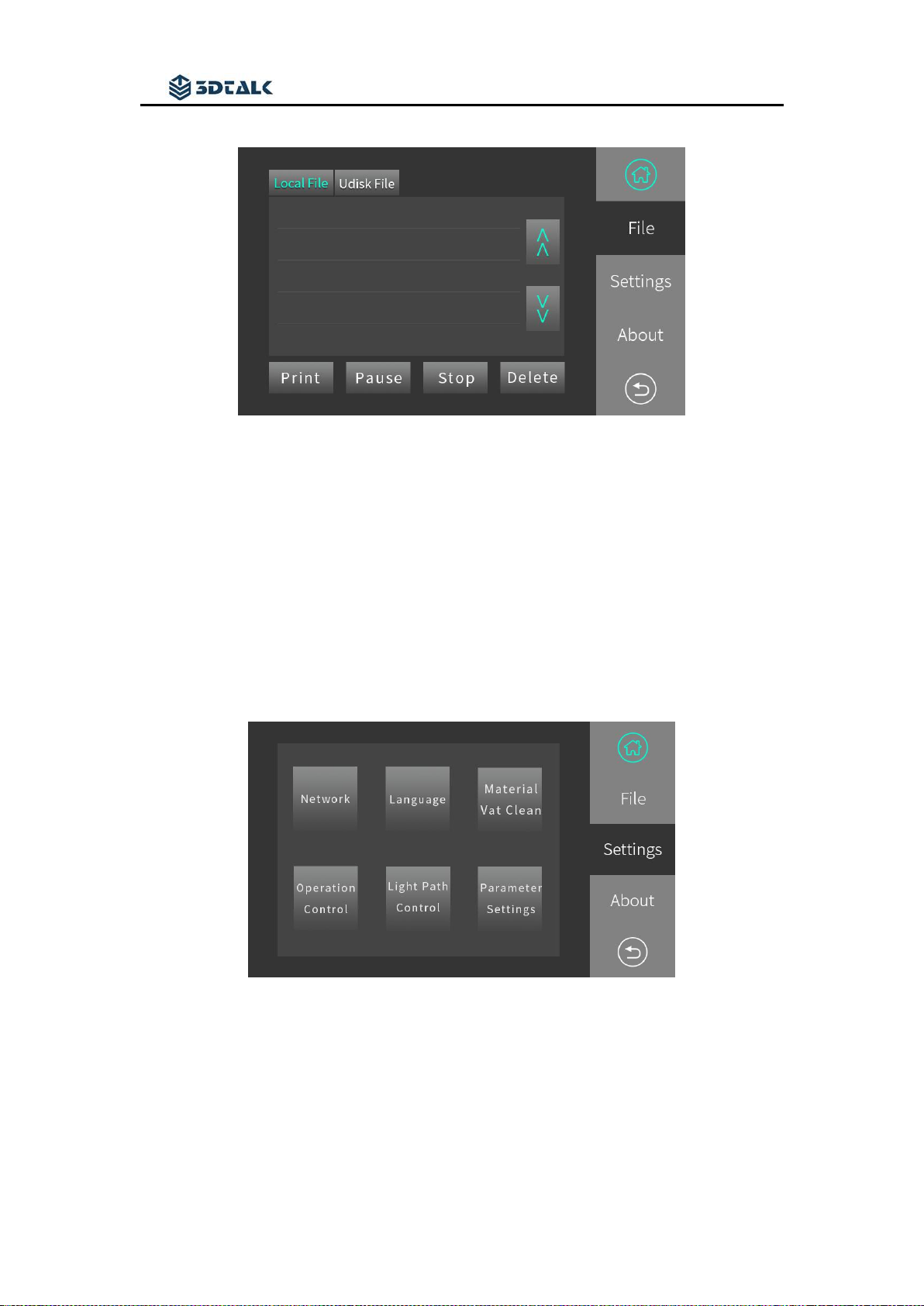
In the [File] tab, select the print file stored in the printer and the inserted USB
disk of the printer for printing.
AC110/240V 50/60Hz 400W
USB drive, wifi
Jiangsu Ouring 3D Technology co.,Ltd
9
[Local file] is stored in the model print file of the printer. All files printed by the
printer will be stored in this location.
[Udisk file] After the USB disk is inserted into the printer, the print model file will
be recognized by the printer
Operate the related selected files by using the [Print],[Pause],[Stop], and
[Delete] buttons.
Set interface
[Network] controls the printer through the LAN. (Development tools are not
supported for use current now.)
[Language] Users can set the language version of the printer to a localized
language.
[Material Vat Clean] When there are many impurities in the bottom of the

Jiangsu Ouring 3D Technology co.,Ltd
10
printer resin vat, this function can be used to cure the resin at the bottom of the
vat, solidify the impurities and remove the cured resin.
[Operation Control] Controls the Z-axis of the printing build plate to move up &
down and return to zero.
Note:
The bottoming operation in Operation Control must confirm that there is no solid
impurities inside the printing build plate and resin vat. It can be operated after being
leveled
[Light Path Control]
[Water Cooled Switch] Manually turn on the water-cooling system of the printer
[Light board switch] manually open the LED light board
[Preset Image] Calibrate the light intensity pattern
[Full Screen Image] Check whether the screen is damaged or not
[Setting]
[Administrator Login] Enter the parameter login password: 123456
[Parameter] User can set the printing parameters in printer (draw “√” in
[Parameter Settings] and save, the model file will be printed according to the
parameters of this page, and the printing parameters set in the software will be
invalid.)
[Parts Replace] Count the use time of the lamp board and screen. When it needs to
be replaced, please click the corresponding button to time the parts.
[Light Calibration] Calibrates the light intensity of the light board.
Tabla de contenidos
Otros manuales de Impresora 3D de Ouring


