Libelium waspmote Smart Metering 2.0 Guía de inicio rápido

-2-
v4.2
Index
Document version: v4.2 - 04/2013
© Libelium Comunicaciones Distribuidas S.L.
INDEX
1. General ................................................................................................................................................. 4
1.1. General and safety information..............................................................................................................................................4
1.2. Conditions of use .........................................................................................................................................................................4
2. Waspmote Plug & Sense!..................................................................................................................... 5
2.1. Features ...........................................................................................................................................................................................5
2.2. Sensor Probes................................................................................................................................................................................5
2.3. Solar Powered ...............................................................................................................................................................................6
2.4. Programming the Nodes...........................................................................................................................................................7
2.5. Radio Interfaces............................................................................................................................................................................8
2.6. Program in minutes.....................................................................................................................................................................9
2.7. Data to the Cloud.........................................................................................................................................................................9
2.8. Meshlium Storage Options.................................................................................................................................................... 10
2.9. Meshlium Connection Options........................................................................................................................................... 10
2.10. Models........................................................................................................................................................................................ 11
2.10.1. Smart Metering.........................................................................................................................................................12
3. Hardware............................................................................................................................................ 14
3.1. General Description .................................................................................................................................................................14
3.2. Specications .............................................................................................................................................................................14
3.3. Electrical Characteristics.........................................................................................................................................................14
4. Sensors ............................................................................................................................................... 15
4.1. Current Sensor ........................................................................................................................................................................... 15
4.1.1. Specications...............................................................................................................................................................15
4.1.2. Measurement Process...............................................................................................................................................15
4.1.3. Socket.............................................................................................................................................................................17
4.2. Load Cell (AME, AMT and AMS from Hanyu) ...................................................................................................................18
4.2.1. Specications...............................................................................................................................................................18
4.2.2. Measurement Process...............................................................................................................................................18
4.2.3. Socket.............................................................................................................................................................................20
4.3. Liquid Flow Sensor (FS100A, FS200A and FS400 from Broiltech)............................................................................20
4.3.1. Specications...............................................................................................................................................................20
4.3.2. Measurement Process...............................................................................................................................................21
4.3.3. Socket.............................................................................................................................................................................22
4.4. Ultrasonic Sensor (MaxSonar® from MaxBotix™)........................................................................................................... 22
4.4.1. Specications...............................................................................................................................................................22
4.4.2. Measurement Process...............................................................................................................................................24
4.4.3. Socket.............................................................................................................................................................................26
Downloaded from Arrow.com.Downloaded from Arrow.com.

-3-
v4.2
4.5. Humidity Sensor (808H5V5)..................................................................................................................................................26
4.5.1. Specications...............................................................................................................................................................26
4.5.2. Measurement Process...............................................................................................................................................27
4.5.3. Socket.............................................................................................................................................................................28
4.6. Temperature Sensor (MCP9700A).......................................................................................................................................28
4.6.1. Specications...............................................................................................................................................................28
4.6.2. Measurement Process...............................................................................................................................................29
4.6.3. Socket.............................................................................................................................................................................30
4.7. Luminosity Sensor (LDR) ........................................................................................................................................................30
4.7.1. Especicaciones..........................................................................................................................................................30
4.7.2. Measurement Process...............................................................................................................................................30
4.7.3. Socket.............................................................................................................................................................................31
4.8. Displacement Foil Sensor (MTP sensor from Metallux and MagnetoPots from Spectra Symbol)............... 31
4.8.1. Specications...............................................................................................................................................................31
4.8.2. Measurement Process...............................................................................................................................................32
4.8.3. Socket.............................................................................................................................................................................33
4.9. Sockets for casing .....................................................................................................................................................................34
5. Board conguration and programming .......................................................................................... 37
5.1. Hardware conguration .........................................................................................................................................................37
5.2. API...................................................................................................................................................................................................37
6. Consumption ..................................................................................................................................... 41
6.1. Power control .............................................................................................................................................................................41
6.2. Tables of consumption............................................................................................................................................................ 41
6.3. Low consumption mode ........................................................................................................................................................42
8. Documentation changelog............................................................................................................... 44
9. Maintenance ...................................................................................................................................... 45
10. Disposal and recycling .................................................................................................................... 46
Index
Downloaded from Arrow.com.Downloaded from Arrow.com.Downloaded from Arrow.com.

-4-
v4.2
General
1. General
1.1. General and safety information
•In this section, the term “Waspmote”encompasses both the Waspmote device itself and its modules and sensor boards.
•Read through the document “General Conditions of Libelium Sale and Use”.
•Do not allow contact of metallic objects with the electronic part to avoid injuries and burns.
•NEVER submerge the device in any liquid.
•Keep the device in a dry place and away from any liquid which may spill.
•Waspmote consists of highly sensitive electronics which is accessible to the exterior, handle with great care and avoid
bangs or hard brushing against surfaces.
•Check the product specications section for the maximum allowed power voltage and amperage range and consequently
always use a current transformer and a battery which works within that range. Libelium is only responsible for the correct
operation of the device with the batteries, power supplies and chargers which it supplies.
•Keep the device within the specied range of temperatures in the specications section.
•Do not connect or power the device with damaged cables or batteries.
•Place the device in a place only accessible to maintenance personnel (a restricted area).
•Keep children away from the device in all circumstances.
•If there is an electrical failure, disconnect the main switch immediately and disconnect that battery or any other power
supply that is being used.
•If using a car lighter as a power supply, be sure to respect the voltage and current data specied in the “Power Supplies”
section.
•If using a battery in combination or not with a solar panel as a power supply, be sure to use the voltage and current data
specied in the “Power supplies” section.
•If a software or hardware failure occurs, consult the Libelium Web Development section.
•Check that the frequency and power of the communication radio modules together with the integrated antennas are
allowed in the area where you want to use the device.
•Waspmote is a device to be integrated in a casing so that it is protected from environmental conditions such as light, dust,
humidity or sudden changes in temperature. The board supplied “as is” is not recommended for a nal installation as the
electronic components are open to the air and may be damaged.
1.2. Conditions of use
•Read the “General and Safety Information” section carefully and keep the manual for future consultation.
•Use Waspmote in accordance with the electrical specications and the environment described in the “Electrical Data”
section of this manual.
•Waspmote and its components and modules are supplied as electronic boards to be integrated within a nal product. This
product must contain an enclosure to protect it from dust, humidity and other environmental interactions. In the event of
outside use, this enclosure must be rated at least IP-65.
•Do not place Waspmote in contact with metallic surfaces; they could cause short-circuits which will permanently damage it.
Further information you may need can be found at: http://www.libelium.com/development/waspmote
The “General Conditions of Libelium Sale and Use” document can be found at:
http://www.libelium.com/development/waspmote/technical_service
Downloaded from Arrow.com.Downloaded from Arrow.com.Downloaded from Arrow.com.Downloaded from Arrow.com.

-5-
v4.2
Waspmote Plug & Sense!
2. Waspmote Plug & Sense!
The new Waspmote Plug & Sense! line allows you to easily deploy wireless sensor networks in an easy and scalable way ensuring
minimum maintenance costs. The new platform consists of a robust waterproof enclosure with specic external sockets to
connect the sensors, the solar panel, the antenna and even the USB cable in order to reprogram the node. It has been specially
designed to be scalable, easy to deploy and maintain.
Note: For a complete reference guide download the “Waspmote Plug & Sense! Technical Guide” in the Development section of
the Libelium website.
2.1. Features
•Robust waterproof IP65 enclosure
•Add or change a sensor probe in seconds
•Solar powered with internal and external panel options
•Radios available: Zigbee, 802.15.4, Wi, 868MHz, 900MHz and 3G/GPRS
•Over the air programming (OTAP) of multiple nodes at once
•Special holders and brackets ready for installation in street lights and building fronts
•Graphical and intuitive programming interface
2.2. Sensor Probes
Sensor probes can be easily attached by just screwing them into the bottom sockets. This allows you to add new sensing
capabilities to existing networks just in minutes. In the same way, sensor probes may be easily replaced in order to ensure the
lowest maintenance cost of the sensor network.
Figure 1: Connecting a sensor probe to Waspmote Plug & Sense!
Downloaded from Arrow.com.Downloaded from Arrow.com.Downloaded from Arrow.com.Downloaded from Arrow.com.Downloaded from Arrow.com.

-6-
v4.2
Waspmote Plug & Sense!
2.3. Solar Powered
Battery can be recharged using the internal or external solar panel options.
The external solar panel is mounted on a 45º holder which ensures the maximum performance of each outdoor installation.
Figure 2: Waspmote Plug & Sense! powered by an external solar panel
For the internal option, the solar panel is embedded on the front of the enclosure, perfect for use where space is a major
challenge.
Figure 3: Internal solar panel
Downloaded from Arrow.com.Downloaded from Arrow.com.Downloaded from Arrow.com.Downloaded from Arrow.com.Downloaded from Arrow.com.Downloaded from Arrow.com.

-7-
v4.2
Waspmote Plug & Sense!
Figure 4: Waspmote Plug & Sense! powered by an internal solar panel
2.4. Programming the Nodes
Waspmote Plug & Sense! can be reprogrammed in two ways:
The basic programming is done from the USB port. Just connect the USB to the specic external socket and then to the computer
to upload the new rmware.
Figure 5: Programming a node
Downloaded from Arrow.com.Downloaded from Arrow.com.Downloaded from Arrow.com.Downloaded from Arrow.com.Downloaded from Arrow.com.Downloaded from Arrow.com.Downloaded from Arrow.com.

-8-
v4.2
Waspmote Plug & Sense!
Over the Air Programming is also possible once the node has been installed. With this technique you can reprogram wirelessly
one or more Waspmote sensor nodes at the same time by using a laptop and the Waspmote Gateway.
Figure 6: Typical OTAP process
2.5. Radio Interfaces
Model Protocol Frequency txPower Sensitivity Range *
XBee-802.15.4-Pro 802.15.4 2.4GHz 100mW -100dBm 7000m
XBee-ZB-Pro ZigBee-Pro 2.4GHz 50mW -102dBm 7000m
XBee-868 RF 868MHz 315mW -112dBm 12km
XBee-900 RF 900MHz 50mW -100dBm 10Km
Wi 802.11b/g 2.4GHz 0dBm - 12dBm -83dBm 50m-500m
GPRS - 850MHz/900MHz/
1800MHz/1900MHz
2W(Class4) 850MHz/900MHz,
1W(Class1) 1800MHz/1900MHz
-109dBm
3G/GPRS - Tri-Band UMTS
2100/1900/900MHz
Quad-Band GSM/EDGE,
850/900/1800/1900 MHz
UMTS 900/1900/2100 0,25W
GSM 850MHz/900MHz 2W
DCS1800MHz/PCS1900MHz
1W
-106dBm
* Line of sight, Fresnel zone clearance and 5dBi dipole antenna.
Downloaded from Arrow.com.Downloaded from Arrow.com.Downloaded from Arrow.com.Downloaded from Arrow.com.Downloaded from Arrow.com.Downloaded from Arrow.com.Downloaded from Arrow.com.Downloaded from Arrow.com.

-9-
v4.2
Waspmote Plug & Sense!
2.6. Program in minutes
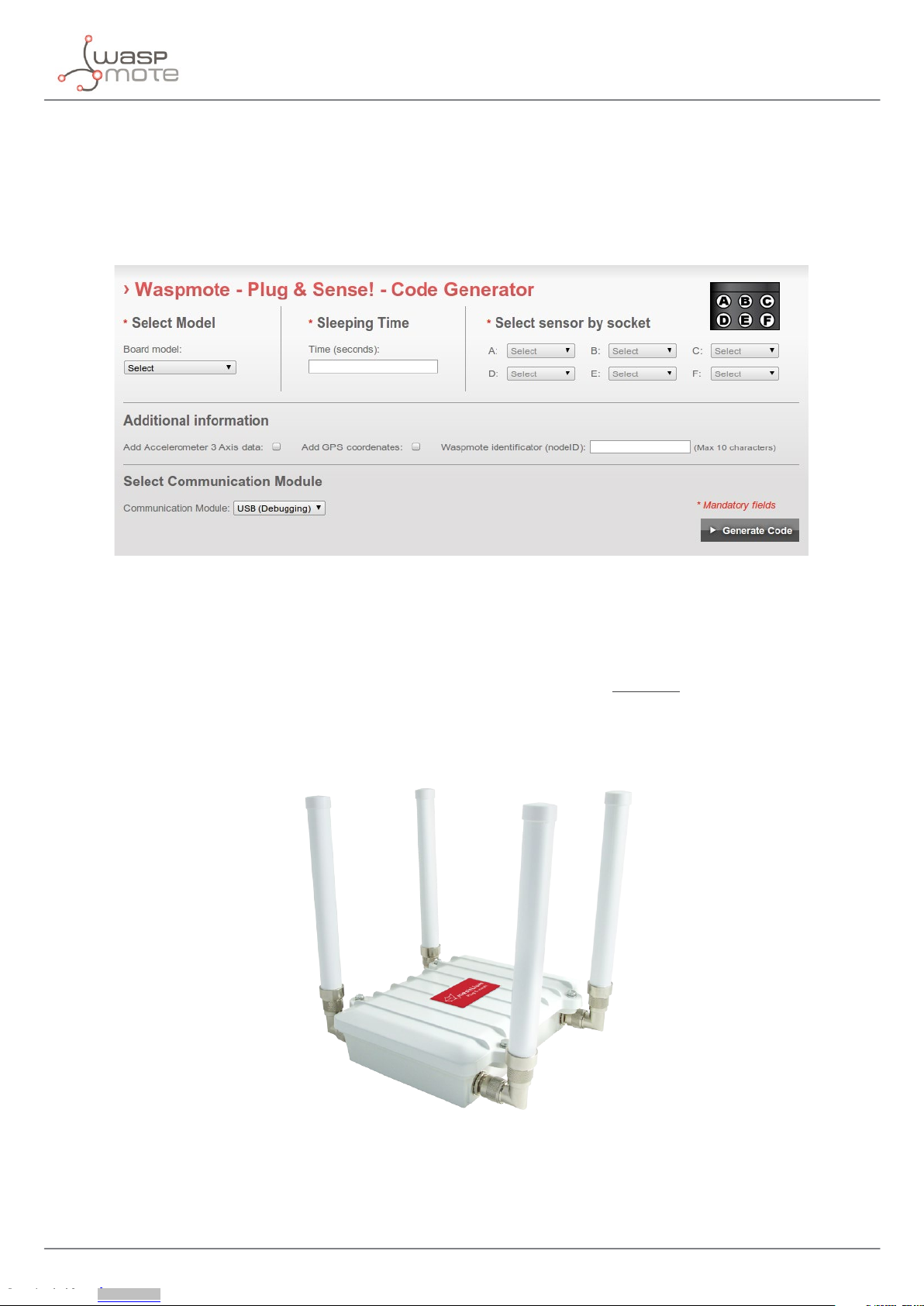
In order to program the nodes an intuitive graphic interface has been developed. Developers just need to ll a web form in
order to obtain the complete source code for the sensor nodes. This means the complete program for an specic application
can be generated just in minutes. Check the Code Generator to see how easy it is at:
http://www.libelium.com/development/plug_&_sense/sdk_and_applications/code_generator
Figure 7: Code Generator
2.7. Data to the Cloud
The Sensor data gathered by the Waspmote Plug & Sense! nodes is sent to the Cloud by Meshlium, the Gateway router specially
designed to connect Waspmote sensor networks to the Internet via Ethernet, Wi and 3G interfaces.
Thanks to Meshlium’s new feature, the Sensor Parser, now it is easier to receive any frame, parse it and store the data into a local
or external Data Base.
Figure 8: Meshlium
Downloaded from Arrow.com.Downloaded from Arrow.com.Downloaded from Arrow.com.Downloaded from Arrow.com.Downloaded from Arrow.com.Downloaded from Arrow.com.Downloaded from Arrow.com.Downloaded from Arrow.com.Downloaded from Arrow.com.

-10-
v4.2
Waspmote Plug & Sense!
2.8. Meshlium Storage Options
Figure 9: Meshlium Storage Options
• Local Data Base
• External Data Base
2.9. Meshlium Connection Options
Figure 10: Meshlium Connection Options
• ZigBee →Ethernet
• ZigBee →Wi
• ZigBee →3G/GPRS
Downloaded from Arrow.com.Downloaded from Arrow.com.Downloaded from Arrow.com.Downloaded from Arrow.com.Downloaded from Arrow.com.Downloaded from Arrow.com.Downloaded from Arrow.com.Downloaded from Arrow.com.Downloaded from Arrow.com.Downloaded from Arrow.com.
Tabla de contenidos
Otros manuales de Unidad de control de Libelium
Manuales populares de Unidad de control de otras marcas

Festo
Festo Compact Performance CP-FB6-E Manual de lista de piezas

Elo TouchSystems
Elo TouchSystems DMS-SA19P-EXTME Manual de usuario

JS Automation
JS Automation MPC3034A Manual de usuario

JAUDT
JAUDT SW GII 6406 Series Guía rápida

Spektrum
Spektrum Air Module System Manual de usuario

BOC Edwards
BOC Edwards Q Series Manual de usuario