Libelium Waspmote 868LP Manual de usuario

Waspmote 868LP
Networking Guide

-2- v7.1
INDEX
1. Introduction .......................................................................................................................... 4
2. Hardware ...............................................................................................................................5
2.1. Specications..................................................................................................................................... 5
2.2. How to connect the module ............................................................................................................ 7
2.3. Expansion Radio Board (XBee 868LP) ........................................................................................... 8
3. General Considerations......................................................................................................10
3.1. Waspmote Libraries........................................................................................................................ 10
3.1.1. Waspmote XBee Files..........................................................................................................10
3.1.2. Constructor ..........................................................................................................................10
3.2. API Functions ................................................................................................................................... 10
3.3. API extension................................................................................................................................... 11
3.4. Waspmote reboot ........................................................................................................................... 11
3.5. Constants pre-dened.................................................................................................................... 11
4. Initialization ........................................................................................................................12
4.1. Setting ON........................................................................................................................................ 12
4.2. Setting OFF....................................................................................................................................... 12
5. Node Parameters................................................................................................................13
5.1. MAC Address ................................................................................................................................... 13
5.2. PAN ID .............................................................................................................................................. 13
5.3. Node Identier ................................................................................................................................ 14
5.4. Available frequencies ..................................................................................................................... 14
5.5. Channel Mask .................................................................................................................................. 16
5.6. Preamble ID ..................................................................................................................................... 16
6. Power Gain and Sensibility ................................................................................................ 17
6.1. Received Signal Strength Indicator ............................................................................................... 17
6.2. Power Level...................................................................................................................................... 17
7. Networking methods ......................................................................................................... 18
7.1. Topology........................................................................................................................................... 18
7.2. Addressing ....................................................................................................................................... 18
7.3. Maximum payloads ........................................................................................................................ 19
7.4. Sending data.................................................................................................................................... 19
7.4.1. Using Waspmote Frame .....................................................................................................19
7.4.2. Sending function .................................................................................................................19
7.4.3. Examples ..............................................................................................................................20
Document Version: v7.1 - 07/2017
© Libelium Comunicaciones Distribuidas S.L.
Index

-3- v7.1
Index
7.5. Receiving Data................................................................................................................................. 21
7.5.1. Receiving function...............................................................................................................21
7.5.2. Examples ..............................................................................................................................21
8. Node Discovery ..................................................................................................................22
8.1. Structure used in Discovery .......................................................................................................... 22
8.2. Searching specic nodes ............................................................................................................... 23
8.3. Node discovery to a specic node ............................................................................................... 23
8.4. Node Discovery Time ..................................................................................................................... 24
9. Sleep Mode........................................................................................................................... 25
10. Security and Data Encryption..........................................................................................26
10.1. Security and Data encryption Overview..................................................................................... 26
10.2. Security in API libraries ................................................................................................................ 26
10.2.1. Encryption Enable .............................................................................................................26
10.2.2. Encryption Key...................................................................................................................26
10.3. Security in a network.................................................................................................................... 27
11. Certications.....................................................................................................................28
12. Code examples and extended information ...................................................................29
13. API changelog .................................................................................................................... 30
14. Documentation changelog .............................................................................................. 31

-4-
v7.1
Introduction
1. Introduction
This guide explains the new XBee 868LP library. This module was specically integrated for our new product lines
Waspmote v15, Plug & Sense! v15 and Meshlium v4.0, released on October 2016.
If you are using previous versions of our products, please use the corresponding guides, available on our
Development website
You can get more information about the generation change on the document “New generation of Libelium product
lines”.
To know the main dierences between XBee-PRO 868 and XBee 868LP see the table below.
[Old] XBee-PRO 868 [New] XBee 868LP
Frequency band 869.4 to 869.65 MHz 863 to 870 MHz
Tx power 25 dBm (software
selectable)
14 dBm (software
selectable)
Tx Current 500 mA typical at 3.3 V 48 mA typical at 3.3 V
RF data rate 24 kb/s 10 kb/s
Rx sensitivity -112 dBm -101 dBm
Max range, indoors/urban up to 550 m up to 112 m
Max range, outdoors (line of sight) with ~2.1dBi
antenna
up to 13 km up to 8.4 km
Regulatory approvals Europe Europe
XBee 868LP compatibility:
Item Compatible Notes
Waspmote 12 Yes New Waspmote API needed (v025 or newer)
Waspmote 15 Yes New Waspmote API needed (v025 or newer)
Old XBee-PRO 868 codes Depends Minor changes:
The XBee-PRO 868 library is capable of sending/
receiving packets with the new XBee 868LP.
However, conguring channels can only be
done by the newest API version.
Important:
•All documents and any examples they contain are provided as-is and are subject to change without notice.
Except to the extent prohibited by law, Libelium makes no express or implied representation or warranty of
any kind with regard to the documents, and specically disclaims the implied warranties and conditions of
merchantability and tness for a particular purpose.
•The information on Libelium’s websites has been included in good faith for general informational purposes
only. It should not be relied upon for any specic purpose and no representation or warranty is given as to its
accuracy or completeness.

-5- v7.1
Hardware
2. Hardware
2.1. Specications
Module Frequency TX Power Sensitivity Channels Distance
XBee 868LP 863 - 870 MHz 14 dBm -106 dBm 30 8.4 km
Figure : XBee 868LP
Note:The XBee 868LP module is provided with a 4.5 dBi antenna, which enables maximum range.
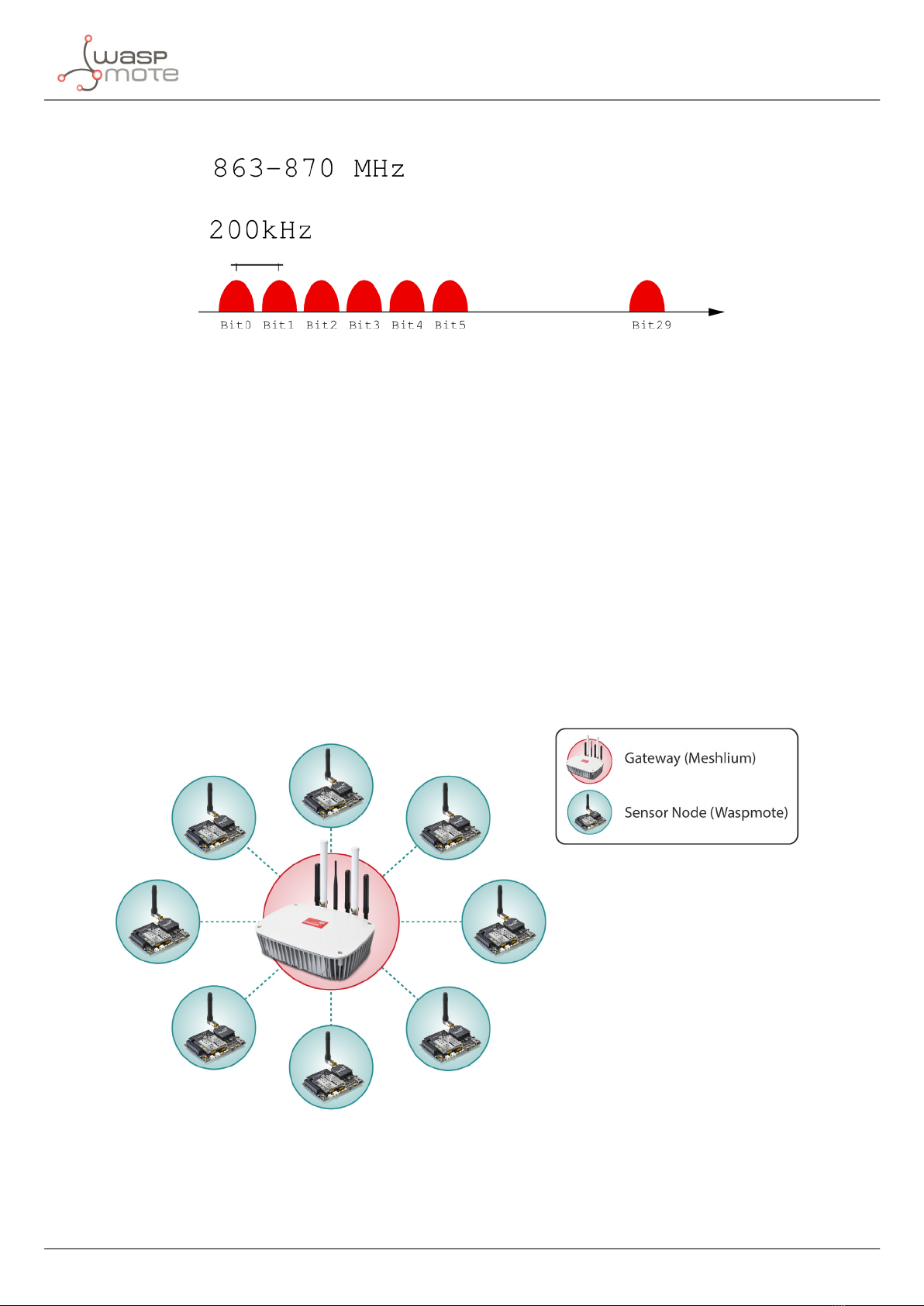
The frequency used is the 868 MHz band, using 30 software selectable channels. Channels are spaced 100 kHz
apart. The transmission rate is 10 kbps.
Note: To know what band is legal in your country, please check the ITU region map. Region 1 ISM free band is 868
MHz and Region 2 ISM free band is 900 MHz. You must also check the legal restrictions by region to use the proper
conguration and channel. It is the responsibility of the users to know the allowed frequency band and channels
in their country, and use them. Ignoring this, could lead to considerable penalties.
Remark: Libelium replaced the XBee 868 module with its natural evolution, the XBee 868LP, in October 2016. The XBee
868LP module is not compatible with other XBee products. Among other dierences, they use dierent baudrates
so they cannot interoperate. The new XBee 868LP features a lower transmission power with a good sensitivity, so
battery performance is improved due to lower consumption while good ranges remain.
Note: Due to the propagation characteristics of the 868/900 MHz band, the near eld eect could make that 2
modules cannot communicate if they are placed very close (< 1 m). We suggest to keep a minimum distance of 3
or 4 meters between modules.
Note: It is not recommended to work without an antenna screwed to the module. The module could be damaged
due to RF reections.

-6-
v7.1
Hardware
Figure : Available frequencies for XBee 868LP
Encryption is provided through the AES 128 bits algorithm. Specically through the type AES-CTR. In this case the
Frame Counter eld has a unique ID and encrypts all the information contained in the Payload eld which is the
place in the link layer frame where the data to be sent is stored.
The way in which the libraries have been developed for module programming means that encryption activation is
as simple as running the initialization function and giving it a key to use in the encryption.
{
xbee868LP.setEncryptionMode(1);
xbee868LP.setLinkKey(key);
}
The classic topology for this type of network is Star topology, as the nodes can establish point to point connections
with brother nodes through the MAC address.
Figure : Star topology

-7- v7.1
Hardware
2.2. How to connect the module
This module can be connected to both SOCKET0 and SOCKET1 on the Waspmote board.
Figure : Module connected to Waspmote in SOCKET0
In order to connect the module to the SOCKET1, the user must use the Expansion Radio Board.

-8-
v7.1
Hardware
2.3. Expansion Radio Board (XBee 868LP)
The Expansion Board allows to connect two communication modules at the same time in the Waspmote
sensor platform. This means a lot of dierent combinations are possible using any of the wireless radios
available for Waspmote: 802.15.4, ZigBee, DigiMesh, 868 MHz, 900 MHz, LoRa, WiFi, GPRS, GPRS+GPS,
3G, 4G, Sigfox, LoRaWAN, Bluetooth Pro, Bluetooth Low Energy and RFID/NFC. Besides, the following
Industrial Protocols modules are available: RS-485/Modbus, RS-232 Serial/Modbus and CAN Bus.
Some of the possible combinations are:
•LoRaWAN - GPRS
•802.15.4 - Sigfox
•868 MHz - RS-485
•RS-232 - WiFi
•DigiMesh - 4G
•RS-232 - RFID/NFC
•WiFi - 3G
•CAN Bus - Bluetooth
•etc.
Remark: GPRS, GPRS+GPS, 3G and 4G modules do not need the Expansion Board to be connected to Waspmote.
They can be plugged directly in the socket1.
In the next photo you can see the sockets available along with the UART assigned. On one hand, SOCKET0 allows
to plug any kind of radio module through the UART0. On the other hand, SOCKET1 permits to connect a radio
module through the UART1.
Figure: Use of the Expansion Board

-9- v7.1
Hardware
The API provides a function called ON() in order to switch the XBee module on. This function supports a parameter
which permits to select the SOCKET. It is possible to choose between SOCKET0 and SOCKET1.
Selecting SOCKET0 (both are valid):
xbee868LP.ON();
xbee868LP.ON(SOCKET0);
Selecting SOCKET1:
xbee868LP.ON(SOCKET1);
In the case two XBee 868LP modules are needed (each one in each socket), it will be necessary to create a new
object from WaspXBee868LP class. By default, there is already an object called xbee868LP normally used for
regular SOCKET0.
In order to create a new object it is necessary to put the following declaration in your Waspmote code:
WaspXBee868LP xbee868LP_2 = WaspXBee868LP();
Finally, it is necessary to initialize both modules. For example, xbee868LP is initialized in SOCKET0 and xbee868LP_2
in SOCKET1 as follows:
xbee868LP.ON(SOCKET0);
xbee868LP_2.ON(SOCKET1);
The rest of functions are used the same way as they are used with older API versions. In order to understand them
we recommend to read this guide.
Warnings:
•Avoid to use DIGITAL7 pin when working with Expansion Board. This pin is used for setting the XBee into sleep.
•Avoid to use DIGITAL6 pin when working with Expansion Board. This pin is used as power supply for the
Expansion Board.
•Incompatibility with Sensor Boards:
-Agriculture v30 and Agriculture PRO v30: Incompatible with Watermark and solar radiation sensors
-Events v30: Incompatible with interruption shift register
-Gases v30: DIGITAL6 is incompatible with CO2 (SOCKET_2) and DIGITAL7 is incompatible with NO2
(SOCKET_3)
-Smart Water v30: DIGITAL7 incompatible with conductivity sensor
-Smart Water Ions v30: Incompatible with ADC conversion (sensors cannot be read if the Expansion Board
is in use)
-Gases PRO v30: Incompatible with SOCKET_2 and SOCKET_3
-Cities PRO v30: Incompatible with SOCKET_3. I2C bus can be used. No gas sensor can be used.

-10-
v7.1
General Considerations
3. General Considerations
3.1. Waspmote Libraries
3.1.1. Waspmote XBee Files
Waspmote API les:
WaspXBeeCore.h
WaspXBeeCore.cpp
WaspXBee868LP.h
WaspXBee868LP.cpp
It is mandatory to include the XBee 868LP library when using this module. The following line must be introduced
at the beginning of the code:
#include <WaspXBee868LP.h>
3.1.2. Constructor
To start using the Waspmote XBee 868LP library, an object from class WaspXBee868LP must be created. This object,
called xbee868LP, is created inside the Waspmote XBee 868LP library and it is public to all libraries. It is used
through the guide to show how the Waspmote XBee 868LP library works.
When creating this constructor, no variables are dened with a value by default.
3.2. API Functions
Through the guide there are many examples of using parameters. In these examples, API functions are called to
execute the commands, storing in their related variables the parameter value in each case.
Example of use
{
xbee868LP.getOwnMacLow(); // Get 32 lower bits of MAC Address
xbee868LP.getOwnMacHigh(); // Get 32 upper bits of MAC Address
}
Related Variables
sourceMacHigh[0-3] → stores the 32 upper bits of MAC address
sourceMacLow [0-3] → stores the 32 lower bits of MAC address
When returning from xbee868.getOwnMacLow() the variable xbee868.sourceMacLow() will be lled with the
appropriate values. Before calling the function, the related variable is created but it is empty.
There are three error ags that are lled when the function is executed:
•error_AT: it stores if some error occurred during the execution of an AT command function.
•error_RX: it stores if some error occurred during the reception of a packet.
•error_TX: it stores if some error occurred during the transmission of a packet.
Tabla de contenidos
Otros manuales de Unidad de control de Libelium
Manuales populares de Unidad de control de otras marcas

Festo
Festo Compact Performance CP-FB6-E Manual de lista de piezas

Elo TouchSystems
Elo TouchSystems DMS-SA19P-EXTME Manual de usuario

JS Automation
JS Automation MPC3034A Manual de usuario

JAUDT
JAUDT SW GII 6406 Series Guía rápida

Spektrum
Spektrum Air Module System Manual de usuario

BOC Edwards
BOC Edwards Q Series Manual de usuario