Print More Materials, All For Application
Content
1.Overview..................................................................................................................................................................... 1
1.1 Machine Overview.............................................................................................................................................1
1.2 Precautions........................................................................................................................................................ 2
1.3 Safety.................................................................................................................................................................. 3
2. Detailed Parameter...................................................................................................................................................... 4
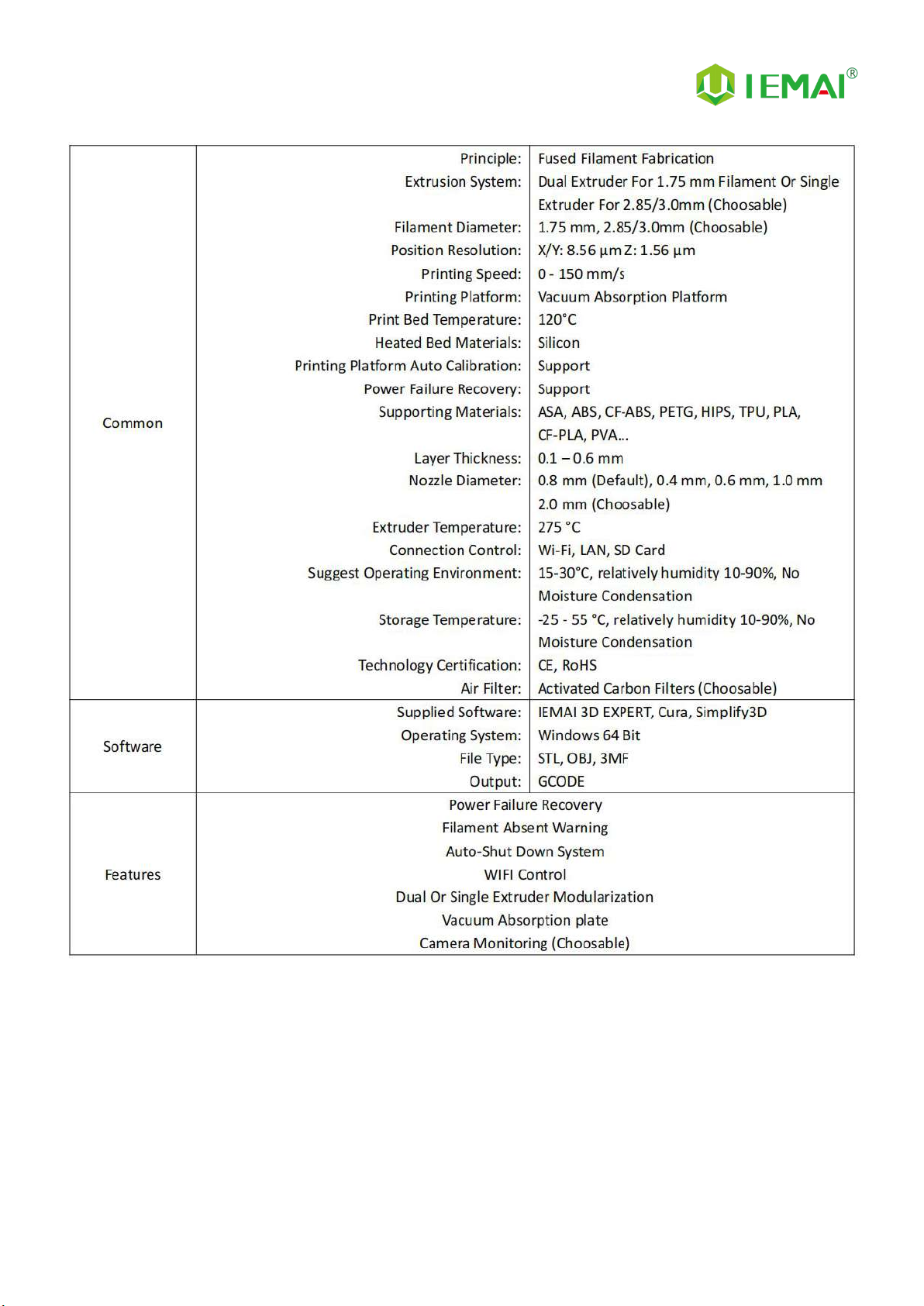
2.1. Specification......................................................................................................................................................4
2.2 Device Layout.................................................................................................................................................... 6
2.3 Interactive Interface.........................................................................................................................................10
3.Device Usage............................................................................................................................................................... 15
3.1 Unboxing for The First Time...........................................................................................................................15
3.2 Power Installation............................................................................................................................................ 17
3.3 Hardware Checking.........................................................................................................................................18
4. Print Operation...........................................................................................................................................................20
4.1 Installation of The Printing Platform and Auto-Calibration........................................................................ 20
4.3 Start Printing.................................................................................................................................................... 25
4.4 Model Removal............................................................................................................................................... 26
4.5 PC-based WIFI LAN Control.......................................................................................................................... 27
5. Function Introduction................................................................................................................................................ 28
5.1 Power Failure Recovery...................................................................................................................................28
5.2 Filament Absent Warning............................................................................................................................... 28
6. Maintenance and Care.............................................................................................................................................. 29
6.1 Maintenance of Linear Guide and Ball Screw............................................................................................... 29
6.2 Dust Removal from Fans.................................................................................................................................30
6.3 Nozzle Maintenance....................................................................................................................................... 31
6.4 Dual Print Head Nozzle Spacing Adjustment Method................................................................................ 33
6.5 Print Head Disassembly and Maintenance................................................................................................... 34
7. Common Problems and Their Solutions..................................................................................................................40
7.1 Movement........................................................................................................................................................40
7.2 Temperature.................................................................................................................................................... 41
7.3 Print.................................................................................................................................................................. 41
8. Appendix A................................................................................................................................................................. 44