
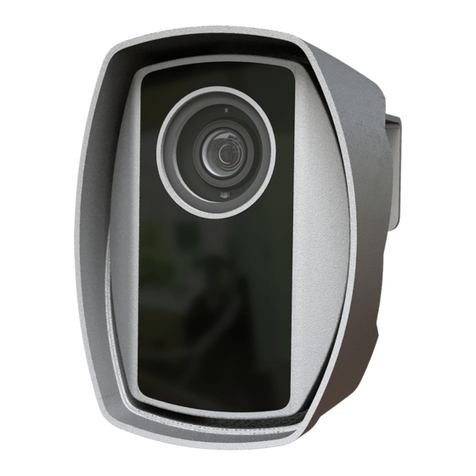
Adaptive Recognition Einar Manual de usuario

Einar
Installation guide
This guide contains an overview of the hardware and required
components, suggested scenarios and step-by-step guide for installation,
and safety and maintenance instructions.
© Copyright Adaptive Recognition Inc.
All rights reserved.
24.04.2023.

Page 2/23
EINAR Installation Guide
Adaptive Recognition America
Adaptive Recognition Hungary
Adaptive Recognition Nordic
Adaptive Recognition Singapore
REQUESTINFO@ADAPTIVERECOGNITION.COM
WWW.ADAPTIVERECOGNITION.COM
EINAR
Install Guide
Document version: 2023.04.12.
Table of Contents
1. Hardware overview.................................................................................................................................... 3
2. Required components ..............................................................................................................................4
3. Recommended installation scenarios ...................................................................................................5
4. Installation steps........................................................................................................................................ 7
4.1. Insert the microSD card ...................................................................................................................7
4.2. Mounting the camera .......................................................................................................................8
4.3. Ground the camera ...........................................................................................................................9
4.4. Adjust the view direction of the camera .....................................................................................10
4.5. Assemble the waterproof cover of the RJ45 connector..........................................................11
4.6. GPIO CABleConnection ..................................................................................................................12
4.7. Software Requirements .................................................................................................................12
4.8. ACCESSING THE WEB INTERFACE.............................................................................................13
5. Safety.........................................................................................................................................................14
5. Maintenance.............................................................................................................................................15
6. Appendix....................................................................................................................................................16
6.1 Ethernet connection........................................................................................................................16
6.2 IO connection ...................................................................................................................................18
6.3 Adding Alternate IP Address .........................................................................................................20
6.4 Restore factory defaults.................................................................................................................21
6.5 Position of the sticker.....................................................................................................................22
CONTACT INFORMATION..............................................................................................................................23

Page 3/23
EINAR Installation Guide
Adaptive Recognition America
Adaptive Recognition Hungary
Adaptive Recognition Nordic
Adaptive Recognition Singapore
REQUESTINFO@ADAPTIVERECOGNITION.COM
WWW.ADAPTIVERECOGNITION.COM
1. HARDWARE OVERVIEW

Page 4/23
EINAR Installation Guide
Adaptive Recognition America
Adaptive Recognition Hungary
Adaptive Recognition Nordic
Adaptive Recognition Singapore
REQUESTINFO@ADAPTIVERECOGNITION.COM
WWW.ADAPTIVERECOGNITION.COM
2. REQUIRED COMPONENTS
In the box:
•Einar ANPR/ALPR Camera
•Bracket
•IP67 Weather Cap for RJ45 Plug
•Ground Terminal
•128GB MicroSD Card
Optional:
•ANPR and MMR license
•Engine file
•GPIO Cable Kit
•ParkIT junction box
Assets to be provided by the Customer:
•4 mm Allen key
•TX10 screwdriver
•CAT5 or CAT6 outdoor shielded cable
•RJ45 connector
•RJ45 crimping tool
•POE+ (IEEE 802.3at standard) injector or switch
•PC or laptop to configuration
•Tools for applied mounting
•Flat Head screwdriver for the junction box
•Philips screwdriver for the junction box

Page 5/23
EINAR Installation Guide
Adaptive Recognition America
Adaptive Recognition Hungary
Adaptive Recognition Nordic
Adaptive Recognition Singapore
REQUESTINFO@ADAPTIVERECOGNITION.COM
WWW.ADAPTIVERECOGNITION.COM
3. RECOMMENDED INSTALLATION SCENARIOS
A good ANPR engine can read the plates from images taken in various conditions. However, if you
want to achieve over 95% recognition rate with short recognition times, you have to calculate the
position of the camera accurately. The best position is if the angle between the camera axis and the
direction of the vehicle movement is minimal and the camera should be installed 1 –1,5 meters above
the headlights of the vehicles.
The distance between the camera and plate is also important. If the camera is too far from the plate,
the characters may not be large enough for recognizing them. In this case, zoom-in until you reach the
proper size. If the distance is too short it may happen that a part of the plate is over the camera’s field
of view (when the vehicle is near to the side of the lane or the plate is not at the middle of the vehicle).
Try to adjust the direction of the camera so that the number plates are horizontal in the picture!
From the point of ANPR/LPR the most important is the size of the characters on the image. It is
recommended to have at least 25-pixel average character height. The too large characters are also
not suitable for ANPR, therefore try to avoid settings where the character size is greater than 50 pixels
in height.
For more information, check How to Install an ANPR camera video on Adaptive Recognition channel.
Also check Einar User Manual on page Einar ANPR Camera for Access Control & Parking - Adaptive
Recognition's documents where additional installation tips can be found.

Page 6/23
EINAR Installation Guide
Adaptive Recognition America
Adaptive Recognition Hungary
Adaptive Recognition Nordic
Adaptive Recognition Singapore
REQUESTINFO@ADAPTIVERECOGNITION.COM
WWW.ADAPTIVERECOGNITION.COM
Please note the following when mounting your camera:
1. Please make sure that the camera does not roll neither to the left nor right.
2. Water may enter into the camera inside through not properly sealed connectors. To maintain
the camera’s watertightness please make sure that connected cables are tightened properly
and the unused connectors are capped.
3. Failures caused by inappropriate installation could void the warranty.
4. Please note that cameras installed inadequately may underperform in reading accuracy and
vehicle detection.
5. Avoid east-west orientation of the camera. Sun can make reading difficult at certain times of
the day.
6. The camera should be lowered below the horizon.

Page 7/23
EINAR Installation Guide
Adaptive Recognition America
Adaptive Recognition Hungary
Adaptive Recognition Nordic
Adaptive Recognition Singapore
REQUESTINFO@ADAPTIVERECOGNITION.COM
WWW.ADAPTIVERECOGNITION.COM
4. INSTALLATION STEPS
4.1. INSERT THE MICROSD CARD
You can insert a microSD card into the device by removing the service port cover as shown in the
attached figure. The use of the card is described in the user manual.
Perform the operation in a clean, low-humidity room!

Page 8/23
EINAR Installation Guide
Adaptive Recognition America
Adaptive Recognition Hungary
Adaptive Recognition Nordic
Adaptive Recognition Singapore
REQUESTINFO@ADAPTIVERECOGNITION.COM
WWW.ADAPTIVERECOGNITION.COM
4.2. MOUNTING THE CAMERA
The camera can be mounted using 3 mounting holes with a diameter of 6 mm on the console. When
mounting, take into consideration the weight of the camera (1540g), with the appropriate fittings.

Page 9/23
EINAR Installation Guide
Adaptive Recognition America
Adaptive Recognition Hungary
Adaptive Recognition Nordic
Adaptive Recognition Singapore
REQUESTINFO@ADAPTIVERECOGNITION.COM
WWW.ADAPTIVERECOGNITION.COM
4.3. GROUND THE CAMERA
Grounding should be done at the ground point on the camera with the bearing provided as it is shown
on the picture. Make sure that the metallic contact is secured at the ground point (e.g. a metal pole)
and that the ground point itself is properly led to the ground. The STP / FTP cable is only allowed on
the remote side (patch panel, PoE switch, server) and must be grounded.

Page 10/23
EINAR Installation Guide
Adaptive Recognition America
Adaptive Recognition Hungary
Adaptive Recognition Nordic
Adaptive Recognition Singapore
REQUESTINFO@ADAPTIVERECOGNITION.COM
WWW.ADAPTIVERECOGNITION.COM
4.4. ADJUST THE VIEW DIRECTION OF THE CAMERA
Loosen the screws marked 2, 3 (tilt) and 4(turn) by using a 4 mm Allen key, while holding the camera
so that it does not “knock down”, then set it to the desired position. The horizontal direction can be
adjusted by loosening screw 1. If the device is in the correct direction, tighten all screws on the bracket.
Otros manuales para Einar
2
Tabla de contenidos
Otros manuales de Cámara digital de Adaptive Recognition
Adaptive Recognition
Adaptive Recognition Einar Manual de usuario

Adaptive Recognition
Adaptive Recognition Vidar Manual de usuario

Adaptive Recognition
Adaptive Recognition Vidar Manual de usuario

Adaptive Recognition
Adaptive Recognition Vidar Manual de usuario

Adaptive Recognition
Adaptive Recognition Vidar Manual de usuario

Adaptive Recognition
Adaptive Recognition Vidar Manual de usuario

Adaptive Recognition
Adaptive Recognition Vidar Speed Manual de usuario

Adaptive Recognition
Adaptive Recognition S1 Manual de usuario

Adaptive Recognition
Adaptive Recognition Vidar Container Manual de usuario


