Zcom R2 Extender Manual de usuario

R2 Extender
Quick Installation Guide
V 1.0 January 2009
Page 1

Copyright
Copyright © 2008 all rights reserved. No part of this publication may be reproduced, adapted,
stored in a retrieval system, translated into any language, or transmitted in any form or by any
means without the written permission of the supplier.
About the Installation Guide
This Installation Guide is intended to guide professional installer to install the R2 Extender. It
includes procedures to assist you in avoiding unforeseen problems.
Conventions
This indicates a warning or caution that you have to abide.
This indicates an important note that you must pay attention to.
Note:
Warning:
Page 2

Chapter 1 Introduction
Introduction
The R2 Extender is a high-performance outdoor-deployable wireless bridge that provides
wireless connectivity among multiple network locations. It supports Base Station, CPE, PTP and
PTMP connectivity. Moreover, the R2 Extender has a built-in 23dBi planar antenna that can
deliver up to a 40Km connection. An external antenna may also be used to improve signal
quality, extend distance and flexible for local coverage applications. With high throughput and
long-distance transmission, the R2 Extender is an ideal backhaul solution for Carriers, Service
Providers and Enterprises!
Page 3

Chapter 2 Preparation before Installation
This chapter describes safety precautions and product information you have to know and check
before installing R2 Extender.
Professional Installation Required
1. Please seek assistance from a professional installer who is well trained in the RF installation
and knowledgeable in the local regulations.
2. The R2 Extender is distributed through distributor and system installer with professional
technicians and will not be sold directly through retail store.
Safety Precautions
To keep you safe and install the hardware properly, please read and follow these safety
precautions.
1. If you are installing an antenna for the first time, for your safety as well as others’, please
seek assistance from a professional installer who has received safety training on the
hazards involved.
2. Keep safety as well as performance in mind when selecting your installation site, especially
where there are electric power and phone lines.
3. When installing your antenna, note the following:
♦Do not use a metal ladder;
♦Do not work on a wet or windy day;
♦Wear shoes with rubber soles and heels, rubber gloves, long sleeved shirt or jacket.
4. When the system is operational, avoid standing directly in front of the antenna. Strong RF
fields are present when the transmitter is on.
Page 4

Product Package
The product package you have received should contain the following items. If any of them are
not included or damaged, please contact your local vendor for support.
R2 Extender with integrated 23dBi antenna ×1
Mounting Kit ×1
PoEInjector&Powercord ×1
GroundingWirew/screw ×1
WaterProofRJ-45ConnectorKit ×1
QuickInstallationGuide ×1
Product CD……………………….. ×1
Note:
Product CD contains Management Tool, Quick Installation Guide and User
Manual!
Mounting Kit
Wall/Pole Mounting Bracket
1. T-Form Bracket ×1
2. Articulation Pole ×1
3. Pole Mount Bar ×1
Fasteners
4. M8×80 Screw … ×2
M8X90Screw X1
5. M8 Washer ×3
6. M8 Spring Washer ×3
7. M8Nut ×1
8. M5×16 Screw ×4
9. M5 Washer ×4
Page 5

10. Wood Screw ×4 (for Wall Mount)
11. Wall/Gyprock Plug ×4 (for Wall Mount)
Waterproof RJ-45 Connector Kit
1. Gland ×1
2. Sealing Nut ×1
3. Sealing ×1
Page 6
Chapter 3 System Installation
Assemble the Mounting Bracket
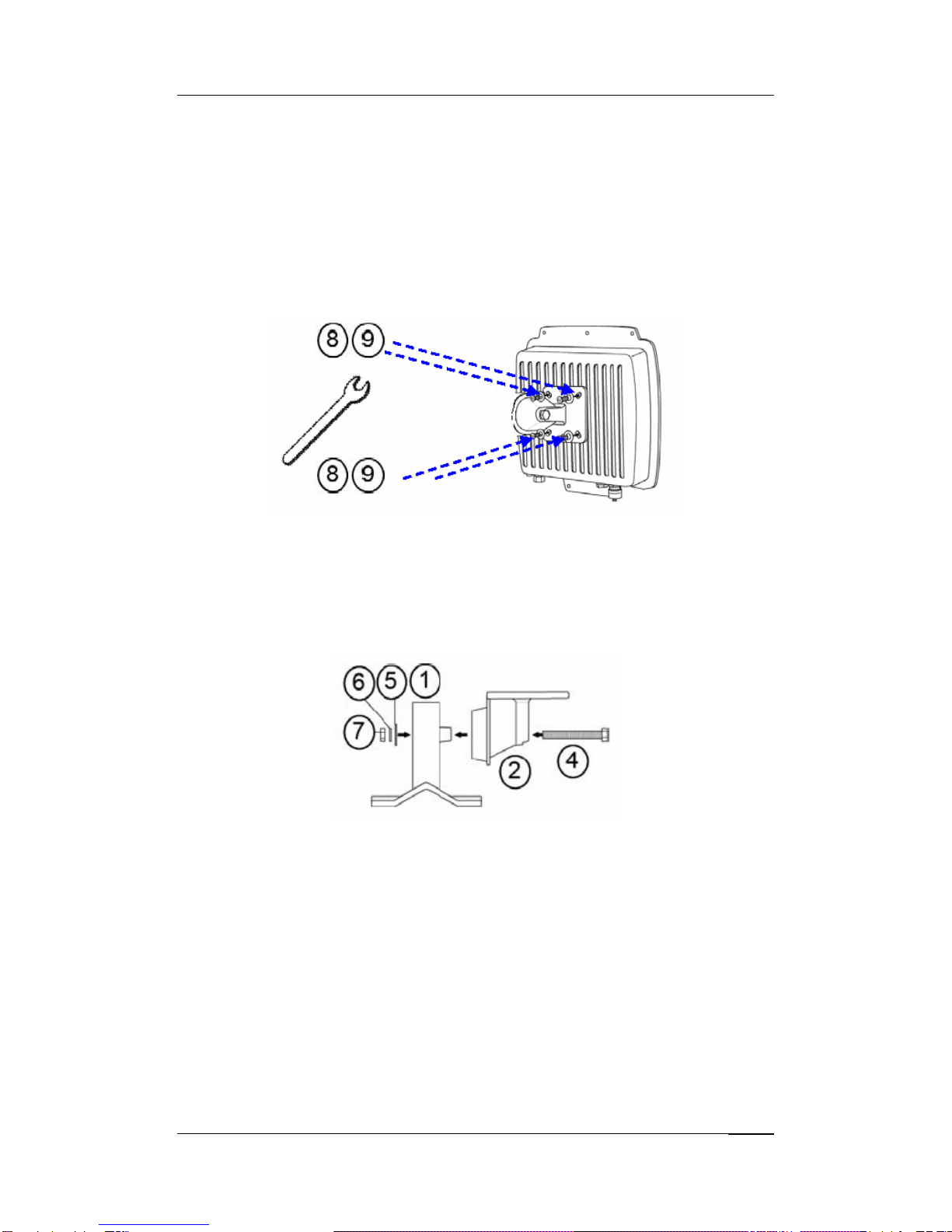
1. Place the main bracket into the seating and use a spanner to fasten the bracket to the R2
Extender with M5×16 screws ○
8and M5 washers ○
9provided in the hardware packets;
2. Assemble the main bracket by placing articulation pole ○
2to the T-form bracket ○
1via a
M8×90 ○
4screw through the insertion axe and fix with the M8 washer ○
5, spring washer
○
6and M8 nut○
7;
Pole Mounting
1. Install the main bracket and the pole mount bar ○
3over the top of the pole by securing the
drill holes of the pole mount bar to the main bracket ones and insert two M8×80 ○
4screws,
spring washers ○
6and washers ○
5through the drill holes and main bracket;
Chapter 3 Hardware Installation Page 7

2. Fasten two M8×80 screws ○
4and washers ○
5through the drill holes and main bracket
with a spanner;
3. Adjust the antenna for appropriate tilt / vertical orientation.
Chapter 3 Hardware Installation Page 8
Connect Up
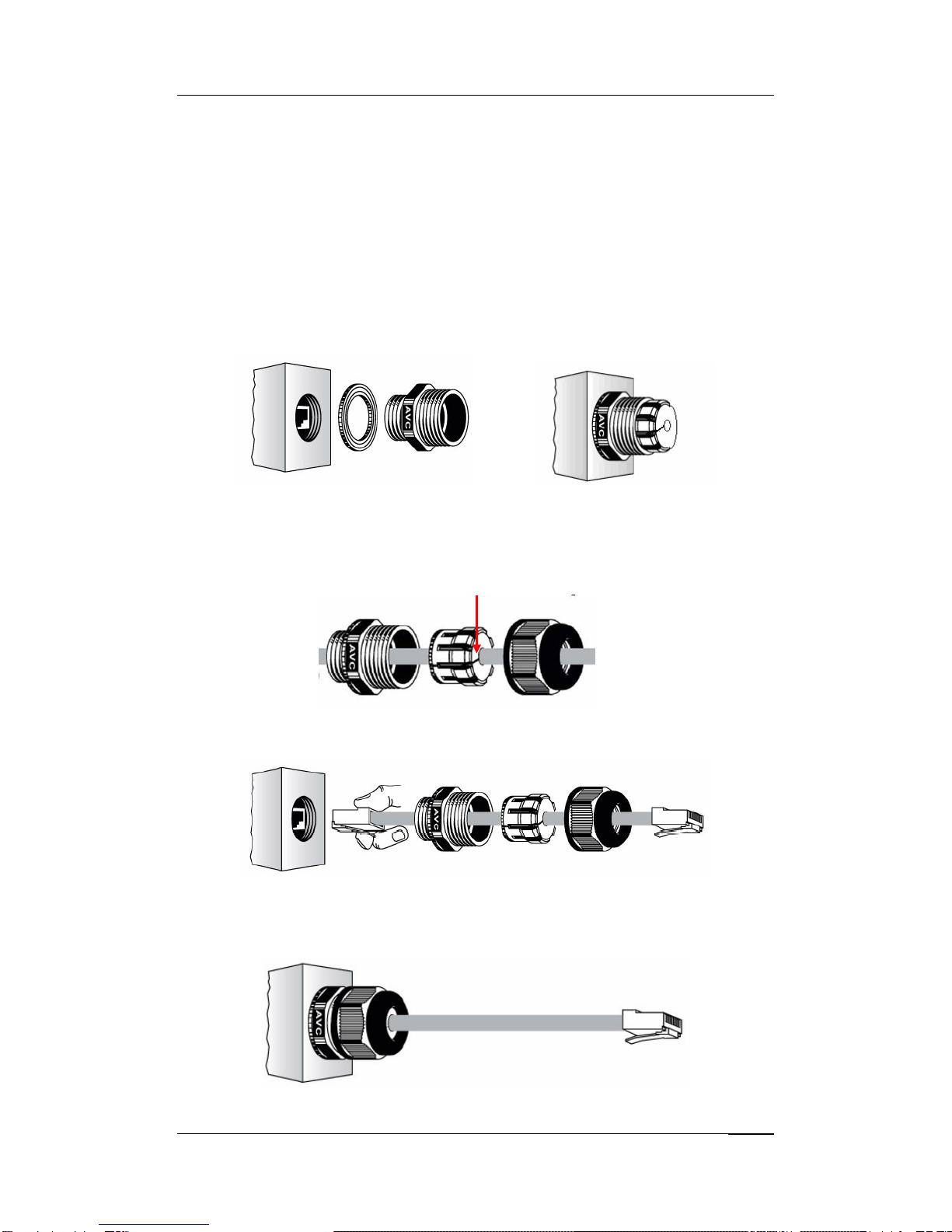
Before installing the Ethernet cable with a waterproof RJ-45 connector, it is recommended that
the Cat-5 RJ-45 coaxial cable be used for the bridge to power injector connections.
1. To connect to the hole labeled PoE+Data, open the black cover in advance by using a
coin or a slotted screwdriver and then screw in the body of the gland and tighten.
2. Slide the sealing nut to the RJ-45 cable from its middle breach and then insert the sealing
into the cable.
Slide the Sealing Nut from its Breach
3. Insert the RJ-45 connector and make sure that the locking tab snaps home.
R2 Extende
r
RJ-45 Port
4. Screw the sealing on the gland and tighten.
Chapter 5 Troubleshooting Page 9

Ground the Wire
The R2 Extender is shipped with a grounding wire. The unit must be properly grounded to
protect against power surges. The grounding point can be found on the bottom of the unit. It is
supplied with an appropriate grounding lug for attachment to the ODU.
Power On
To power up the R2 Extender, follow the steps bellow:
1. Plug a user-supplied Cat-5 Ethernet cable from your wired LAN (or a computer) into the
power injector RJ-45 jack (DATA IN);
2. Plug a user-supplied Cat-5 Ethernet cable from the R2 Extender into the power injector
RJ-45 jack (P+DATA OUT);
3. Connect the power module to the power injector and plug the AC cord into an AC power
receptacle.
4. After being powered on, the device will send out the beep sound lasting about 1.5
seconds, informing you that the R2 Extender is powered up! Wait for about 60 seconds
the system will be initialized and start working.
Chapter 5 Troubleshooting Page 10
Otros manuales para R2 Extender
1
Tabla de contenidos
Otros manuales de Extensor de Zcom