
Yeastar Technology MyPBX Standard V6 Manual de servicio

Standard V6/V7
Administrator's Guide
Version 20.19.0.23
Yeastar Technology Co., Ltd.

MyPBX Standard V6/V7 Administrator's Guide
www.yeastar.com Page 2
Table of Contents
1. Introduction......................................................................................... 5
1.1 Features ......................................................................................... 5
1.2 Hardware Specifications.................................................................... 6
1.2.1 Exterior Appearance ............................................................................ 6
2. System Setup ...................................................................................... 7
2.1 Connection Drawing ......................................................................... 7
2.2 Connecting Ethernet Line .................................................................. 8
2.3 Supplying Power .............................................................................. 8
3 Administrator Login ............................................................................... 9
4 Status ................................................................................................ 12
4.1 Line Status.................................................................................... 12
4.1.1 Extension Status............................................................................... 12
4.1.2 Trunk Status .................................................................................... 13
4.2 System Status............................................................................... 14
4.2.1 System Info ..................................................................................... 14
4.2.2 Network Status................................................................................. 15
5 System............................................................................................... 16
5.1 Network Preferences ...................................................................... 16
5.1.1 LAN Settings .................................................................................... 16
5.1.2 WAN Settings ................................................................................... 18
5.1.3 DHCP Server .................................................................................... 19
5.1.4 VLAN Settings .................................................................................. 20
5.1.5 VPN Settings .................................................................................... 22
5.1.6 DDNS Settings.................................................................................. 23
5.1.7 Static Route ..................................................................................... 24
5.2 Security Settings ........................................................................... 25
5.2.1 Security Center................................................................................. 25
5.2.2 Firewall Rules ................................................................................... 26
5.2.3 IP Blacklist....................................................................................... 29
5.2.4 AMI Settings .................................................................................... 30
5.2.5 Database Grant ................................................................................ 30
5.2.6 Alert Settings ................................................................................... 31
5.3 LDAP Server.................................................................................. 34
5.3.1 LDAP Server..................................................................................... 34
5.4 Storage Management ..................................................................... 35
5.4.1 External Storage ............................................................................... 35
5.5 System Preferences........................................................................ 38
5.5.1 Password Settings ............................................................................. 38
5.5.2 Date and Time.................................................................................. 40
5.5.3 Firmware Update .............................................................................. 40
5.5.4 Backup and Restore........................................................................... 41
5.5.5 Reset and Reboot.............................................................................. 42

MyPBX Standard V6/V7 Administrator's Guide
www.yeastar.com Page 3
5.5.6 Hot Standby..................................................................................... 42
6 PBX ................................................................................................... 45
6.1 Extensions .................................................................................... 45
6.1.1 FXS/VoIP Extensions.......................................................................... 45
6.1.2 Phone Provisioning ............................................................................ 56
6.2 Trunks .......................................................................................... 65
6.2.1 Physical Trunk .................................................................................. 65
6.2.2 VoIP Trunk....................................................................................... 73
6.3 Outbound Call Control .................................................................... 82
6.3.1 Outbound Routes .............................................................................. 82
6.3.2 Speed Dial Settings ........................................................................... 85
6.4 Inbound Call Control ...................................................................... 86
6.4.1 IVR................................................................................................. 86
6.4.2 Ring Groups ..................................................................................... 89
6.4.3 Queues ........................................................................................... 91
6.4.4 Conferences ..................................................................................... 95
6.4.5 Inbound Routes ................................................................................ 96
6.5 Audio Settings ..............................................................................102
6.5.1 Custom Prompts ..............................................................................102
6.5.2 Music on Hold Prompts......................................................................104
6.5.3 System Prompts Settings ..................................................................105
6.6 Basic Settings...............................................................................106
6.6.1 General Preferences .........................................................................106
6.6.2 Business Hours................................................................................109
6.6.3 Feature Codes .................................................................................110
6.6.4 Voicemail Settings............................................................................114
6.7 Advanced Settings ........................................................................117
6.7.1 SIP Settings....................................................................................117
6.7.2 IAX Settings....................................................................................124
6.7.3 Blacklist .........................................................................................125
6.7.4 Callback Settings .............................................................................126
6.7.5 DNIS Settings .................................................................................128
6.7.6 DISA..............................................................................................128
6.7.5 PIN User Settings.............................................................................129
6.7.8 PIN Settings....................................................................................131
6.7.9 Paging Groups .................................................................................131
6.7.10 SMS Settings.................................................................................133
6.7.11 Certificates....................................................................................135
7 Reports .............................................................................................136
7.1 Call Logs......................................................................................136
7.2 System Logs ................................................................................136
8 Logout ..............................................................................................137
9. Use MyPBX .......................................................................................138
9.1 Make outbound call .......................................................................139

MyPBX Standard V6/V7 Administrator's Guide
www.yeastar.com Page 4
9.1.1 Sample Routing via VoIP Trunk...........................................................139
9.2 Incoming call................................................................................142
9.2.1 Sample Routing to an IVR..................................................................142
APPENDIX A FAQ...................................................................................144
APPENDIX B MyPBX Security Configuration Guide ......................................145
0. Security Center*.............................................................................145
1. Ports and password enhancement.....................................................146
1.1 Web GUI (HTTP) .................................................................................147
1.2 Extension ..........................................................................................148
2. Firewall configuration ......................................................................151
3. Service security..............................................................................160
3.1 Disable Guest Call...............................................................................160
3.2 SSH access enhancement.....................................................................161
3.3 AMI settings*.....................................................................................163
3.4 TFTP* ...............................................................................................165
3.5 Database Grant* ................................................................................165
3.6 Alert settings .....................................................................................167
4. International call limit .....................................................................169
4.1 Limit call credit at provider side.............................................................169
4.2 Set password for international call .........................................................169
4.3 Disable international call in MyPBX.........................................................171
APPENDIX C How to Configure External Storage........................................174
APPENDIX D How to Configure NAT Setting ..............................................176
APPENDIX E How to Use Auto Provision....................................................178
APPENDIX F How Do I Configure Distinctive Ring Tones..............................182
APPENDIX G How to Use Email to SMS.....................................................184
APPENDIX H How to Use DID ..................................................................186
APPENDIX I How to Use BLF Key to Choose the PSTN line ..........................190
APPENDIX J How to Use TLS in MyPBX .....................................................191
J.1 How to register IP phones to MyPBX via TLS .....................................191
J.2 How to register SIP trunk to VoIP provider via TLS ............................214
APPENDIX K How to use LDAP.................................................................217

MyPBX Standard V6/V7 Administrator's Guide
www.yeastar.com Page 5
1. Introduction
MyPBX—IP-PBX for Medium Businesses/Home Office
MyPBX is a standalone embedded hybrid PBX for small businesses and remote
branch offices of larger organizations (1-100 users per site). MyPBX also offers
a hybrid solution (a combination of VoIP applications using legacy telecom
equipment) alternative for enterprises who are not yet ready to migrate to a
complete VoIP solution.
Note: This guide applies to MyPBX Standard V6/V7; the hardware
pictures in this document are for MyPBX Standard V7.
1.1 Features
● Alert
● HTTPS
● Auto-provision
● Integrated built-in packet capture tools
● Blacklist
● Interactive Voice Response (IVR)
● BLF Support
● Intercom/Zone Intercom
● Blind Transfer
● L2TP
● Call Back
● LDAP
● Call Detail Records(CDR)
● Mobility Extension
● Call Forward
● Multiple administrators
● Call Parking
● Music On Hold
● Call Pickup
● Music On Transfer
● Call Recording
● Open VPN
● Call Routing
● Paging/Zone Paging
● Call transfer
● PIN Users
● Call Transfer
● PPPoE
● Call Waiting
● QoS
● Caller ID
● Queue
● Conference
● Ring Group
● Database Grant
● Route by Caller ID
● DDNS
● Security Center
● Define Office Time
● Skype Integration (Skype Connect)
● Dial by Name
● Speed Dial
● DIDs
● Spy functions
● Direct Inward System Access (DISA)
● Static Route
● Distinctive Ringtone
● T.38
● Do Not Disturb(DND)
● Three-way Calling
● External Storage
● VLAN
● Firewalls
● Voicemail
MyPBX Standard V6/V7 Administrator's Guide
www.yeastar.com Page 6
● Follow me
● WAN
For more info, please click: http://www.yeastar.com/Products/MyPBX.asp
1.2 Hardware Specifications
1.2.1 Exterior Appearance
Front Panel
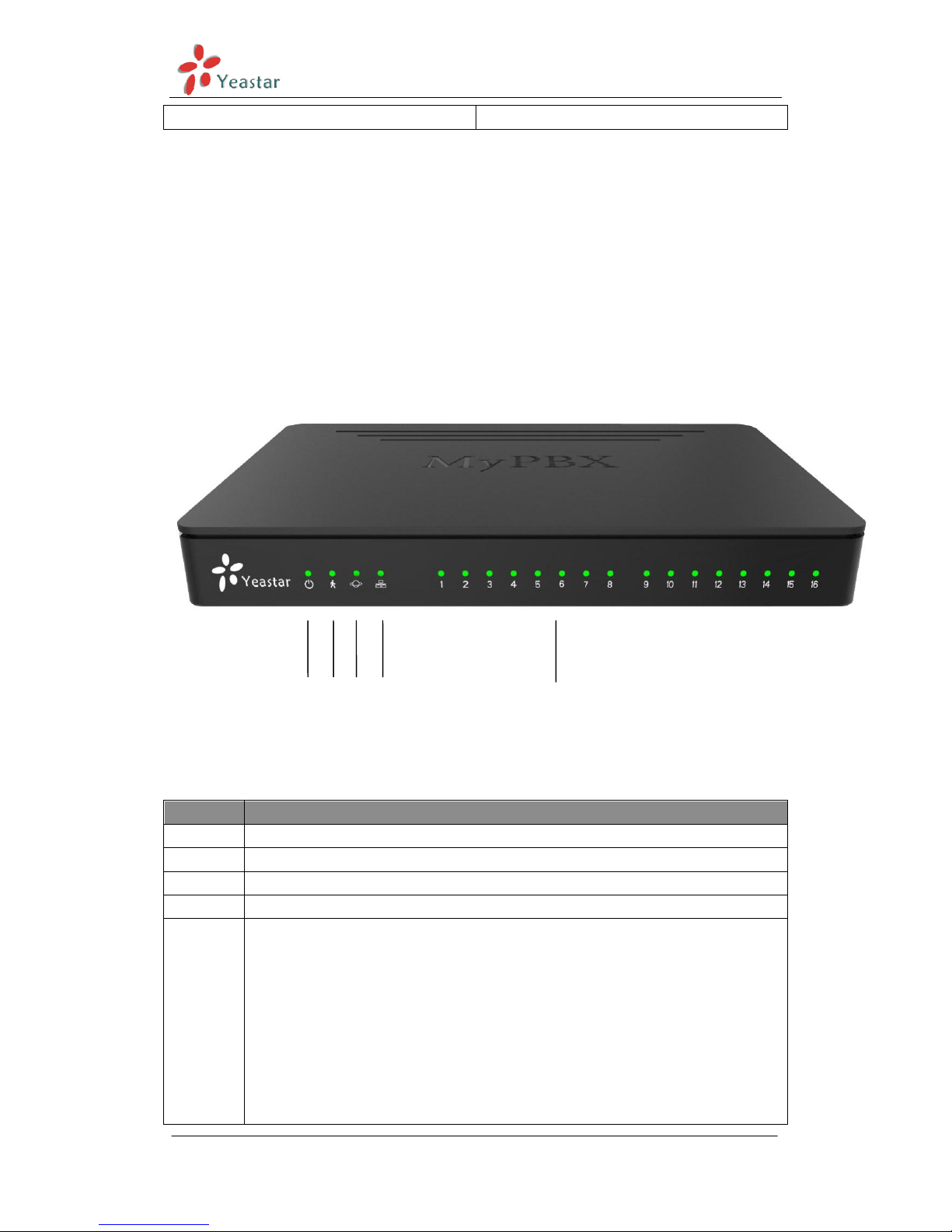
Figure 1-1 MyPBX Standard V7 Front Panel
No.
Identification
①
Green LED indicates correct power is being supplied to the unit
②
Green LED indicates the MyPBX is fully functional.
③
Green LED indicates stable WAN Port connection
④
Green LED indicates stable LAN Port connection
⑤
Red LED indicates presence of an FXO/GSM port.
Orange LED indicates presence of a BRI port.
Green LED indicates presence of an FXS port.
LED Blinking- Red blinking: No connection between FXO port and
PSTN
Alternately blinks Red and Green: FXO port has an incoming call.
Alternately blinks Red and Green fast: FXO port is in a call.
Alternately blinks Green and Red: FXS port is ringing.
Alternately blinks Green and Red fast: FXS port is in a call.
①②③④⑤

MyPBX Standard V6/V7 Administrator's Guide
www.yeastar.com Page 7
2. System Setup
2.1 Connection Drawing
Figure 2-1 MyPBX Standard Connection Drawing

MyPBX Standard V6/V7 Administrator's Guide
www.yeastar.com Page 8
2.2 Connecting Ethernet Line
MyPBX provides two 10/100M Ethernet ports with RJ45 interface and LED
indicator. Plug Ethernet line into MyPBX‘s Ethernet port, and then connect the
other end of the Ethernet line with a hub, switch, router, LAN or WAN. Once
connected, check the status of the LED indicator. A yellow LED indicates the port
is in the connection process, and a green LED indicates the port is properly
connected.
2.3 Supplying Power
MyPBX utilizes the high-performance switch power supply, which supplies
the required power for the unit.
AC Input: 100~240V DC Output: 12V, 5A
Please follow the steps below to connect MyPBX unit to a power outlet:
1. Connect the small end of the power cable to the power input port on the
MyPBX back panel, and plug the other end of the cable into a 100V AC
power outlet.
2. Check the Power LED on the front panel. A solid green LED indicates that
power is being supplied correctly.
MyPBX Standard V6/V7 Administrator's Guide
www.yeastar.com Page 9
3 Administrator Login
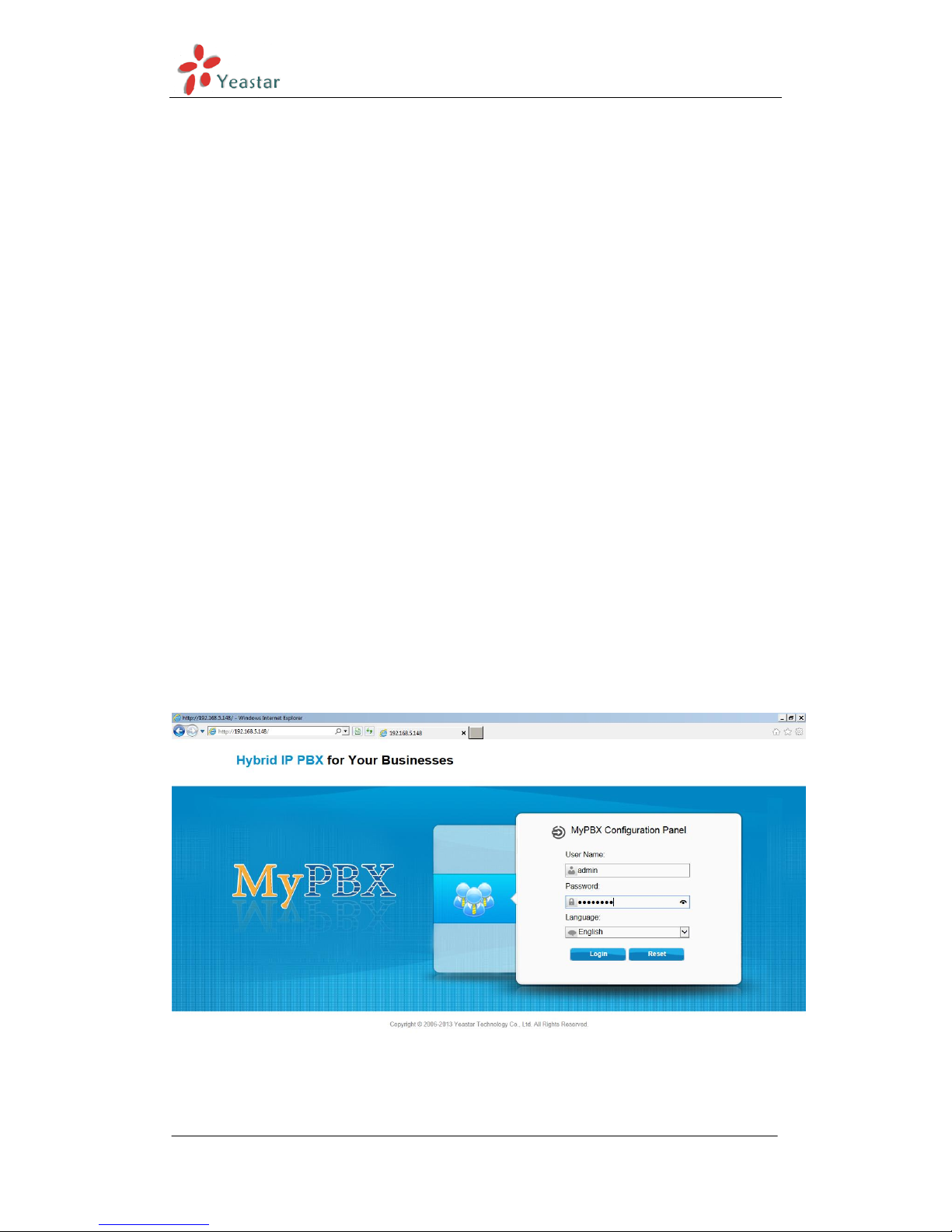
From your web browser, input the IP address of the MyPBX server.
If this is the first time you are configuring MyPBX, please use the default settings
as below (your PC should be in the same local network with MyPBX):
IP Address: http://192.168.5.150
Note: MyPBX supports multiple administrators in hierarchical mode
(Administrator, General Manager, CDR Manager)
·Administrator
Has all the authority.
Username: admin, Password: password
·General Manager
Has basic authority; without the advanced authority to create VoIP trunks,
reset, update, backup and restore MyPBX.
Username: user, Password: password
You should enable this account before you use it.
·CDR Manager
Only has the authority to check the call recordings.
Username: cdr, Password: password
In this example, the IP address is 192.168.5.148.
Figure 3-1 Login Page
MyPBX Standard V6/V7 Administrator's Guide
www.yeastar.com Page 10
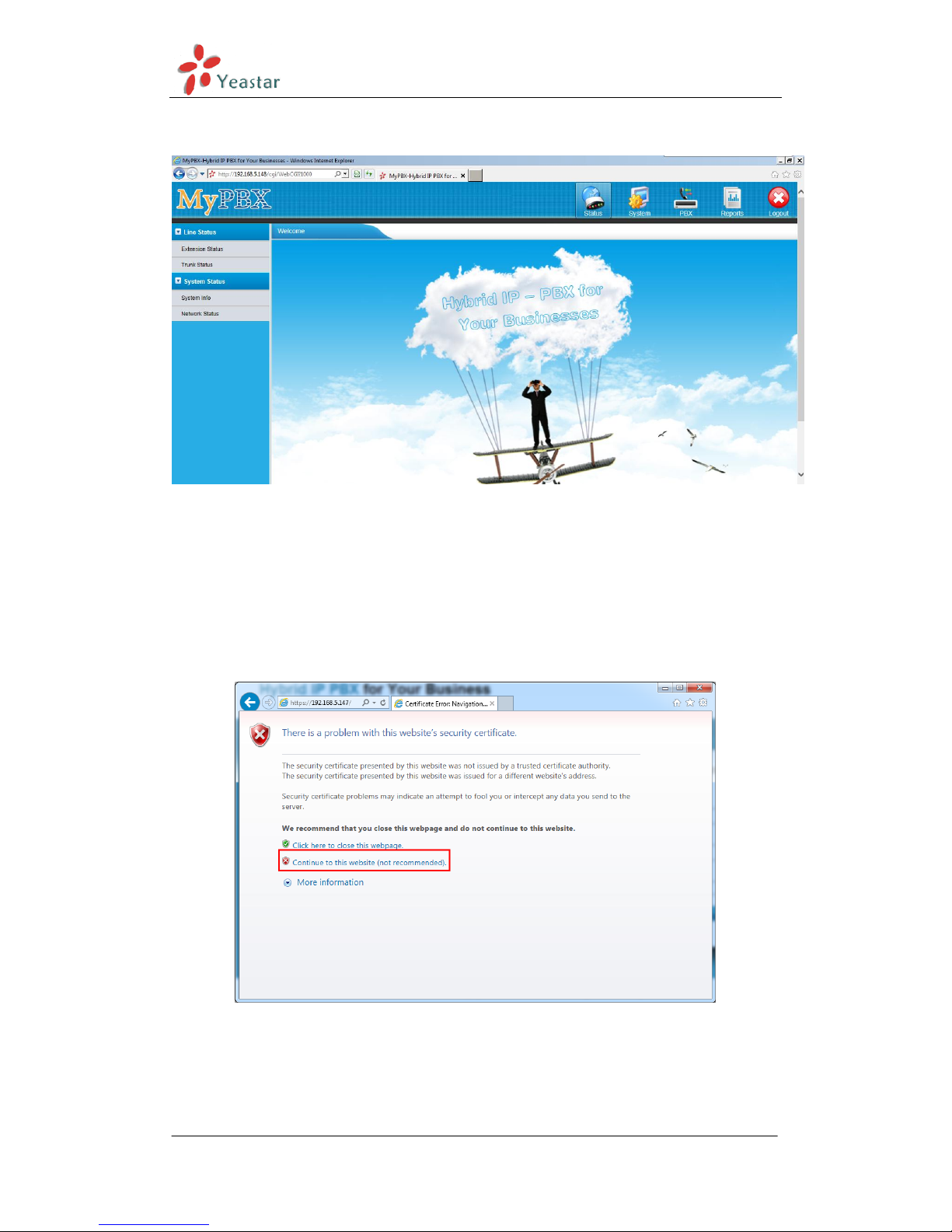
This is the welcome page of MyPBX Standard V7 after successful login.
Figure 3-2 Welcome Page
You can also login via HTTPS protocol
Like https://192.168.5.147 , you will see a prompt that is a certificate problem.
Click ―Continue to …‖, then you can login after enter user and password .HTTPS
is HTTP over SSL, and it is safer than HTTP.
Figure 3-3 HTTPS warning page
Este manual sirve para los siguientes modelos
1
Tabla de contenidos
Otros manuales de Cambiar de Yeastar Technology


