Wave LEA Manual de usuario

Lifeguard Entry Alert System
USER MANUAL
v0922-1.0
WAVE LEA System User Guide v0922-1.0
Page of1 24
IMPORTANT. Please read this guide
thoroughly before using your LEA system.
Design subject to change.

TABLE OF CONTENTS
Safety Instructions …………………………………………………………………. 3
Warnings/Cautions ………………………………………………………………… 3
Compatibility ……………………………………………………………………….. 5
Legal Information ………………………………………………………………….. 5
Welcome … ………………………………………………………………………… 6
What’s in the Box ….……………………………………………………………….. 7
Powering and Charging Your LEA Hub …………………………………………. 8
LEA Management App ……………………………………………………………. 9
Using the App ……………………………………………………………………… 10
Using Lifeguard Tags …….…………………………………………………………17
Using Your LEA System ………..………………………………………………….. 19
Troubleshooting ……………………………………………………………………. 22
Customer Support …………………………………………………………….…… 24
WAVE LEA System User Guide v0922-1.0
Page of2 24

Important Safety Instructions
1. These instructions are accurate as of date of release and may be updated as needed. Always check
the WAVE website, www.wavedds.com/support for the most recent version which may contain
important updates.
2. Heed all warnings.
3. Always follow these instructions.
4. Clean only with a damp clean cloth. Do not use cleaning products containing ammonia.
5. Do not block any ventilation openings.
6. Do not install near any heat sources such as radiators, stoves, or other apparatus that produce heat.
7. Protect the power cord from being walked on or pinched particularly at plugs, convenience
receptacles, and the point where they exit from the equipment.
8. Only use attachments/accessories specified, approved or authorized by WAVE SYSTEMS INC.
9. Use only with the cart, stand, tripod, or bracket specified by WAVE SYSTEMS INC or sold with the
equipment. When a cart is used, use caution when moving the cart/equipment combination to avoid
injury from tip-over.
10. Unplug this equipment during lightning storms or when unused for long periods of time.
11. Refer all servicing to qualified personnel. Servicing is required when the equipment has been
damaged in any way, liquid has been spilled or objects have fallen into the equipment, does not
operate normally, or has been dropped.
WARNINGS/CAUTIONS
IMPORTANT! WAVE SYSTEM products are designed to supplement and NEVER
replace responsible human supervision of swimmers. Only another human being can
investigate, intervene and rescue a potential drowning victim if necessary. NEVER LET
ANYONE SWIM ALONE OR UNATTENDED REGARDLESS OF AGE OF SWIMMING
ABILITY LEVEL OR EXPERIENCE.
• Contains small parts which may be a choking hazard.
• Equipment may contain magnetic material. Consult your physician on whether this might affect an
implantable medical device.
• To reduce the risk of fire or electrical shock, do NOT expose the AC Charging/Power Adapter to
dripping or splashing, and do not place objects filled with liquids on or near the product.
WAVE LEA System User Guide v0922-1.0
Page of3 24

• Keep the product away from fire and heat sources. Do NOT place naked flame sources, such as
lighted candles, on or near the product.
• Do NOT make unauthorized alterations to this product.
• Do NOT use unauthorized products and accessories with this equipment.
• Do NOT use AC charging/power adapters other than the unit included with this equipment.
• Where the AC mains plug or an appliance coupler is used as the disconnect device, the disconnect
device shall remain readily operable.
• Internal batteries provided with this product may present a risk of fire or chemical burn if mishandled.
• If a battery leaks, do not allow the liquid to come in contact with the skin or eyes. If contact is made,
seek medical advice immediately.
• Do not expose products containing batteries to excessive heat (e.g. from storage in direct sunlight, fire
or the like).
Avoid leaving equipment in direct sunlight on extremely hot days (100ºF +).
Avoid direct water spray at equipment.
Dispose of used batteries properly following local regulations. Do not incinerate.
NOTE: Appropriate compliance protocols for this equipment in process as of the time of this writing.
This equipment generates, uses, and can radiate radio frequency energy and, if not installed and used in
accordance with the instructions, may cause harmful interference to radio communications. However,
there is no guarantee that interference will not occur in a particular installation. If this equipment does
cause harmful interference to radio or television reception, which can be determined by turning the
equipment off and on, the user is encouraged to try to correct the interference by one or more of the
following measures:
• Reorient or relocate the receiving antenna.
• Increase the separation between the equipment and receiver.
• Connect the equipment into an outlet on a circuit different from that to which the receiver is
connected.
• Consult the dealer or an experienced radio/TV technician for
Changes or modifications not expressly approved by WAVE SYSTEMS INC may void the user’s authority
to operate this equipment.
WAVE LEA System User Guide v0922-1.0
Page of4 24

Compatibility
Only WAVE SYSTEM INC approved, recommended or authorized products may be used with this
equipment. Use of any non-authorized products may void your warranty.
Legal Information
Security Information: This product is capable of receiving automatic security updates from WAVE. To
receive automatic security updates, you must complete the product setup process in the WAVE
Management app and connect the product to the Internet. If you do not complete the setup process,
you will be responsible for installing security updates that WAVE makes available.
By using WAVE SYSTEM products you acknowledge and agree that WAVE products are
NOT intended and will NOT be used as a replacement or substitute for responsible and
diligent human supervision of swimmers and non-swimmers around water. Furthermore
you agree to hold WAVE SYSTEMS INC., its partners, affiliations, manufacturers, suppliers
and vendors harmless for any injuries or damages, physical or otherwise, as a result of the
correct or misuse of WAVE SYSTEM INC products.
Not for use while diving or snorkeling.
The Bluetooth® word mark and logos are registered trademarks owned by Bluetooth SIG, Inc.
Wi-Fi is a registered trademark of Wi-Fi Alliance®
WAVE Systems Inc: 1-203-429-4636
© WAVE SYSTEMS INC. v0922-1.0 No part of this work may be reproduced, modified, distributed or
otherwise used without prior written permission.
WAVE LEA System User Guide v0922-1.0
Page of5 24

WELCOME.
Congratulations and thank you for your purchase of the WAVE Lifeguard Entry Alert
system (LEA)!
The LEA system uses proven wireless tracking technologies to accurately determine the
real time status of your lifeguards and alert your facility should a lifeguard enter the
water.
LEA is simple to use, deploys quickly, and is portable. It will work in all water types
including pools, lakes and other natural bodies of water.
Please read this manual thoroughly before using LEA. If you should have any questions
your WAVE salesperson directly.
The WAVE Team
WAVE LEA System User Guide v0922-1.0
Page of6 24

WHAT’S IN THE BOX
• 1 x WAVE Lifeguard Entry Alert (LEA) Hub
• 1 x Wall Mount
• 1 x Charging/Power Adapter
• 1 x Power Cord
• Lifeguard Tag Wearables*
•Included quantities will depend on your specific order and/or may be shipped separately.
NOTE: If any item is missing please contact Customer Support at 1-203-429-4636 or [email protected].
WAVE LEA System User Guide v0922-1.0
Page of7 24
LIFEGUARD TAGS
(You may receive one style or both)
QUICK START GUIDE
POWER CORD
AC ADAPTER
WALL MOUNT
LEA HUB

POWERING & CHARGING LEA
The LEA Hub may be powered via the internal battery
or the AC Charging/Power Adapter. The standard
battery will last up to 6 hours of typical use*.
Fully charging the battery normally takes up to 4 hours.
After this initial set up process you may view the Hub’s
battery level at any time by using the LEA Management
App (see below).
Note: Always insert Connector Plug into Hub Power/
Charging Port first, then plug power cord into AC wall outlet.
START UP PROCESS
Press the Power Button to initiate the startup process. The LED on the Power Button will glow
green, the Strobe will light up in a “chase” pattern, and depending on your software version
installed, a tone may sound. Once the start up process is complete (typically up to 2 minutes),
the Strobe will begin a slow fade in/fade out “breathing” pattern to indicate that the Hub is on.
Note: If red light appears on Power Button during start up process, a restart is needed. Press
and hold Power Button for 10 seconds to initiate restart the Hub.
WAVE LEA System User Guide v0922-1.0
Page of8 24
Power
Button
Strobe
Power/Charging Port
Power Cord
AC Charging/
Power Adapter
Connector Plug

NORMAL POWER DOWN PROCESS
Press and hold the power button down for approximately 3 seconds to power down the Hub.
The green LED on the Power Button will turn off. Depending on the system software version
installed in your w10, it may sound a tone and the Strobe will light in a pattern during the shut
down process.
* Your actual battery life may vary depending on system alerts, notifications and environmental factors.
LEA MANAGEMENT APP
The LEA Management App is a simple to us app that enables you to monitor the status
of LEA, the Lifeguard Tags and other accessories. The app may be used on desktop
computers, laptops, smartphones and tablets (recommended).
Note: Although recommended, it is not necessary to have the LEA app open or active
while using LEA. The system will monitor your guards using the most recent settings.
SETTING UP THE APP
1. Power on LEA and allow the Hub to fully complete the Start Up Process.
2. A one-time reboot is necessary to access the Management App
3. To reboot, press the Power Button for 3 seconds (or until the green LED turns off). It
will take about 90 seconds for the unit to completely power off.
4. Once off, turn LEA back on by pressing the Power Button. After the Strobe changes
a breathing pattern, the LEA is ready to connect.
5. Open your device’s web browser program (Chrome, Safari, etc.).
6. To access the Management App open the WAVE Management App and enter your
serial number found on the back of your LEA Hub
Note: Your device must have WiFi activated and be on the WAVE wireless network to
connect to and manage LEA. Depending on how your device is configured, its access
to the Internet may be interrupted while on the WAVE network.
WAVE LEA System User Guide v0922-1.0
Page of9 24

USING THE APP
Note: We often release software updates to improve user experience. As a result, your
version of the Management App may look different and/or have different functionality
from this guide. Please make sure to check your email for update notices from WAVE,
and return to this guide for updated versions.
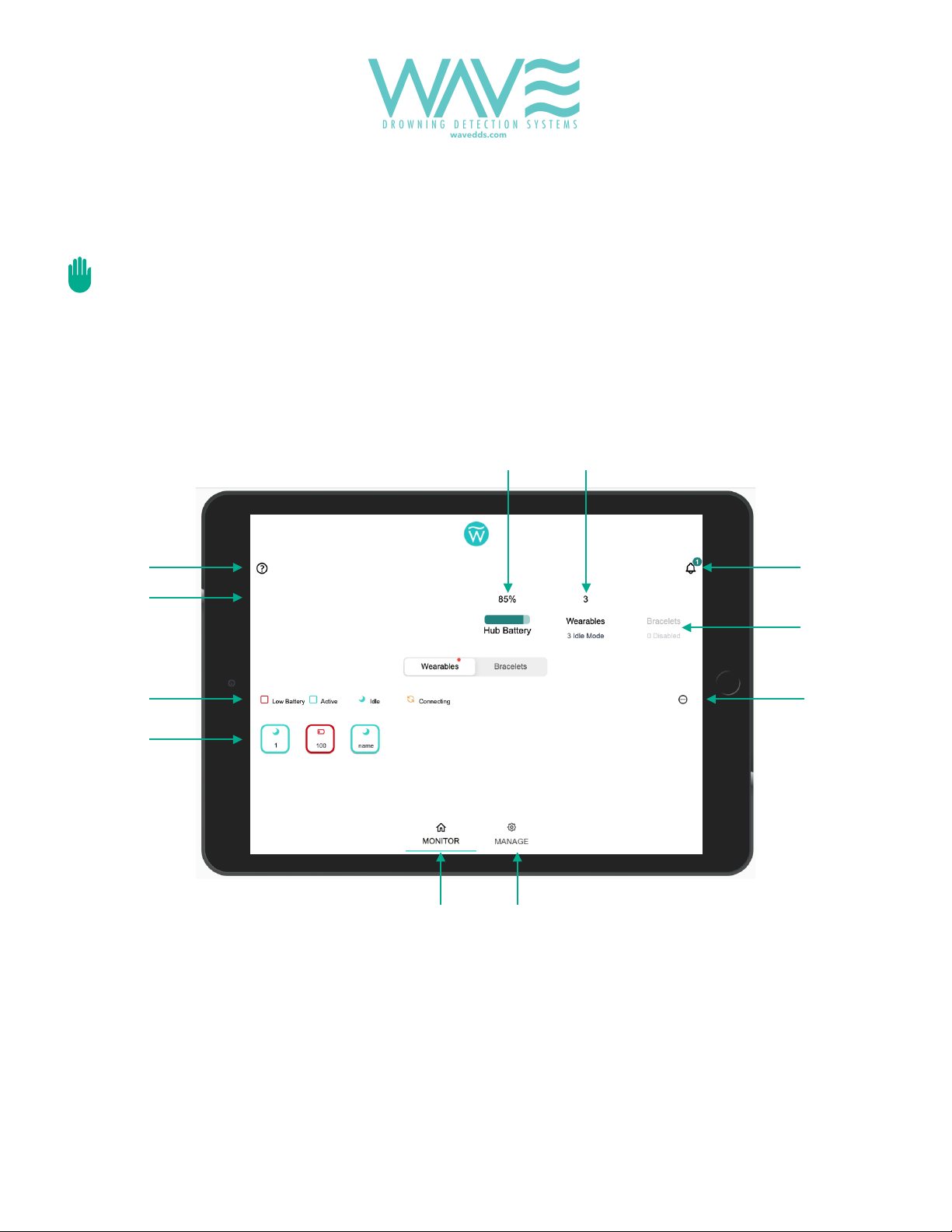
MONITOR PAGE
This is the page that will appear when the app is first opened. This page enables you to
view the general status of both the system and all enabled Lifeguard Tags on one
screen
1. LEA Hub Battery Level. Provides the current internal battery level. Changes to a charging
icon when plugged into wall power.
2. Tags.Number of wearables that the system is currently monitoring.
3. System Notifications.These are non-emergency messages about the system. Touching this
icon will launch a pop-up window displaying the current message(s).
WAVE LEA System User Guide v0922-1.0
Page of10 24
1
2
3
4
5
6
7
8
10
11
9
Smith Family Pool
Tabla de contenidos
Otros manuales de Sistema de seguridad de Wave
Manuales populares de Sistema de seguridad de otras marcas

EDM
EDM Solution 6+6 Wireless-AE Manual de usuario

Highway Safety Group
Highway Safety Group EA401 Manual de usuario

Siren
Siren LED GSM Manual de usuario

Detection Systems
Detection Systems 7090i Instrucciones de montaje

Se-Kure Controls
Se-Kure Controls MicroMini SK-4841 Manual de usuario

Siemens
Siemens FDM273 Manual de usuario