
TypeS BT530033 Guía


TABLE OF CONTENTS
1. Introduction ..........................................................................................................................................................................1
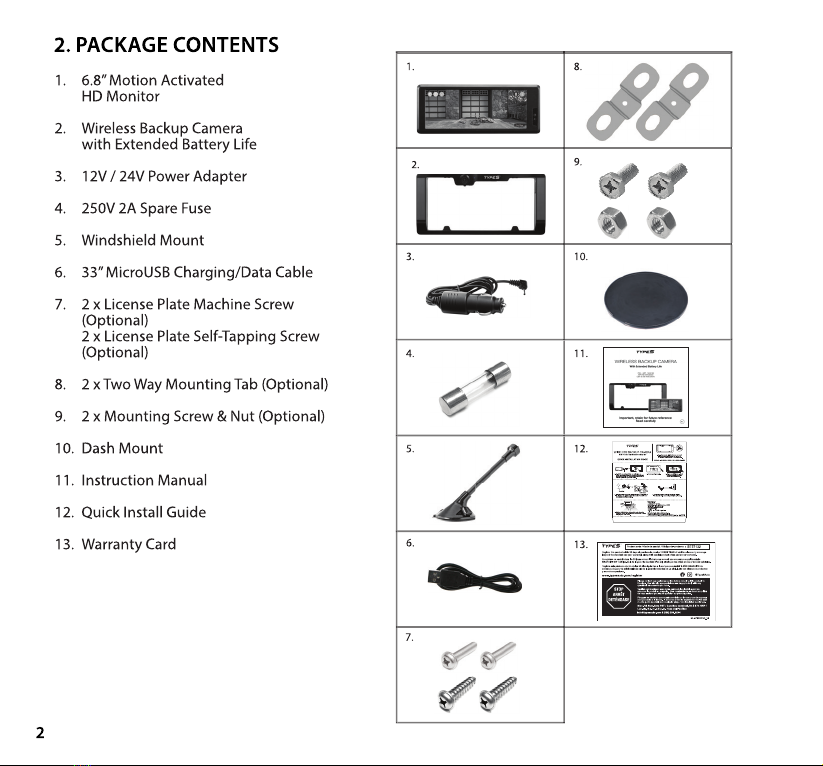
2. Package Contents ...............................................................................................................................................................2
3. Product Specications ......................................................................................................................................................3
4. Before You Install..................................................................................................................................................................4
5. Installation Guide ................................................................................................................................................................4
6. Settings and Operation ....................................................................................................................................................9
7. Safety Information ............................................................................................................................................................14
8. Maintenance & Warranty ................................................................................................................................................17
9. General Information ........................................................................................................................................................ 20

1
Please read all of the installation instructions carefully before installing the product. Improper
installation will void manufacturer’s warranty. The installation instructions do not apply to all types of
vehicles, and are written as guidelines to assist in installing the system.
Consult an experienced technician if you are not comfortable installing the product. You can also
contact TYPE S at 866.294.9244 to speak to one of our installation specialists if you have any specic
questions regarding the Wireless Backup Camera.
BEFORE using the Wireless Backup Camera - With Extended Battery Life, please read the safety
information provided in this user manual. ALWAYS use the product as outlined in this user
manual.
Please make sure to read and understand all local laws and regulations regarding cameras and their
use in a vehicle. Laws vary by state.
1. INTRODUCTION


4
Please charge and test the Camera / Monitor before you install on your vehicle.
1. Fully charge camera. Fold back camera power port plug and insert included charging cable. Most
AC wall adapters will work with the USB charging cable.
2. Plug in monitor, power on camera, and test connection. (Camera and monitor come pre-paired)
1. Remove the backing tape on the Dash Mount and attach it to the dashboard. Place the suction
cup of the Windshield Mount on top of the Dash Mount and push the knob counter clockwise to
lock in place.
2. Attach Dash Monitor to the Windshield Mount and adjust to your desired position.
3. Adjust the tube of the Windshield Mount so the base of the Dash Monitor is touching the surface
of the dashboard in order to reduce vibration rattling.
DASH MONITOR INSTALLATION DASH MOUNT
1. 2. 3.
5. INSTALLATION GUIDE
4. BEFORE YOU INSTALL

5
1. Take the 12V/24V power adapter and plug adapter
into the right side of the Dash Monitor. Plug the
other end into 12V/24V power port in your car.
2. Now, the Dash Monitor is ready to be activated
by the motion trigger when you wave your hand
in front of the monitor or tap once on the Dash
Monitor screen.
WARNING: Many vehicles provide constant power to the
12V outlet. If your outlet provides constant power,
please remember to unplug the Dash Monitor when
not in use to avoid draining the vehicle battery.
1. Place the Windshield Mount on the windshield and push the knob counter clockwise to lock in place.
2. Attach Dash Monitor to the Windshield Mount and adjust to your desired position.
3. Adjust the tube of the Windshield Mount so the base of the Dash Monitor is touching the surface of
the dashboard in order to reduce vibration rattling.
DASH MONITOR INSTALLATION WINDSHIELD MOUNT
POWER UP THE DASH MONITOR
CHARGING THE WIRELESS BACKUP CAMERA
1. 2. 3.
Fold back camera power port plug and insert included charging
cable. Most AC wall adapters will work with the USB charging cable.
12V/24V
Power adapter

6
WIRELESS BACKUP CAMERA INSTALLATION
A STANDARD INSTALLATION:
*Please follow your local laws and regulations regarding constant monitoring while driving. It is
recommended that you glance at the image only when in reverse, and use as an aid. Do not rely
solely on the camera view to back up.
2. Secure the Wireless Backup Camera
and license plate with screws back onto
the rear of your vehicle.
Blue LED light
4. Power on the Monitor with the 12V/24V
adapter. You can see the parking view when
you wake up the Wireless Backup
Camera by tapping once on the screen or
motion trigger in front of Monitor.
3. Push and hold the power button of
the Wireless Backup Camera
for 1 second, the blue LED light
will ash 2 times.
1. Unscrew your license plate.

7
B LOWERING INSTALLATION FOR VEHICLES WITH TRUNK OR HATCH DOOR RELEASE
1. Unscrew and remove your license plate.
2a. Unscrew and detach the original
Mounting Tabs from the back of the
Wireless Backup Camera.
3. Install the license plate onto the Wireless
Backup Camera with the Mounting Screws &
Nuts.
4. Secure the Wireless Backup Camera
with the license plate back onto the rear of your
vehicle.
2b. Install the Two Way Mounting Tabs onto
the Wireless Backup Camera.
(This allows more clearance for nger tips to release door latch)

Este manual sirve para los siguientes modelos
2
Tabla de contenidos
Otros manuales de Electrónica del automóvil de TypeS


