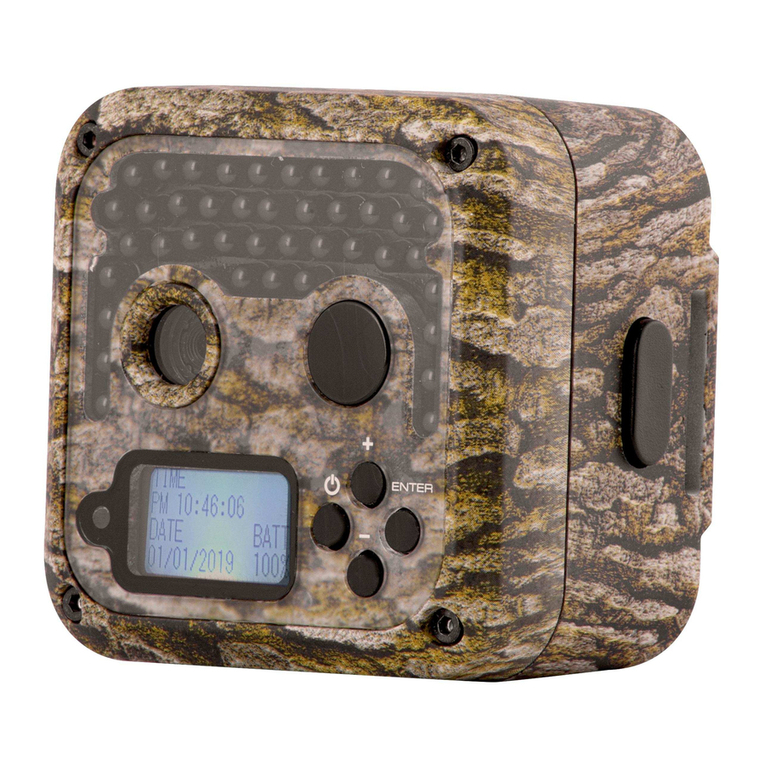
TRUTH CAM 63037 Manual de usuario

Before Operation
Quick Start
Initial Camera Setup
Recommended
Accessories
Customer Service &
Warranty
© 2012 Primos®Hunting
Additional information on this product and
answers to frequently asked questions
can be found at www.primos.com
Camera
Features/Functions
Operating Tips
!
PLEASE READ CAREFULLY BEFORE USE

IMPORTANT
For your protection, please carefully read these warnings, precautions and safety/operating
instructions completely before operating the camera. Follow these instructions closely and
keep this manual for future reference.
WARNING
To reduce the risk of fire, electrical shock or product damage/failure,
- Do not expose unit with the door open to rain, moisture, dripping or splashing. Do not open
or close the camera door with wet hand. Completely wipe off water on camera and camera
door before opening.
- Do not lay product on moist ground or submerge in water (this unit is designed for vertical,
upright outdoor use)
- DO NOT OPEN CASE HOUSING. UNINSULATED, ‘DANGEROUS VOLTAGE’ WITHIN PRODUCTS
ENCLOSURE. DO NOT REMOVE FRONT OR BACK HOUSING COVER. THERE ARE NO USER
- SERVICEABLE PARTS INSIDE, REFER SERVICING TO PRIMOS®CUSTOMER SERVICE.
- Only use batteries as specified in this user manual and install according to correct
polarization. Failure to follow may result in leaking or exploding batteries, damage to camera,
fire or personal injury. Do not handle damaged or leaking batteries.
- Do not expose to extreme heat. Do not leave product and/or batteries exposed in direct
sunlight inside a vehicle, or other contained environment for a long period of time.
- Only use accessories as recommended in this manual
CARE & CAUTION
- Transport and handle with care. Do not strongly shake, bump, hit, drop or otherwise
cause impact to the camera – can result in camera malfunction, damage to lens, sensor,
LCD screen, or other key components. Additionally, damage to the case could result in
imperfections to water-resistant properties.
- Take extra care when handling or using camera in places with sand and dust. Sand, dust and
foreign substances exposed to camera lens, PIR sensor, LED array and/or the internal door
panel components may result in poor picture quality or malfunction of camera. If exposed to
any of these elements, please carefully wipe off completely before continued use.
MODIFICATION WARNING
You are cautioned that any changes or modifications not expressly approved in this manual
could void your warranty of this equipment.
OPERATING TEMPERATURE
- Recommended storage temperature range -100F to 1400F
- Recommended operating temperature range 200F to 1200F
WARNING
To avoid possible camera, battery or other damage and/or injury, NEVER ATTACH A BATTERY
to the camera’s external 6V DC power port while other batteries are installed in the camera. The
6V DC power port is designed to be used as the ONLY power source, do not install batteries in
the camera while using this external battery source (*This will void your warranty).
!
PLEASE READ CAREFULLY BEFORE USE

Simple to Use
Simple to Understand
Visit www.primos.zendesk.com for FAQ,
PDF Manuals, Camera Support or to open a
Troubleshooting Ticket.
Instructions Video Clips
Visit www.primos.com/TruthCam for
Instructional Video Clips.
ONLINE SUPPORT

Table of Contents
Before Operation
Needed to Operate 1
Select SD Card Size 2
Identify Parts 3
Understand Sliding Switch & Button Functions 4
Quick Start - Initial Camera Setup
Easy 6 Step Setup 5
Camera Settings Backup Battery 6
Camera Status Lights 6
Camera Features/Functions
Camera Sensitivity 7
Time/Date 7
Format 8
Viewing/Retrieving Image 9
Clearing SD Card 10
Power Saving Sleep State 10
Image Stamp 10
Recommended Accessories
Featured Primos®TRUTH®CAM Accessory 11
Other Accessories 11
Operating Tips
Important Notes 12

Recommended Accessories
Operating Tips
Customer Service & Warranty
Introduction
Thank you for choosing a Primos®TRUTH®Cam, we know you have choices
and we appreciate you choosing us. Our goal at Primos®is to provide products
for hunters that are reliable and “Simple to Use”. This past year we have been
honored by getting so much feedback from you our customers. The TRUTH®
Cams are some of the most highly rated products within the Game Camera
category. We appreciate the positive feedback as well as input on how to make
our products even better.
This year we have made some major improvements to our TRUTH®Cams. All
TRUTH®Cams now have a 1 second trigger speed, ZERO Photo Capture Noise,
increased 32GB SD Memory card support and up to 200% LONGER Battery
Life. We like you are always pushing to make our time afield more productive
and fun. The TRUTH®Cam has all the features you want in a game camera that
is “Simple To Use”.
Contact Info 15
Warranty Protection 15
TRUTH®CAM’s - Now with ZERO Photo Capture Noise &
Up to 200% LONGER BATTERY LIFE

Included:
1. TRUTH® Camera (1)
2. 72” Mounting Strap (1)
3. Instruction Manual
4. Warranty Registration Card
TRUTH®CAM BLACKOUT™ CR
INSTRUCTION MANUAL
1. Four (4) “D” size Alkaline or Rechargeable Batteries
2. One or more SD Memory Cards
(Camera will support up to 32GB SD or SDHC Cards)
Note: If no SD Card is installed ‘SD’ will display on initial menu screen
3. SD Memory Card Reader or other device to view image/video files
on SD Card. (Many computers have a SD Memory Card slot built-in)
1
BEFORE OPERATION
Needed to Operate:

1GB
2GB
4GB
8GB
Day Photos
3.1MP
820
1,650
3,300
6,610
Video
10S High Res
50
100
200
400
Video
30S High Res
20
40
90 180
Video
60S Low Res
70
140
280
570
*Photo/Video SD Card Storage Capacity
*Approximation - photo/video sizes vary based on individual image details
Night Photos 1.3MP
3,300 6,660 13,330 26,660
16GB 32GB
13,220
53,320
720
360
1,140
26,440
106,640
1,440
720
2,280
Select SD Card Size
This chart allows you to see the approximate capacity of 1GB, 2GB, 4GB, 8GB, 16GB
& 32GB SD Memory Cards. Check to see what [megapixel] photos or [resolution] videos
that will be best for your SD Card.
2

3
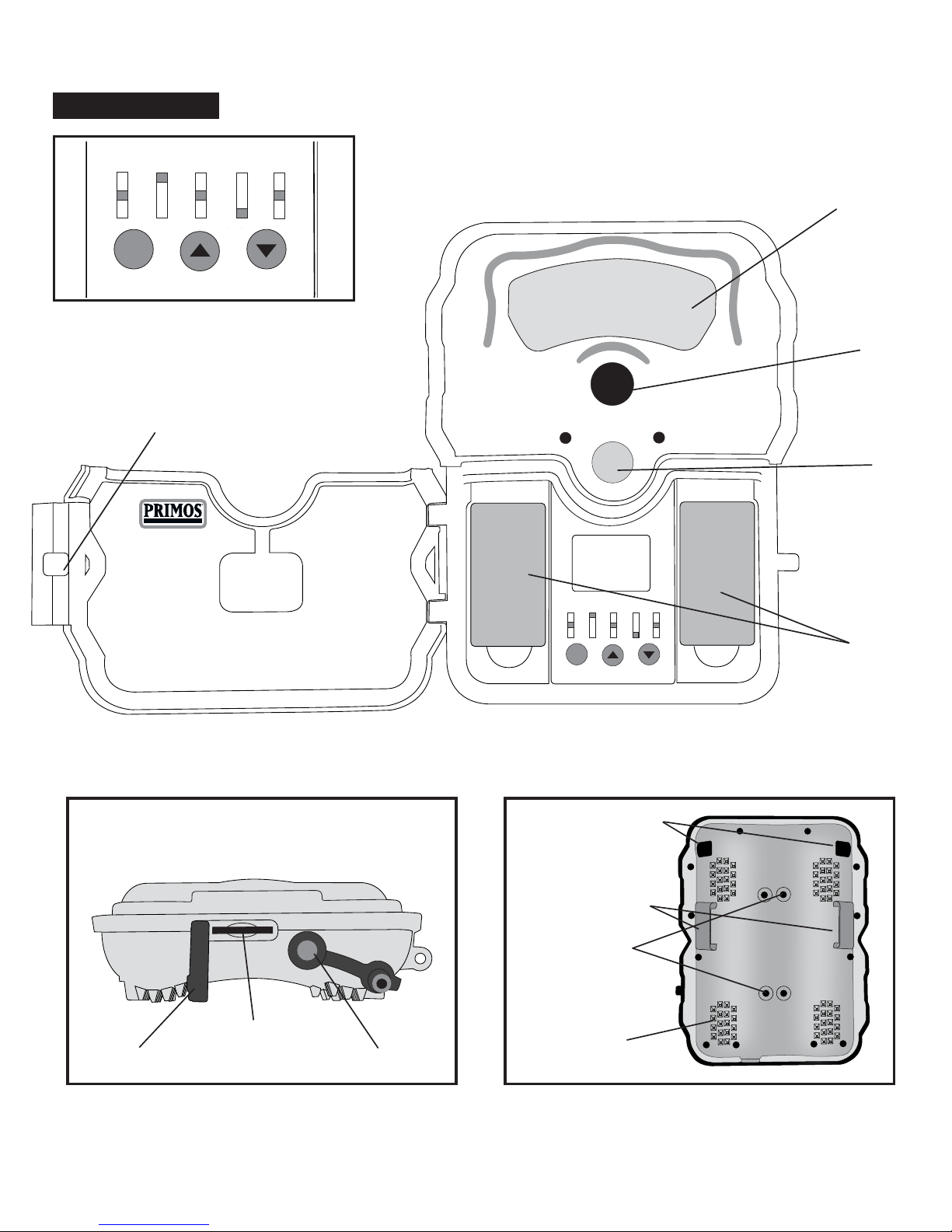
Identify Parts
STATUS
SET/WAKE UP DOWN
VIDEO DELAY MULTI SENSOR
SHOT
STATUS VIDEO DELAY MULTI SENSOR
SHOT
OFF
10s
30s
60s
10s 1
3
5
1
M
30
M
PHOTO
VIDEO
HI
NORM
LO
Non Visible LED Lights
Camera Lens
PIR Motion Sensor
“D” Battery
Compartments
Door Latch with
Optional Pad Locking Hole
STATUS
SET/WAKE UP DOWN
VIDEO DELAY MULTI SENSOR
SHOT
STATUS VIDEO DELAY MULTI SENSOR
SHOT
OFF
10s
30s
60s
10s 1
3
5
1
M
30
M
PHOTO
VIDEO
HI
NORM
LO
CLOSE UP VIEW OF CAMERA BUTTONS
Bottom View Back View
SD Card Slot
Rubber SD Card Cover External Battery Port
(Optional 6V DC)
Through Housing
5/16”Security Cable Hole
Tree Gripping Teeth
Mounting Strap Slots
Brass Inserts
(For optional
Attachment Accessories)

43
PIR Motion Sensor
“D” Battery
Compartments
BUTTON FUNCTIONS
- Use to navigate (scroll up or down) between number of pictures
‘0000’, date or time.
Set - While on date or time screen, press SET button to change settings.
Use buttons to adjust setting & press Set again to save.
TIP: See page 8 for formatting SD Card using this camera
UNDERSTAND SLIDING SWITCH & BUTTON FUNCTIONS
LCD Screen Notes -
1. Initial main screen displays number of
pictures ‘0000’ and battery life.
2. Use buttons to see date or time.
SLIDING SWITCHES
Status - Select PHOTO or VIDEO -
this turns “ON” the unit. Move switch
to “OFF” to shut off the unit.
Video - Video recording length (only
relevant if camera status is set to VIDEO).
Delay - The pre-set amount of
time you desire between photo/
video recordings.
Multi Shot - Number of pictures taken
each triggering event (only relevant if camera status is set to PHOTO).
Sensor - Motion Detector Sensitivity. Use ‘NORM’ as default see (page 7).

5
1. Install Batteries - Uses four (4) “D”
size Alkaline or Rechargeable batteries.
(Note: Camera identifies fully charged rechargeable
batteries, such as NiMH, as less than 99% on battery
indication level. Rechargeable batteries run on
different voltage and cause this variation. Most fully
charged rechargeable batteries will show 50-60%.)
2. Install up to 32GB SD Memory Card (not included) into the card slot
on the bottom of the camera. If SD Card is not installed, camera will display
“NO SD” on Initial Primos Menu Screen. (Note: SD Card Slot is protected by rubber
seal [plug]. Open door of the camera and gently rotate seal from slot. After SD Memory Card is
installed, replace rubber seal in original position to prevent moisture and elements from entering
camera and possibly causing malfunction.)
3. Secure Camera to Tree or Pole using included Mounting Strap
(must thread strap through Mounting Strap Slots on back of camera).
4. Turn On Camera and Slide Switches to desired settings. The LCD
screen will turn on and show the number of photos/videos on SD Card.
SD Card
QUICK START INITIAL CAMERA SETUP
Easy 6 Step Setup
5. Setup-Time and Date -Push UP or DOWN to find Time and Date
screens. While on respective screen, press Set button and then buttons
to adjust selected field.
Tabla de contenidos