78
Troubleshooting
Issue Suggeson
No sound is heard. 1) Check power connecon. If there is no flashing or solid blue LED, the speaker is not turned on.
2) Make sure the correct Bluetooth device is connected. If needed, double-click BT buon to disconnect
and then reconnect from the Bluetooth device.
3) Increase volume level using the remote.
4) Check volume level on Bluetooth device and make sure no mute funcon is acvated.
5) If no sound is heard from all previously connected secondary speakers, reacvate Transmier Mode by
pressing TX buon once on main unit.
6) If no sound is heard from specific previously connected secondary speaker, reacvate Receiver Mode by
pressing RX buon once on the impacted unit.
Sound/connecon 1) Keep Bluetooth device (smartphone, tablet, etc.) at a staonary locaon. Signal can easily become
is intermient. unstable if the Bluetooth device is moving (ie. inside a pocket while walking).
2) Move Bluetooth device closer to main unit.
3) Disconnect and reconnect Bluetooth device.
4) Move away from (or remove) any nearby electronic device that may present signal interference (ie.
router, microwave, TV, etc.)
5) You may improve signal connecon by slightly elevang the speaker.
6) If intermient sound only impacts specific secondary speaker, move that speaker closer to main unit.
Speaker not responding 1) Check remote baery.
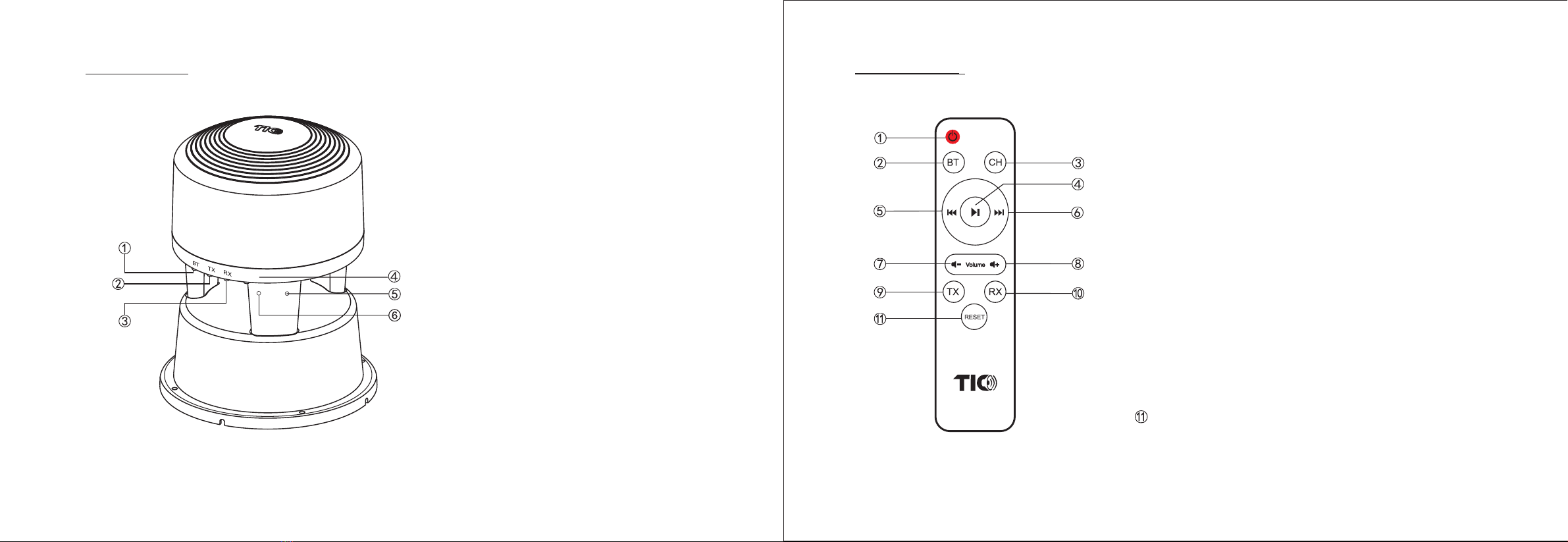
to remote. 2) Find I R node on speaker and aim remote directly.
3) Move remote closer to speaker before aiming.
4) Provide shielding if direct sunlight is hing on the path of the infrared signal.
Cannot seng up 1) Make sure no Bluetooth device is connected except to the main unit. You can disconnect any connected
broadcast mode device by double-clicking the BT buon on any secondary speaker.
2) First acvate the respecve broadcast mode by pressing the TX/RX buon only once before
double-clicking the TX/RX buon to iniate broadcast connecon.
3) Move secondary speaker closer to main unit during set up.
4) Make sure to iniate the connecon setup within the 30-seconds window. Ask a second person to help
press the TX/RX buons simultaneously.
Remote is lost 1) Use another remote if you have purchased mulple TIC Bluetooth 5 speakers/devices.
2) Replacement remotes can be purchased on our website.
The B series speaker can be installed in-ground or surface-mounted. In-ground installaon is generally opmal
since burying speaker in-ground will enhance its resonance, providing a fuller audio experience. When mounted
on a surface, please ensure the wiring is safely secured and does not become a tripping
hazard. The opmal burial depth is 1 inch exposure from ground level for the boom secon.
System should be fully tested above surface before speakers and wires are buried.
To clean speaker, you can rinse with fresh water from directly above the speaker and wipe with
a cloth. If needed , use mild detergent to remove dirt. 1''
Caution
Risk of Electric Shock. Do Not Open.
The lightning flash with an arrowheah symbol, within an equilateral triangel, is intended to alert the user to the presence
of uninsulated “ dangerous voltage” with the product’s enclosure that may be of sufficient magnitude to constute a risk
of electric shock to persons.
The exclamaon point within an equilateral triangle is intended to alert the user to the presence of important operang
and maintenance (servicing) instrucons in the literature accompanying the product.