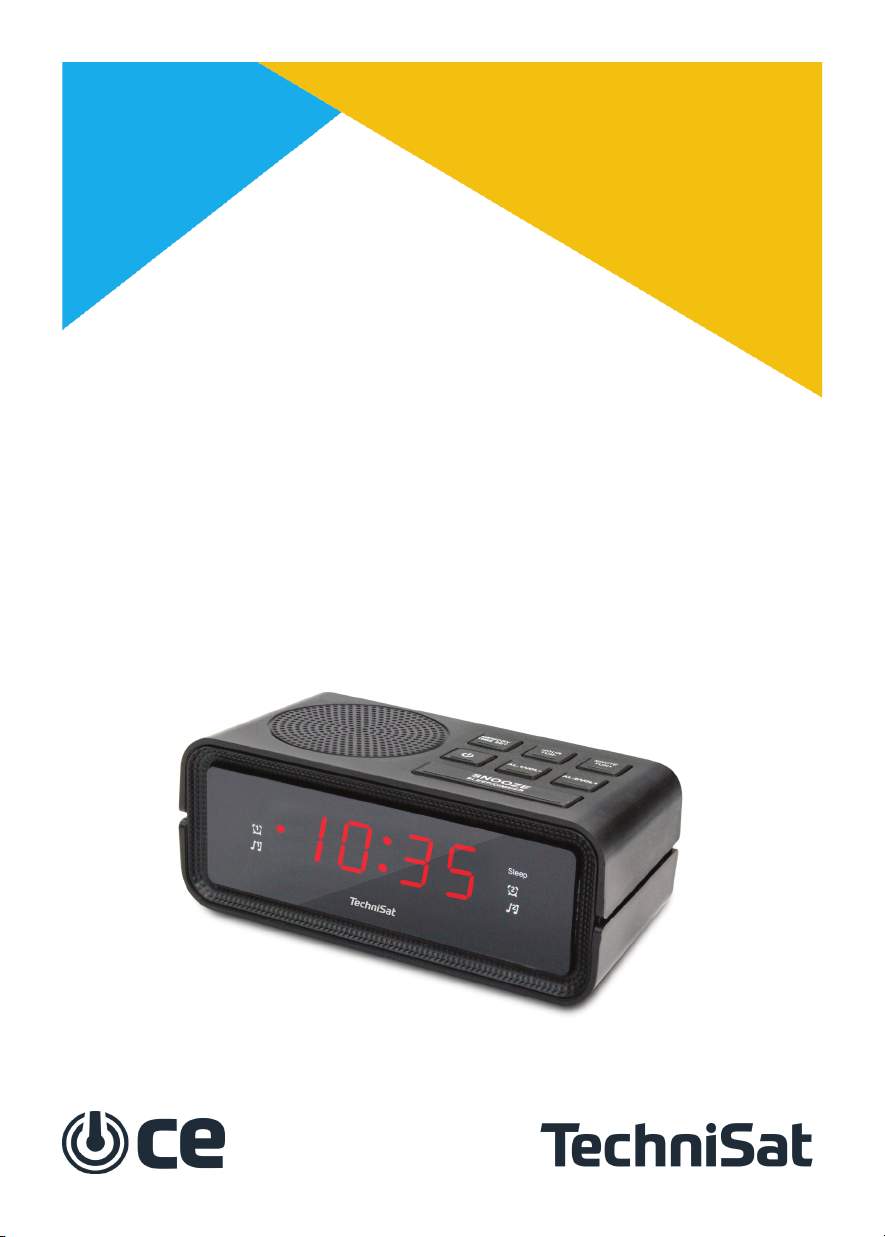
TechniSat CE DIGICLOCK 2 Manual de usuario

User m nu l
DIGICLOCK 2
R dioclock with LED displ y

Inform tion bout recycling
The p ck ging of this r dio l rm clock is entirely m de of recycl ble m teri ls.
Ple se sort them nd put them in ppropri te recycling bins. This receiver must
not be disposed of with norm l household w ste ﬞer use. It must be disposed of
t speci l collection point for used electric l nd electronic equipment. You will
find inform tion bout the ne rest w ste dispos l points t your loc l municip l
office. Ple se lso remember not to dispose of used b מּeries from the remote
control together with household w ste. Ple se t ke them to speci l collection
point for h z rdous w ste.
DIGICLOCK 2 is CE m rked nd meets the EU st nd rds. TechniS t reserves the
right to ch nges nd errors in printing. Condition 20/2020 TechniS t nd DIGIC-
LOCK 2 re registered tr dem rks of TechniS t Digit l GmbH.
S fety instructions
Re d ll s fety instructions c refully nd keep them for future reference. Alw ys
follow ll w rnings nd instructions in this m nu l nd on the b ck of the unit.
Be c reful when using the AC d pter!
- The device c n only be connected to the m ins 100-240 V~, 50/60 Hz.
- Never מּempt to use the device to oper te under ny other volt ge.
- The power cord must not be connected until the inst ll tion is completed cor-
rectly.
- If the unit's power cord is d m ged or if the unit is d m ged in ny other w y, do
not st rt it.
- Do not pull the c ble when unplugging the unit from the outlet.
- To void the risk of fire or electric shock, do not expose the unit to r in or mois-
ture.

- Do not use the device ne r b ths, swimming pools nd w ter.
- Do not pl ce cont iners with liquids such s flower v ses on the device. They m y
f ll, nd esc ping liquid m y c use serious d m ge or risk of electric shock.
- Do not open the housing. Otherwise there is risk of electric shock.
- Never מּempt to rep ir d m ged unit yourself. Alw ys cont ct one of our cus-
tomer service centers.
- Do not open the unit under ny circumst nces
- only speci list c n do so.- Foreign bodies such s needles, coins, etc. must not
f ll into the unit.
- Do not touch the termin l cont cts on the b ck of the device with met l objects
or fingers. This m y result in short circuits.
- Do not pl ce open fire sources such s burning c ndles on the device.
- Never llow children to use this device without supervision.
- Alw ys h ve m inten nce work c rried out by qu lified personnel. Otherwise you
put yourself nd others t risk.
- The device rem ins connected to the m ins supply even ﬞer it h s been swit-
ched off. If the device will not be used for n extended period of time, unplug the
AC d pter from the m ins socket.
- Do not listen to the r dio t high volume. This c n le d to perm nent he ring d -
m ge.
Seמּing up the device
- Pl ce the device on st ble, s fe nd horizont l surf ce. Ensure good ventil tion.
- Do not pl ce the unit on soﬞ surf ces such s c rpets, ceilings or close to curt ins
nd w ll h ngers s you c n cover the ventil tion holes. This c n interrupt the ne-
cess ry ir circul tion. This c n le d to fire in the unit.
- Do not cover the unit with curt ins, bl nkets or newsp pers.
- Do not pl ce the unit ne r he t sources such s r di tors. Avoid direct Sunshine
nd pl ces with exception lly high levels of pollin tion.

- Do not choose loc tion in rooms with high humidity, e.g. in the kitchen or
s un , s condens tion m y d m ge the device. The unit is designed for use in dry
nd moder te environments nd must not be exposed to dripping or spl shing
w ter.
- The unit m y only be oper ted in horizont l position.
- Do not pl ce ny he vy objects on the unit.
- When moving the product from cold to w rm, moisture m y ccumul te inside
the product. In this c se, w it bout n hour before oper ting the unit.
- Route the power cord so th t no one c n trip over it.
- The outlet should be s close to the ppli nce s possible.
- To connect to the m ins, plug the m ins plug completely into the socket.
- Use suit ble, e sily ccessible m ins plug nd void using multiple sockets!
- Do not touch the power cord or plug with wet h nds, d nger of electric shock!
- In the event of m lfunction or smoke nd odour from the housing, immedi tely
unplug the m ins plug from the socket!
- Disconnect the power plug before storm bre ks out.
- If the ppli nce will not be used for long period of time, e.g. before the st rt of
long journey, unplug it from the m ins socket.
- Too high volume c n c use he ring d m ge.
D nger of suffoc tion!
P ck ging nd its p rts should not be leﬞ by children. Risk of suffoc tion by films
nd other p ck ging m teri ls.
The r dio l rm clock is powered by ltern ting current. Use two AAA-size b מּe-
ries to m int in the ex ct time during m ins power f ilure. Insert the b מּeries by
m tching the pol rity m rkings (+/-) in the b מּery comp rtment.
Repl ce ll b מּeries simult neously with new ones. Remove ll b מּeries when the
device will not be used for long time.

Device functions
Seמּing the correct time
- To set the correct time, turn off the device by pressing the ON/OFF buמּon (2).
- Then press the MEMORY / TIME SET buמּon (5) longer.
- To set the time, press the HOUR / TUN- buמּon (6).
- Use the MINUTE / TUN+ buמּon (3) to set the minutes.
Autom tic tuning
- To st rt the utom tic se rch for r dio st tion, press HOUR / TUN- (6) or MI-
NUTE / TUN+ (3) longer.
- The r dio l rm clock will utom tic lly st rt se rching the b nd th t will stop t
the first st tion found.
M nu l r dio tuning
- Use the HOUR / TUN- (6) nd MINUTE / TUN+ (3) buמּons to set the correct re-
ception frequency. E ch time you press it, the frequency ch nges by 0.1 MHz.
S ving st tions to your f vourites
- To s ve st tion to the F vourite List press the MEMORY / TIME SET buמּon (5)
longer.
- The progr m number will blink on the screen. Use the HOUR / TUN- (6) or MI-
NUTE / TUN+ (3) buמּons to set the desired number nd s ve the progr m by con-
firming with the MEMORY / TIME SET buמּon (5).

C lling progr m from the list of r dio progr ms
- Press the MEMORY / TIME SET buמּon (5).
- Then use the HOUR / TUN- (6) or MINUTE / TUN+ (3) buמּons to select the pro-
gr m number nd confirm the selection with the MEMORY / TIME SET buמּon (5).
Al rm seמּing
- To set the l rm, turn off the l rm clock by pressing the buמּon TURN OFF/ON
(2).
- Aﬞer switching off the device, press nd hold AL.1 / VOL- (7) or AL.2 / VOL+ (4)
until the time seמּing fl shes in the displ y.
- You c n choose whether the device is to oper te in mode during the l rm:
R dio or Buzzer mode. The LED with the buzzer symbol is n option with buzzer.
The LED with note symbol is n option with r dio. Press AL.1 / VOL- (7) or AL.2
/ VOL+ (4) to select the desired mode.
- If you h ve lre dy selected the l rm mode you c n now set the l rm time.
Press HOUR / TUN- (6) to set nd MINUTE / TUN+ (3) to set the minutes.
- Press MEMORY / TIME SET (5) to s ve the l rm time.
Activ tion nd de ctiv tion of the l rm
- When the l rm clock is off, you c n choose whether the device should oper te
in mode during the l rm: R dio or Buzzer. LED with buzzer symbol is n option
with buzzer. The LED with note symbol is n option with r dio. Press AL.1 / VOL-
(7) or AL.2 / VOL+ (3) to select the desired mode.
- To de ctiv te the l rm, press the AL.1 / VOL- (7) or AL.2 / VOL+ (3) buמּon until
the red LED with the bell nd note symbol dis ppe rs.
- When the l rm is ctiv ted, press the On/Off buמּon (2) to turn off the l rm.
Snooze function
- During the l rm, pressing the SNOZE/SLEEP/DIMMER buמּon (1) will switch off for
20 minutes.
- During the snooze, the LED next to the bell symbol nd note fl shes.
- Aﬞer 20 minutes, the l rm will sound g in.
- To turn off the l rm completely, press the On/Off buמּon (2), the LED t the
l rm type symbol will stop blinking.
Seמּing the shutdown timer
- The shutdown timer is set when the l rm clock is on.
- By pressing the SNOZE/SLEEP/DIMMER buמּon (1) you h ve the possibility to
ch nge the time ﬞer which the device will utom tic lly switch off.
- The following seמּings re v il ble: 10, 20, 30, 40, 50, 60, 70, 80, 90 min nd
OFF (timer off).

Volume ch nge
- While listening to the r dio, press AL.1 / VOL- (7) to decre se the volume.
- While listening to the r dio, press the AL.2 / VOL+ buמּon (3) to incre se the vo-
lume.
LED b cklight intensity ch nge
Two screen brightness seמּings re v il ble.
- To ch nge the brightness, press nd hold the SNOZE/SLEEP/DIMMER buמּon (1).
- Pressing the SNOZE/SLEEP/DIMMER buמּon (1) g in for longer period of time
will return to the previous LED brightness..
Specific tion
Frequency r nge: FM 87.5 -108 MHz
LED displ y: 0.6"
Power: AC 230V ~ 50 Hz
Dimensions of the device: 125.4x50x60mm
B מּeries: 2x AAA for memory support
RMS power: 0.5W
Number of f vorite st tions: 20
NOTE: the b מּery power supply is only used to support the device memory in c se
of power f ilure (including the memory of the hour)!*
*b מּeries re not included in set.
Cont ct
In c se of m lfunction, ple se cont ct your loc l distributor of TechniS t pro-
ducts.

Gebruiks nwijzing
DIGICLOCK 2
R dio- l rmklok met LED-displ y

Opmerkingen over recycling
De verp kking v n deze r dio l rmklok is volledig gem kt v n recycleb re m te-
ri len. Gelieve ze te sorteren en in de juiste recycl geb kken te doen. Deze ontv n-
ger m g n gebruik niet met het norm le huisvuil worden weggegooid. Het moet
worden fgevoerd n r een speci l inz melpunt voor gebruikte elektrische en
elektronische pp r tuur. U vindt inform tie over de dichtstbijzijnde fv lverwijde-
ringspunten bij uw pl tselijke gemeentek ntoor. Vergeet ook niet om gebruikte
b מּerijen uit de fst ndsbediening niet s men met het huisvuil weg te gooien.
Breng ze n r een speci l inz melpunt voor gev rlijk fv l voor verwijdering.
DIGICLOCK 2 is CE-gem rkeerd en voldoet n de EU-normen. TechniS t behoudt
zich het recht voor om wijzigingen en fouten in het drukwerk n te brengen. St -
tus 10/2020TechniS t en DIGICLOCK 2 zijn geregistreerde h ndelsmerken v n
TechniS t Digit l GmbH.
Veiligheidsinstructies
Lees lle veiligheidsinstructies zorgvuldig door en bew r ze voor toekomstig geb-
ruik. Volg ltijd lle w rschuwingen en instructies in deze h ndleiding en op de
chterk nt v n het toestel.
Wees voorzichtig met het gebruik v n de AC- d pter!
- Het pp r t m g lleen worden ngesloten op de netsp nning 100-240 V~,
50/60 Hz.
- Probeer het pp r t nooit onder een ndere sp nning te gebruiken.
- Het netsnoer m g p s worden ngesloten ls de inst ll tie op de juiste wijze is
voltooid.
- Als het netsnoer v n het toestel besch digd is of ls het toestel op een ndere
m nier besch digd is, m g u het toestel niet gebruiken.
- Trek niet n de k bel ls u de stekker uit het stopcont ct h lt.
- Om het risico v n br nd en elektrische schokken te vermijden, m g u het

pp r t niet n regen of vocht blootstellen.
- Gebruik het pp r t niet in de buurt v n b den, zwemb den of w ter.
- Pl ts geen vloeib re verp kkingen zo ls bloemenv zen op het pp r t. Ze kun-
nen v llen, en ontsn ppende vloeistof k n ernstige sch de of risico op een elektris-
che schok veroorz ken.
- Open de k st niet. Anders best t er een risico op een elektrische schok.
- Probeer nooit zelf een besch digd pp r t te rep reren. Neem ltijd cont ct op
met een v n onze kl ntenservicecentr .
- Open het pp r t in geen gev l - lleen een speci list k n dit doen.
- Vreemde voorwerpen zo ls n lden, munten, enz. mogen niet in de eenheid v l-
len.
- R k de nsluitcont cten n de chterk nt v n het pp r t niet n met me-
t len voorwerpen of vingers. Dit k n leiden tot kortsluiting.
- Pl ts geen open vuurbronnen zo ls br ndende k rsen op het pp r t.
- L t kinderen dit pp r t nooit zonder toezicht gebruiken.
- L t onderhoudswerkz mheden ltijd uitvoeren door gekw lificeerd personeel.
Anders breng je jezelf en nderen in gev r.
- Het pp r t blijﬞ ook n uitsch keling op het stroomnet ngesloten. Als het
pp r t gedurende l ngere tijd niet wordt gebruikt, h l d n de stekker v n de
AC- d pter uit het stopcont ct.
- Luister niet n r de r dio op hoog volume. Dit k n leiden tot blijvende gehoors-
ch de.
Instellen v n het pp r t
- Pl ts het pp r t op een st biele, veilige en horizont le ondergrond. Zorg voor
goede ventil tie.
- Pl ts het pp r t niet op een z chte ondergrond zo ls t pijt, pl fond of in de
buurt v n gordijnen of muurh ngers, ngezien de ventil tieopeningen kunnen
worden fgedekt. Dit k n de noodz kelijke luchtcircul tie onderbreken. Dit k n lei-
den tot een br nd in het toestel.
- Dek het pp r t niet f met gordijnen, dekens of kr nten.
- Pl ts het pp r t niet in de buurt v n w rmtebronnen zo ls r di toren. Ver-
mijd direct zonneschijn en pl tsen met uitzonderlijk hoge bestuivingsnive us.
Tabla de contenidos
Idiomas:
Otros manuales de Radio reloj de TechniSat

TechniSat
TechniSat DigitRadio 50 Manual de usuario

TechniSat
TechniSat DIGITRADIO 51 Manual de usuario

TechniSat
TechniSat DIGITRADIO 51 Manual de usuario

TechniSat
TechniSat DigiClock Radio Manual de usuario

TechniSat
TechniSat TECHNIRADIO 40 Manual de usuario

TechniSat
TechniSat DIGITRADIO 52 Manual de usuario

TechniSat
TechniSat DIGITRADIO 52 CD Manual de usuario

TechniSat
TechniSat DigiClock Radio Manual de usuario