
Audiovox CE90 Manual de usuario

1
ALARM CLOCK RADIO
OPERATION INSTRUCTIONS
RISK OF ELECTRIC SHOCK
DO NOT OPEN
The lightning flash
and arrowhead
within the triangle is
a warning sign
alerting you of
"dangerousvoltage"
inside the product.
CAUTION: TO REDUCE THE RISK
OF ELECTRIC SHOCK, DO NOT
REMOVE COVER (OR BACK) NO
USER-SERVICEABLE PARTS
INSIDE. REFER SERVICING TO
QUALIFIEDSERVICEPERSONNEL.
The exclamation point
within the triangle is a
warning sign alerting
you of important
instructions
accompanying the
product.
WARNING
WARNING: TO REDUCE THE RISK OF FIRE OR ELECTRIC SHOCK, DO NOT
EXPOSE THIS APPLIANCE TO RAIN OR MOISTURE.
*SEE BOTTOM OF UNIT FOR GRAPHIC SYMBOLS *
* DO NOT CONNECT FM ANTENNA TO EXTERNAL ANTENNA *
WARNING:
DO NOT PLACE THE UNIT ON BEDDING OR OTHER SURFACES
THAT PREVENTS AIR FLOW THROUGH THE UNIT.

2
•To disconnect the cord, pull it out by the
plug, not by the cord.
•Avoid exposure to temperature extremes,
direct sunlight, moisture, sand, dust or
mechanical shock.
Allow adequate air circulation to prevent
internal heat build-up. Do not place the unit
on surfaces (rugs, blankets, etc.) or near
materials (curtains, draperies) that may
block the ventilation holes.
•Should any solid object or liquid fall into the
unit, unplug the unit and have it checked by
qualified personnel before operating it any
further.
•When cleaning the casing, use a soft cloth
dampened with a mild detergent solution.
Never use abrasive cleansers or chemical
solvents.
WARNING
FEATURES
PRECAUTIONS
• To prevent fire or shock hazard do not
expose the unit to rain or moisture. • To avoid electrical shock, do not open the
cabinet. Refer servicing to qualified per-
sonnel only.
•Electronic digital alarm clock and sleep
timer are combined.
•Two wake-up modes available: radio or
buzzer alarm.
•Power back-up function to keep the clock
operating during a power interruption, us-
ing an optional 6F22 battery.
This device complies with Part 15 of FCC Rules. Operations is subject to the following two
conditions: (1) this device may not cause harmful interference, and (2) this device must accept
any interference received, including interference that may cause undesirable operation.
WARNING:
DO NOT PLACE THE UNIT ON BEDDING OR OTHER
SURFACES THAT PREVENTS AIR FLOW THROUGH THE
UNIT.

3
LOCATION OF CONTROLS
1. Function selector [ON/OFF/
RADIO BUZZER]
2. CLOCK set button
3. HOUR set button [HR]
4. MINUTE set button [MIN]
5. ALARM set button
6. SLEEP set button
7. SNOOZE/SLEEP OFF button
8. Time display
9. Power back-up battery
compartment [bottom]
10. Radio dial scale
11. TUNING control
12. BAND selector
13. VOLUME control
14. AC power cord
15. Antenna wire
TIME DISPLAY INDICATOR
PM indicator
ALARM
indicator
MINUTE
digits
HOUR
digits
4
POWER SUPPLY
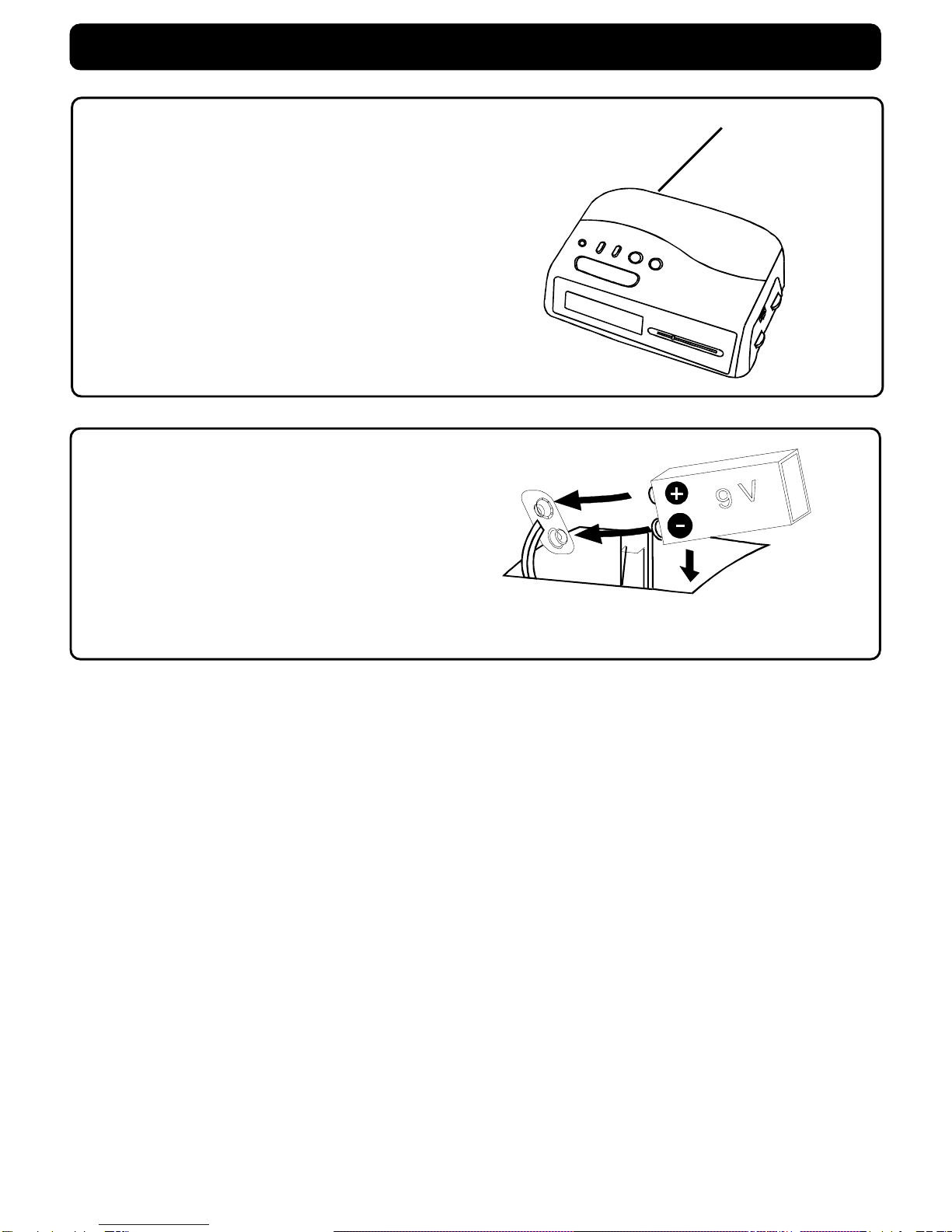
POWER BACK UP DURING POWER INTERRUPTION
When to replace the battery
To check the battery condition, unplug the AC
power cord from the wall outlet and plug it in
again after a few minutes. If the displayed
time is incorrect, replace the battery with a
new one.
Caution
•Be sure to install the battery before discon-
necting the AC power cord.
•When the unit is left unplugged for a long
time, remove the battery to avoid undue
battery discharge and unit damage from
battery leakage.
Besuretoinstallanoptional9Vbatteryforthe
power back-up function. If the AC power
supply is interrupted, the battery supplies
powertokeeptheclockoperatingandholding
the alarm time setting.
•During power interruption, the clock func-
tion is maintained although illumination of
the indicator goes off, but the alarm sound
does not come on.
•After a power interruption, the displayed
time may not be always correct (it may
gain or lose less than ten minutes per
hour).
This battery is only for clock operation and
alarm memory during power interruption.
You cannot listen to the radio with the
battery.
USING HOUSE CURRENT
Before use, check that the rated voltage of
your unit matches your local voltage.
Caution: To prevent electrical shock,
match wide blade of plug to wide slot,
fully insert.
To AC outlet
Insert one "6F22" battery

5
HOW TO SET THE CLOCK
1. While pressing the CLOCK set button, press the HR button to the desired hour.
LISTENING TO THE RADIO
2.While pressing the CLOCK set button, press the MIN button to the desired minute.
• PM 12:00 = NOON time , and PM indicator will light up.
1.Set to ON. 2. Select a band 3. Tune in to a station
4. Adjust the volume. 5.After listening
Set to OFF.
AM: Rotate the unit horizontally
To improve the radio reception
FM: Extend the external antenna wire

6
WAKE UP TO ALARM [RADIO OR BUZZER]
HOW TO TURN OFF THE ALARM
1.If you want to snooze a few more
minute.
Press the SNOOZE button will deactivate
the sound for 9 minute. You can repeat
this function as many times as you like
within 119 minutes from the preset alarm
time.
2.To complete cancel the alarm mode.
Press the ALARM button, and it will
resume after 24 hours.
1. While pressing the ALARM button, press the HR button to the desired hour.
2. While pressing the ALARM button, press the MIN button to the desired minute.
3.For radio alarm
Firsttune inthe desiredstation andadjust
the volume.
Set to RADIO
For buzzer alarm
Set to BUZZER
4. The AL [Alarm] indicator will lights up
•Set to RADIO or BUZZER will come on at the preset time, and shut off automatically after
119 minutes.

7
Frequency range FM: 88-108 MHz
AM: 530-1700 kHz
Antennas FM: 1 meter antenna wire
AM: Built-in ferrite bar antenna
Speaker 8 Ohm
Power output 240mW [at 10% total harmonic distortion]
Powerrequirements 120V AC, 60 Hz
For the power backup function: 9V DC, one 6F22 battery
Dimensions Approx. 179x132.2x54.8mm [W/D/H]
Weight Approx. 560g [not inculed battery]
Design and specifications subject to change without notice.
HOW TO SET THE SLEEP TIMER
1.While listening to the radio,
Set to OFF.
2.Press SLEEP.
The radio turns on, and will turn off
after 59 minutes. maximum to 119 minutes.
Press SLEEP and HOUR.
OR
SPECIFICATION
maximum to 119 minutes.
Press SLEEP and MINUTE button, will
be counted down automatically.
3.Turn off the SLEEP before 59 minutes.
Press the SNOOZE button.

8
1. Read Instructions - Allthesafetyandoperatinginstructionsshould beread beforethe
applianceisoperated.
2. Retain Instructions -The safety and operatinginstructionsshouldberetained forfuture
reference.
3. HeedWarnings-Allwarnings onthe applianceand inthe operatinginstructionsshould be
adheredto.
4. Follow Instructions - All operating and useinstructionsshouldbe followed.
5. Water and Moisture -Theappliance should notbeused near water- forexample,near a
bathtub,washbowl,kitchensink,laundrytub,inawet basement,or nearaswimmingpool,
andthelike.
6. Carts and Stands -The appliance should be used only
with a cart or stand that is recommended by the
manufacturer.
6A. Anapplianceandcart combination should bemovedwith
care. Quick stops, excessive force, and uneven surfaces
maycause theappliance andcart combinationto overturn.
7. Wall or Ceiling Mounting - The appliance should be
mounted to a wall or ceiling only as recommended by the
manufacturer.
8. Ventilation -The appliance should be situated so that its location or position does not
interferewithitsproperventilation. Forexample, theapplianceshouldnotbe situatedon a
bed, sofa, rug, or similar surface that may block the ventilation openings;or, placed in a
built-ininstallation,suchasabookcaseorcabinet, thatmay impedetheflowofairthrough
theventilationopenings.
9. Heat -The appliance should be situated away from heat sources such as radiators, heat
registers, stoves, or other appliances (including amplifiers) that produce heat.
10. Power Sources -The appliance should be connected to a power supply only of the type
described in the operating instructions or as marked on the appliance.
11. Grounding or Polarization - Precautions should be taken so that the grounding or
polarizationmeansof anappliancearenot defeated.
12. Power-Cord Protection -Power-supplycordsshould beroutedso thattheyare notlikely
to be walked on or pinched by items placed upon or against them, paying particular
attention to cords at plugs, convenience receptacles, and the point where they exit from
theappliance.
13. Cleaning -Theappliance should becleanedonly as recommendedbythemanufacturer.
14. Power Lines - An outdoorantennashouldbe located awayfrompowerlines.
IMPORTANT SAFETY INSTRUCTIONS

9
15. Outdoor Antenna Grounding - If an outside antenna is connected to the receiver, be
sure the antenna system is grounded so as to provide some protection against voltage
surges and built up static charges. Section 810 of the National Electrical Code, ANSI/
NFPA No. 70, provides information with respect to proper grounding of the mast and
supporting structure, grounding of the lead-in wire to an antenna discharge unit, size of
grounding conductors, location of antenna-discharge unit, connection to grounding
electrodes, and requirements for the grounding electrode. See Figure 1.
16. Nonuse Periods - The power cord of the appliance should be unplugged from the outlet
when left unused for a long period of time.
17. Object and Liquid Entry - Care should be taken so that objects do not fall, and liquids
are not spilled, into the enclosure through openings.
18. Damage Requiring Service - The appliance should be serviced by qualified service
personnel when:
A. The power-supply cord or the plug has been damaged; or
B. Objects have fallen, or liquid has been spilled, into the appliance; or
C. The appliance has been exposed to rain; or
D. The appliance does not appear to operate normally or exhibits a marked change in
performance, or
E. The appliance has been dropped, or the enclosure damaged.
19. Servicing - The user should not attempt to service the appliance beyond that described
in the operating instructions. All other servicing should be referred to qualified service
personnel.

10 811-0R9691-011
Otros manuales para CE90
1
Tabla de contenidos
Idiomas:
Otros manuales de Radio reloj de Audiovox

Audiovox
Audiovox KCD3180 Manual de usuario

Audiovox
Audiovox CE255 Manual de usuario

Audiovox
Audiovox CE200 Manual de usuario

Audiovox
Audiovox CE609CR Manual de usuario

Audiovox
Audiovox Portable MP3 CD Player Manual de usuario

Audiovox
Audiovox CR-308 Manual técnico

Audiovox
Audiovox CR8030iE5 Manual de usuario

Audiovox
Audiovox RC105 Manual de usuario

Audiovox
Audiovox RP5640 Manual de usuario

Audiovox
Audiovox CD1120 Manual de usuario


