Swatch Touch Zero One Manual de usuario

IN
DETAIL
USER MANUAL
YOUR
SWATCH TOUCH ZERO ONE YOUR USER MANUAL

© 2015 Swatch Ltd.
This manual may not be copied or reproduced, in
whole or in part, without the prior written permission
of Swatch Ltd.
SWATCH and SWATCH TOUCH are registered trade-
marks of Swatch Ltd.
The Bluetooth® word mark and logos are registered
trademarks owned by Bluetooth SIG, Inc. and any use
of such marks by Swatch Ltd. is under license.
Android and Google Play are trademarks of Google Inc.
178 Regulatory compliance information
180 Watch and battery disposal, battery change
Apple, the Apple logo, and iPhone are trademarks of
Apple Inc., registered in the U.S. and other countries.
App Store is a service mark of Apple Inc.
IOS is a trademark or registered trademark of Cisco in
the U.S. and other countries and is used under license
by Apple Inc.
Other trademarks and trade names are those of their
respective owners.
While every eort has been made to ensure that the
information contained in this manual is complete and
accurate, Swatch Ltd. cannot exclude the possibility of
errors in typography or photography and disclaims any
liability for such errors.
3 English
24 Chinese simplied 简体中文
46 Chinese traditional 繁體中文
68 Japanese 日本語
90 Korean 한국어
112 Russian Русский
134 Thaï
177 Arabic
LANGUAGES

3
Getting started with your Swatch Touch Zero One:
4 What is it all about?
6 Get to know it
8 How to activate it
Main Menu
10
13
14
16
Additional information
21 Taking care of your watch: battery and more…
23 Restore to factory settings
17
18 SETTINGS
19 CONNECT
CONTENTS
3x
3x
3x
3x
3x
3x
3x
English

4
GETTING
STARTED
You can check the power of your
spikes, calculate your steps, and
see how many calories you burnt.
It also measures how much you
clap. Set your goals and see the
progress!
English
Partner up with Swatch.
The Touch Zero One
Is your perfect beach
volleyball companion.
It’s fun. Smart. Sporty.
· ON / OFF
· POWER HITS
· HITS
3x
It’s a
Beach Volley-
ball-companion
Measuring the
power of your
smashes. And
counting the hits.
· STEPS
· KCAL
· KM / MI
· TIME
3x
It’s a
step counter
Keeping track
of your steps,
the distance you
travel each day,
and the calories
you burn.
· T1 (Time zone 1)
· T2 (Time zone 2)
· DATE
· ALARM
· CHRONO
· TIMER
3x
It’s a
watch
Providing every-
thing you expect
from Swiss-
made quality.
All these
functions are
available on
your watch:
What is it all about?

5
GETTING
STARTED
Personalize it by buddying up via
Bluetooth®with your smartphone:
Select a virtual coach to spur you
on, share your achievements with
friends online – have fun.
· ON / OFF
3x
It’s
interactive
Sharing data
with your
smartphone.
Thus delivering
more fun.
· beep ON / OFF
· 24 hr. / 12 hr.
· Date EU / US
· dist. KM / dist. MI
3x
It’s
personalized
Being individual
when it comes
to “talking your
language.”
· ON / OFF
· POWER CLAPS
· CLAPS
3x
It’s a
clap-o-meter
Recording the
intensity and
amount of your
applause.
What is it all about?
· ON / OFF
· 00.10 – 99.90
3x
It’s a
goalsetter
Rewarding
you on your
progress.
English
And because it’s a Swatch,
it’s easy to use, water-resistAnt,
and features long battery life.

6
3x
English
Get to know it
Watch functions
Hours Minutes
Seconds
Main menu
Step counter,
Beach Volleyball
and Fan
information
Time format
Steps*
Goal / rewards
Bluetooth
activated
Alarm activated
Battery
depleted
GETTING
STARTED
The watch display explained
* Shortcut for cumulated steps
(e.g. 10K = 10,000 steps)

7
Get to know it
GETTING
STARTED
It has a touchscreen
The lower part of your display is a
touchscreen. Navigate and select
functions with your ngertip.
English
left section middle section right section
3x
3x
3x
Swipe: Browse, increase,
or decrease value,
switch from ON to OFF
Long press: Lock or
unlock, set value at zero
3x
3x
3x
Swipe: Browse, increase,
or decrease value,
switch from ON to OFF
3x
3x
Quick touch: Select or
conrm, quick info screen
3x
3x
Long press:
Backlight ON
3x

8
quick touch
English
How to activate it
GETTING
STARTED
Long press to unlock the watch.
Browse through main menu /
level 1. Quick touch to access
functions on level 2.
Browse through functions on
level 2 and select the function with
a quick touch.
Swipe for increasing or decreas-
ing values.
Conrm every step with a quick
touch. A high-pitched beep and the
display blinking three times conrm
your settings.
Unlocked watch mode:
Control your watch
Navigation on your watch is easy
and simple – it is all based on
two levels. On level 1 you browse
through the main menu. On level 2
you adjust settings or get infor-
ma-tion for the selected function.
Example for navigation and settings
illustrated on opposite page:
3
2
5
4
1
Locked watch mode:
Quick info screen
Gain a quick overview of the most
relevant information when watch
is in locked mode. A simple quick
touch on the touchscreen and
the watch immediately displays
the most relevant information.
It is an automatically displayed
sequence of information; the
watch returns by default to the
watch screen.
The Quick Info changes based on your
activated function (Step Counter, or Beach
Volleyball, or Fan).

9
Functions | LEVEL 2 LOCKED MODEMain menu | LEVEL 1
unlockQuick info
screen
browse through main menu
selectbrowse
selectbrowse
adjust settings
conrm
1
2
3 54
English
How to activate it
GETTING
STARTED

10
FUNCTIONS
English
3x
3x
3x
3x
3x
3x
3x
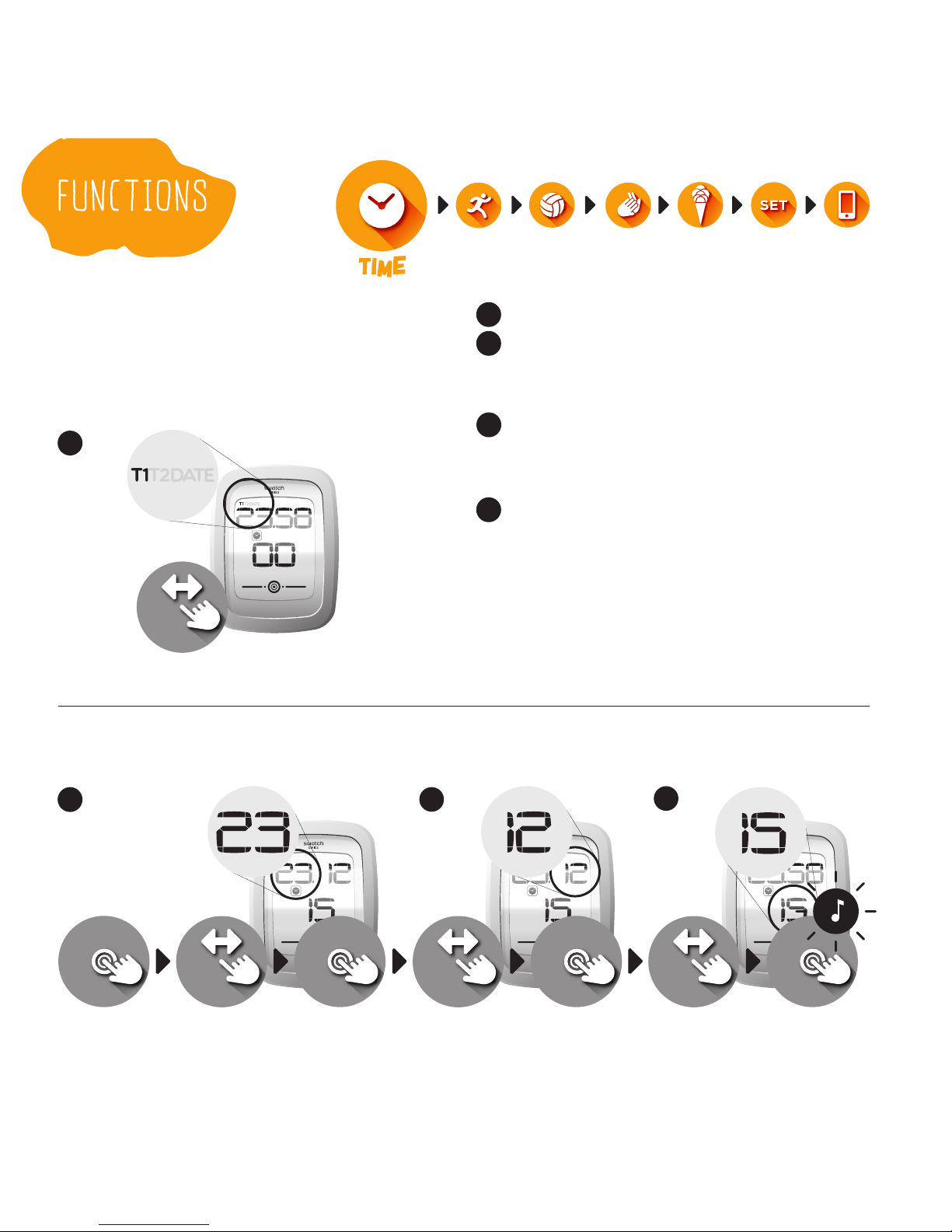
Setting TIME and DATE
To set T1, T2, and DATE, the same
procedure can be followed. Select
main function “Watch.”
Swipe to choose T1, T2, or DATE.
After selecting, swipe to adjust
hours / day. Conrm. Next value is
ready to adjust.
Swipe to adjust minutes /
month. Conrm. Next value is
ready to adjust.
Swipe to adjust seconds / year.
Conrm.
2
1
3
4
234
select adjust adjust adjustconrm conrm conrm
1
browse
Otros manuales para Touch Zero One
1
Tabla de contenidos