
Supvan TP76E Manual de usuario

SUPVAN Preface
1
Contents
DECLARATION...........................................................................................................................3
BRIEF INTRODUCTION OF SPECIAL FUNCTIONS...........................................................3
PRECAUTIONS.......................................................................................................................... 4
CHAPTER 1 APPEARANCE DESCRIPTION AND CONFIGURATION................................................. 6
1.1 APPEARANCE PARTS OF SUPVAN TUBE PRINTER....................................................................... 6
1.2 LCD DISPLAY DESCRIPTION..................................................................................................7
1.3 INCLUDED ITEMS................................................................................................................ 8
CHAPTER 2 FUNCTION KEYS.......................................................................................................... 9
CHAPTER 3 CONSUMABLE INSTALLATION.................................................................................. 14
3.1 INSTALLATION AND REMOVAL OF RIBBON CASSETTE................................................14
3.2 INSTALLATION AND REMOVAL OF LABEL CASSETTE.................................................. 15
3.3 INSTALLATION AND REMOVAL OF TUBE ADJUSTER AND TUBE.................................. 16
3.4 REPLACEMENT OF HALF-CUTTER AND CUTTING BOARD ASSEMBLY........................18
CHAPTER 4 BASIC OPERATION.................................................................................................... 19
4.1 PRINT OF TUBE........................................................................................................... 19
4.2 PRINT OF LABEL..........................................................................................................20
4.3 PRINT OF HEAT SHRINK TUBE................................................................................... 20
CHAPTER 5 OPERATION OF FUNCTION KEY................................................................................ 22
NOTE:....................................................................................................................................... 22
5.1 【ESC】.................................................................................................................... 23
5.2 【MEDIA】..................................................................................................................23
5.3 【SEG LENGTH】.......................................................................................................24
5.4 【CHAR SIZE】.......................................................................................................... 26
5.5 【REPEAT】............................................................................................................... 27
5.6 【FRAME】.................................................................................................................28
5.7 【MARGIN】.................................................................................................................29
5.8 【CHAR SPACE】.......................................................................................................30
5.9 【DENSITY】.............................................................................................................. 31
5.10 【ALIGN】...................................................................................................................32
5.11 【SEQ】.................................................................................................................... 32
5.12 【SET CUT】..............................................................................................................35

SUPVAN Preface
2
5.13 【FILE】..................................................................................................................... 35
5.14 【CURSOR PRINT】...................................................................................................38
5.15 【FONT】................................................................................................................... 39
5.16 【COPY PRINT】........................................................................................................40
5.17 【STOP】....................................................................................................................40
5.18 【REV FEED】........................................................................................................... 40
5.19 【HOME】...................................................................................................................41
5.20 【END】..................................................................................................................... 41
5.21 【CUT DEPTH】......................................................................................................... 41
5.22 【DELETE SEG】........................................................................................................44
5.23 【DOUBLE ROWS】................................................................................................... 44
5.24 【X2】【X2】.............................................................................................................. 44
5.25 【PRINT】...................................................................................................................45
5.26 【CAPS LOCK】......................................................................................................... 45
5.27 【EN/SY】..................................................................................................................45
5.28 【BACKSPACE】.........................................................................................................46
5.29 【→】,【←】............................................................................................................46
5.30 【↑】,【↓】............................................................................................................46
5.31 【SHIFT】...................................................................................................................46
5.32 【TEST】.................................................................................................................... 46
5.33 【ENTER】..................................................................................................................48
5.34 LOW TEMP MODE........................................................................................................48
5.35 SCREEN BRIGHTNESS ADJUSTMENT......................................................................... 48
5.36 REPEAT AND SEQ PRIORITY PRINT SETTINGS.........................................................49
CHAPTER 6 PERFORMANCE DESCRIPTION..................................................................................50
CHAPTER 7 COMPUTER SOFTWARE OF TP76E HIGH-SPEED COMPUTER TUBE PRINTER...........51
7.1 SOFTWARE CONFIGURATION OF TP76E TUBE PRINTER................................................51
CHAPTER 8 OTHERS..................................................................................................................... 52
8.1 SPECIFICATION OF ORIGINAL CONSUMABLES.........................................................................52
8.2 HOW TO OPERATE THE TUBE PRINTER CORRECTLY.................................................52
8.3 SIMPLE TROUBLESHOOTING.......................................................................................53
8.4 LIST OF SPECIAL SYMBOLS........................................................................................55

SUPVAN Preface
3
Declaration
1. “硕方”and “Supvan” are registered trademarks of Supvan Technology (Beijing)
Co., Ltd.
2. For any information about the instruction contents, Supvan reserves the right to
vary because of the upgrade of tube printer.
3. Supvan will not be responsible for any consequence caused by operations
which do not follow the requirements of instructions.
4. If you want to know more about the machine or Supvan, please visit
www.supvan.com.
Brief Introduction of Special Functions
1. English operation interface contains different input methods, e.g. English
letters, numbers, symbols etc.
2. Large white backlit LCD can display 5-row-and-2-column input contents.
3. Powerful function keys make operation more convenient and simple.
4. Assembly standard 85-key computer keyboard.
5. When there is any switch on/off or any error operation, the machine will send a
ticking sound.
6. TP76E tube printer can realize the automatic half/full cutting functions.
7. 9 different fonts give consumer more printing choices and make printing
effective and easier.
8. The unique test key is convenient to monitor the machine status and check its
performance.
9. The unique cursor print setting can realize range printing between any two
specific segments.
10. The powerful built-in file memory capacity can store up to 100 files for easy
calls at any time.
11. Supvan high-speed computer tube printer TP76E can be connected to any
computer. It is compatible with Windows XP/Win 7/Win 8 operating system and
can realize independent operations on the work site. It can be used as a
dual-purpose machine.
12. Its portable design suits various occasions.
13. The hard case is reliable which can protect the tube printer effectively.
14. The package includes 1 black ribbon. Other than that, we sell two more color
(white and red) ribbon as optional choice.

SUPVAN Preface
4
Precautions
Warning
1. Please use a single power socket. Do not use any socket inserted with multiple
devices, this may cause a fire or electric shock.
2. Do not let any metal or liquid get into tube printer. This may cause fire or
electric shock or machine damage.
3. Do not use power plug with wet hand in case of any electric shock.
4. When open the upper cover, do not let any object contact with the moving part
of tube printer.
5. Use voltage between 100 and 240V AC. If not, it may result in fire, electrical
shock or machine failure.
6. Do not disassemble or modify the tube printer without any authorization. This
may lead to fire or electric shock.
7. Please let the tube printer away from alcohol, gasoline and other flammable
solvents as well as any ignition source to prevent any deflagration and fire.
8. When clean the tube printer, please use wet gauze that has been twisted
closely. Do not use any flammable organic solvent.
9. When find any abnormal smell or noise in operation, please turn off the tube
printer immediately, pull out its plug and contact with your dealer.
10. Please use the tube printer in a clean place. Do not use it on carpet. Otherwise,
the dust may cause short circuit or even fire.
11. When there is any foreign object getting into the tube printer, do not use it in
case of any damage.
12. The machine can only print Φ≤6.0mm tube or heat shrink tube. Printing Φ >
6.0mm tube may affect the print effect, cause a printing error, or even damage
the print head.

SUPVAN Preface
5
Caution
1. Not all consumables are suitable for your tube printer because of the difference
of consumable specification. Please choose Supvan original consumables to
enjoy the premium print quality and avoid malfunction of the printer.
2. Supvan will not be responsible for any warranty caused by counterfeit ribbon or
label.
3. Do not touch the print head with hand.
4. Please use the cutter carefully to avoid injured.
5. Touching the print head which just finished working may cause your skin being
burnt.
6. Please keep the printer away from high moisture environment in case of
electric shock.
7. If the machine will not be used for a long time, unplug the AC adapter from the
power outlet. Otherwise, electrical leakage may occur.
8. The machine is very precision. Please operate it on a flat surface to prevent
falling damage or shock vibration.
9. Do not compress your tube printer.
10. Keep away from any electromagnetic interference which generates a magnetic
field.
11. Do not block the outlet of the printer.
12. Do not press the keyboard too hard.
13. In operation, do not pull out any print media forcibly from the outlet. Take it out
after cutting. Otherwise, this will affect the printing result or damage your tube
printer.
14. Consumables or tube printer shall be stored in a dry place with ventilation,
room temperature, and non-direct sunlight.
SUPVAN Chapter 1 Appearance Description and Configuration
6
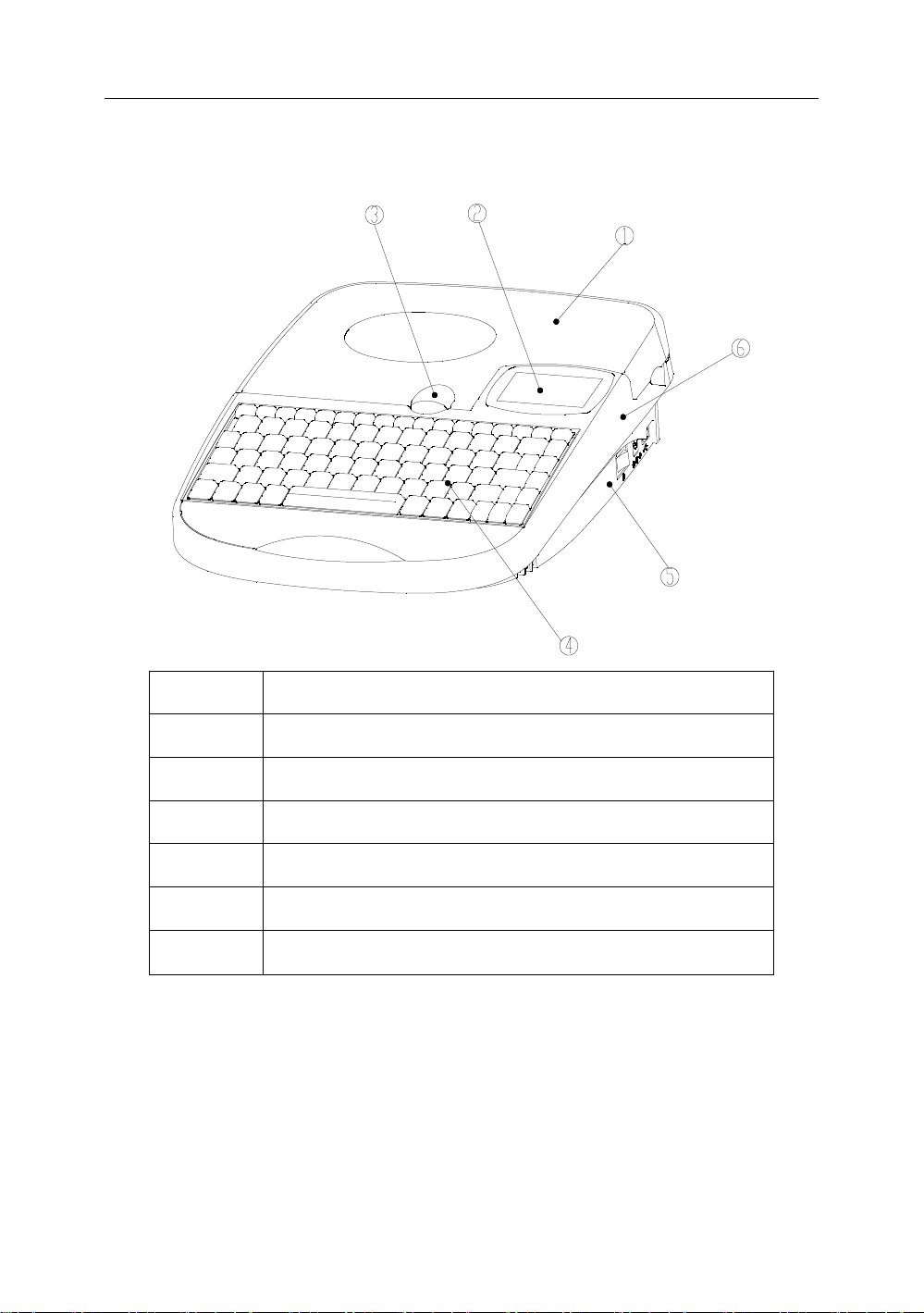
Chapter 1 Appearance Description and Configuration
1.1 Appearance Parts of Supvan Tube Printer
SEQ
Name
1
Upper cover
2
LCD display
3
Cover opening button
4
Keyboard
5
Lower case
6
Upper case

SUPVAN Chapter 1 Appearance Description and Configuration
7
1.2 LCD Display Description
Text prompt
Description
1
Seg Length
Length of segment that cursor locates
2
Char Size
Character size of segment that cursor locates
3
Set Cut
Setting state of half cut function:
Normal; Half cut; Solid line
4
Frame
Frame setting state of segment that cursor locates.
Normal; Frame; Underline
5
Repeat
Repeat printing times of segment that cursor locates.
6
Density
Setting value of density level.
7
Caps Lock
Current setting state of letter uppercase/lowercase
8
Media
The setting type of printer media
9
En/Sy
Current display of input method
10
Display content: Segment numbering and segment
content.

SUPVAN Chapter 1 Appearance Description and Configuration
8
1.3 Included Items
1. One Supvan TP76E Tube Printer
2. One Tube Adjuster
3. One Ribbon Cassette (Black)
4. One Label Cassette (Random color and size)
5. One Power Adapter (Including Power Cord)
6. One USB Computer Cable
7. One TP Series Editing Software CD-ROM
8. One Instruction
9. One Qualified Certificate
10. One Test Printing Sample
11. One Hard Case

SUPVAN Chapter 2 Function Keys
9
Chapter 2 Function Keys
ESC the current setting, operation or error description to return
to the previous level of menu or a document input interface.

SUPVAN Chapter 2 Function Keys
10
Tabla de contenidos
Otros manuales de Etiquetadora de Supvan


