SoundEar®3 – manual RetuRn to table of Contents
9
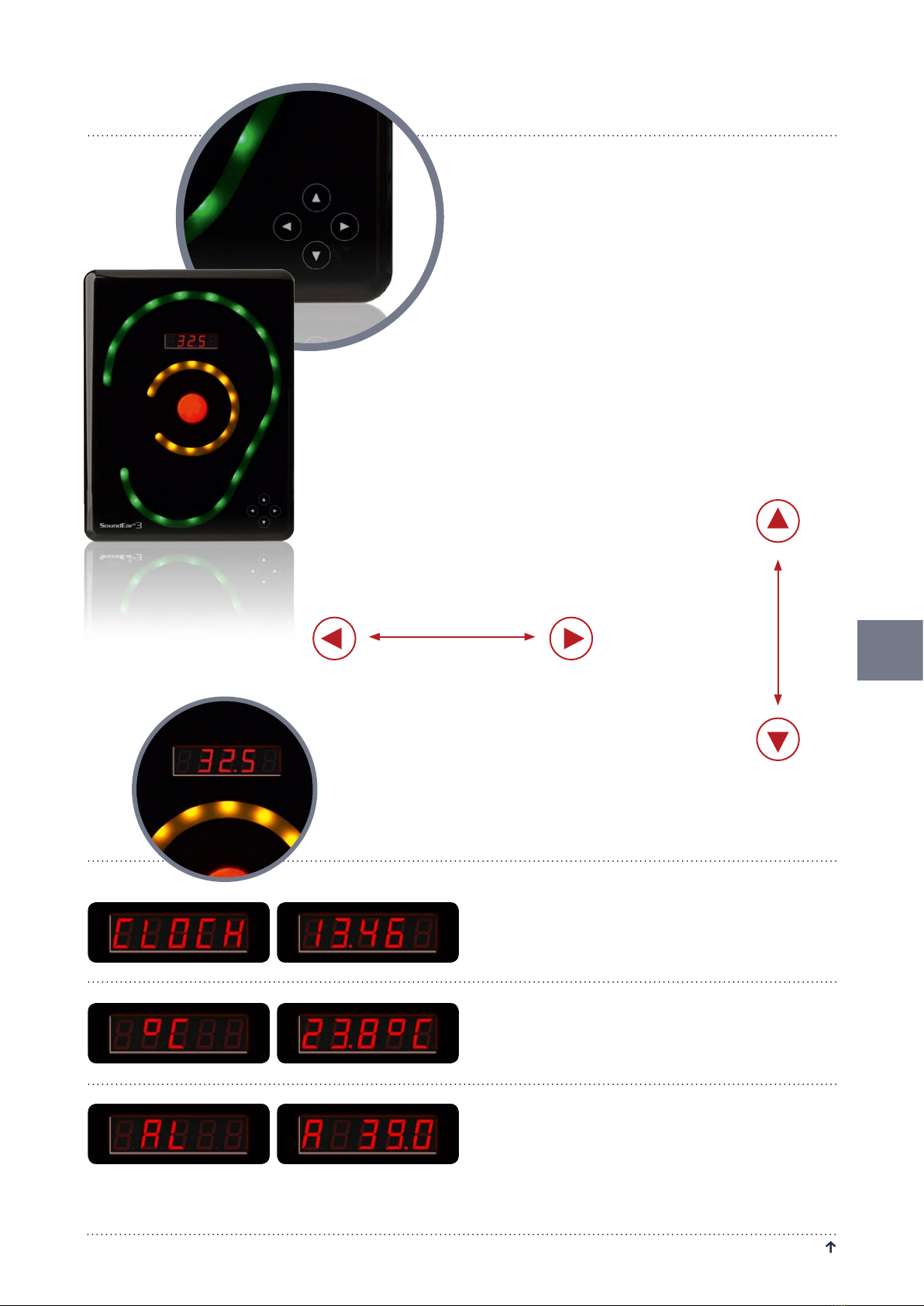
Located on the front of SoundEar®3 you will find a touch
display from which you can control the device manually.
The functions of the touch display include setting alarm
levels, time, noise level, temperature, Leq15 and on/off
function for the mini display.
Use the horizontal arrow heads to navigate between the
different options.
Use the vertical arrow heads to set the alarm level.
PLEASE NOTE! To lock the touch display, please go to
”Display Settings” in the software.
TOUCH DISPLAY OPTIONS
Clock – See the time in the mini display.
The time settings will sync automatically when you
connect SoundEar®3 to your PC for the first time.
°C – Shows the room temperature.
AL – Set alarm level.
Set the visual alarm level.
With the horizontal arrow heads select the ”AL” function.
Place a finger on either of the vertival arrow heads to set
TOUCH DISPLAY
Set the alarm level.
Navigate between
the different options.