
SIM1 XT-B Manual de usuario

Firmware 1.0

Add Source
(b)
Learn & Play
(a)
on/off out balanced
out
in 9/12 V
led
interactive
display
USB
MIDI
true bypass down up
Menu Set: PreAmp, Ir Cab, OD, Reverb
(c)
&
a. Learn & Play - automatic pickups matching
(hold bypass + down)
Set up your Source Bass by recording Neck, Mid
and Bridge position pickups. The system will
automatically match the Target Bass pickups with
your Source Bass pickups.
b. Add Source - profile one pickup at a time
(hold down + up)
Make the profile and store one pickup at a time as
Source Bass. The matching Source/Target
pickups is not automatic, it requires the use of the
Editor for PC/Mac. Through the Editor you can
turn the new Source Bass into a Target Bass,
using the “Show in Target” button in “My Guitars”.
c. Menu Settings –set cabinets/effects
(hold bypass + down + up)
Surf the Effects Menu. Select and set each effect
you wish to combine to each Target Bass. It
includes: Gain of Target Bass, IR Cabinets,,
Overdrive, Reverb, Tone Control, Master Gain.

bypass
Hold bypass
+ down to start
4. Play an ascending chromatic scale
starting from the E (6 open string),
making a progression of 9 notes per
string (80 seconds, 2 seconds per
note is recommended) –see the tab
beside;
a) & Set-up your source bass (automatic pickups matching).
For a perfect bass guitar emulation the pedal must learn the tone of each
pickup of the Source Bass. With this procedure it will automatically make the
matching between the Target and the Source Bass pickups.
1. Make sure your Source Bass is in tune (440 Hz), with volume/tone open;
2. In case you wish to configure 3 pickup tone positions, adjust the volume
knobs of your Source Bass to get only the Neck pickup sound;
3. Hold simultaneously the BYPASS and DOWN switches on the pedal for 3
seconds. The system will ask you the number of pickups you would like to
configure (1 or 3). Press the DOWN switch to configure only 1 pickup, or UP
switch to configure 3 pickups. When the countdown is finished the device will
start recording (
Hold UP to Abort the procedure);

bypass
Switch Up to end the
Learning procedure
bypass
%
Select
Down or Up
5. If you are satisfied with the quality rating, then press the UP switch, otherwise
press DOWN switch and repeat the last pickup configuration.
6. If you selected the 3-pickup option, repeat steps 4-5 for mid (both pickups
active) and bridge pickup. (For any reason, during individual Pickup configuration,
it is possible to stop the Learning Procedure pressing the DOWN switch for 2
seconds).
7. After you have configured the last pickup (Bridge PU), the system will make a
computing process of the sounds loaded in the XT-B (Display: Computing
Progress 00%...100%).
8. At the end of the Computing Process, press the UP switch again to end the
Learning procedure. At this point the Target Bass profiles included in XT-B will be
associated to the pickups you just configured. Scroll UP and DOWN the Switch
selectors to test the variety of sounds.

Target
Bass
Pickup
Source
Bass
Pickup
Pickup Matching
9. For each Bass Profile Preset, while performing, it is
recommended to activate the Pickup of your Source Bass
according to the suggestion of the display. This allows to
reach a sound as close as possible to that one of the
original Target Bass.
When the BYPASS MODE is activated the Check Indicator
shows the red light and the message “True Bypass”
appears on the Display. Now the signal is not processed in
any way, the sound is the original one of the Source Bass,
and the second line of the display shows the bass/pickup
you are supposed to play on the Source Bass (if you edited
the name before with the Software). Pressing the BYPASS
Switch again, the red light of the check indicator turns off
and the sound will shift to that one of the Target Bass in
use.
The BALANCED OUTPUT, connected directly to the mixer of the PA, is useful for instance when playing the sound
of an acoustic bass guitar. In this way the result will be more realistic and accurate.
The STANDARD OUTPUT must be connected to the bass amplifier. Other effects can be connected in cascade,
both through the BALANCED OUTPUT or through the STANDARD OUTPUT.

bypass
Hold Down
+ Up to start
b) Profile one pickup at a time (pickup matching through editor)
This function allows you to record more Source Bass pickups, without modifying
the previous configuration of the pedal. The matching between Target and Source
Bass pickups requires the use of the Editor for PC/Mac.
Useful to:
•Record, as Source Basses, some unusual pickup configurations, different from
Neck, Mid (both pickups activate) or Bridge positions;
•Record as many Source Basses as you want, to use in a different moment;
•Profile one or more Basses to be used as Target Guitars (Source Basses can be
Turned into Target Basses, using the function of the Editor “Show in Target”).
1. Make sure your Source Bass is in tune (440 Hz), with volume/tone open;
2. Adjust the knobs of your Source Bass to get the pickup sound you wish to profile;
3. Hold simultaneously the UP and DOWN switches on the pedal for 3 seconds. When the countdown is finished
the device will start recording (
Hold UP to Abort the procedure
);
4. Play the same chromatic scale explained in the Learn & Play paragraph;
5. The newly created Source Bass will be named with a progressive number (i.e. Guit4, in case Guit1, Guit2, Guit3
were already stored);
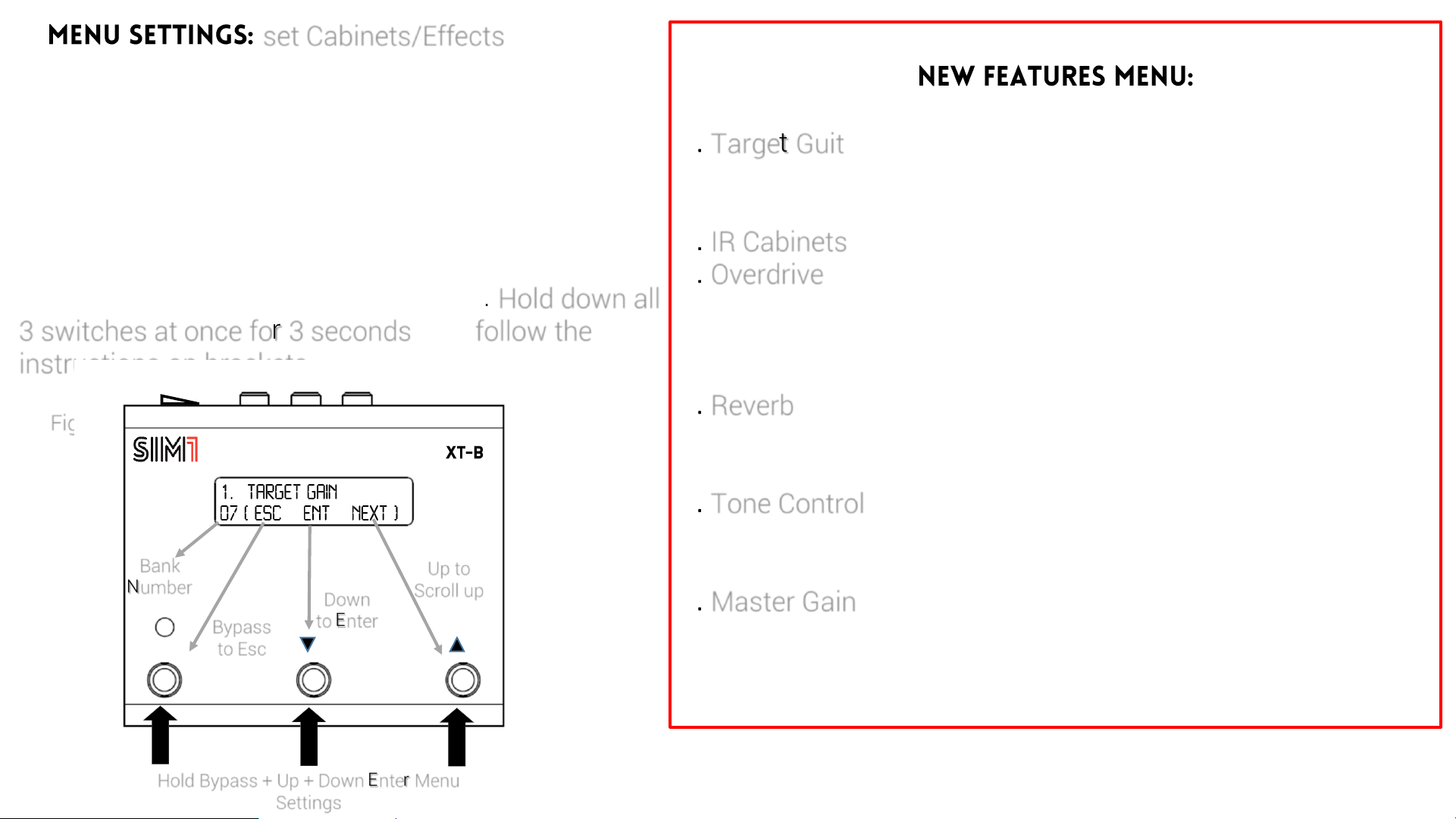
c) set Cabinets/Effects
This menu gives the opportunity to add some
effects/cabinet simulation and make volume settings
to each bass included in the presets. This feature
allows you to connect the XT-B directly to the PA or to
a powered speaker, and use it as a stand alone pedal.
Go to the bass/bank you wish to adjust. Hold down all
3 switches at once for 3 seconds, and follow the
instructions on brackets, to make your settings.
1. Target Guit
1.1 Gain (adjust the volume of each target bass)
1.2 Bypass (set the bank in bypass mode)
2. IR Cabinets (add an Impulse Response Cabinet Emulation)
3. Overdrive
4.1 OD Status (activate the Overdrive)
4.2 OD Drive (set the Overdrive Percentage )
4.3 OD Level (set the Overdrive Volume)
4. Reverb
5.1 Rev Status (activate the Reverb)
5.2 Rev Level (set the Reverb Percentage )
5. Tone Control
6.1 Treble
6.2 Bass
6. Master Gain
7.1 Master Unbal (set the Volume of the Unbalanced Out.)
7.2 Master Bal (set the Volume of the Unbalanced Output)
Fig. 1
bypass
Hold Bypass + Up + Down Enter Menu
Settings
Bank
Number Down
to Enter
Up to
Scroll up
Bypass
to Esc

bypass
Bank
Number Down
to Enter
Up to
Scroll up
options
Bypass
to Esc
bypass
Bank
Number Down
to Enter
Up to
Scroll up
options
Bypass
to Esc
Up to Next
option
bypass
Bank
Number Down to
Previous
option
Bypass
to Esc bypass
Bank
Number Down to
Previous
option
Up to Next
option
Bypass
to Esc
How to Edit the Overdrive Section
1. Scroll up with the UP Switch until you reach “3 – Overdrive” section;
2. Enter this section through the DOWN Switch (fig. 2);
3. Enter the section “3.1 OD Status” (Overdrive Status) through the DOWN Switch
(fig.3);
4. Activate or Deactivate the Overdrive through UP or Down Switches (fig. 4);
5. Esc using the BYPASS Switch (fig. 5);
Up to Next
option
2
345

bypass
Bank
Number Down to
Enter
Up to next
option
Bypass
to Esc
bypass
Bank
Number Down to
Enter
Up to next
option
Bypass
to Esc
bypass
%
-
Bank
Number Down to
Decrease
Up to
Increase
Bypass
to Esc
bypass
Down to
Decrease
Up to
Increase
Bypass to
go Esc
-db
-
How to Edit the
Overdrive Section
6. Scroll up with the UP Switch to
get to the DRIVE section;
7. Enter this section through the
DOWN Switch (fig. 6);
8. Adjust the Drive level through the
DOWN/UP Switches (fig. 7);
9. Esc using the BYPASS Switch;
10. Scroll up with the UP Switch to
get to the LEVEL section;
11. Enter this section through the
DOWN Switch (fig. 8);
12. Adjust the Drive level through
the DOWN/UP Switches (fig. 9);
67
89
Bank
Number

bypass
Down to
Reject
Up to
Confirm
Bypass to
go back
Fig. 10
How to Edit the Overdrive Section
13. When you finish editing your preset, exit by repeatedly pressing the BYPASS
Switch, until you get the SAVE CHANGES page
14. Use UP Switch to save changes (fig. 10), DOWN Switch not to save, BYPASS
Switch to go back to the previous page
On each bank of XT-1 it is possible to Copy/Paste the PreAmp/Effects settings
from a different preset. Go to the bank you wish to modify, hold the Bypass
Switch for 3 seconds, and follow the instructions on brackets (fig. 10).
1.2.Target
Bypass=ON
3.Overdrive
1.1 Target Gain 5. Tone 2.Cabinet IR
6.1 Master
Gain
BAL Out
6.2 Master
Gain
UNBAL Out
Target Bass Guitar 4.Reverb
Otros manuales de Pedal de música de SIM1


Manuales populares de Pedal de música de otras marcas


Matthews Effects
Matthews Effects Whaler V2 Manual de usuario

Grid 1
Grid 1 Pedal Jeanie Manual de usuario

Amptweaker
Amptweaker tightboost Manual de usuario

Ibanez
Ibanez TS-808 Tube Screamer Overdrive Pro Manual de usuario

PuzzleSounds
PuzzleSounds DR. Q ENVELOPE FILTER Manual de usuario

BYOC
BYOC Analog Chorus Manual


