
SIGLENT SSG5000 Series Manual de usuario

SIGLENT
SSA3000X Service Manual 1
SSG5000X
Signal Generator
r
Service Manual
E01A

SIGLENT
2 SSG5000X Service Manual
Guaranty and Declaration
Copyright
SIGLENT TECHNOLOGIES CO., LTD All Rights Reserved.
Trademark Information
SIGLENT is the registered trademark of SIGLENT TECHNOLOGIES CO.,LTD
Declaration
◆SIGLENT products are protected by patent law worldwide
◆SIGLENT reserves the right to modify or change parts of or all the
specifications or pricing policies at company’s sole decision.
◆Information in this publication replaces all previously corresponding
material.
◆Any way of copying, extracting or translating the contents of this manual is
not allowed without the permission of SIGLENT.
◆SIGLENT will not be responsible for losses caused by either incidental or
consequential in connection with the furnishing, use or performance of this
manual as well as any information contained.
Product Certification
SIGLENT guarantees this product conforms to the national and industrial
standards in China as well as the ISO9001: 2015 standard and the ISO14001:
2015 standard. Other international standard conformance certification is in
progress.

SIGLENT
SSG5000X Service Manual 3
General Safety Summary
Carefully read the following safety precautions to avoid any personal
injury or damage to the instrument and any products connected to it. To
avoid potential hazards, please use the instrument as specified.
Use Proper AC Power Line
Only the power cord designed for the instrument and authorized by local
country should be used.
Ground the Instrument
The instrument is grounded through the protective earth conductor of
the power line. To avoid electric shock, please make sure the instrument
is grounded correctly before connecting its input or output terminals.
Connect the Probe Correctly.
If a probe is used, do not connect the ground lead to high voltage since it
has isobaric electric potential as the ground.
Look Over All Terminals’ Ratings
To avoid fire or electric shock, please observe all ratings and label
notices on this instrument. Before connecting the instrument, please
read the manual carefully to gain more information about the ratings.
Use Proper Overvoltage Protection
Make sure that no overvoltage (such as that caused by a thunderstorm)
can enter the product, or else the operator might be exposed to danger of
electrical shock.
Electrostatic Prevention
Operate the instrument in an electrostatic discharge protective area
environment to avoid damages induced by static discharge. Always
ground both the internal and external conductors of the cable to release
static before connecting.
Maintain Proper Ventilation
Inadequate ventilation may cause increasing of the instrument’s
temperature, which will eventually damage the instrument. So keep well
ventilated and inspect the intake and fan regularly.
Avoid Exposed Circuit or Components
Do not touch exposed contacts or components when the power is on.
Do Not Operate Without Covers
Do not operate the instrument with covers or panels removed.
Use Only the Specified Fuse.
Keep Product Surfaces Clean and Dry.
To avoid the influence of dust and/or moisture in the air, please keep the
surface of the device clean and dry.

SIGLENT
4 SSG5000X Service Manual
Do Not Operate in Wet Conditions.
In order to avoid short circuiting to the interior of the device or electric
shock, please do not operate the instrument in a humid environment.
Do Not Operate in an Explosive Atmosphere.
In order to avoid damage to the device or personal injury, it is important
to operate the device away from an explosive atmosphere.

SIGLENT
SSG5000X Service Manual 5
Safety Terms and Symbols
Terms on the product. These terms may appear on the product:
DANGER Indicates direct injuries or hazards that may happen.
WARNING Indicates potential injuries or hazards that may happen.
CAUTION Indicates potential damages to the instrument or other
property that may happen.
Symbols on the product. These symbols may appear on the product:
Hazardous Protective Warning Earth Chassis
Voltage Ground Ground

SIGLENT
6 SSG5000X Service Manual
Contents
Guaranty and Declaration .............................................................................2
General Safety Summary ..............................................................................3
Safety Terms and Symbols ...........................................................................5
Preparation Information ................................................................................7
Power-on Inspection..................................................................................7
Interface Test.............................................................................................8
Performance Verification Test....................................................................15
10 MHz output accuracy test...................................................................16
Absolute amplitude accuracy test............................................................17
Second Harmonics ..................................................................................20
Internal AM modulation test .....................................................................22
Internal FM modulation test.....................................................................24
Internal ΦM modulation test.....................................................................26
Pulse modulation test ..............................................................................28
I/Q modulation distortion performance test..............................................30
I/Q modulation EVM performance test.....................................................32
LF AC test................................................................................................34
LF DC test ...............................................................................................36
Assembly Procedures .................................................................................37
Safety Considerations..............................................................................37
List of Modules ........................................................................................38
Required Tools.........................................................................................38
Disassembly Procedures.........................................................................39
Removing the Outer Cover................................................................39
Removing the IQ Module...................................................................40
Removing the Power Module ............................................................41
Removing the Control Board.............................................................42
Removing the Main Board.................................................................43
Removing the front panel ..................................................................44
Removing the LCD, Keyboard...........................................................45
Contact SIGLENT.........................................................................................46

SIGLENT
SSG5000X Service Manual 7
Preparation Information
Before initiating performance verification or any adjustments, it is
recommended to follow these procedures. The following topics are discussed
in this chapter.
⚫How to perform power-on inspection.
⚫How to perform interface test.
For more detailed information about the signal generator operation, please
refer to the SSG5000X User Manual.
Power-on Inspection
The normal operating voltage for SSG5000X series signal generators is in the
range of 100-240 VRMS, 50 Hz/ 60 Hz/ 440 Hz.
Please use the power cord provided with the accessories to connect the
instrument to the power source as shown in the figure below.
Figure 1-1 Connect power cord
Note: To avoid electric shock, make sure that the instrument is
correctly grounded to the earth before connecting AC power.
Press the power-on button located at the lower left corner of the front panel
and several keys will illuminate for about 6 seconds. Then, the boot screen will
appear on the display.
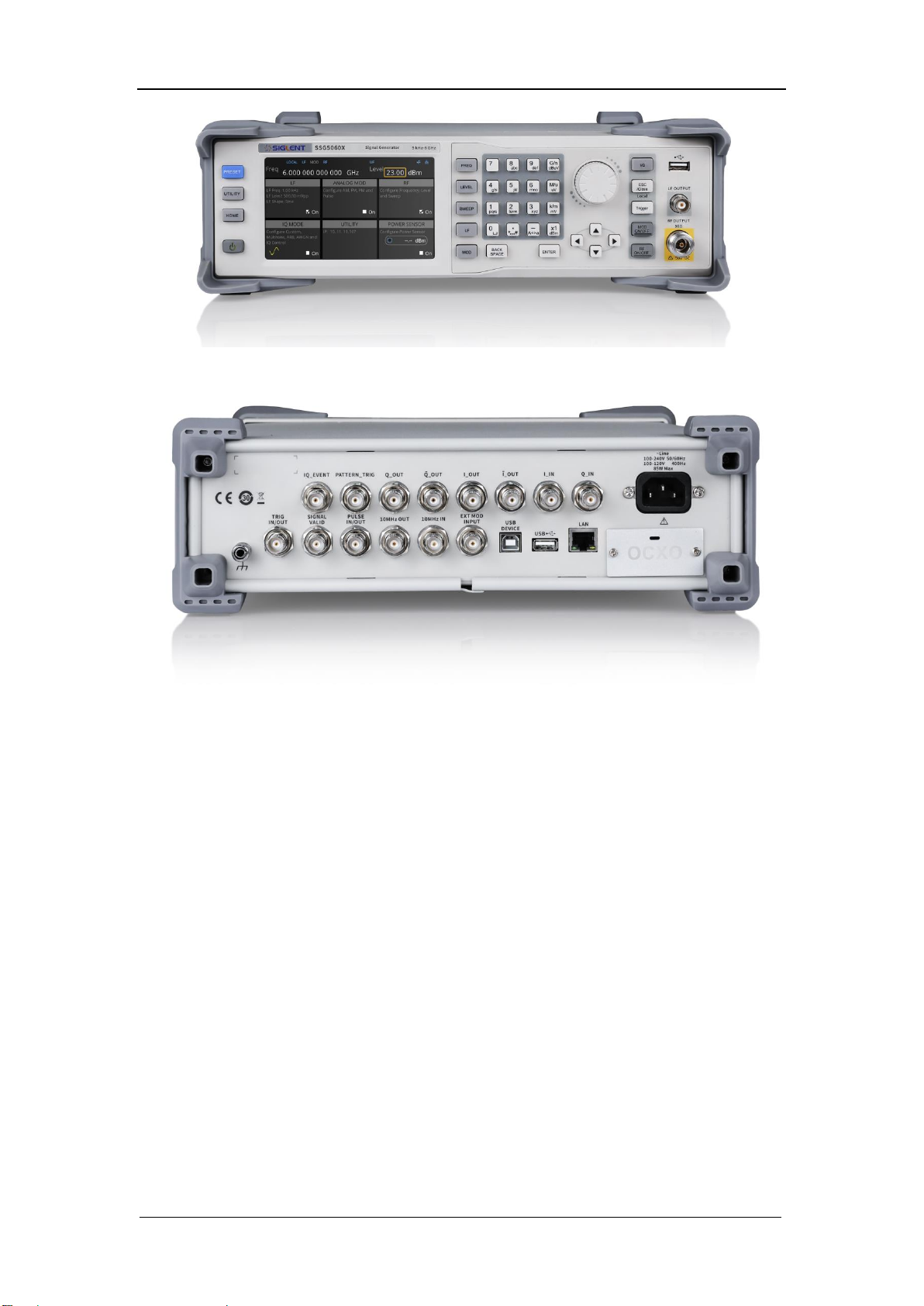
The front panel is shown in the figure below.
Power
Interface
SIGLENT
8 SSG5000X Service Manual
Figure 1-2 Front Panel
Figure 1-3 Rear Panel
Interface Test
The SSG5000X series signal generator is designed with three standard
interfaces: USB Host, USB Device, and LAN. Being connected to other
instruments via these interfaces enables the signal generator to achieve
additional capabilities. In order to ensure the signal generator is operating
properly, it is recommended to first test the interfaces.
USB Host Test
To test if the USB Host interface is working normally.
Tools:
● USB memory device (U disk)
Steps:
SIGLENT
SSG5000X Service Manual 9
1. Insert a U disk into the USB Host interface on the front panel of the signal
generator.
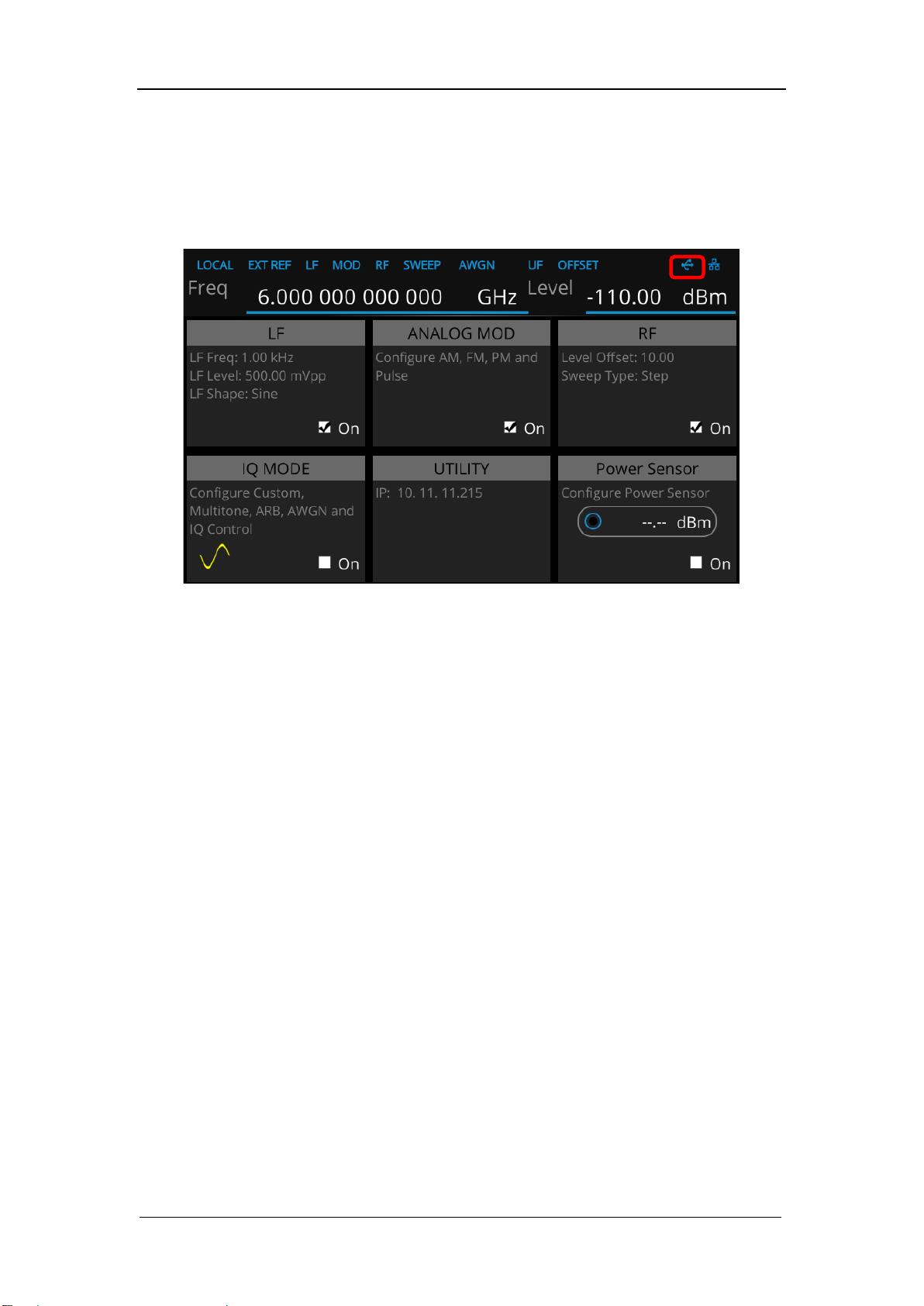
2. An icon shaped like a U disk appears on the upper right of the screen, as
shown in figure below. The icon appearance indicates the U disk has been
successfully recognized.
Figure 2-1 USB drive has been properly recognized

SIGLENT
10 SSG5000X Service Manual
USB Device Test
To test if the USB Device interface is operating normally.
Tools:
●A computer with USB interface that is compatible with running National
Instruments NI-MAX software
● A standard USB cable (Type A-B)
● NI-MAX software
Steps:
1. Download and install National Instruments NI MAX software by following the
installation instructions provided by National Instruments.
2. Connect the signal generator USB Device port and the computer using an
USB cable.
3. Run NI MAX software. Click “Device and interface” at the upper left corner of
the NI software interface and immediately displays the “USBTMC” device
symbol.
4. Click “Open VISA Test Panel” option button, and then the following
Interface will appear. Then click the “Input/Output” option button and click
the “Query” option button in order to view the Read operation information.
Tabla de contenidos
Otros manuales de Inversor de SIGLENT

SIGLENT
SIGLENT SDG6000X Series:SDG6022X Manual de usuario

SIGLENT
SIGLENT SDG800 Series Manual de usuario

SIGLENT
SIGLENT SDG2042X Manual de usuario

SIGLENT
SIGLENT SDG1000X Series Manual de usuario

SIGLENT
SIGLENT UM0202X-E02C Manual de usuario

SIGLENT
SIGLENT SDG2000X Series Manual de usuario

SIGLENT
SIGLENT SDG5000 series Manual de usuario

SIGLENT
SIGLENT SDG5000 series Manual de usuario

SIGLENT
SIGLENT SSG3000X Manual de usuario


