RVS RVS-77555 Manual de usuario

1080P HD 360° CAMERA SYSTEM
WITH BUILT-IN RECORDING
RVS-77555
Instruction Manual
VEHICLE SAFETY -
IT'S ALL WE DO.
TM

Rear View Safety
2
1. Precautions....................................................................................................................... 3
2. Features............................................................................................................................ 5
3. Standard Conguration................................................................................................... 6
4. Specications.................................................................................................................... 7
5. Wiring Diagram............................................................................................................... 8
6. Operation Instruction....................................................................................................... 9
6.1 RemoteControl...............................................................................................................9
6.2 User Interface Setup....................................................................................................... 6
7. System Contents............................................................................................................. 25
8. Installation/Calibration....................................................................................................26
9. WebApp Operating Instructions...................................................................................... 35
10. FAQs.............................................................................................................................. 40
Table of Contents

Vehicle Safety - It's All We Do.TM 3
1. Precautions
Storage and Keeping
1. Do not expose the System to excessive heat or cold.The storage temperature of this device is
-30~+80°C, and the operating temperature is -20~+70 °C.The humidity is RH 90%.
2. Never use this device near a bathtub, wash basin, kitchen, damp basement, swimming pool
or similar places.
3. Never use this device in environments with excessive moisture, dust or smoke.
4. Avoid dropping or striking this device.
5. Avoid using this device in enclosed spaces, areas with excessive vibration or subject to
severe impacts.
6. Never puncture, scratch or use abrasive cleaning materials on this device.
7. Do not place cables where they may be pinched or stepped on.
8.The Control Box is not designed to be waterproof.
Operating Precautions
1.The device may be powered by a 12 or 24 volt automotive battery or vehicle electrical system.
2. Make sure all cables are connected properly. Observe polarity. Improper cable connections
may damage the system. Remove the power cable connections when you do not intend to use
the unit.
Warning!
1. The opening of the case should be by professionals.
2. Do not watch the video while driving unless you are monitoring the
rear view camera display.

Rear View Safety
4
Maintenance
1. Remove all the cable connections from the control box before cleaning the device.
2. Use a mild household detergent and clean the unit with a slightly damp, soft cloth.
3. Never use strong solvents such as thinner or benzine, as they might damage the nish of
the device.
This symbol is intended to alert the user to the presence of uninsulated "dangerous
voltage" within the product's enclosure that may be of sucient magnitude to
constitute risk of electric shock to persons.
This symbolisintendedtoalert the usertothepresence ofimportantoperatingand
maintenance (servicing) instructions in the literature accompanying the appliance.
This symbol is intended to alert the user not to dispose of electrical and electronic
equipment.
CAUTION
You are cautioned that any changes or modications not expressly approved in this manual
could void your warranty and necessitate expensive repairs.

Vehicle Safety - It's All We Do.TM 5
2.1 Basic Features
1. 4 pcs. 190° Full HD 1080P wide-angle sh-eye cameras, horizontal view angle>170°,
Maximum of 8CH inputs.
2.Techniques of dual-core ARM Cotex-A9 and SOC development of built-in high performance
H.264 video encoding / decoding engineer core make it ecient to composite high accuracy
seamless images.
3. Supports 4 pcs. x 128G SD cards for recording storage.
4. Low-cost calibration tools, simplied calibration procedures.
5. Maximum 4CH 1080P / 30 FPS video resolution.
6. High denition 1080P HDMI video output.
7. Simplied installation steps, easy auto stitching.
2.2 Application
2. Features

Rear View Safety
6
2.3 Features
1. Panoramic image.
2. Blending seamless stitching.
3. 360° view.
4. Auto switch to reversing image when reverse wire is triggered.
5. Auto switch to left / right image when left / right wire is triggered.
6. Installation guide with pictures.
7. Automatic plane correction.
8. Supports Recording.
3. Standard Conguration
ITEM CONFIGURATION QUANTITY
1 Main control box
2 Full HD fish-eye camera
3 Remote control
4 Infrared extension cable 1
5 Main harness
6 Power Cable
Wi-Fi Antenna
8 20M extension cable for HD camera
9 HDMI extension cable
10 Monitor
Vehicle Safety - It's All We Do.TM 7
ITEM CONFIGURATION QUANTITY
1 Main control box
2 Full HD fish-eye camera
3 Remote control
4 Infrared extension cable 1
5 Main harness
6 Power Cable
Wi-Fi Antenna
8 20M extension cable for HD camera
9 HDMI extension cable
10 Monitor
2. Camera Parameter
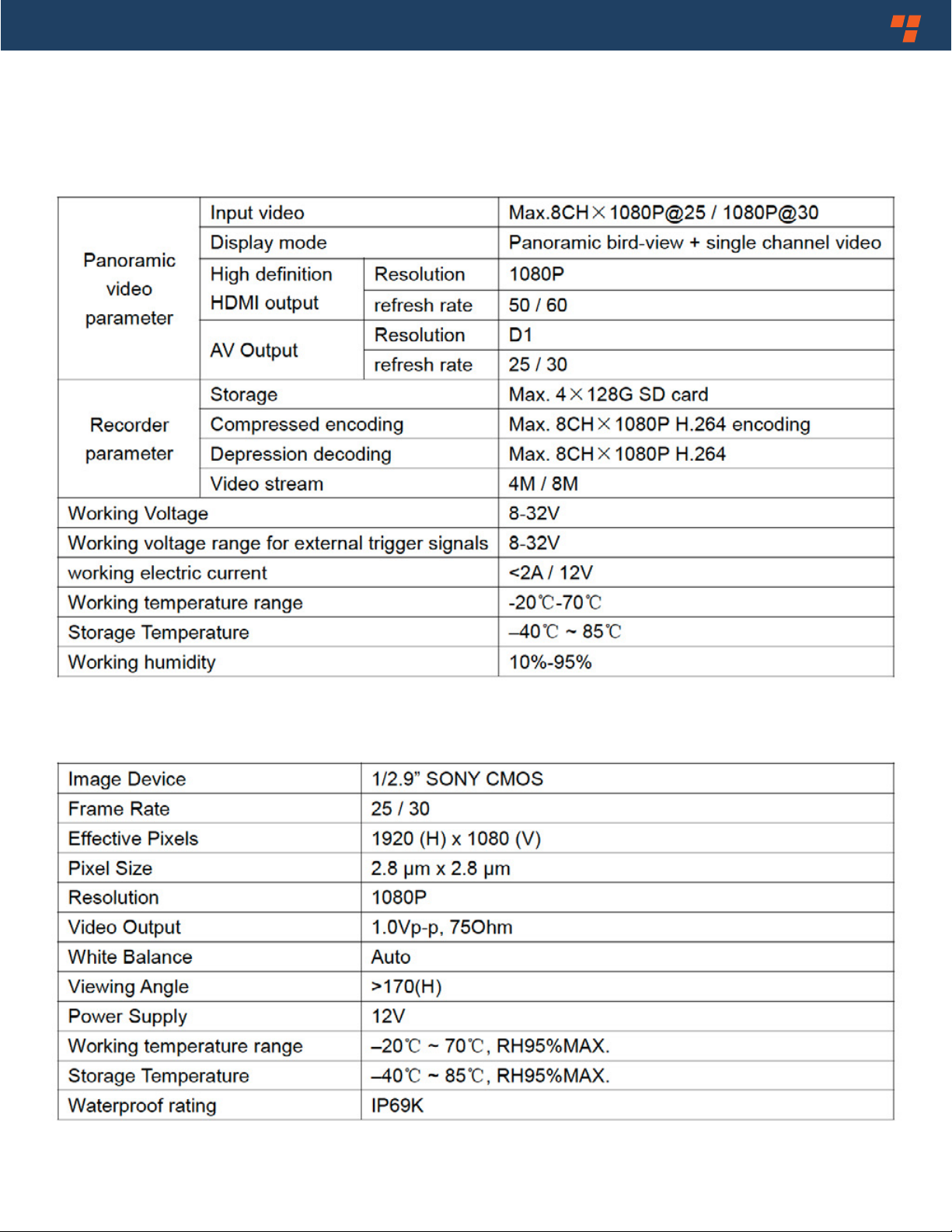
4. Specications
1. Main Control Box
Rear View Safety
8
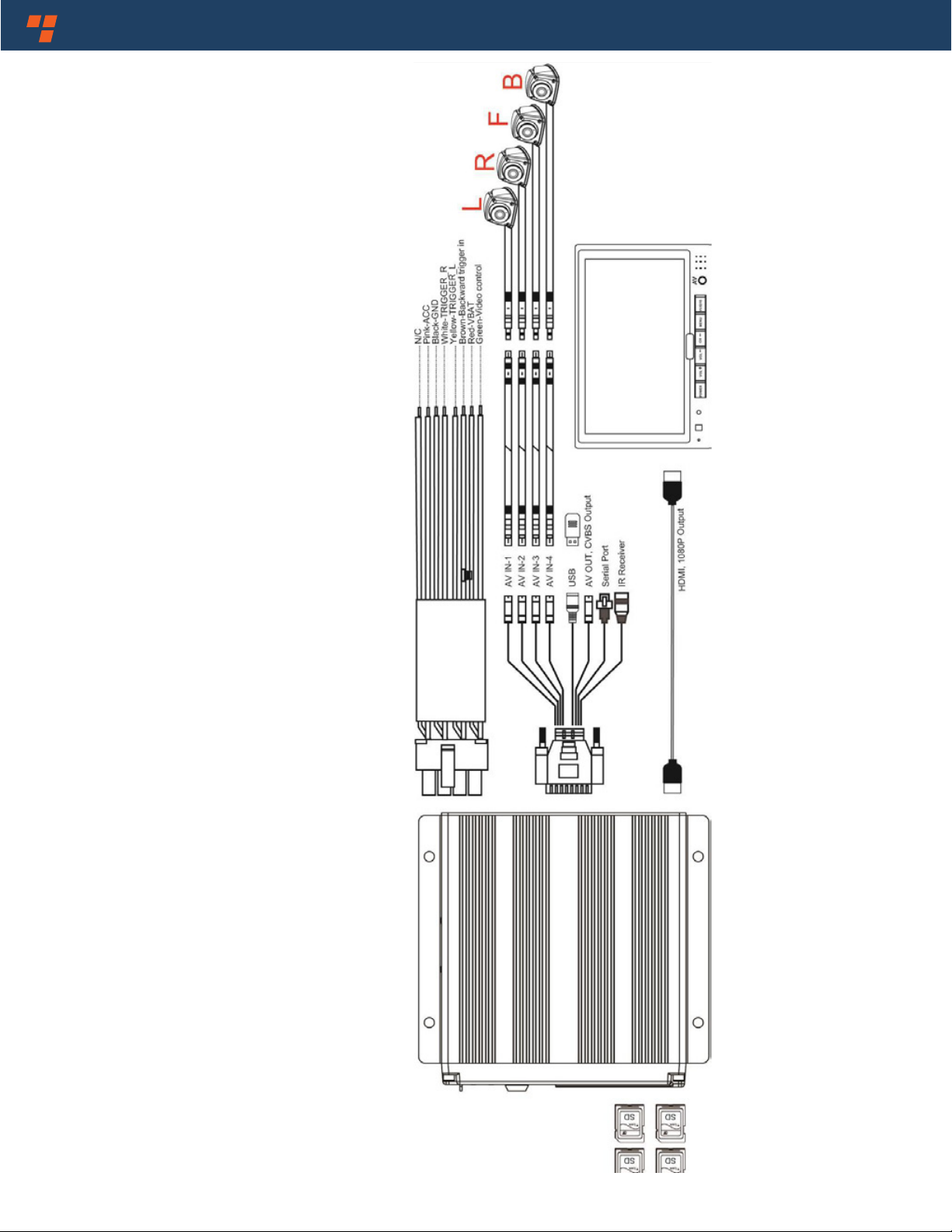
5.Wiring Diagram
Vehicle Safety - It's All We Do.TM 9
6.Operation Instruction
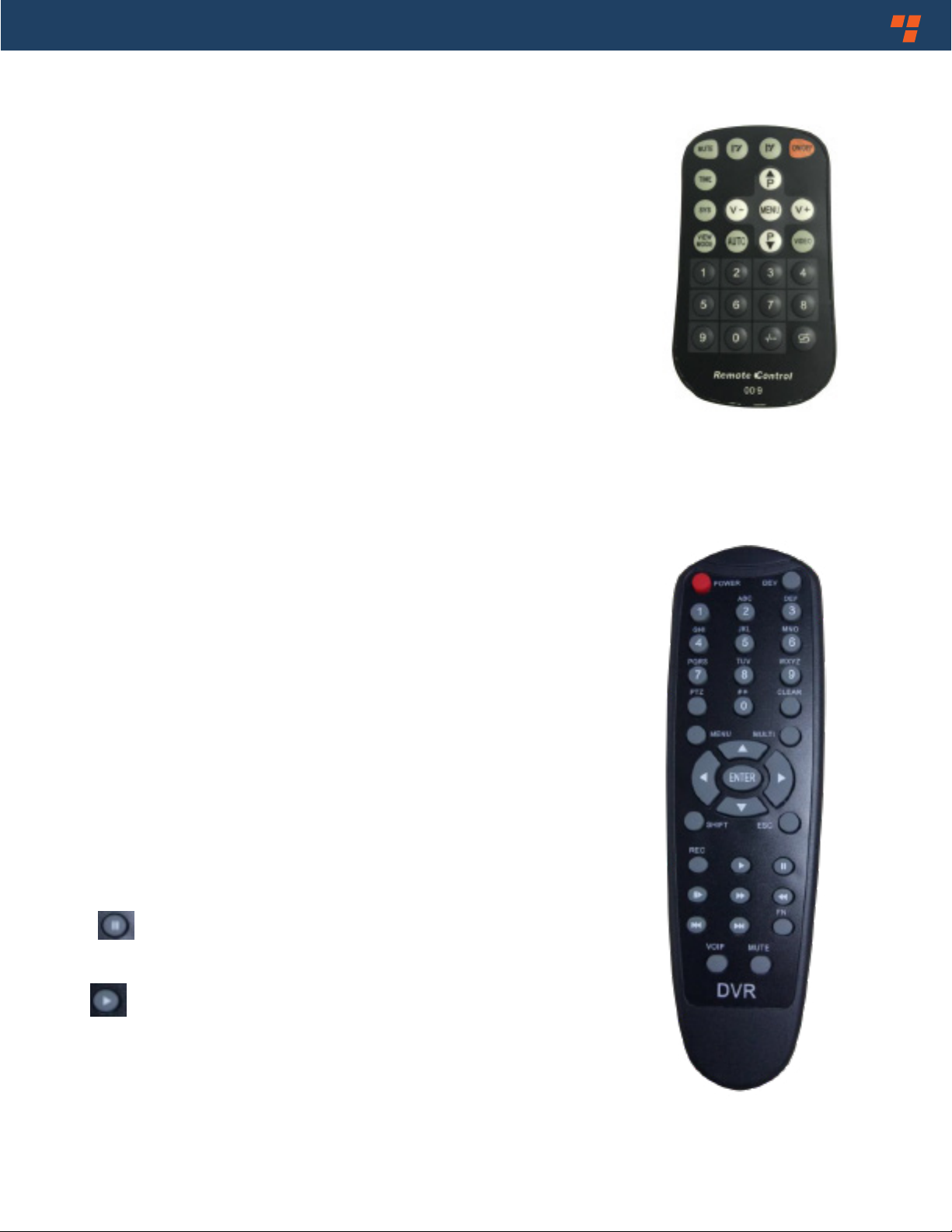
6.1 Remote Control
• MENU: (ENTER / MENU)
Enter into main menu or conrm menu selection.
• SYS: (ESC)
Exit main menu interface / return to main menu interface.
• V- /V+: (LEFT, RIGHT)
Left, right / Decrease, Increase button.
Shift image channel to left / right
view, or operate plus / minus in main menu interface.
• P+ / P-: (UP, DOWN)
Front / back button. Shift image channel to front / back view.
•VIEW MODE: (SHIFT)
Same function as Tab button to shift current channel to full
screen display or exit from full screen display. It's used for
switching menu selection in main menu interface.
• ON / OFF: (POWER)
Turn on / o video display.
• Number button 0-9: (0-9)
Input numbers.
• - / --: (CLEAR)
Back space button: Delete a character.
• : ( )
Press to pause recording.
• : ( )
Press to start recording.

Rear View Safety
10
6.2 User Interface
6.2.1 User Administration
Feature Description:
1) Input password.
2) Login conrmation.
3) Change Password
4) Return to last menu
Note:
1) Initial password: 000000. Please modify password after stitching is nished.
2) If password is forgotten, input“root”to log in. Select factory default setting in Information
menu and new password will be 000000
3) The operation period lasts for 10 min after login. Password must be input again once time
out or after restart device or in sleepy mode.
Password Reset
Otros manuales para RVS-77555
1
Tabla de contenidos
Otros manuales de Accesorios para automóviles de RVS