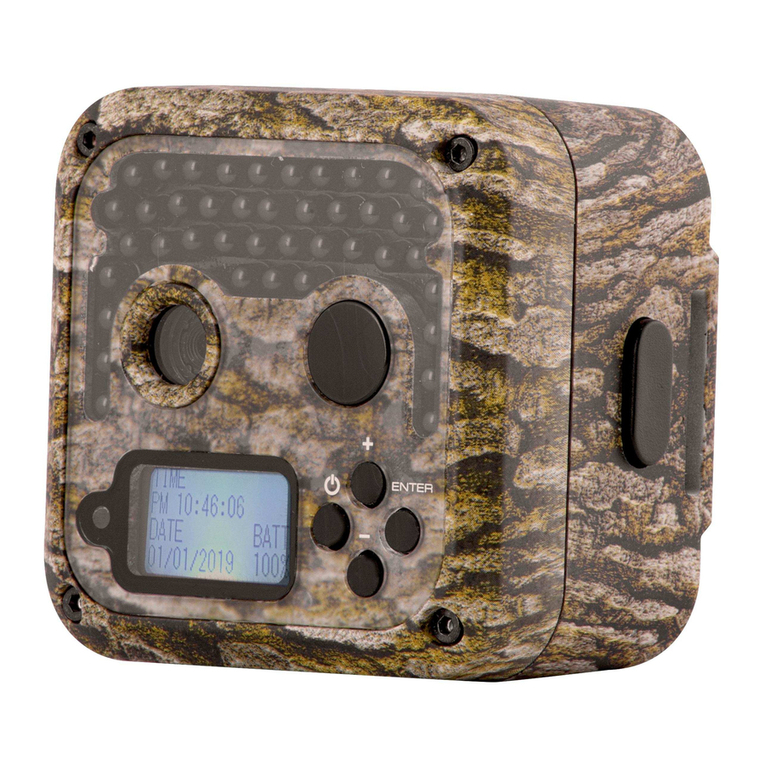
Primos 63065 Super Model II Manual de usuario

Before Operation
Quick Start
Initial Camera Setup
Camera Menu Options
(Detailed Description)
Other Features/
Functions
Recommended
Accessories
Operating Tips
Customer Service &
Warranty
© 2012 Primos®Hunting
Additional information on this product and
answers to frequently asked questions
can be found at www.primos.com
!PLEASE READ CAREFULLY BEFORE USE

IMPORTANT
For your protection, please carefully read these warnings, precautions and safety/operating
instructions completely before operating the camera. Follow these instructions closely and
keep this manual for future reference.
WARNING
To reduce the risk of fire, electrical shock or product damage/failure,
- Do not expose unit with the door open to rain, moisture, dripping or splashing. Do not open
or close the camera door with wet hand. Completely wipe off water on camera and camera
door before opening.
- Do not lay product on moist ground or submerge in water (this unit is designed for vertical,
upright outdoor use)
- DO NOT OPEN CASE HOUSING. UNINSULATED, ‘DANGEROUS VOLTAGE’ WITHIN PRODUCTS
ENCLOSURE. DO NOT REMOVE FRONT OR BACK HOUSING COVER. THERE ARE NO USER
- SERVICEABLE PARTS INSIDE, REFER SERVICING TO PRIMOS®CUSTOMER SERVICE.
- Only use batteries as specified in this user manual and install according to correct
polarization. Failure to follow may result in leaking or exploding batteries, damage to camera,
fire or personal injury. Do not handle damaged or leaking batteries.
- Do not expose to extreme heat. Do not leave product and/or batteries exposed in direct
sunlight inside a vehicle, or other contained environment for a long period of time.
- Only use accessories as recommended in this manual
CARE & CAUTION
- Transport and handle with care. Do not strongly shake, bump, hit, drop or otherwise
cause impact to the camera – can result in camera malfunction, damage to lens, sensor,
LCD screen, or other key components. Additionally, damage to the case could result in
imperfections to water-resistant properties.
- Take extra care when handling or using camera in places with sand and dust. Sand, dust and
foreign substances exposed to camera lens, PIR sensor, LED array and/or the internal door
panel components may result in poor picture quality or malfunction of camera. If exposed to
any of these elements, please carefully wipe off completely before continued use.
MODIFICATION WARNING
You are cautioned that any changes or modifications not expressly approved in this manual
could void your warranty of this equipment.
OPERATING TEMPERATURE
- Recommended storage temperature range -100F to 1400F
- Recommended operating temperature range 200F to 1200FVisit primos.zendesk.com for FAQ, PDF
Manuals, Camera Support or to open a
Troubleshooting Ticket.
!PLEASE READ CAREFULLY BEFORE USE

Instructions Video Clips
CARE & CAUTION
- Transport and handle with care. Do not strongly shake, bump, hit, drop or otherwise
cause impact to the camera – can result in camera malfunction, damage to lens, sensor,
LCD screen, or other key components. Additionally, damage to the case could result in
imperfections to water-resistant properties.
- Take extra care when handling or using camera in places with sand and dust. Sand, dust and
foreign substances exposed to camera lens, PIR sensor, LED array and/or the internal door
panel components may result in poor picture quality or malfunction of camera. If exposed to
any of these elements, please carefully wipe off completely before continued use.
MODIFICATION WARNING
You are cautioned that any changes or modifications not expressly approved in this manual
could void your warranty of this equipment.
OPERATING TEMPERATURE
- Recommended storage temperature range -100F to 1400F
- Recommended operating temperature range 200F to 1200F
SUPER COMPACT, HIGH
PERFORMANCE CAMERA....
Yet Incredibly
Simple to Use
ONLINE SUPPORT
Visit primos.zendesk.com for FAQ, PDF
Manuals, Camera Support or to open a
Troubleshooting Ticket.
Visit www.primos.com/ for
Instructional Video Clips.

Table of Contents
Before Operation
Needed to Operate 1
Select SD Card Size 2
Identify Parts 3
Quick Start - Initial Camera Setup
Initial Use/ Before Use 5
Camera Settings Backup Battery 5
Camera Status Lights 6
Camera Menu Options
Button Functions 7
Sliding Switch Settings - Photo Mode 8
Sliding Switch Settings - Video Mode 10
Sliding Switch Settings - Time Lapse 11
Camera Menu (Date, Time, Sensitivity Formatting & Instant Trigger) 13
Handheld Photo Viewer (Reviewing Photos & Videos) 15
Clearing SD Memory Card 18
Active RUN Mode 18
Powering Unit OFF 18
Image Stamp 18
Recommended Accessories
Operating Tips
Important Notes 20
Featured Primos®Camera Accessory 19
Other Accessories 19
Additional Ways to View/Retrieve Images 23

Table of Contents
Before Operation
Needed to Operate 1
Select SD Card Size 2
Identify Parts 3
Quick Start - Initial Camera Setup
Initial Use/ Before Use 5
Camera Settings Backup Battery 5
Camera Status Lights 6
Camera Menu Options
Recommended Accessories
Operating Tips
Customer Service & Warranty
Introduction
Important Notes 20
Contact Info 25
Warranty Protection 25
Featured Primos®Camera Accessory 19
Other Accessories 19
Small in size but big on performance, the highly advanced SUPER MODEL™
II game camera has a lightning fast .3 second trigger, and captures photos, videos
and time lapse sequences with best-in-class 7 MP image clarity and a 50’ extended
night range. The SUPER MODEL™II has up to a year-long battery life! SUPER-
EASY SLIDE-THE-SWITCH SETUP - Full-color sliding switches allow you to
see all active settings on one screen, it’s so quick and simple to understand even
Will and Jimmy can use it! The SUPER MODEL™II is also a Hand-Held Photo
Viewer so you can quickly review, save, delete, and organize your photos or
videos, eliminating the hassle of needing separate viewers and SD cards. Never
before has a trail camera packed this many features into a device this small!
The Primos®SUPER MODEL™II - Game Camera and Photo Viewer
Super Model
Additional Ways to View/Retrieve Images 23

1GB
2GB
4GB
8GB
Photo
5MP
700
1410
2830
5670
Photo
3MP
820
1650
3300
6610
Video
15S High Res
40
90
180
360
Video 15S Low Res 280 570 1140 2280
Video
30S High Res
20
40
90
180
30S Low Res
140
280
570
1140
Video
60S Low Res
70
140
280
570
Video
*Photo/Video SD Card Storage Capacity
*Approximation - photo/video sizes vary based on individual image details
Photo 7MP 540 1090 2180 4370
16GB 32GB
11520
13220
720
4560
360
2280
1140
23040
26440
1440
9120
720
4560
2280
8740 17480
45S Low Res 105 175 315 605
Video 1175 2315
SUPER MODEL™ II
INSTRUCTION MANUAL
12
Included:
1. SUPER MODEL™ II Camera (1)
2. Tree Mounting Bracket (1)
3. 72” Mounting Strap (1)
4. Instruction Manual
5. Warranty Card
1. Eight (8) “AA” size Alkaline, Lithium or
Rechargeable Batteries
2. One or more SD Memory Cards
(Camera will support up to 32GB SD or SDHC Cards)
3. SD Memory Card Reader or other device to download image/video files
from SD Card. (Many computers have a SD Memory Card slot built-in)
BEFORE OPERATION
Needed to Operate:

1GB
2GB
4GB
8GB
Photo
5MP
700
1410
2830
5670
Photo
3MP
820
1650
3300
6610
Video
15S High Res
40
90
180
360
Video 15S Low Res 280 570 1140 2280
Video
30S High Res
20
40
90
180
30S Low Res
140
280
570
1140
Video
60S Low Res
70
140
280
570
Video
*Photo/Video SD Card Storage Capacity
*Approximation - photo/video sizes vary based on individual image details
Photo 7MP 540 1090 2180 4370
16GB 32GB
11520
13220
720
4560
360
2280
1140
23040
26440
1440
9120
720
4560
2280
8740 17480
45S Low Res 105 175 315 605
Video 1175 2315
SUPER MODEL™ II
INSTRUCTION MANUAL
1
**
**
2
1. Eight (8) “AA” size Alkaline, Lithium or
Rechargeable Batteries
2. One or more SD Memory Cards
(Camera will support up to 32GB SD or SDHC Cards)
3. SD Memory Card Reader or other device to download image/video files
from SD Card. (Many computers have a SD Memory Card slot built-in)
BEFORE OPERATION
Select SD Card Size
This chart allows you to see the approximate capacity of 1GB, 2GB, 4GB, 8GB, 16GB &
32GB SD Memory Cards. Check to see what megapixel photos or resolution videos that
will be best for your SD Card.
**Recommended for general use and optimal battery life. (See Operating Tips for
more info.)

43
Identify Parts
PIR Motion Sensor
Bottom View Tree Mounting Bracket
SD Card Slot
“AA” Battery
Compartments External Battery Port
(Optional 6V DC)
Through Housing
Security Cable Hole
Tree Gripping Teeth
Mounting Strap Slots
Brass Inserts
(For optional
Attachment Accessories)
Camera Lens
Infrared LED Lights
Power Button
Menu/Photo Viewer
Button

43
PIR Motion Sensor
Camera Lens
Infrared LED Lights 2.5” Viewing LCD Screen
Power Button
Menu/Photo Viewer
Button
ENTER/RUN Button
Arrow Buttons
Up, Down, Right & Left

65
1. Install Batteries - Uses eight (8) “AA”
size Alkaline, Lithium or Rechargeable
batteries.
2. Install up to 32GB SD Memory
Card (not included) into the card slot
on the bottom of the camera.
3. Secure Camera Bracket to Tree or Pole using included Mounting Strap.
4. Turn On Camera and Slide Switches to desired settings.
QUICK START INITIAL CAMERA SETUP
Initial Use/Before Use
5. Enter MENU to Setup-Time and Date
6. Your camera is ready to use! Hit ‘RUN’ button to begin 15 second
countdown to active mode, the Super Model™II will be armed and ready to
take pictures whenever the Motion Sensor detects motion or movement.
(
NOTE
:TEST camera before placing in field/woods to make sure Photos/Videos are being
saved on SD Card.)
Camera Settings Backup Battery
*** This Camera is equipped with an internal rechargeable backup battery
that is dedicated to saving the date, time and menu settings when the main
“AA” batteries are removed. This internal backup battery can preserve your
settings for up to 6 months when fully charged. (NOTE: With first use or after a
long period of time without camera use, internal battery may initially take up to 30 hours to fully
charge - charges only when “AA” batteries are installed when camera is turned ON.)
Este manual sirve para los siguientes modelos
2
Tabla de contenidos
Otros manuales de Cámara de exploración de Primos

Primos
Primos Proof Camera Series 63054 Manual de usuario

Primos
Primos TRUTH Cam Ultra Series Manual de usuario

Primos
Primos Truth Cam 35 63010 Manual de usuario

Primos
Primos 63053 Manual de usuario

Primos
Primos 65064M Manual de usuario

Primos
Primos Waggin' Whitetail 62606 Manual de usuario

Primos
Primos 63063 Manual de usuario

Primos
Primos Bullet Proof 2 Manual de usuario