GT+
ENGLISH
ISGTPLUSEN_11_14.doc
10
In the event that "No" is chosen, the transmitter number must be
entered.
The cursor is placed under the character which can then be
edited using the up and down arrow buttons. The cursor may be
moved using the left and right arrow buttons.
The number is confirmed by pressing OK.
In the event that "Yes" is chosen, the code for the site to be
programmed must be entered.
The cursor is placed under the character which can then be
edited using the up and down arrow buttons. The cursor may be
moved using the left and right arrow buttons.
The transmitter number must be entered once the site code has
been confirmed.
The number is confirmed by pressing OK.
The GT+ is ready to program the transmitter once the number
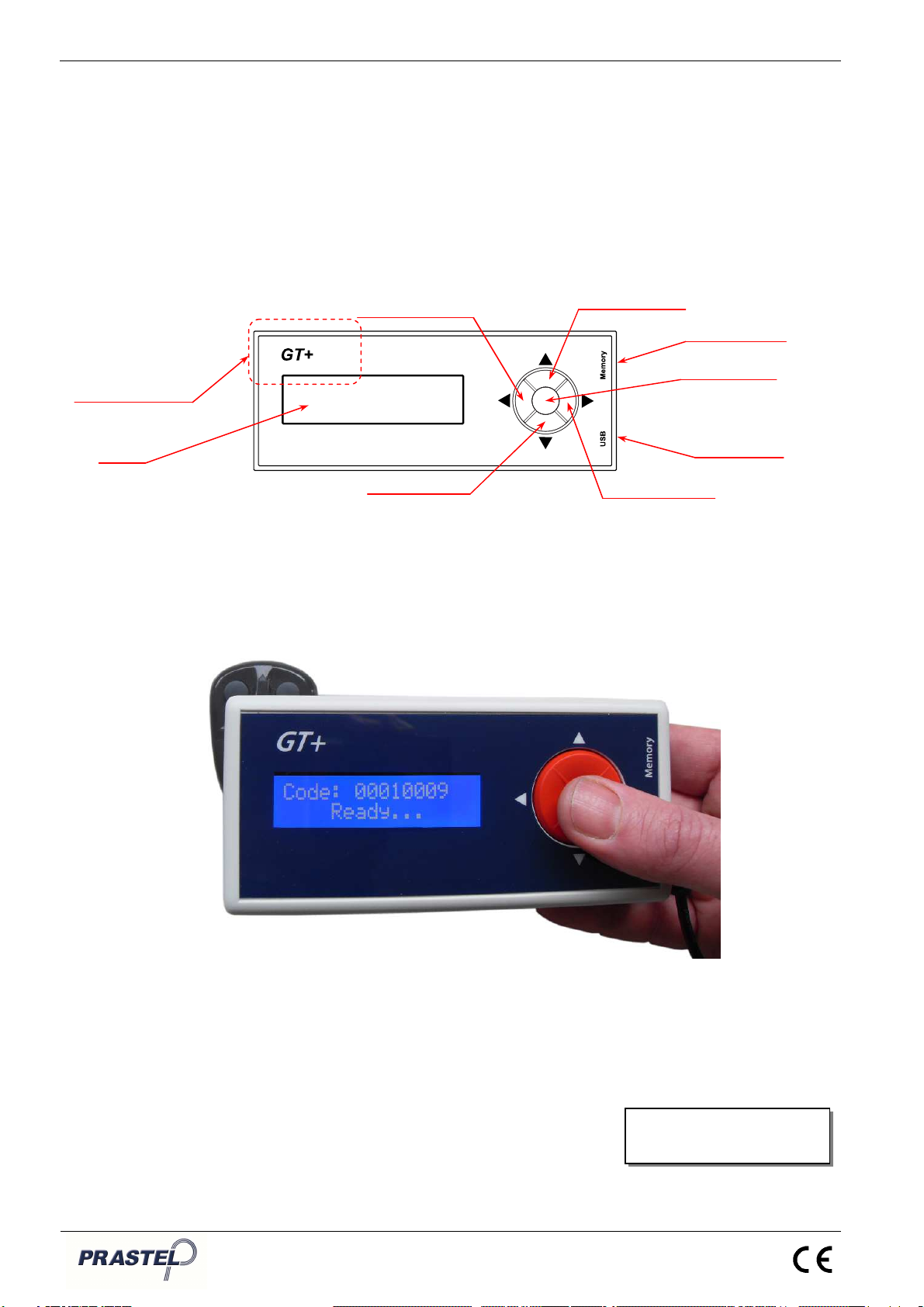
has been confirmed. To do so, apply the GT+ programming
area (see Figure 2 and 3) to the transmitter (buttons 1 and 2)
and press OK.
The "Wait…" message will be displayed during programming.
The GT+ must remain in contact with the transmitter during this
phase.
When transmitter programming is successful, the GT+ will
display the "Ok!" message, sound a short beep (if the buzzer
has been activated) and then automatically increase the
transmitter number so as to program the next transmitter.
Press the left arrow button to stop the programming phase.
If the programming fails, the GT+ will show the "ERROR!"
message, sound a double beep (if the buzzer has been
activated) and wait for confirmation before a new programming
phase may be started. In this case, the number will not be
incremented.
“Group“ Submenu:
This submenu allows a transmitter group code to be edited
using Easyroll contactless system.
The group code to be programmed must be entered.
The cursor is placed under the character which can then be
edited using the up and down arrow buttons. The cursor may be
moved using the left and right arrow buttons.
The GT+ is ready to program the transmitter once the group
code has been confirmed. To do so, apply the GT+
programming area (see Figure 2 and 3) to the transmitter
(buttons 1 and 2) and press OK.
The "Wait…" message will be displayed during programming.
The GT+ must remain in contact with the transmitter during this
phase.
When the transmitter programming is successful, the GT+ will
display the "Ok!" message, sound a short beep (if the buzzer
has been activated) and then wait to program the next
transmitter.
Press the left arrow button to stop the programming phase.
If the programming fails, the GT+ will show the "ERROR!"
message, sound a double beep (if the buzzer has been
activated) and wait for confirmation before a new programming
phase may be started.
“Copy” Submenu:
This submenu allows a transmitter copy code to be edited using
Easyroll contactless system.
The copy code allows a lost transmitter in a receiver memory to
be replaced by simple radio transmission from the new