ORiNG IDS-4312+ Manual de usuario

I
ID
DS
S-
-4
43
31
12
2+
+
I
In
nd
du
us
st
tr
ri
ia
al
l
D
De
ev
vi
ic
ce
e
S
Se
er
rv
ve
er
r
U
Us
se
er
r
M
Ma
an
nu
ua
al
l
V
Ve
er
rs
si
io
on
n
1
1.
.0
0
A
Ap
pr
ri
il
l,
,
2
20
01
17
7
w
ww
ww
w.
.o
or
ri
in
ng
g-
-n
ne
et
tw
wo
or
rk
ki
in
ng
g.
.c
co
om
m

IDS-4312(+) Series User Manual
ORing Industrial Networking Corp
1
COPYRIGHT NOTICE
Copyright © 2017 ORing Industrial Networking Corp.
All rights reserved.
No part of this publication may be reproduced in any form without the prior written consent
of ORing Industrial Networking Corp.
TRADEMARKS
is a registered trademark of ORing Industrial Networking Corp.
All other trademarks belong to their respective owners.
REGULATORY COMPLIANCE STATEMENT
Product(s) associated with this publication complies/comply with all applicable regulations.
Please refer to the Technical Specifications section for more details.
WARRANTY
ORing warrants that all ORing products are freefrom defects in material and workmanship
for a specified warranty period from the invoice date (5 years for most products). ORing
will repair or replace products found by ORing to be defective within this warranty period,
with shipment expenses apportioned by ORing and the distributor. This warranty does not
cover product modifications or repairs done by persons other than ORing-approved
personnel, and this warranty does not apply to ORing products that are misused, abused,
improperly installed, or damaged by accidents.
Please refer to the Technical Specifications section for the actual warranty period(s) of the
product(s) associated with this publication.
DISCLAIMER
Information in this publication is intended to be accurate. ORing shall not be responsible
for its use or infringements on third-parties as a result of its use. There may occasionally
be unintentional errors on this publication. ORing reserves the right to revise the contents
of this publication without notice.
CONTACT INFORMATION
ORing Industrial Networking Corp.
3F., NO.542-2, Jhongjheng Rd., Sindian District, New Taipei City 231, Taiwan, R.O.C.
Tel: + 886 2 2218 1066 // Fax: + 886 2 2218 1014
Website: www.oringnet.com
Technical Support
E-mail: support@oringnet.com
Sales Contact
E-mail: sales@oringnet.com (Headquarters)
sales@oring-networking.com.cn (China)

IDS-4312(+) Series User Manual
ORing Industrial Networking Corp
2
Table of Content
Getting Started...............................................................................................3
1.1 About IDS-4312(+) Series.....................................................................................3
1.2 Software Features ................................................................................................3
1.3 Hardware Specifications .......................................................................................3
Hardware Overview........................................................................................5
2.1 Front Panel...........................................................................................................5
2.1.1 Ports and Connectors.......................................................................................5
2.1.2 LED..................................................................................................................6
2.2 Top Panel.............................................................................................................6
2.3 Rear Panel ...........................................................................................................7
Hardware Installation.....................................................................................8
3.1 DIN-rail Installation ...............................................................................................8
3.2 Wall Mounting.......................................................................................................9
3.3 Wiring.................................................................................................................10
3.3.1 Grounding......................................................................................................10
3.3.2 Redundant Power Inputs ................................................................................ 11
3.4 Connection......................................................................................................... 11
3.4.1 Cables............................................................................................................ 11
Management.................................................................................................13
4.1 DS-Tool ..............................................................................................................13
4.1.1 Install DS-Tool................................................................................................13
4.1.2 Using DS-Tool ................................................................................................14
4.1.3 Configure Device Servers...............................................................................15
4.1.4 Configure Serial Port......................................................................................21
4.2 Web Management ..............................................................................................30
4.2.1 System...........................................................................................................31
4.3 Configuration by SSH Console............................................................................49
4.3.1 Connect to DS................................................................................................49
Technical Specifications .............................................................................51

IDS-4312(+) Series User Manual
ORing Industrial Networking Corp
3
Getting Started
1.1 About IDS-4312(+) Series
The IDS-4312(+) is an industrial device server with one RS-232/422/485 port and two
LAN ports designed for converting signals between serial and Ethernet networks. It also
provides 802.11 b/g/n WLAN function for wireless connectivity. The device offers standard
features of device servers such as TCP/IP interfaces and versatile operation modes
including Virtual Com, Serial Tunnel, TCP Server, TCP Client, UDP. The device also
supports Windows utility DS-Tool which allows you to configure multiple devices and set
up the mappings of Virtual Com. The device can transfer data to five host PCs
simultaneously for redundancy in case of Ethernet connection breakdown or host PC
failure. Further, the device supports HTTPS, SSH, and SSL encryption to assure the
security of critical data transmission. One of the Ethernet port on the IDS-4312+ supports
IEEE802.3af-compliant PoE PD (Power Device) function, making the device ideal for
environment where cabling or power supply is difficult.
1.2 Software Features
Supports five host devices including Virtual COM, TCP Server, TCP Client modes
and four IP ranges
Supports operating modes such as Virtual Com, Serial Tunnel, TCP Server, TCP
Client, UDP
NAT-pass through support for users to manage IDS-4312 through NAT router
Ensure high levels of security with SSL data encryption, HTTPS/SSH, IP access
control and IP white list
Event warning by Syslog, Email, SNMP trap, and beeper
Configurable by Web Interface and Windows utility
Configurable by Windows utility (DS-Tool)
Various Windows OS supported: Windows NT/2000/ XP/ 2003/VISTA(32/64bit)/
Windows 7(32/64bit)
1.3 Hardware Specifications
1 x RS-232/422/485 serial ports
2 x 10/100Base-T(X) Ethernet ports (one PoE port provided by IDS-4312+)
1 x WLAN antenna connector
DIN-rail and wall-mount enabled
Redundant DC power inputs
Operating Temperature: -40 to 70oC

IDS-4312(+) Series User Manual
ORing Industrial Networking Corp
4
Storage Temperature: -40 to 85oC
Operating Humidity: 5% to 95%, non-condensing
Casing: IP-30
Dimensions: 45 (W) x 81 (D) x 95 (H) mm

IDS-4312(+) Series User Manual
ORing Industrial Networking Corp
5
Hardware Overview
2.1 Front Panel
2.1.1 Ports and Connectors
The device provides the following ports on the top panel. The Ethernet port on the device
use RJ-45 connectors
Port
Description
Copper port
2 x 10/100Base-T(X) port (one PoE port for IDS-4312+)
Serial port
1 x DB9 serial ports
IDS-4312 IDS-4312+

IDS-4312(+) Series User Manual
ORing Industrial Networking Corp
6
2.1.2 LED
LED
Color
Status
Description
PW1/2
Green
On
Power is on and function normally
PoE
Green
On
PoE power is on and function normally
ETH
1/2
Green
On
Port running at 100Mbps
TX /
RX
Red
On
Receiving data
Green
On
Transmitting data
WLAN
Green
Blinking
Connecting to wireless networks
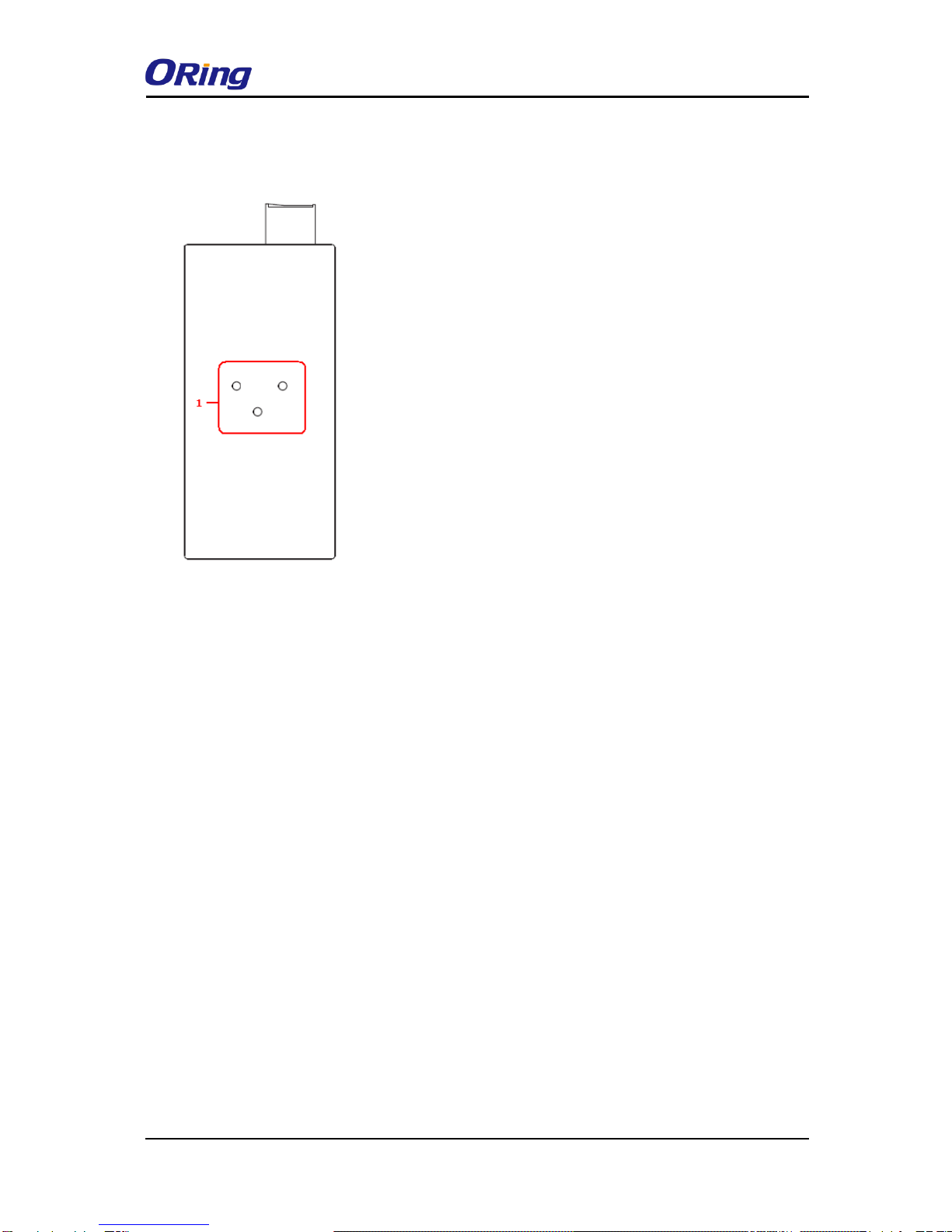
2.2 Top Panel
Below are the top panel components of the device:
1. Terminal blocks: PWR1, PWR2, Relay
2. Ground wire. For more information on how to ground the switch, please refer to 3.3.1
Grounding.
1. Power status indicators
2. LAN port connection indicators
3. Reset button
4. Ethernet port (ETH 2 of IDS-4312+ is
PoE-enabled)
5. Serial signal transmission status
indicator
6. Serial signal reception status indicator
7. Serial port
8. LED for wireless connection status
9. PoE status indicator
1. Terminal block
2. Wall-mount screw holes

IDS-4312(+) Series User Manual
ORing Industrial Networking Corp
7
2.3 Rear Panel
1. DIN-rail screw holes

IDS-4312(+) Series User Manual
ORing Industrial Networking Corp
8
Hardware Installation
3.1 DIN-rail Installation
The device comes with a DIN-rail kit to allow you to fasten the device to a DIN-rail in any
environments.
DIN-rail Kit Measurement (unit = mm)
Installing the device on the DIN-rail is easy. First, screwthe Din-rail kit onto the back of the
device, right in the middle of the back panel. Then slide the device onto a DIN-rail from the
Din-rail kit and make sure the device clicks into the rail firmly.

IDS-4312(+) Series User Manual
ORing Industrial Networking Corp
9
3.2 Wall Mounting
Besides Din-rail, the device can be fixed to the wall via wall mount kits, which can be
found in the package.
Wall-Mount Kit Measurement (unit = mm)
Follow the steps below to install the device to a rack.
Step 1: Install the L-shape mounting kits provided in the package to the left and right of the
device.
Step 2: With front brackets orientated in front of the rack, mount the device in the rack with
four rack-mounting screws.
Tabla de contenidos
Otros manuales de Servidor de ORiNG

ORiNG
ORiNG IDS-5012 Manual de usuario

ORiNG
ORiNG IDS-342GT+ Manual de usuario

ORiNG
ORiNG IDS-5042-WG Series Manual de usuario

ORiNG
ORiNG IDS-342GT Manual de usuario

ORiNG
ORiNG IDS-1112 Manual de usuario

ORiNG
ORiNG IDS-5042 Series Manual de usuario

ORiNG
ORiNG IDS-1112 Manual de usuario

ORiNG
ORiNG IUSB-9000 Series Manual de usuario

ORiNG
ORiNG IDS-5612 Series Manual de usuario

ORiNG
ORiNG IDS-5011F Series Manual de usuario