Ness D8xCeL / D16xCeL CoNtroL PaNeL – User's MaNUaL 5
OPERATION
OPERATING RULES
Generally, the panel will be Disarmed. Armed
and Home modes provide different levels of
security for your premises when you are home
or away. Before leaving the premises you must
"Arm" (turn on) the panel. After arming, the panel
will ignore detectors during the Exit Delay Time
to allow you to exit without triggering an alarm.
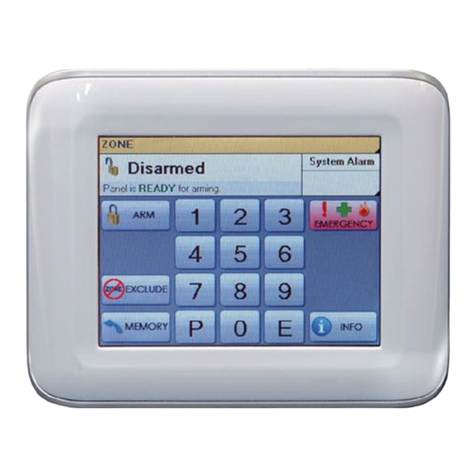
The system can be armed and disarmed using
the keypad supplied, by SMS or by optional
Radio Keys or Access Cards or Fobs.
When you enter the premises the panel will
ignore selected zones for the Entry Delay Time
and will not alarm unless you disarm the panel
during this allowed time.
KEYPAD 'TAMPER' ALARM
If you make a mistake while entering your user
code at the keypad, just press the E button and
start again, however keep in mind that multiple
incorrect attempts will trigger the alarm. Clear
the alarm by entering a valid user code + E.
See page 14
AREA PARTITIONING
Area Partitioning allows the zones to be split
into two partitions; Area1 and Area2. The
panel then effectively operates as two separate
systems sharing only the siren outputs and
communicator. See page 10.
COMMON AREA ZONES
Zones assigned to both Areas are Armed only
when Area1 and Area2 are both Armed. This
allows the Common Area zone/s to be shared
by both Areas.
For example, Office A and Office B operate as
separate areas but the entrance foyer used by
both offices is assigned to both areas meaning
it will automatically Arm when both Areas have
Armed. The Common Area then automatically
disarms when either Area1 or Area2 Disarms.
HOME MODE allows you to Arm selected zones
while others are ignored. Typically, perimeter
zones (doors and windows) can be monitored
while you are at home. See page 12.
MEMORY MODE allows you to review the last
30 events in memory. See page 16.
AREA OPERATION
Arming and Disarming is carried out as normal
from a single keypad or separate keypads
installed in both areas or by Radio Key.
Area operation only applies to zones when they
are in the Armed state. This means that Day,
24hr and Home zones are independent of the
area operations.
Note: Area partitioning is in addition to Home
Mode. Any zone may be allocated to any area.
This section describes the operation of a typical control panel installation. Keep in mind that
your installation may vary depending on the selected options and equipment. The operating
instructions which follow will cover the most common options.
Consult your installation company if you require further information.
The control panel can be operated by keypad or by SMS (requires an active SIM card). You may
also have optional Radio Keys or Access Control equipment installed.