
NCI 7050 Manual de usuario

Model 7050
Bulk Sampling Scale
User’s Manual

10/01 PN 7424-16620B Printed in USA
Risk of electrical shock. Do not remove cover. No user serviceable parts inside.
Refer servicing to qualified service personnel.
Weigh-Tronix reserves the right to change
specifications at any time.
CAUTION
EUROPEAN COUNTRIES
WARNING
This is a Class A product. In a domestic environment this product may cause
radiointerference for which the user may be required to take adequate measures.
UNITED STATES
This equipment has been tested and found to comply with the limits for a
Class A digital device, pursuant to Part 15 of the FCC Rules. These limits are
designed to provide reasonable protection against harmful interference when
the equipment is operated in a commercial environment. This equipment
generates, uses, and can radiate radio frequency energy and, if not installed
and used in accordance with the instruction manual, may cause harmful
interference to radio communications. Operation of this equipment in a
residential area is likely to cause harmful interference in which case the user
will be required to correct the interference at his own expense.
CANADA
This digital apparatus does not exceed the Class A limits for radio noise
emissions from digital apparatus set out in the radio Interference Regulations
of the Canadian Department of Communications.
Le present appareil numerique n’emet pas de bruits radioelectroniques
depassant les limites applicables aux appareils numeriques de la Class A
prescrites dans le Reglement sur le brouillage radioelectrique que edicte par le
ministre des Communications du Canada.

Table of Contents .................................................................................... i
Specifications ........................................................................................ 1
Introduction ........................................................................................... 3
Unpacking and Preparing the 7050 ....................................................... 3
7050 Description .................................................................................... 4
Front Panel Keys .............................................................................. 4
Hard Keys ................................................................................. 5
Softkeys ..................................................................................... 6
Weighing Operations ............................................................................. 7
Single Piece Weighing .................................................................... 8
Gross Weighing ............................................................................... 8
Net Weighing .................................................................................. 8
Entering a Known Tare Weight ................................................. 9
Removing an Active Tare Weight ............................................. 9
Bulk Sampling Operations ..................................................................... 9
Sampling Overview ......................................................................... 9
Sampling in Dribble Mode ............................................................ 10
Sampling in Bulk Mode ................................................................. 11
Counting While Using a Container ................................................ 12
Entering Numeric Values ............................................................... 12
Reverse Sampling ......................................................................... 12
Table of Contents
i

CapacityCapacity
CapacityCapacity
Capacity ResolutionResolution
ResolutionResolution
Resolution
50 lb. .001 lb
50 lb .01 oz
25 kg .0005 kg
800 oz .02 oz
In-line transformer, 115 VAC, 50/60 Hz
Optional 230 VAC, 50/60 Hz
Zero, Tare, Enter, Escape, Clear, 0-9, Decimal
Point, ←←
←←
←, →→
→→
→, and 5 Softkeys
All keys provide users with tactile and
(configurable) audio acknowledgment when
they are activated.
Display symbols include Stability, Active Tare,
Current Base, Center of Zero, Unit of Measure
and Display Label.
240 x 64 dot matrix LCD display
5" x 1.33" displayable area
7050: Cold cathode fluorescent backlit (white
on blue)
Selectable, 0.1 to maximum readable updates
Pounds, kilograms, ounces, pounds and
ounces
Up to 1 part in 50,000
Battery protected real time clock
Quartzell: 1 part in 2,000,000
Specifications
Capacities and
Resolutions
Power
Operational keys
Annunciators
Display
Display rate
Units of measure
Displayed resolution
Time and date
Internal Resolution
1

Fully selectable to ignore noise and vibration
Capable of storing one record for recall
including ID #, pieces, weight, pieces per lb.,
and piece weight.
Scale has 2 power-saving timers; one controls
backlight, and another has capability of shutting
the scale off. Any keypress wakes the scale.
Com1: RS-485; used for interfacing with a
remote Quartzell® base.
Com2: RS-232;used for connecting to an Orion
label printer.
• Remote Quartzell scale 3635-300 lb
18" x 18" base
• 230 VAC in-line transformer
• Orion Label Printer
14°F to 104°F (-10°C to 40°C),
10 to 90% RH non-condensing
Platform 12" x 14"
Overall 14" W x 17" D x 4.5" H
18.5-lbs.
UL
CE
CUL pending
15 months
Harmonizer digital filtering
Memory
Power saving
Standard input and output
Available options
Operating temperature
Dimensions
Weight
Agencies
Warranty
2

This manual explains the operation of the 7050
bulk sampling scale. The 7050 is a computer-
based counting scale specifically configured
for bulk mail applications.
This manual explains only the basic application
which ships from the factory and also
assumes all the functions of the scale are
enabled. Your scale has been configured for
your particular application.
This manual is divided into the following main
sections:
• Unpacking and Preparing the 7050
• 7050 Description
• Weighing Operations
• Bulk Sampling Operations
The unit must be
plugged into an
easily accessible
outlet that is earth
grounded and of the
appropriate
voltage.
Introduction
Unpacking and Preparing the 7050
When you receive your 7050, unpack the unit
and save all shipping materials. Remove the
protective plastic from the scale platform.
Place the scale on a level, vibration free
surface. Level the scale with the help of the
bubble level under the scale platform. Turn the
screw feet until the bubble is centered and the
scale does not rock. Tighten the knurled locking
knobs above each foot against the scale base.
Plug the unit into the appropriate power source.
Keep in mind that the power receptacle must
be earth grounded and easily accessible to the
user.
Press any key to activate the scale.
3
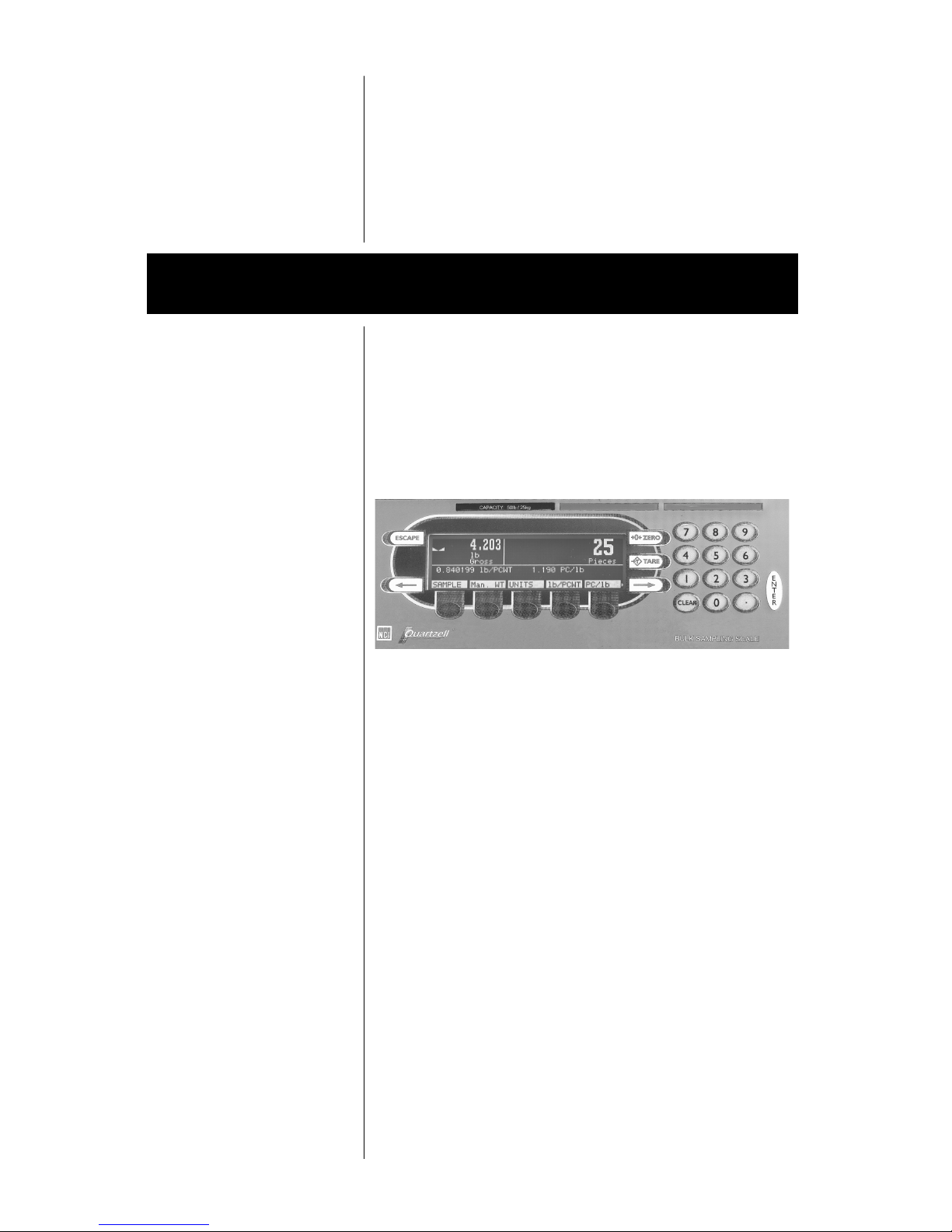
The 7050 is a 12"x 14" scale with an attached
5" x 12" display housing. See Figure 1. The
scale base is cast aluminum enclosing a
QDT®(Quartzell®Digital Technology) weight
sensor and electronics package. The scale
platter is stainless steel.
The display is a 64" x 240" dot matrix which
allows several lines of text and the ability to
display graphics.
There are five softkeys located directly below
the display, a numeric keypad to the right and
six other labeled keys. The keys will be
described in the next section.
Built into the 7050 are two serial ports (Com1
and Com2). Com1 is used for 3635 QDT®base
connection only. Com2 is used for Orion printer
connection only.
The keys on the front panel of the 7050 are of
two types; hard keys and softkeys. Hard keys
are labeled directly and softkey labels appear on
7050 Description
Upon power up, the unit will briefly display
an opening screen, then show the default
display mode. The scale is now ready for
use. After several minutes of inactivity, the
scale will go into a sleep mode. Press any key
to reactivate the scale.
Figure 1
7050 front panel
To increase the contrast of
the display, press and hold
the CLEAR and 9 keys until
the desired contrast is
reached. To decrease
contrast, press and hold
the CLEAR and 3 keys.
Front Panel Keys
4

Hard Keys
Stable scale icon
Center of zero icon
the display. Softkeys function differently at
different times and their labels change as
needed.
Below are brief descriptions for each of the
hard key functions:
ESCAPEESCAPE
ESCAPEESCAPE
ESCAPE
Press the ESCAPEESCAPE
ESCAPEESCAPE
ESCAPE key to back out of
menus or cancel an entry and return to
gross weight mode.
ZEROZERO
ZEROZERO
ZERO
Press the ZEROZERO
ZEROZERO
ZERO key to establish a zero
reference. When the scale is at zero, ±¼
division, the center-of-zero icon will be
displayed. When the scale is in motion the
stable scale icon will disappear. See note at
left.
TT
TT
TAREARE
AREARE
ARE
Press the TT
TT
TAREARE
AREARE
ARE key to zero weight of
container or enter an active tare weight. The
display shows net weight. Active on both
local and remote scale.
ENTERENTER
ENTERENTER
ENTER
Press the ENTERENTER
ENTERENTER
ENTER key to accept displayed
information, whether numeric characters
that have been keyed in or a choice
displayed while in the menus.
CLEARCLEAR
CLEARCLEAR
CLEAR
Press the CLEARCLEAR
CLEARCLEAR
CLEAR key to clear last digit
from a displayed number. Repetitive
pressing will clear all digits entered.
0-90-9
0-90-9
0-9 and ..
..
.
Use the numeric keys for entering in
numbers or a decimal
5

Softkeys
Right ArrowRight Arrow
Right ArrowRight Arrow
Right Arrow
Press this key to acquire second tier of
softkeys.
Left ArrowLeft Arrow
Left ArrowLeft Arrow
Left Arrow
Press this key when in second tier of
softkeys to return to first tier of softkeys
Softkeys are so named because their function is
not set but changes as the programming
directs. Press the RightRight
RightRight
Right or Left ArrowLeft Arrow
Left ArrowLeft Arrow
Left Arrow key to
scroll between the two tiers of soft keys.
The softkeys which appear in the 7050 BSS
application are as follows:
First Tier:First Tier:
First Tier:First Tier:
First Tier:
SampleSample
SampleSample
Sample
Press this key to start sample process
Manual Weight EntryManual Weight Entry
Manual Weight EntryManual Weight Entry
Manual Weight Entry
Press this key to manually enter gross
weight from a remote scale or other
source.
UnitsUnits
UnitsUnits
Units
Press this key to change the unit of
measure
Weight per piece entryWeight per piece entry
Weight per piece entryWeight per piece entry
Weight per piece entry
Press this key to manually enter a
known piece weight in decimal pounds
or ounces.
6

Weighing Operations
The basic unit Model 7050 will operate in the
following manner: After system check, Area A
will indicate a stable condition and center of
zero, Area B will display 0.000 lb. Gross, Area
C will display 0.000 lb. Gross, Area D will be
blank.
Pieces per unit weight entryPieces per unit weight entry
Pieces per unit weight entryPieces per unit weight entry
Pieces per unit weight entry
Press this key to manually enter known
pieces per pound.
Second Tier:Second Tier:
Second Tier:Second Tier:
Second Tier:
Remote ScaleRemote Scale
Remote ScaleRemote Scale
Remote Scale
Connection to 3635-300# only
ID NumberID Number
ID NumberID Number
ID Number
Press this key to manually enter an ID or
job number (up to 16 digits)
PrintPrint
PrintPrint
Print
Press this key to send a formatted
output to a label printer
RECALLRECALL
RECALLRECALL
RECALL
Press this key to recall previous
transaction. Press ESCAPEESCAPE
ESCAPEESCAPE
ESCAPE to return to
the count/weight display.
OFFOFF
OFFOFF
OFF
Press this key to turn the display off.
Pressing any key will turn the scale on.
These keys will be described in more detail as
scale operation is described in the following
sections.
7
Otros manuales para 7050
1
Tabla de contenidos
Otros manuales de Escala de NCI

NCI
NCI 6702 Manual de usuario

NCI
NCI 6720 Manual de usuario

NCI
NCI 7821 Manual de usuario

NCI
NCI 7820 B Manual de usuario

NCI
NCI 7620 Family Manual de usuario

NCI
NCI 7815 Manual de usuario

NCI
NCI 7050 Manual de usuario

NCI
NCI 7820 B Manual de usuario

NCI
NCI 7820 B Manual de usuario

NCI
NCI 6712 Manual de usuario


