
MSI VIGOR GK40 Manual de usuario

GK40
VIGOR
GAMING KEYBOARD

2
Content
01 English ............................................................................................3
02 繁體中文 ...........................................................................................6
03 简体中文 ...........................................................................................9
04 日本語.............................................................................................12
05 한국어 ............................................................................................15
06 Bahasa Indonesia ........................................................................18
07 Tieng Viet ......................................................................................21
08 Français.........................................................................................24
09 Español..........................................................................................27
10 Türkçe............................................................................................30
11 Polski.............................................................................................33
12 Italiano...........................................................................................36
13 Português ....................................................................................39
14 Nederlands ...................................................................................42
15 Deutsch .........................................................................................45
16 Русский.........................................................................................48
17 български.....................................................................................51
18 Dansk.............................................................................................54
19 Suomi.............................................................................................57
20 Magyar...........................................................................................60
21 Norsk .............................................................................................63
22 Română .........................................................................................66
23 Slovenský......................................................................................69
24 Svenska.........................................................................................72
25 Čeština...........................................................................................75
26 Українська .................................................................................... 78
27 Ελληνικά........................................................................................81

3
01 English
Introduction
Thank you for choosing the well-designed gaming keyboard, MSI GK40, to be your companion.
This exquisite gaming keyboard will surely give you a delightful and professional experience in
PC games.
This guide provides instructions and illustrations to help you get the most from the keyboard,
and it is recommended to read this guide before using it.
Package Contents
▶ GAMING Keyboard
▶ User Guide
System Requirements
▶ PC with available USB port
▶ Windows 10/ 8.1/ 8/ 7, OSX 10.3 or latest
Specifications
▶ Interface: USB
▶ Cable Length: 1.8M braided cable
▶ Dimensions: 472 x 207 x 38 mm
Introductions to Function Keys
LED Indicators Adjustment
Use the keyboard hot keys listed below to customize the backlit configurations.
+
Speed up the backlit
effect or change
color
+
Slow down the
backlit effect or
change color
+
Increase backlit
brightness
+
Decrease backlit
brightness

4
+
Set backlit flow
direction
+
Switch backlit mode
Total 8 backlit modes available for selecting, including 7 default
backlitmodesand1cuomizedbacklitprole.
Media Function
+
Media Player +
Volume Down +
Volume Up
+
Mute +
Previous Track +
Next Track
+
Play/Pause +
Stop +
Email
+
Web Browser +
Windows Lock/ Unlock +
Calculator
+
Switch between [W][A][S][D]
and[↑][↓][←][→]

5
How to Customize the Backlit Profile
1. Press + to enter Customized Mode.
2. In Customized Mode:
• Press + or to switch and select the keyboard area you’d like
to customize, the keyboard backlit of the selected area will flash twice.
• Press + or to adjust the backlit brightness of the selected
keyboard area.
• Press + or to adjust the color tone.
Reference: Anti-ghosting
Tab+Caps+Shift+Ctrl+Q+W+E+R+T+A+S+D+F+G+Z+X+C+V+B+Space 20 keys
Q+W+E+R+T+Y+U+I+O+P+Space 11 keys
A+S+D+F+G+H+J+K+L+; +Space 11 keys
Z+X+C+V+B+N+M+,+.+/+Backspace 11 keys
TAB+CAPS+Shift+Ctrl+Alt+Q+W+E+A+S+D+Z+X+C 14 keys
TAB+CAPS+Shift+Ctrl+Space+Q+W+E+A+S+D+F+G+Z+X+C+↑+←+↓+→ 20 keys
Shift-L+Shift-R+Ctrl-L+Ctrl-R+Alt-L+Alt-R+Space+↑+←+↓+→ 11 keys
A+S+D+F+J+K+L+;+Backspace 9 keys

6
02 繁體中文
簡介
感謝選用微星電競系列產品MSIGK40。此精心設計製作的專業電競鍵盤將帶給您愉悅與專業的
個人電腦遊戲使用體驗。
本手冊提供鍵盤的使用說明與圖示,讓使用者可以認識產品並快速上手,因此建議您在使用產品
前,先行閱讀本手冊。
包裝內容物
▶ 遊戲鍵盤
▶ 使用手冊
系統需求
▶ 配備有USB連接埠的個人電腦
▶ Windows10/8.1/8/7,OSX10.3或更新
規格
▶ 介面:USB
▶ 線長:1.8公尺編織線
▶ 尺寸:472x207x38mm
功能鍵介紹
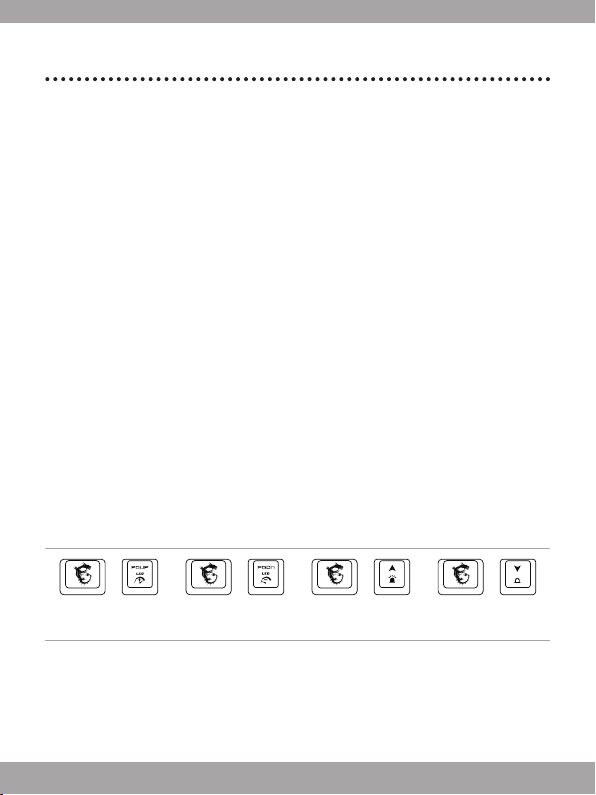
LED 燈光調整
使用以下快捷鍵進行燈光控制。
+
背光效果加速或切
換顏色
+
背光效果減速或切
換顏
+
增加亮度 +
降低亮度

7
+
調整背光流動方向
+
切換背光模式
此款鍵盤提供8組背光模式選用,包含7組出廠預設背光模式,以及
1組個性化背光配置設定模式。
多媒體功能
+
媒體播放器
+
音量降低
+
音量增加
+
靜音
+
上一首
+
下一首
+
播放/暫停
+
停止
+
電子郵件
+
網路瀏覽器
+
Windows功能鎖定/解鎖
+
計算機
+
切換[W][A][S][D]或
[↑][↓][←][→]功能

8
如何自訂個性化背光配置
1. 按下 +進入自定義模式。
2. 在自定義模式中:
• 按下 +或 可選擇欲執行個性化設定的鍵盤背光區域,選取到
的鍵盤區域會閃爍兩下。
• 按下 +或 可調整選取的鍵盤背光區域的亮度。
• 按下 +或 可調整鍵盤背光燈色。
參照:Anti-ghosting
Tab+Caps+Shift+Ctrl+Q+W+E+R+T+A+S+D+F+G+Z+X+C+V+B+Space 20鍵
Q+W+E+R+T+Y+U+I+O+P+Space 11鍵
A+S+D+F+G+H+J+K+L+; +Space 11鍵
Z+X+C+V+B+N+M+,+.+/+Backspace 11鍵
TAB+CAPS+Shift+Ctrl+Alt+Q+W+E+A+S+D+Z+X+C 14鍵
TAB+CAPS+Shift+Ctrl+Space+Q+W+E+A+S+D+F+G+Z+X+C+↑+←+↓+→ 20鍵
Shift-L+Shift-R+Ctrl-L+Ctrl-R+Alt-L+Alt-R+Space+↑+←+↓+→ 11鍵
A+S+D+F+J+K+L+;+Backspace 9鍵
9
03 简体中文
简介
感谢选用微星电竞系列产品MSIGK40电竞键盘。此精心设计制作的专业电竞键盘将带给您愉悦
与专业的个人计算机游戏使用体验。
本手册提供键盘的使用说明与图标,让用户可以认识产品并快速上手,因此建议您在使用产品
前,先行阅读本手册。
物品清单
▶ 电竞键盘
▶ 用户指南
系统需求
▶ 配备有USB端口的个人计算机
▶ Windows10/8.1/8/7,OSX10.3或更新
规格
▶ 连接接口:USB
▶ 线长:1.8公尺编织线
▶ 尺寸:472x207x38mm
功能键介绍
LED 指示灯调整
使用以下热键进行灯光控
+
背光效果加速或切
换颜色
+
背光效果减速或切
换颜色
+
增加亮度 +
降低亮度

10
+
调整背光流动方向
+
切换背光模式
此款键盘提供8组背光模式选用,包含7组出厂默认背光模式,
以及1组个性化背光配置设定模式。
多媒体功能
+
媒体播放器
+
音量降低
+
音量增加
+
静音
+
上一首
+
下一首
+
播放/暂停
+
停止
+
电子邮件
+
网络浏览器
+
Windows键锁定
+
计算器
+
切换[W][A][S][D]或
[↑][↓][←][→]功能
Tabla de contenidos
Idiomas:
Otros manuales de Teclado de MSI


