max mobility SmartDrive MX1 Manual de usuario

User’s Manual
5425 crossings boulevard
nashville, tn 37013 usa
p: 615.731.1860
f: 888.411.9027
www.max-mobility.com
max mobility, llc
®
SmartDrive MX1
Rev. MX1.0 UM-C
Wheelchair Power Assist

SmartDrive User’s Manual I
Specication Sheet
Manufacturer: Max Mobility, LLC
Address: 5425 Crossings Blvd.
Nashville, TN 37013
USA
Rev.
®
Range: 10 miles
Maximum speed (level surface): 4.5 mph
Maximum speed (6 incline): 4.0 mph
Motor power: 250 W
Motor voltage: 24 V
Operating temperature: -25 C to 50 C
Continuous theoretical driving range: 11.7 W-h/km
Maneuvering theoretical range: 18.6 W-h/km
Maximum thermal drive test range: 60 minutes / 1522 ft (no failure)
Total weight: 19.6 lbs
NOTE: e stated values are from testing with a 250 lb. occupant. e range, speed, etc. vary depending on driving conditions.
MX1.0 SS-A
SmartDrive MX1
Drive Unit Model: SD1.0
Overall length: 14.3 in
Overall width: 5.5 in
Overall height: 9.5 in
Weight: 11 lbs
Omni-wheel diameter: 7.6 in
Omni-wheel width: 2.8 in
Battery Unit Model: SB1.0
Battery type: Lithium-Ion (Lithium Iron Phosphate)
Nominal operating voltage: 24 V
Electric charge: 10 A-h
Overall length: 14.9 in
Overall width: 6.7 in
Overall height: 2.4 in
Weight: 8.3 lbs
e SmartDrive has been tested and conforms to all applicable requirements of ANSI/RESNA Standards
for Wheelchairs - Volume 1 and Volume 2.
**A wheelchair’s specications provided by its manufacturer may be slightly aected by the addition of the SmartDrive.**
Wheelchair Compatibility Requirements
Drive wheel diameter: 22, 24, 25 or 26 in
Minimum seat width: 10 in
Minimum seat depth: 12 in
Maximum seat depth: 20 in
Minimum under-seat clearance: 2 in
Axle receiving tube diameter: 1-1/4, 1-3/8, 1-1/2 or 2 in
User weight: 80 - 250 lbs
Wheelchair Power Assist

II max mobility®
Table of Contents
Specication Sheet I
Table of Contents II
1. Introduction 1
Intended Use of the SmartDrive . . . . . . . . 1
Must Read Prior-to-Use Information . . . . . . 1
Warnings and Safety Precautions . . . . . . . 1
Electromagnetic Interference (EMI) . . . . . . 3
List of Components . . . . . . . . . . . . . . 3
2. SmartDrive Set-Up 5
Adaptive Clamp Mounting . . . . . . . . . . 5
Drive Unit Attachment and Removal . . . . . . 6
Battery Unit Clipping . . . . . . . . . . . . . 7
3. Operating the SmartDrive 9
Power-Assist ON/OFF . . . . . . . . . . . . . 9
Switching Between States. . . . . . . . . . . 9
Power-Assist Mode . . . . . . . . . . . . . . 9
Push Activation . . . . . . . . . . . . . . . 9
Button Activation . . . . . . . . . . . . . 10
Braking . . . . . . . . . . . . . . . . . . 10
PowerPush . . . . . . . . . . . . . . . . 11
Operating Conditions . . . . . . . . . . . . 11
4. Battery 12
5. Maintenance 13
Cleaning . . . . . . . . . . . . . . . . . 13
Roller Replacement. . . . . . . . . . . . . 13
Other Maintenance. . . . . . . . . . . . . 13
6. Warranty 13
Manufacturer’s Contact Information . . . . . 13

SmartDrive User’s Manual 1
Intended Use of the SmartDrive
e Max Mobility SmartDrive Wheelchair Power Assist device is exclusively intended to provide power assist to manual
wheelchairs, empowering disabled persons, including pediatrics, capable of operating a powered and manual wheelchair
by providing a means of enhanced mobility. It is also exclusively intended to be used on manual wheelchairs that meet the
“Wheelchair Compatibility Requirements” outlined in the Specication Sheet on Page I of this manual.
Must Read Prior-to-Use Information
Improper use of the SmartDrive or the wheelchair it is attached, depending on surface, weather, and trac conditions, can
present a potential of injury and cause damage to the wheelchair or SmartDrive. erefore, the SmartDrive must only be
handled and used under the following prerequisites:
• e user is both physically and mentally capable of operating the wheelchair and device in all possible conditions
and situations.
• Proper instruction on its handling and operation has been received by reading and understanding this user’s manual
in its entirety.
• No technical modications have been made to the device.
• e user must take time to become accustom to the SmartDrive’s response and performance by rst
practicing its operation in a safe area that is free from hazards. One should become familiar with the push recogni-
tion, braking response, acceleration/top speed, etc. of the device before venturing out with the device, where poten-
tially hazardous situations may exist. It is strongly recommended that the user not attempt to use the SmartDrive
outdoors until it can be safely operated indoors without diculty.
If any issues or malfunctions exist, cease the use of the SmartDrive and contact Max Mobility for service/further instruction.
Any contrary use to the directions of this user’s manual, to the recommendations of one’s mobility equipment dealer, or to
the technical limitations dened by either Max Mobility and one’s wheelchair manufacturer is considered to be misuse of the
SmartDrive. Max Mobility is not responsible for any injuries or damage caused by this type of misuse.
Warnings and Safety Precautions
All warnings and safety precautions issued by one’s wheelchair manufacturer must be heeded in addition to
those stated in this manual. Failure to do so could result in serious injury or death.
Handling or use of the SmartDrive by anyone who
has not received proper instruction from this manual
1. Introduction
function and ability.
e specications provided by one’s wheelchair manu-
facturer may be slightly aected by the addition of the
SmartDrive.
Do not use an escalator to move one’s wheelchair between
oors. Serious bodily injury may occur.
Do not lean over the top of the back upholstery to reach
objects from behind as this may cause the wheelchair to tip
over.
e center of balance of a wheelchair may be aected by the
to this new feeling. attachment of a SmartDrive.
may result in serious injury or death.
e SmartDrive is for single person use only. Do not use or
operate on a wheelchair that is being pushed by an atten-
dant.
One MUST familiarize themselves with the response and
performance of the SmartDrive prior to regular use. Do
not attempt to use outdoors until it can be safely
operated indoors without colliding into walls or any other
objects.
e addition of the SmartDrive to one’s wheelchair may
cause it to feel dierent. Take the time to become accustom
Methods for safe use of a SmartDrive attached
wheelchair are dierent for each user depending on
(Continued on next page)

2max mobility®
Do not shift your weight or sitting position toward
the direction you are reaching as one’s wheelchair
As for driving up and down slopes, please adhere to the
instructions given by the diverse wheelchair manufacturers
accordingly.
Riding over curbs or obstacles can cause tipping and seri-
ous bodily harm. If you have any doubt that you can safely
cross any curb or obstacle, ALWAYS ask for help. Be aware
of your riding skills and personal limitations. Develop new
skills only with the help of a companion.
When crossing major roads, intersection, railway crossings
or highways as well as when you drive steep, long slopes
you should always have somebody accompany you in the
interest of your safety.
Always use caution when transferring in or out of the
wheelchair. Every precaution should be taken to reduce
the transfer distance and be certain the wheel locks are
engaged to prevent the wheels from moving. Also always
power o and disattach the SmartDrive drive unit when
transferring to and from your chair.
Always power o the drive unit and consider removing
when transferring from the wheelchair.
e SmartDrive is not designed to drive up or down large
curbs/steps. Only perform this maneuver when absolutely
necessary and always ask for help.
Do not take a SmartDrive attached wheelchair on an
escalator or motorized walkway. Serious bodily injury may
occur.
e SmartDrive is designed to be used with a seat cushion.
It is strongly recommended that a seat cushion be used on
your wheelchair when using the SmartDrive.
Do not attempt to attach the SmartDrive to a wheelchair
that does not meet the specications outlined in “Wheel-
chair Compatibility Requirements” in the Specication
Sheet on Page I of this manual.
Any modications to the SmartDrive will void the
warranty and may create a safety hazard.
may tip over backwards or sideways.
Do not tip or wheel your wheelchair without assistance,
unless you are highly skilled.
Using Anti-Tippers substantially reduces your risk of
falling over backwards, which can cause serious injury. If
you are afraid of tipping over, use Anti-Tipppers. Anti-
Tippers will keep you from falling over, but they will limit
your ability to be pulled up curbs and some other maneu-
vers. Just as children learn to ride bikes without training
wheels, you may be able to learn to use your wheelchair
with Anti-tippers. It is STRONGLY recommended that
Anti-Tippers be employed to the wheelchair until the user
has become accustom to operating the SmartDrive in all
possible environments, situations, and conditions.
Do not attempt to stop a moving wheelchair with wheel
locks. Wheel locks are not brakes.
Do not stand on the frame of your wheelchair.
Your wheelchair is not designed for weight training and
is unsafe from use as a seat while weight training. Weight
training from your wheelchair substantially changes the
stability of your chair and may cause tipping.
Make sure the battery unit is charged before use.
Always turn the unit o when parked to prevent accidental
activation.
e SmartDrive is not designed to be driven in heavy rain/
snow or on wet/icy surfaces which may cause malfunc-
tion or damage. Do not use in these conditions or on these
surfaces.
Do not operate over rough terrain, slick surfaces, extreme
slopes, or loose ground.is may cause injury or damage to
your SmartDrive and void the warranty.
Use extreme caution when operating a SmartDrive at-
tached wheelchair in conned areas. Consider powering o
the unit to reduce the chance of damage or injury.
Use extreme caution when operating a SmartDrive
attached wheelchair when near streets. Consider
powering o the unit to reduce the chance of ac-
cident or injury.

SmartDrive User’s Manual 3
Electromagnetic Interference (EMI)
Electromagnetic Interference comes from radio wave sources. Examples of these sources are radio/TV station transmit-
ters, receivers, transceivers [send and receive signals], cell phones, walkie-talkies, etc. ere are many sources of EMI in one’s
daily environment, some that are avoidable and some that one might not even realize. Powered electronic devices, such as
the SmartDrive are susceptible to EMI, both strong and weak, from these types of transmitters, as well as from electrostatic
discharges (ESD) and conducted sources. ese interferences can cause unintentional activation of the SmartDrive motor or
damage to its control system, potentially causing a safety hazard and leading to costly repairs.
Every power wheelchair or power assist device can resist EMI up to a certain level, also known as its “immunity level”. e
higher the immunity level, the less the device is at risk of interference. An immunity level of 20 V/m is understood to provide
sucient protection from the sources encountered on a daily basis. e SmartDrive has been tested and found to be immune
to this minimum immunity level of 20 V/m.
ough equipped to be suciently protected against EMI, any chair modications or accessory additions can eect its im-
munity. Parts from other suppliers have unknown EMI properties, and their interaction with the SmartDrive is untested.
Electromagnetic energy becomes increasing more intense the closer to the source you become. erefore, it is recommended
that the SmartDrive not be operated in close vicinity to sources of radio waves. ere are three categories that EMI sources
fall under:
1. Long Range Transceivers: ese are sources of strong radio waves, including commercial radio and TV broadcast
antenna towers and amateur (ham) radios.
2. Medium Range Mobile Transceivers: ese are sources of potentially strong radio waves, including two-way radios
used by emergency vehicles, tractor-trailers, and taxis.
3. Handheld Transceivers: ese are sources of relatively low strength waves but have the possibility of getting very
close to your wheelchair, including walkie-talkies, citizen band (CB) radios, cell phones, and other personal com-
munication devices.
e following are not likely to cause EMI problems: Cordless phones, MP3/CD players, TV sets, and AM/FM radios.
If any unintentional activation of the SmartDrive occurs, turn o the unit as soon as it is safe to do so and report the incident
to Max Mobility [please indicate any source of EMI that was in close proximity when the incident occurred].
USA / Canada
is device complies with Part 15 of the FCC rules. Operation is subject to the following two conditions: (1) is device may
not cause harmful interference, and (2) this device must accept any interference, including interference that may cause unde-
sired operation. Any changes or modications not expressly approved by the party responsible for compliance could void the
user’s authority to operate the equipment.
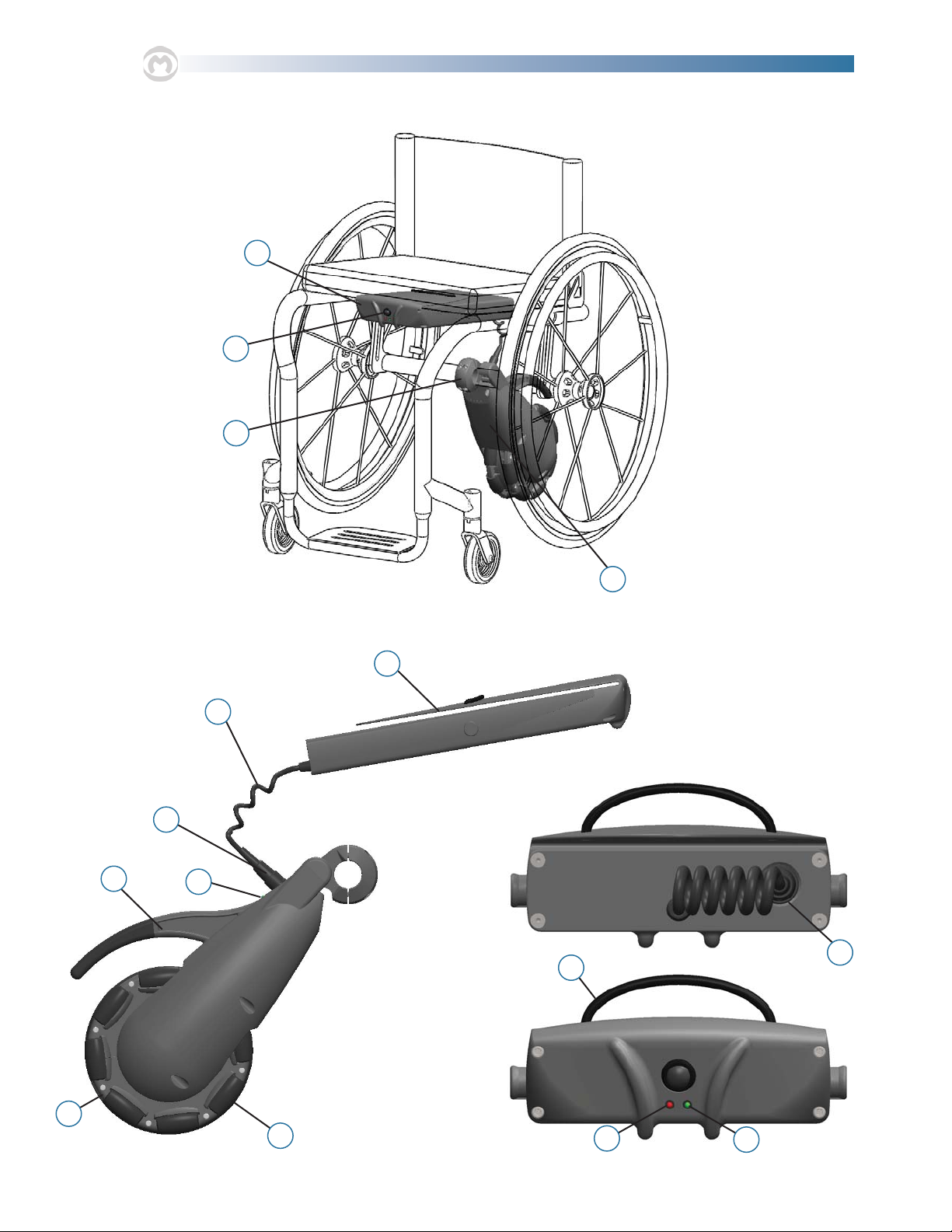
1. Battery Unit
2. Push Button
3. Adaptive Clamp
4. Drive Unit
5. Omni-Drive Wheel
6. Rollers
7. Drive Unit Handle
8. Drive Unit LED
9. Battery Unit Connector
10. Cord
11. Battery Unit Clip
12. Battery Unit Handle
13. Battery Unit Red LED
14. Battery Unit Green LED
15. Connector Holder
List of Components
(refer to the next page for diagrams)

1
2
4
3
5
6
7
11
8
9
10
12
13 14
15
4max mobility®

SmartDrive User’s Manual 5
2. SmartDrive Set-Up
Adaptive Clamp Mounting
e SmartDrive adaptive clamp is designed to permanently mount to the axle tube of a wheelchair while presenting a simple
means of attaching/removing the drive unit. Remove the backing of the adhesive on both parts of the clamp, and use a 3/16”
allen wrench to signicantly tighten all the four (4) screws to mount the clamp to the axle receiving tube. e following posi-
tion and orientation are critical to the proper function of SmartDrive and must be heeded:
1. e protrusions coming from the side of the clamp are to
be positioned rearward with the extrusion ats perpen-
dicular to the ground when the chair [with the user in it]
is resting on a level plane.e screws should be tightened
as much as possible so to prevent rotation or translation
of the clamp.
2. e clamp must be positioned midway between the two
rear wheels of the wheelchair on the axle receiving tube.
All four (4) screws should be tightened as much as possible,
xing it in this position and orientation. Failure to do
this could cause the wheelchair to not drive/ride straight
and/or the clamp to move during use causing the Smart-
Drive to not function properly.
Adjustments made to the wheelchair set-up could aect the orientation of the SmartDrive clamp. Adjust the
clamp whenever changes are made to the chair.

6max mobility®
Drive Unit Attachment and Removal
e SmartDrive drive unit is designed to easily attach to the adaptive clamp so the user can quickly attach/remove whenever
desired or necessary. Use of the handle and the drop and lock interaction make attaching the SmartDrive simple for all users.
1. To attach the drive unit to the wheelchair, align the
ats in the adaptive clamp with the receiving slots on
the front, underside of the unit body [the drive unit will
be angled slightly higher than horizontal]. Lower the
receiving end of the drive unit over the extrusions of the
clamp.
2. Rotate the unit downward to pivotally attach the drive
unit to the clamp, and consequently the wheelchair.
3. Under its own weight, the omni-wheel end of the drive
unit rests on the ground between the rear wheels of the
wheelchair.
Remove the unit by rmly grasping the handle and perform-
ing the steps in reverse order, rst rotating upwards then
lifting the receiving slots o the adaptive clamp.
Never attempt to remove the drive unit from the clamp while still seated in the wheelchair. is presents a serious
risk of tipping over and injury.

SmartDrive User’s Manual 7
Battery Unit Clipping
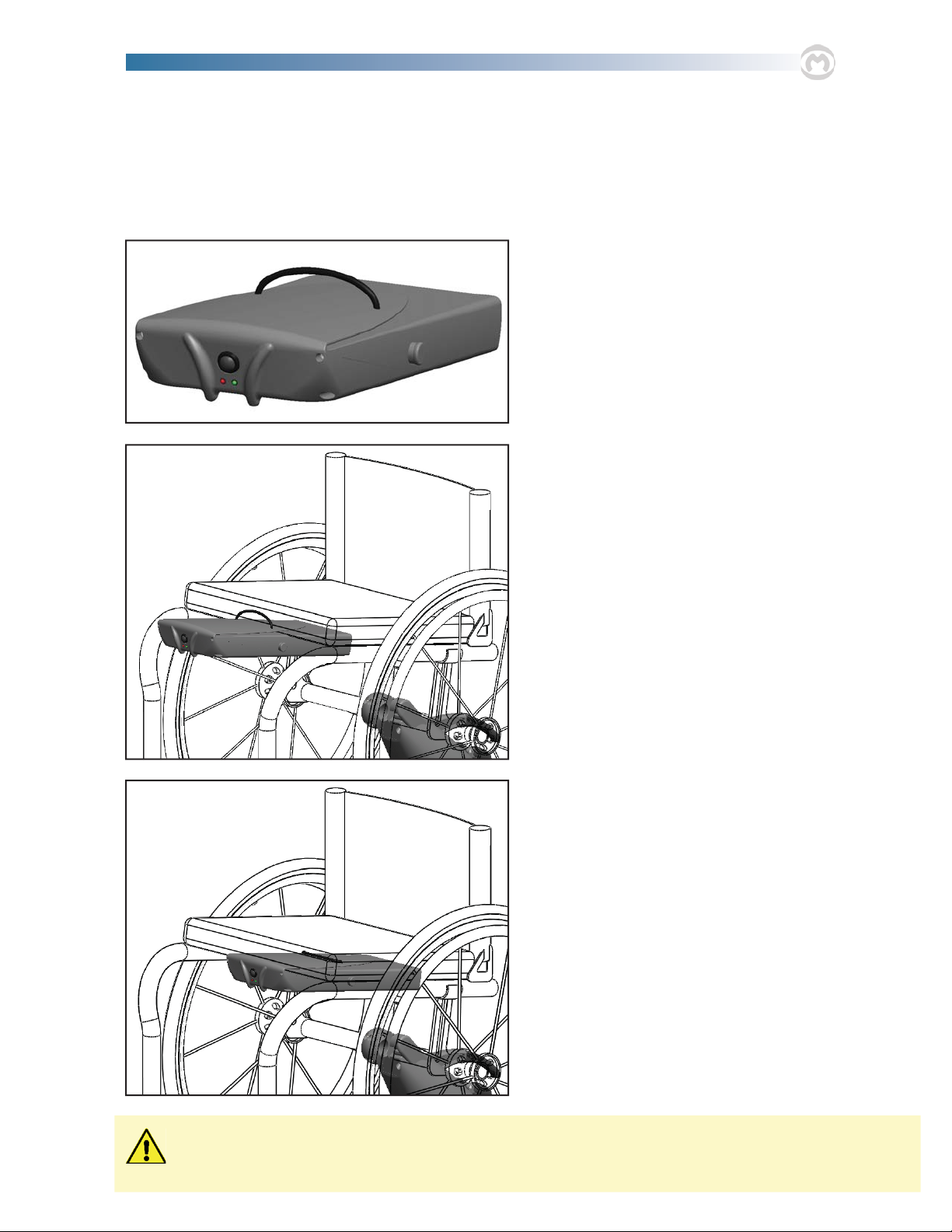
e Battery Unit is equipped with an oversized clip for attachment to the seat of the wheelchair. e unit is made to latch
onto and hang below the upholstered seat. ere is a connector holder in the back of the battery unit to aid in cord manage-
ment when handling the unit, in addition to the handle to assist in carrying/lifting.
1. Pick up the battery unit using the handle presented on
the top of the clip.
2. Lower the battery unit towards the seat of the wheel-
chair. Position the upholstery of the seat between the
bottom surface of the clip and the top surface of the bat-
tery housing. Slide the unit back until the front surface of
the upholstered seat is making contact with the handle.
3. Slide the battery back as far back as possible by pushing
on the front of the unit.
Under-seat clearance must be at least 2 in. for the battery unit to suciently t. Any bulging of the wheelchair
upholstery caused by the battery unit has the potential of causing pressure sores. Cease use of the SmartDrive if
this condition exists.
Tabla de contenidos
Otros manuales de Silla de ruedas de max mobility

max mobility
max mobility SDMX2-DUM Manual de usuario

max mobility
max mobility SmartDrive MX2+ Manual de usuario
max mobility
max mobility Thumb Throttle Button Manual de usuario

max mobility
max mobility SmartDrive MX2+ Manual de usuario

max mobility
max mobility Folder Adaptor Bar Manual de usuario
max mobility
max mobility SmartDrive MX2 Manual de usuario

max mobility
max mobility SmartDrive MX2 Manual de usuario

max mobility
max mobility smartdrive mx1+ Manual de usuario

max mobility
max mobility SmartDrive Manual de usuario