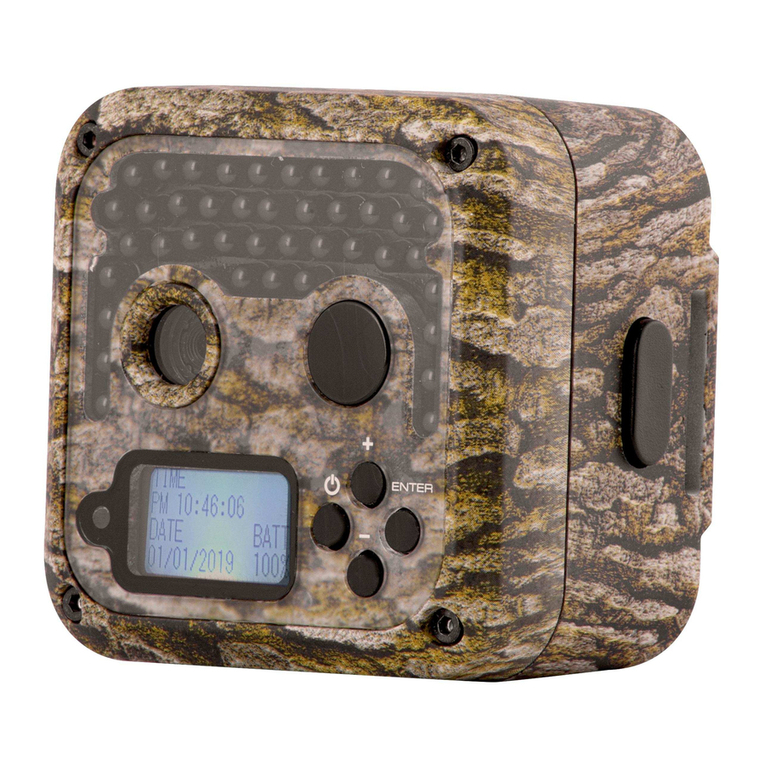
Lynx Ranger BN061 Manual de usuario

RANGER
8MP Digital Trail Camera
Instructions for use
Model BN061 / BN062

- 2 -
1 Introduction ........................................................ 3
2 Specications..................................................... 3
3 Partsidentication.............................................. 5
4 Packagecontents .............................................. 6
5 BatteryandSDcardinstallation......................... 7
6 Screensymbolsandoperationmodes............... 8
6.1Generalmode............................................... 8
6.2Playbackmode ........................................... 10
7 Settingupyourcamera.....................................11
7.1Settingthetimeanddate.............................11
7.2Settingthecapturemode ........................... 12
7.3Settingimagesize ...................................... 12
7.4Settingvideosize....................................... 13
7.5Settingcameradelay ................................. 13
7.6Setvideotime ............................................ 14
7.7SettingtheTVOutsystem ......................... 14
7.8Resettingthecameratodefault ................. 14
8 Usingthecamera............................................. 15
8.1Mountingthecamera ................................. 15
8.2SwitchingOn.............................................. 16
8.3AdjustingPIRsensitivity............................. 16
8.4Testingthecameracoveragearea............. 16
8.5Securingthecamera.................................. 17
8.6Replacingbatteries .................................... 18
8.7Previewinganddeletingimagesorvideos. 18
8.8FormatSDcard.......................................... 18
8.9Lock/Unlockale..................................... 19
8.10Takeaninstantaneousphotoorvideo ..... 19
8.11Cameranoresponserecovery................. 20
9 Viewingimagesandmovies............................. 20
10 Glossary........................................................... 21

- 3 -
1. In t r o d u c t I o n
Trailcamerasrecordtheactivityofwildlifeunattended
bytakingstillimagesorshortvideosofanythingthat
intrudesthepassiveinfrared(PIR)sensorcoverage
area.
RANGERdigitaltrailcameraBN061/BN062is
compact(147mmx94mmx46mm)andwater
resistantandmaybemountedoutdoorsforlong
periodsoftime.Thecameracantakeupto15photos
adayand15photosanightforoneyearonasingle
setof8AAbatteries.
2. Sp e c I f I c a t I o n S
ProductName RANGERTrailCamera
ModelNumber BN061/BN062
ImageSensorType 1/2.5InchCMOS
EffectivePixels 5.0-Megapixelinterpolateto8.0MP
EffectiveFocalLength 7.45mm
LensAperture f/3.0
Cameraeldofview 55Degrees
IRFilter Fullyautomatic
Display 6.5mmTFTLCD
PIRsensor Yes
PIRdistanceadjustor Yes(2m~20m)
PIRsensoreldofview 42Degrees
TriggerSpeed ±1second

- 4 -
NumberofIRLEDs 30
Maximumillumination
distancefornightshots
15metres
Imagestorage 1xSDCardupto32GBcapacity
LowBatteryIndicator Yes
Timedelaybetween
shots
5secondsto60minutes.
Default1minute
Imageresolution 8.0MP or 5.0MP
MultipleframesperPIR
sensortriggerevent
1to99stillimagesor
15to60secondsofAVIvideo
Videoresolution 640x480pixels@30fpsor
HD1280x720@30fps
Fileformats JPEGforstillimages
AVIforvideos
Date&timeimprint Yes
Moonphaseimprint Yes
Temperatureimprint Yes
Exposure Auto
Whitebalance Auto
Menulanguage English
TVoutput Yes.NTSCandPAL
Powersupply 8xAAbatteries
Batterylife 230daysassumingaverage
15day&15nightpicturesperday
Tripodsocket Yes
Waterresistant Yes

- 5 -
3. pa r t S Id e n t I f I c a t I o n

- 6 -
4. pa c k a g e co n t e n t S
1xDigitalscoutingcamera
1xUserManual(thisdocument)
1xUSBcable
1xMountingKit
1xTVOUTcable

- 7 -
5. Ba t t e r y a n d Sd ca r d In S t a l l a t I o n
NOTE: Make sure camera is OFF whenever installing
or removing batteries.
▲ Use8xAAAlkalinebatteries.
▲ Whenreplacingbatteriesmakesurethebattery
voltageandpolarity(+/-)arecorrect.Incorrect
voltageorpolaritywilldamagethecamera.
Me M o r y
Theexpandablemediacardslotiscapableof
acceptingSDcardswithcapacityupto32GB(sold
separately).
In S e r t I n g Sd c a r d
NOTE: Make sure camera is OFF whenever installing
or removing the memory card.
InserttheSDmemorycardintotheSDcardslot•
withthecoppercontactsfacingupasshownon
thestickerlocatedatthesideofthehousing.
ToremovetheSDmemorycard,depressitsoit•
popsoutandpullgently.
▲ SDcardsmustbecleanandcontainnodata
orimagesfromothersources.Ifyouareusing
theSDcardfromotherdevices,makesureyou
formattheSDcardpriortouseinthecamera.
Newcardsmaybeusedstraightfromthe
package.

- 8 -
6. Sc r e e n Sy M B o l S a n d op e r a t I o n Mo d e S
Ifyouswitchonthecamerabutdon’tpressanyof
thebuttonsforabouttensecondsitwillautomatically
entersleepmodeandthescreenwillgoblank.Press
theWake/Sleepbuttontoenterorexitsleepmode.
6.1 ge n e r a l Mo d e
TwomodesofoperationareselectableviatheMODE
button(see3.Partsidentication).Uponactivation
thecameradefaultstoGeneral Mode,whichlooks
likethis:

- 9 -
PressingOKinGeneral Modewillbringupthismenu:
ge n e r a l Mo d e Me n u It e M S
Dateandtime mm/dd/yyyyhh:mm
Capturemode
Single
Multiple(from2to99)
Video
Imagesize 5.0MP(2560x1920)
8.0MP(3264x2448)
Videosize 640x480(VGA)
1280x720(HD)
Camera
standbydelay
5secondsto60minutes
Videotime 15to60seconds
TVOUTsignal NTSC60Hz
PAL50Hz
Resettofactory
default
Yes
No
Exit

- 10 -
PresstheMODEbuttontoswitchbetweenPlayback
andGeneralmodes.
6.2 pl a y B a c k Mo d e
Use Playback Modetoreviewphotosandvideos,to
deletepicturesorformattheSDcard.Playback Mode
lookslikethis:
PressingOKinPlayback Modewillbringupthismenu
thatlookslikethis:
Este manual sirve para los siguientes modelos
1
Tabla de contenidos