
Lycaon Board Lycaon GR Manual de usuario
Please read all the information
before you hit the road with your board.
User Manual

LYCAON BOARD
Read Before Riding.......................................................................................1
Warnings........................................................................................................2
Board Diagram...............................................................................................3
Remote Diagram............................................................................................4
Charging the Board and the Remote..............................................................5
Connecting (Pre-paired with Board)..............................................................5
Pre-Ride Checklist.........................................................................................6
Riding Stance.................................................................................................7
Riding the LycaonBoard................................................................................8
Remote Warning Instruction.........................................................................10
Remote Control Specification.......................................................................12
Technical Parameters of Lycaon GR............................................................12
Packing List...................................................................................................15
Proper Use of the Board................................................................................16
Limited Warranty..........................................................................................16
For all Return and Warranty Shipping..........................................................16
Contents

LYCAON BOARD
1
Always wear a helmet. Other safety gear such as gloves, pads, closed-toe shoes,
long sleeves, and long pants are strongly advised.
Be aware of other cars and vehicles, as they can kill. Always ride defensively
when in the presence of other vehicles. Be aware of local laws that govern proper
usage of your board on public roads, bike paths, sidewalks, or other places you
may ride.
Braking downhill on a full battery can cause a board shutdown. Internal circuitry
will allow for some braking on a downhill at full charge, but this braking is
limited. To avoid this be sure to ride on flats or uphill to drain the battery before
attempting a downhill after a full charge.
Your board can lose power and brakes at any moment due to radio interference, a
dead remote battery, downhill overcharging on a full battery, and other factors.
Only ride your board at speeds and on hills where you'd be comfortable without
power and brakes.
Acceleration in Pro mode is rapid and may be dangerous.
Hills and high speed can be very dangerous. Be sure to start slow and remain
extra careful in these conditions, even if you are an experienced rider.
Read Before Riding

LYCAON BOARD
2
Always wear a helmet when riding.
Never ride in the water, over wet surfaces, in the rain, on slippery or uneven
surfaces, steep hills, or in traffic. Avoid cracks, train tracks, gravel, rocks, or any
obstacles that could cause loss of traction. Avoid riding at night, areas with poor
visibility, and narrow spaces for any safety risk.
When you ride a LycaonBoard Electric Skateboard you risk death or serious
injury from loss of control, collisions, and falls. You must read and follow all
warnings and instructions in this manual.
Do not ride the LycaonBoard Electric Skateboard in environments, on inclines, or
at speeds where you would not be safely in control of an unpowered skateboard.
In the event of wireless interference or battery fault, you may need to rely on
skating techniques like foot braking or sliding to a stop. Riding in wet conditions
or through puddles may damage the board's electronics and cause the board to
lose power or stop suddenly, causing a risk of loss of control or falls. Damage to
the board due to water exposure is not covered under warranty. Keep your
fingers, hair, and clothing away from belts, motors, wheels and all moving parts.
Do not open or tamper with electronics housings.
Electric shock is possible and this also voids the warranty.
ONLY CHARGE USING A LYCAONBOARD CHARGER. OTHER
CHARGERS MAY POSE RISK OF FIRE.
Warnings
LYCAON BOARD
33
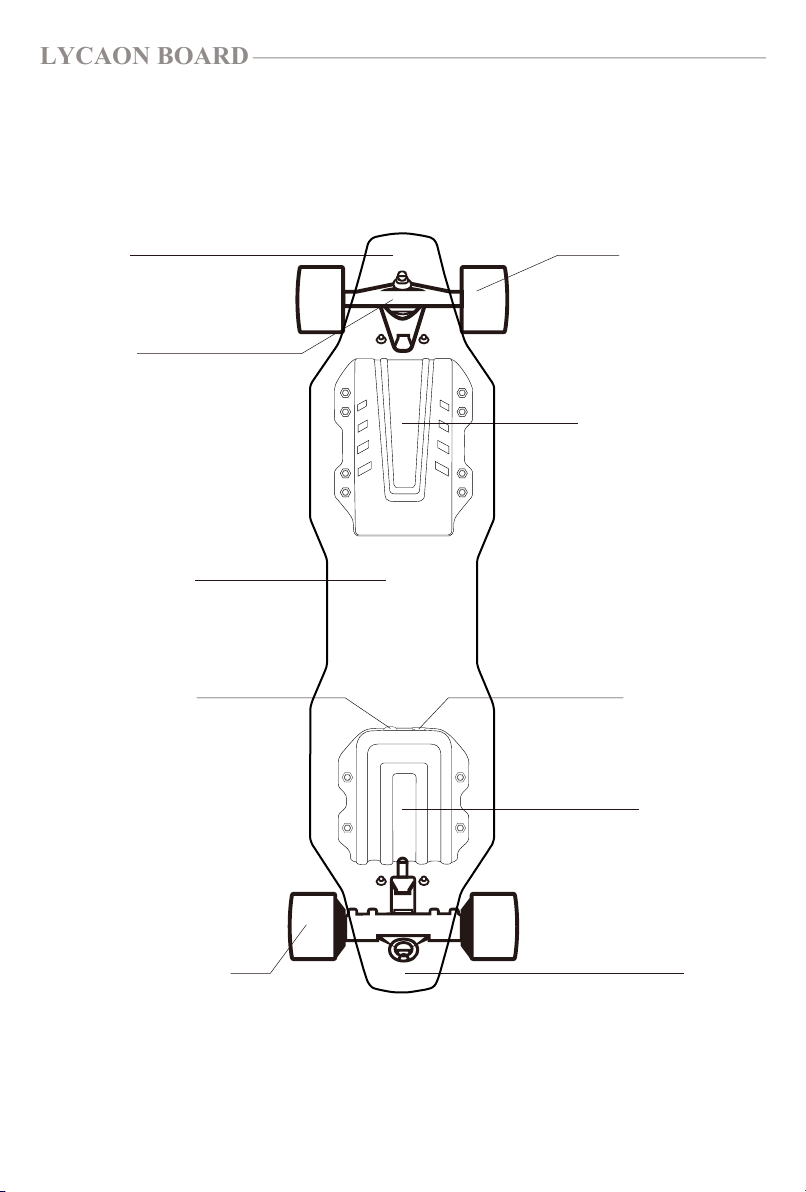
Board Diagram
Nose
Truck
Front Wheel
Maple Deck
Hub Motor Wheel
Power Button
Battery Enclosure
Charge Port
Heat Sink
Tail
LYCAON BOARD
4
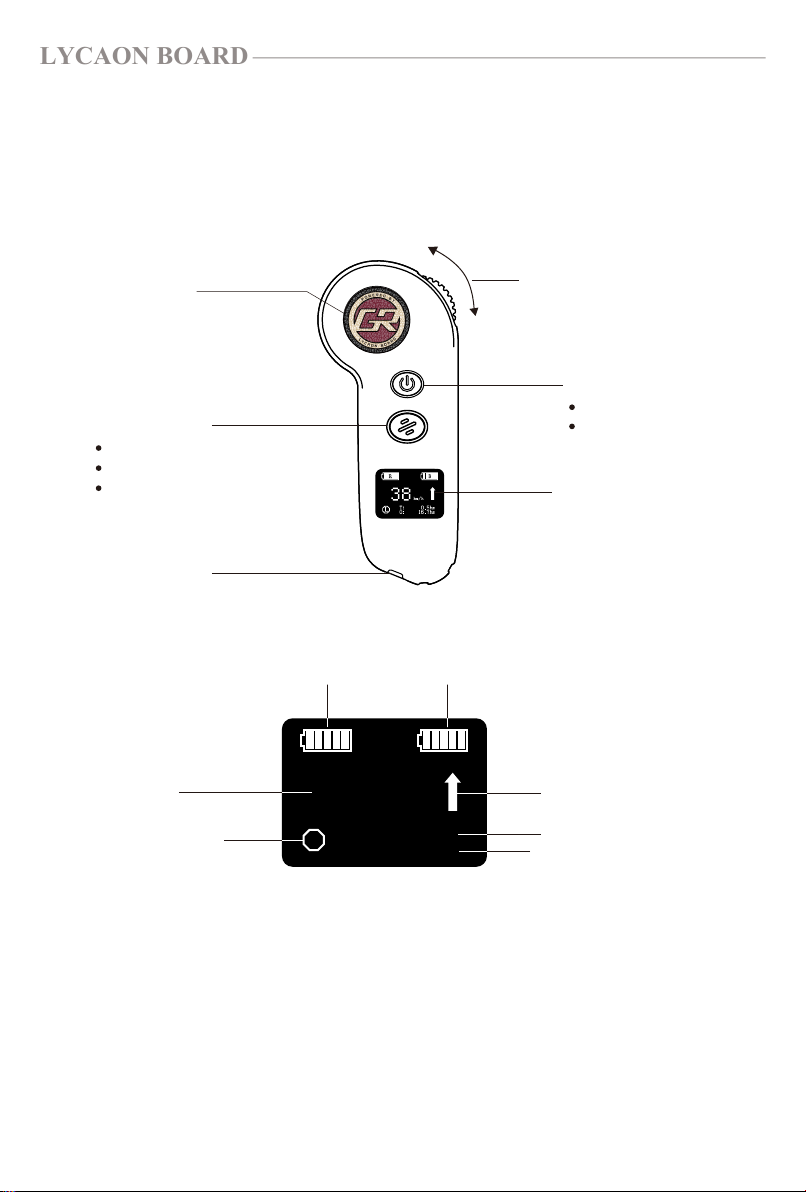
Remote Diagram
Power Button
Display Screen
Switch Button
Model Logo
Charge Port
Press to switch speed mode
Double-press to switch marching direction
Select options after paring
Note: To switch speed mode, you’ll have to get the
throttle trigger in neutral position(zero throttle).
Hold to Turn on/off
Press to confirm options
38
L
km/h
0.5hm
16.7hm
T:
0:
R B
Brake Intensity changes with speed modes
Speed Mode: Low (L)
①
②
Medium (M)
High (H)
Pro Mode (P)
Battery Status of The Remote/ Board
Back/Forth
Speed
Speed Mode Cumulate Mileage
Single Mileage
Accelerate
Thumb Throttle
Brake

LYCAON BOARD
5
Connecting (Pre-paired with Board)
①Charging the board: Connect the charger to the skateboard, it will enter into
charging state automatically with the red indicator light on.
When properly charging the light on the charger will turn red. When charging is
complete the light will turn green.
②Charging the remote: When charging the remote control, the remote vibrates
shortly once. The screen displays the charging progress in real time.
Note: Either the remote or the board could not be operated or would not work in
the charging state.
1. Keep the remote and the board powered off.
2. Hold the power button of the board and that of the remote at the same time for
about 5 seconds.
3. The remote control will display a successful pairing prompt with two short
vibration and one long vibration when pairing is successful.
4. Speed, mileage unit and wheels diameter shall be selected when the remote got
paired with the board. Press Switch Button to switch options, and press
Power Button to confirm. Re-pairing remote allows to reset all the options.
5. After wheels diameter option is selected, the remote will enter into main
function interface.
Charging the Board and the Remote
LYCAON BOARD
6
Pre-Ride Checklist
Always wear a helmet. Other protective equipment such as gloves, pads,
closed-toe shoes, long sleeves, and long pants are recommended.
Ride in an open, flat area without foot or car traffic for your first rides. Also
make sure the speed mode and marching direction are set to your respon-
sive way.
Read through the warnings on the first two pages of this manual.
Avoid environments that can cause loss of control including loose gravel,
water, hills, cracks, train tracks, traffic, low light, or poor visibility.
Regularly check and tighten all hardware.
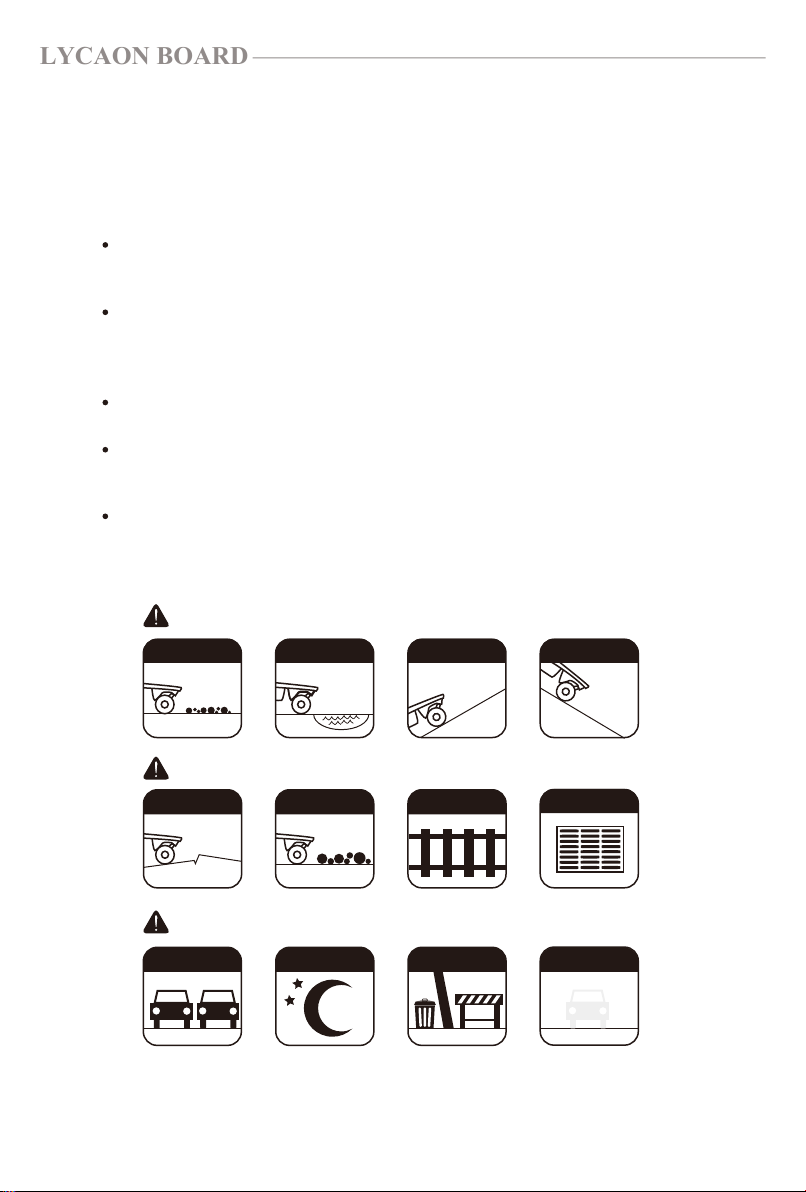
AVOID THESE THINGS THAT CAN CAUSE SLIPPING:
AVOID THESE THINGS THAT CAN CAUSE TRIPPING:
AVOID THESE THINGS THAT CAN CAUSE COLLISIONS:
GRAVEL
CRACKS
WATER UPHILL DOWNHILL
LARGER ROCKS TRACKS
TRAFFIC NIGHT TIME OBSTACLES POOR VISIBILITY
GRATES/DRAINS
LYCAON BOARD
7
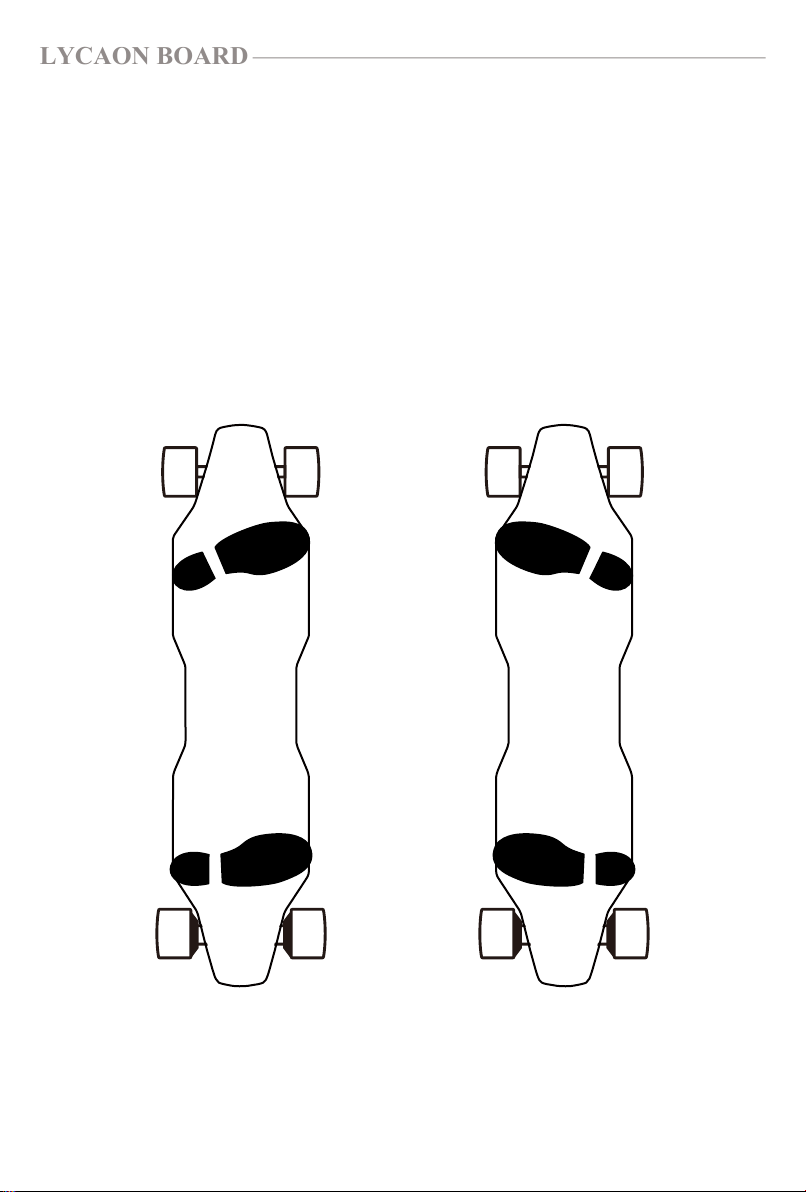
Riding "Regular" means you stand with your left foot forward, towards the nose
of the board. Riding "Goofy" means you stand with your right foot forward. How
do you know which one you are? Think about a tug-of-war - whichever foot you
would put forward when competing in a tug of war to brace yourself, that is the
foot you should put forward when riding. Test and see what works best for you.
Riding Stance
Regular Stance Goofy Stance
LYCAON BOARD
8
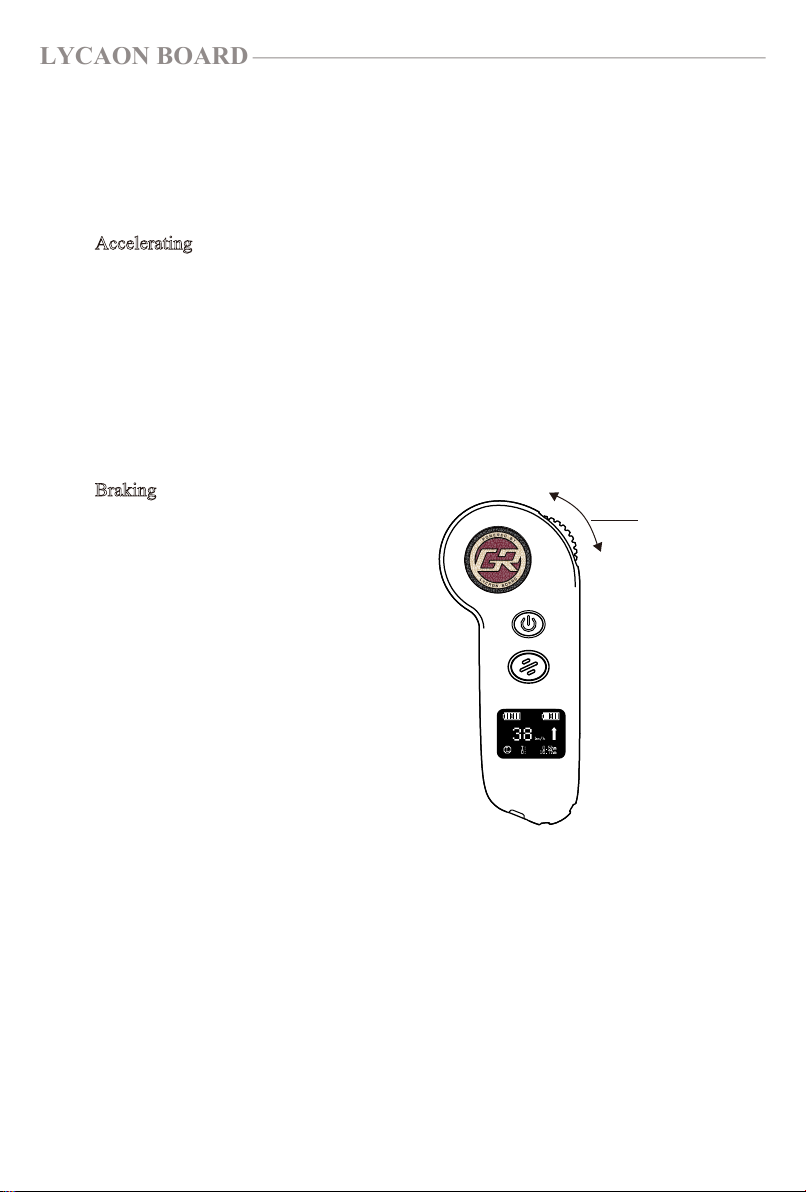
Accelerating
First, bend your knees and shift your weight forward towards the board's nose.
Gently extend your thumb to push the Thumb Throttle away from you until the
motors begin to engage. The further you roll the Thumb Throttle forward, the
faster Lycaon Board will go. At any time you can release the ThumbThrottle to
coast or roll it backwards to brake.
Braking
When you are ready to brake make sure
to bend your knees and shift your
weight to the rear of the deck. Gently
roll the Thumb Throttle downwards
until you feel the board's motors begin
to actively slow the board down. For
additional braking power roll the
Thumb Throttle downward at a faster
rate, but be sure your stance is prepared
so you don't lose your balance and have
to step off the board.
Riding the LycaonBoard
Accelerate
Throttle
Brake
Tabla de contenidos


