
Logiware go1984 Manual de usuario

User manual
Alfred-Mozer-Str. 42
D-48527 Nordhorn
Germany
Telephone (+49)(0)5921 7139925
Telefax (+49)(0)5921 7139929
go1984

go1984
http://www.go1984.com
Alfred-Mozer-Str. 42
D-48527 Nordhorn
Germany
Telephone (+49)(0)5921 7139925
Telefax (+49)(0)5921 7139929
http://www.logiware.de

Contents
go1984 User manual
© 2000-2009 logiware gmbh
Table of Contents
...................................................................................................................................11Introduction
...................................................................................................................................22Editions
...................................................................................................................................33Installation
...................................................................................................................................84Launching the program
...................................................................................................................................105 Entering the license code
...................................................................................................................................136 Basic setup
......................................................................................................................................................... 14Adding a camera
.................................................................................................................................................. 14IP camera
.................................................................................................................................................. 18PTZ camera
.................................................................................................................................................. 23Webcam (USB)
.................................................................................................................................................. 24Capture card
......................................................................................................................................................... 25Recording .................................................................................................................................................. 28Calculating memory requirements
.................................................................................................................................................. 29Memory management
.................................................................................................................................................. 30Scene generation
.................................................................................................................................................. 31Pre-/Post alarm
.................................................................................................................................................. 32Access time period
.................................................................................................................................................. 33Export
......................................................................................................................................................... 34Motion detection
......................................................................................................................................................... 39Http event
......................................................................................................................................................... 45Notification .................................................................................................................................................. 46Sound .................................................................................................................................................. 47E-mail .................................................................................................................................................. 48FTP .................................................................................................................................................. 50LAN-Broadcast
.................................................................................................................................................. 54External program
.................................................................................................................................................. 55ISDN......................................................................................................................................................... 56Scheduler
...................................................................................................................................607 User management
...................................................................................................................................628Webserver
......................................................................................................................................................... 63Configuration
......................................................................................................................................................... 65Interface ......................................................................................................................................................... 68iPhone Client
......................................................................................................................................................... 70J2ME Client
......................................................................................................................................................... 73DynDNS ......................................................................................................................................................... 76Clustermode
...................................................................................................................................799 Image Center
...................................................................................................................................8310 Additional settings
......................................................................................................................................................... 83Camera ......................................................................................................................................................... 86Startup settings
......................................................................................................................................................... 87HTTP Proxy
......................................................................................................................................................... 88SMTP server configuration
......................................................................................................................................................... 90Translation
...................................................................................................................................9111 Event management
...................................................................................................................................9512 Appendix
......................................................................................................................................................... 95POP3/SMTP-Server
...................................................................................................................................9613 Masthead

1go1984 User manual Introduction
© 2000-2009 logiware gmbh
1Introduction
go1984 is software designed for professional and hassle-free monitoring by closed circuit TV (CCTV). It
sets a new benchmark in the industry: it is simple to use, packed with features and available at an
affordable price.
go1984 features everything you'll ever need to carry out professional CCTV surveillance, including:
·Live monitoring
·Recording (timer-controlled, motion-triggered or permanent)
·Control of PTZ cameras
·Notification options: acoustic, by e-mail or by voice call via ISDN
·Remote access via network or the Internet
·Calendar functions
The software works as a so-called "hybrid system", which means it is capable of processing digital
network cameras as well as analog video sources via video servers or capture cards. Companies with
analog video technology can use the software to assist the "smart transition" to the digital world while
integrating their existing hardware. go1984 thus makes an important contribution to protecting your
investments.
go1984 supports the hardware of many well-known manufacturers such as, for instance: Axis, Sony,
JVC, Panasonic, Mobotix, Logitech, Intellinet and many others.
The following figure illustrates the connectivity options provided by go1984:

2
Editions
© 2000-2009 logiware gmbh
2Editions
go1984 is available in various editions. The following figure highlights the differences.

3go1984 User manual Installation
© 2000-2009 logiware gmbh
3 Installation
Installing go1984 is a matter of minutes even for users unfamiliar with the program. An unregistered
version of the software can be tested for 30 days with all its functions. An uninstaller is included in the
download so that you can remove go1984 immediately from your computer if you are not happy with
the program.
To start the installation, click on the following icon:
First choose the language you want for the installation process.
You will now be taken step by step through the installation process for go1984. You can accept the
default settings and continue in the installation process by clicking on the "Next >" button where
applicable.

4
Installation
© 2000-2009 logiware gmbh
If you prefer to install to a different directory or hard-drive, please select the corresponding option in
the following dialog.

6
Installation
© 2000-2009 logiware gmbh
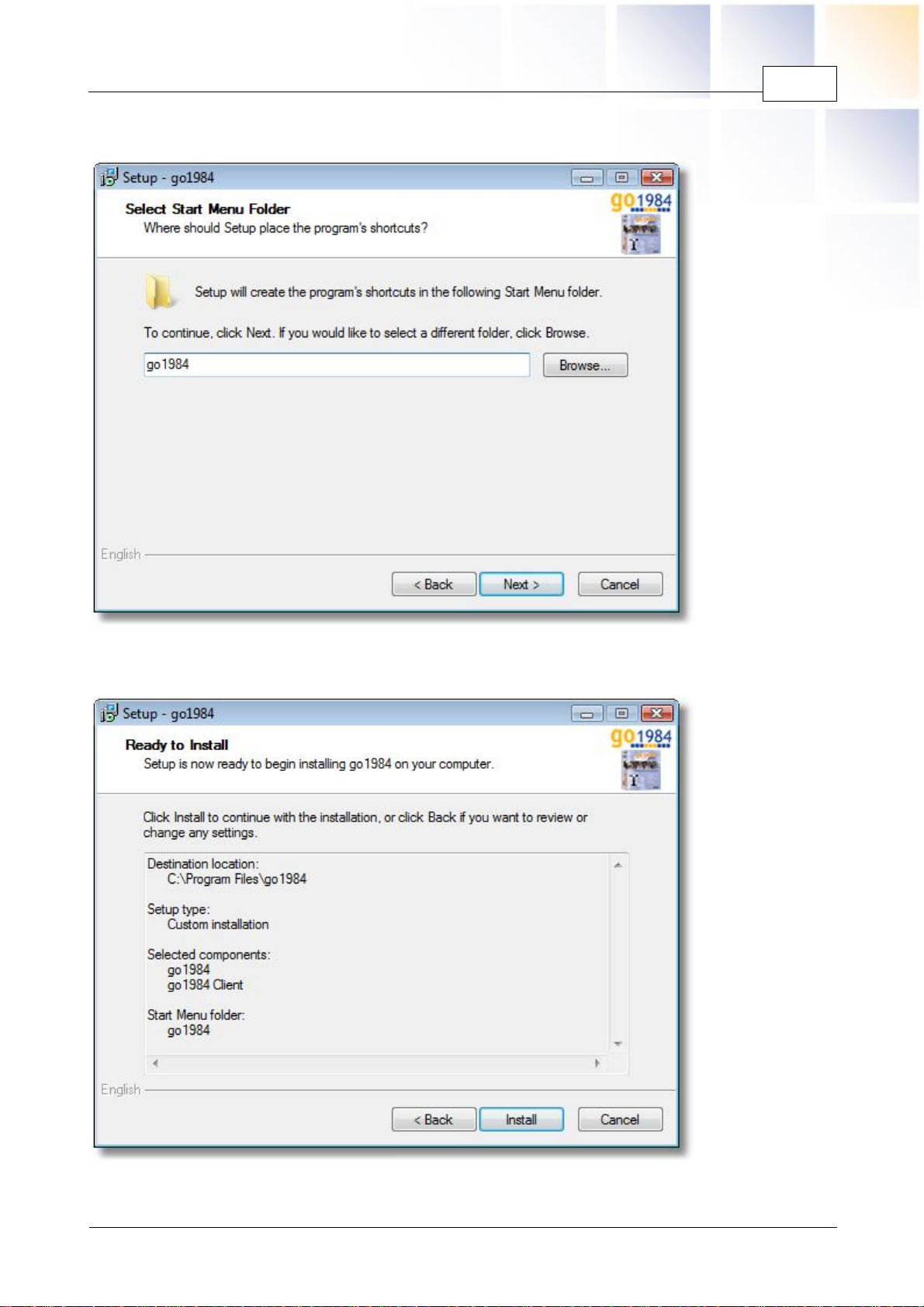
The installation routine will automatically create an entry labeled go1984 in your Windows start menu. If
you prefer a different name, you can change it at this point.
All settings needed for the installation processes are now available. By clicking on the "Install" button,
the installation will be completed and the required files will be copied to your hard-drive.

7go1984 User manual Installation
© 2000-2009 logiware gmbh
The installation of go1984 has now been completed. The installation routine is closed when you click on
the "Finish" button. You can choose to have go1984 launched directly afterwards.
In the Enterprise edition go1984 can be installed as a service. To do this, you start the program on a
one-off basis via the command line using the parameter "-install".
A message will appear indicating that the service has been successfully installed.
Otros manuales para go1984
1
Tabla de contenidos
Manuales populares de Software de otras marcas


PS Audio
PS Audio PowerPlay Manual del propietario

Brady
Brady LOCKOUT PRO 3.0 Manual de servicio

Avaya
Avaya Interaction Center Manual de usuario

Texas Instruments
Texas Instruments TI-83 Plus Silver Edition Manual

Novell
Novell GROUPWISE 8 - INTERNET AGENT Manual de usuario

Oracle
Oracle Application 9i Manual de usuario

Acer
Acer RDM Manual de usuario

Canon
Canon Vixia HF21 Manual de usuario

Canon
Canon ZR950 Manual de usuario

Samsung
Samsung Auto Backup Manual de usuario

Polycom
Polycom Vortex EF2201 Instrucciones de instalación y funcionamiento

Brocade Communications Systems
Brocade Communications Systems Brocade 8/12c Manual de usuario