LG PREMTB10U Instrucciones de funcionamiento originales

Installation & Operation
LG Programmable Thermostat
www.lg.com
P/NO : MFL62129209
Type : LG Programmable Thermostat
Models : PREMTB10U
• Please read this Installation & Operation manual completely before
installing the product.
• Installation work must be performed in accordance with the national
wiring standards and local code by authorized personnel only.
• Please retain this manual for future reference after reading it thor-
oughly.
ENGLISH FRANCE

2TIPS FOR SAVING ENERGY
ENGLISH
TIPS FOR SAVING ENERGY
Here are some tips that will help you minimize the power consumption when you use the air
conditioner. You can use your air conditioner more efficiently by referring to the instructions
below:
• Do not cool excessively indoors. This may be harmful for your health and may consume more
electricity.
• Block sunlight with blinds or curtains while you are operating the air conditioner.
• Keep doors or windows closed tightly while you are operating the air conditioner.
• Adjust the direction of the air flow vertically or horizontally to circulate indoor air.
• Speed up the fan to cool or warm indoor air quickly, in a short period of time.
• Open windows regularly for ventilation as the indoor air quality may deteriorate if the air con-
ditioner is used for many hours.
• Clean the air filter once every 2 weeks. Dust and impurities collected in the air filter may block
the air flow or weaken the cooling / dehumidifying functions.
For your records
Staple your receipt to this page in case you need it to prove the date of purchase or for warranty
purposes. Write the model number and the serial number here:
Model number :
Serial number :
You can find them on a label on the side of each unit.
Dealer’s name :
Date of purchase :

IMPORTANT SAFETY INSTRUCTIONS
READ ALL INSTRUCTIONS BEFORE USING THE APPLIANCE.
Always comply with the following precautions to avoid dangerous situations and ensure peak
performance of your product.
WARNING
It can result in serious injury or death when the directions are ignored.
CAUTION
It can result in minor injury or product damage when the directions are ignored.
WARNING
• Installation or repairs made by unqualified persons can result in hazards to you and others.
• The information contained in the manual is intended for use by a qualified service technician
familiar with safety procedures and equipped with the proper tools and test instruments.
• Failure to carefully read and follow all instructions in this manual can result in equipment mal-
function, property damage, personal injury and/or death.
Installation
• For electrical work, contact the dealer, seller, a qualified electrician, or an authorized service
Center. Do not disassemble or repair the product. There is risk of fire, electric shock, explo-
sion, equipment malfunction, or injury.
• Request to the service center or installation specialty store when reinstalling the installed
product. There is risk of fire, electric shock, explosion, equipment malfunction, or injury.
• Do not disassemble, fix, and modify products randomly. There is risk of fire, electric shock,
explosion, equipment malfunction, or injury.
• The product shall be installed according to the national standards and local code.
• Apply totally enclosed noncombustible conduit in case of local building code requiring plenum.
In-use
• Do not place flammable stuffs close to the product. There is risk of fire, electric shock, explo-
sion, equipment malfunction or injury.
• Do not allow water to run into the product. There is risk of fire, electric shock, explosion, equipment
malfunction or injury.
• Do not give shock to the product.There is risk of fire, electric shock, explosion, equipment malfunc-
tion or injury.
• Request to the dealer, seller, a qualified electrician, or an authorized Service Center when the prod-
uct becomes wet. There is risk of fire, electric shock, explosion, equipment malfunction, or injury.
!
!
!
3
ENGLISH

IMPORTANT SAFETY INSTRUCTIONS
4
ENGLISH
• Do not give shock using sharp and pointed objectsThere is risk of fire, electric shock, explosion,
equipment malfunction or injury.
• Do not touch or pull the lead wire with wet hands. There is risk of product breakdown or electric
shock.
CAUTION
In-use
• Do not clean using powerful detergents like solvent but use soft cloths. There is risk of fire, electric
shock, explosion, equipment malfunction or deformation.
• Do not press the screen using powerful pressure. There is risk of product break-down or malfunc-
tion.
!

TABLE OF CONTENTS
2TIPS FOR SAVING EN-
ERGY
3IMPORTANT SAFETY IN-
STRUCTIONS
6PART DESCRIPTION
11 OPERATION INSTRUC-
TION
11 Standard Operation - Cooling Mode
12 Standard Operation - Power Cooling
13 Standard Operation - Heating Mode
14 Standard Operation - Dehumidification
Mode
15 Standard Operation - Fan Mode
16 Standard Operation - Auto Operation
Mode
17 Standard Operation - Timed Override
18 Standard Operation - Set back
19 Standard Operation – Temperature
Setting
20 Standard Operation - Airflow Setting
21 Sub Function - Plasma Purification
22 Sub Function - Energy-Saving Cooling
Operation
23 Sub Function - Automatic Drying
24 Sub Function - Electric Heater
25 Sub Function - Humidifier
26 Sub Function - Fan Auto
27 Function Setting - Vane Angle Control
28 Function Setting - Elevation Grill
29 Function Setting - Child Lock
30 Function Setting - Minimum Difference
between heating and cooling Set
points
31 Function setting - Changing Current
Time
33 Function Setting - Override set time
34 Function Setting - Set back tempera-
ture
35 Function Setting - Filter Sign Clear
36 Programming - Simple Reservation
37 Programming - Sleep Reservation
38 Programming - Weekly Reservation
45 Programming - Weekly Reservation
Schedule Copy/Paste
46 Programming - Holiday Reservation
47 Programming - Delete All Reservation
48 Different mode drive
49 Ventilation Product - lnterlocked Air
conditioner and Ventilator
50 Ventilation Product - lnterlocked oper-
ation with general Ventilator
51 Ventilation Product Function Settings
51 Ventilation Product - Ventilator single
operation
52 Ventilation Product Reservations Set-
tings
53 Troubleshooting Mode Self Diagnosisr
54 Checkups before reporting breakdown
55 INSTALLATION METHOD
58 Thermostat installation
59 GROUP CONTROL
60 INSTALLATION IN-
STRUCTION
60 Installer Setting - How to enter installer
setting mode
63 Installer Setting - Test Run Mode
64 Installer Setting - Setting Address of
Central Control
65 Installer Setting - E.S.P. Function
67 Installer Setting - Thermistor
68 Installer Setting - Ceiling Height Selec-
tion
69 Installer Setting - Static Pressure Set-
ting
70 Installer Setting - Override
Master/Slave Setting
71 Installer Setting - Dry Contact Mode
Setting
72 Installer Setting - Fahrenheit / Celsius
Switching
73 Installer Setting - Emergency Heater
Setting
75 Installer Setting - Option Function
Setting
76 Installer Setting - Setting temperature
range
5
TABLE OF CONTENTS
ENGLISH

6PART DESCRIPTION
ENGLISH
Accessory
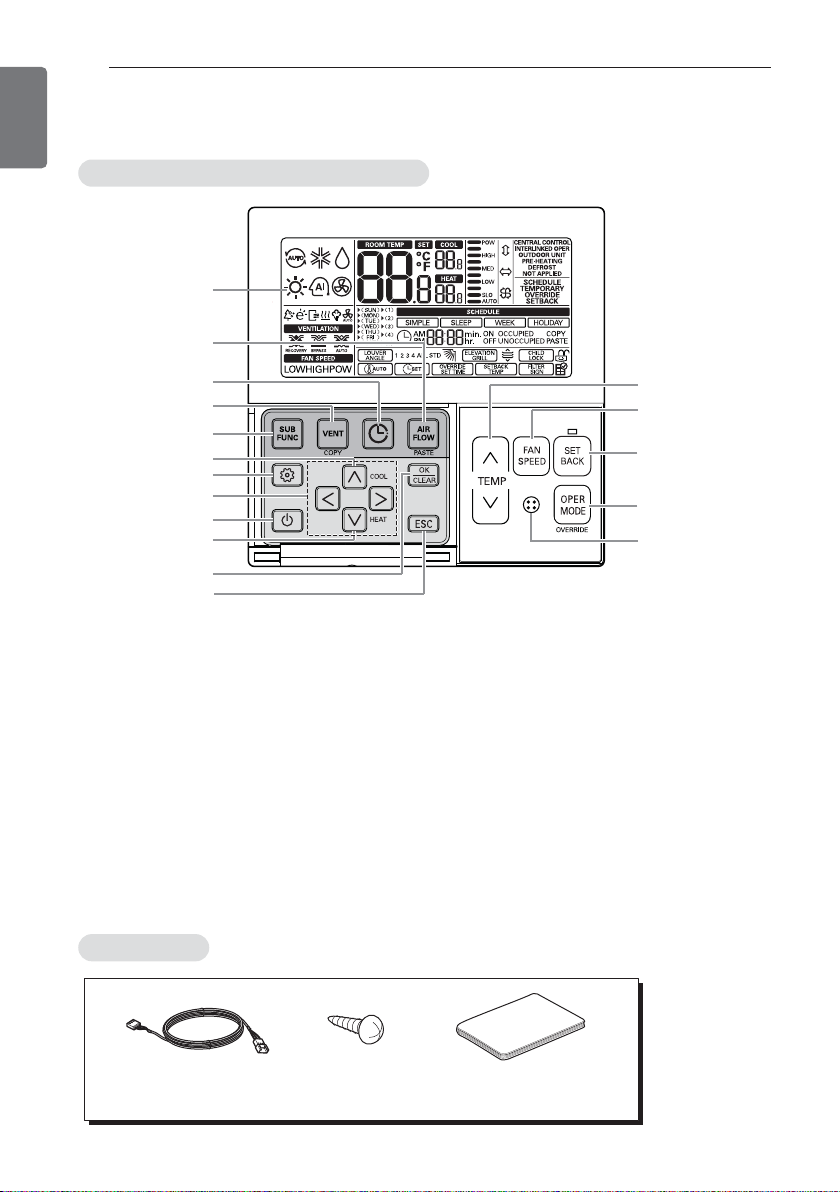
Name and Function of Thermostat
PART DESCRIPTION
1Operation indication screen
2Set temperature button
3Fan Speed button
4Set back button
5Operation mode selection button
6Wireless Thermostat receiver
- Some product don’t receive the wireless
signals.
7Sub function button
8Ventilation button
9Reservation button
10 Air flow button
11 Cooling desired temperature
12 Function setting button
13 Up, Down, Left, Right button
14 On/Off button
15 Heating desired temperature
16 Setting/Cancel button
17 Exit button
1
7
8
9
10
11
13
12
14
15
16
17
2
3
4
5
6
CSome functions may not be operated and displayed depending on the product type.
Connection Cable
(1EA, 32ft (10m))
Screw
(4 EA)
Installation & Operation
Manual

PART DESCRIPTION 7
ENGLISH
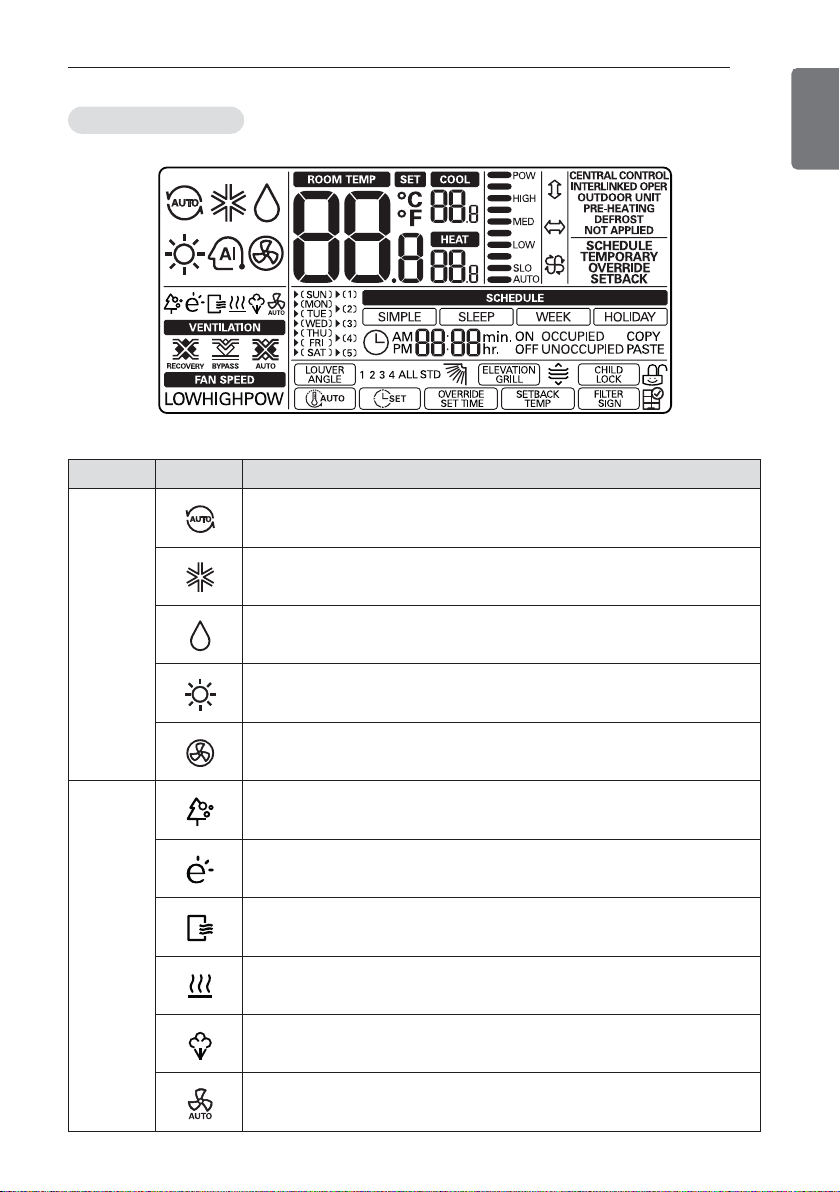
Icon description
Function Icon Description
Operation
mode
A
Auto mode
- Product is change operating mode cooling or heating automatically.
Cooling mode
- Product is running cooling mode.
Dehumidification Mode
- Product is running dehumidifying mode.
H
Heating mode
- Product is running heating mode.
Fan only operating mode
- Product is running just fan operating.
Sub
function
Plasma Purification
- Product is operating Plasma Purification filter.
Energy-Saving Cooling Operation
- Product is running cooling mode in limited set temperature for energy
saving.
Automatic Drying
- Indoor unit is operating automatic drying.
Electric Heater
- Product is operating electric heater in heating mode.
H
Humidifier
- Product is operating Humidifier.
F
Fan Auto function
- Indoor unit enable fan auto function.
- Indoor unit doesn’t operate fan when compressor off

8PART DESCRIPTION
ENGLISH
Function Icon Description
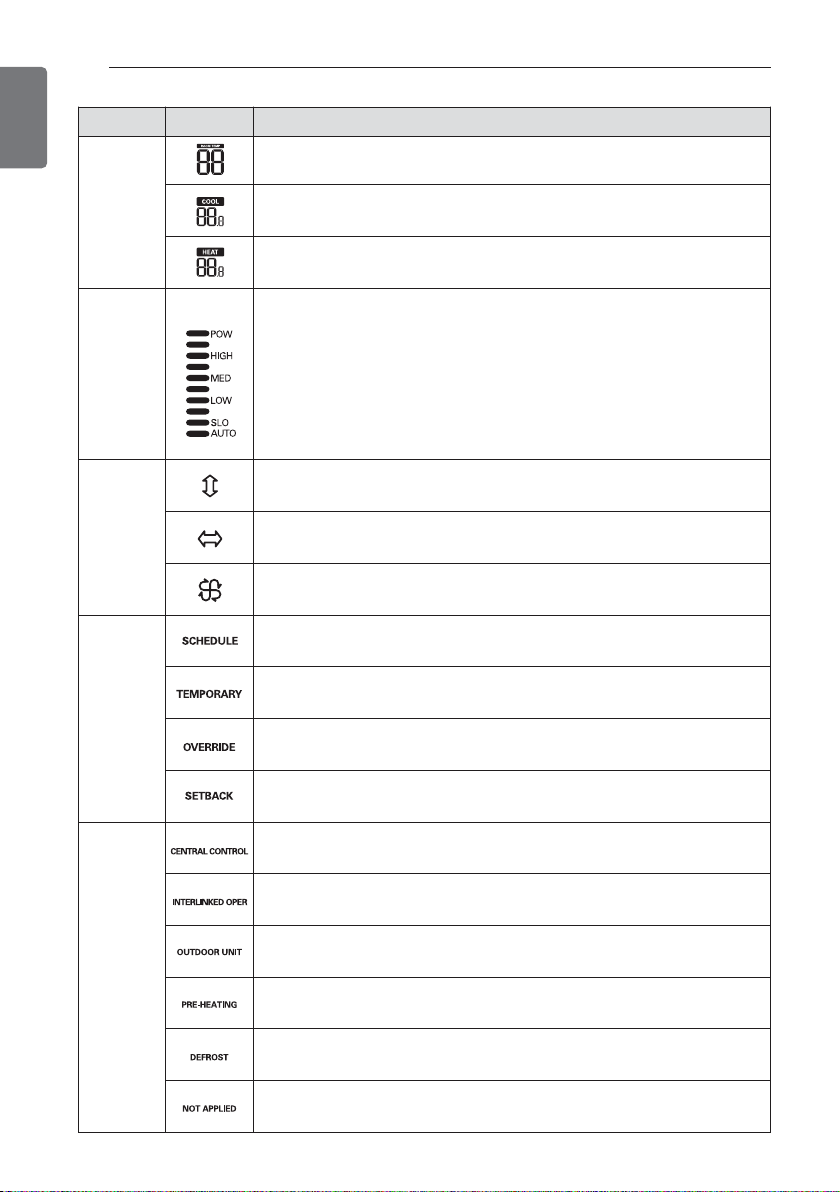
Tempera-
ture
Current temperature
- Display current room temperature.
Cooling set point temperature
- temperature set point for cooling operation.
Heating set point temperature
- temperature set point for heating oper-
ation.
Fan Speed
Display current wind strength.
POW :
wind strength - power
HIGH :
wind strength - high
MED :
wind strength - medium
LOW :
wind strength - low
SLO :
wind strength - weak
AUTO :
wind strength - automatic
Air Flow
Louver up-down swing
- Indoor unit louver operate up-down swing.
Louver left-right swing
- Indoor unit louver operate left-right swing.
Louver Swirl swing
- Indoor unit louver operate paired opened cross swing.
Controller
mode
Schedule operation mode(Simple / sleep/ week / holiday)
- Controller operate in accordance with schedule reservation
Temporary mode
- Setting mode change temporarily
Schedule override mode
- Occupied/unoccupied state change
Set back operation mode
- Controller operate set back operation.
Product
state
monitoring
Command received from central controller or outdoor unit
Slave indoor unit on a heat pump system. Prevents mode change not
compatible with current outdoor unit mode.
Outdoor unit running
Indoor unit pre-heating operation running
Defrost operation running
Function not applied

PART DESCRIPTION 9
ENGLISH
Function Icon Description
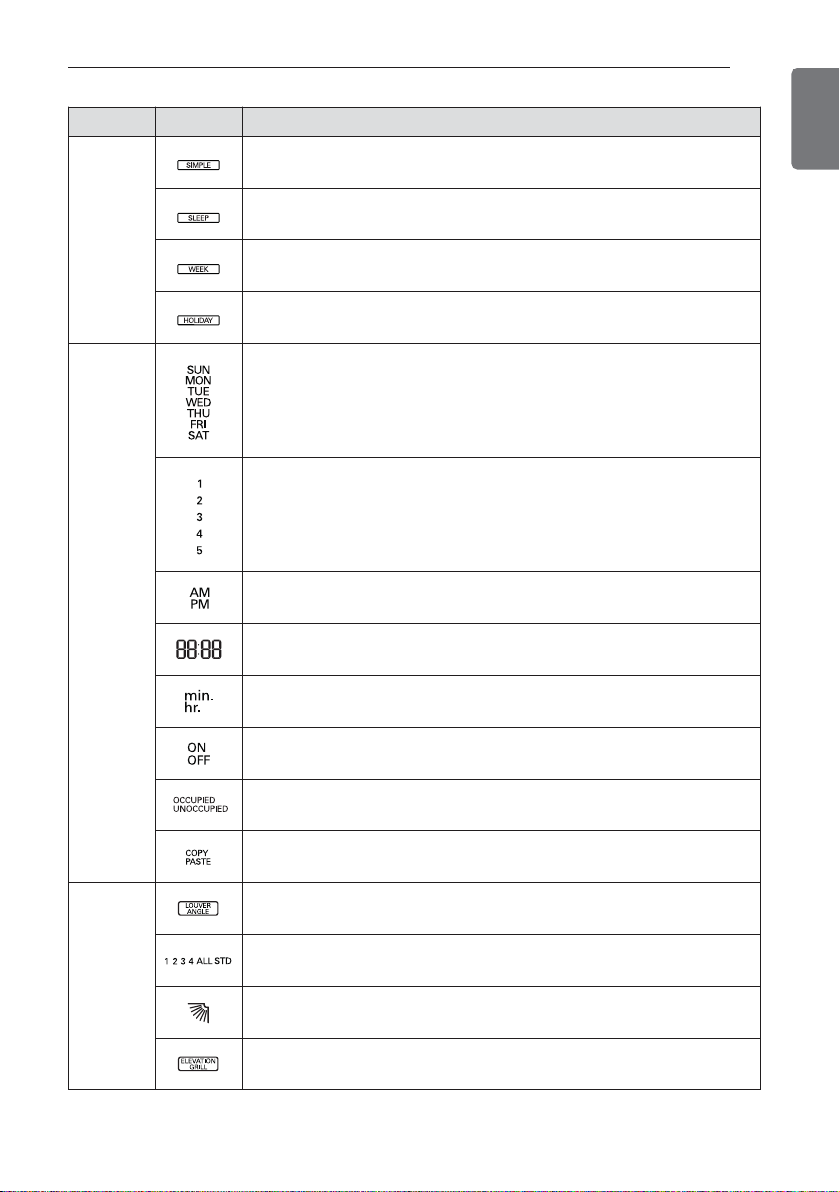
Schedule
Reservation
Simple reservation in operation
Sleep reservation in operation
weekly reservation in operation
Holiday reservation in operation
Schedule
Reservation
& Time
Day of week
SUN: Sunday / MON: Monday / TUE: Tuesday
WED: Wednesday / THU: Thursday / FRI: Friday
SAT: Saturday
The number of weekly reservation event
Time - AM/PM
Time – value of hour / minute
min.: minute / hr. : hour
Turn on/off by schedule reservation
Display weekly reservation occupied / unoccupied state
Weekly reservation schedule data copy / paste
Function
setting
Louver angle setting step
1,2,3,4,ALL : Louver number / STD: Standard angle set
Louver angle state
Elevation grill setting step

10 PART DESCRIPTION
ENGLISH
Function Icon Description
Function
setting
Grill state : up / : stop / : down
Child lock setting step
:Child lock set / : Child lock cancel
Minimum difference value setting step between
cooling / heating set points
Current time setting step
Schedule override timer setting step
Default Set back cooling / heating temperature set points setting step
Filter sign clear setting step
Indoor unit air filter cleaning Alarm
Otros manuales para PREMTB10U
1
Tabla de contenidos
Otros manuales de Termostato de LG
Manuales populares de Termostato de otras marcas

EWELLY
EWELLY EW-181 Manual de usuario

Prolon
Prolon T1100 Instrucciones de instalación

Computherm
Computherm Q20 Manual de usuario

Heatmiser
Heatmiser neoStat Manual de usuario

Aube Technologies
Aube Technologies TH111GFCI-NP 240 VCA Manual de usuario

Mars
Mars HEAT CONTROLLER IR Wireless Thermostat Manual de usuario