
Kohzu Precision SC series Manual de usuario

[REPLACING THE BACKUP BATTERY OF SC SERIES]
November 29, 2017
Kohzu Precision Co., Ltd. | Introduction
1
Replacing the backup battery of SC series
Kohzu Precision Co., Ltd.
1. Introduction ...........................................................................................3
2. Preparations ..........................................................................................5
3. Backup system parameters........................................................................6
3.1. Backup with Chamonix ..........................................................................6
3.2. Take notes from the front panel ................................................................6
4. Replace the backup battery........................................................................7
4.1. Remove the SC controller's cover .............................................................7
4.1.1. SC-200, SC-210, SC-400, SC-410, and SC-800 ........................................7
4.1.2. SC-020 and SC-021 ..........................................................................7
4.2. Remove the backup battery ....................................................................8
4.2.1. SC-200, SC-210, SC-400, SC-410, and SC-800 ........................................8
4.2.2. SC-020 and SC-021 ..........................................................................9
4.3. Prepare a cable tie ............................................................................. 10
4.4. Fix and connect the battery................................................................... 11
4.5. Close the top cover ............................................................................ 13
5. Initialize the system of SC controller ........................................................... 14
5.1. Connect the cable .............................................................................. 14
5.2. Reset the system parameters................................................................ 14
5.3. Reset system parameters with Chamonix ................................................. 15
5.4. Restore system parameters .................................................................. 17
5.5. Restore of backup with Chamonix........................................................... 17
5.6. Restore backup from the front panel........................................................ 17
6. Revision History.................................................................................... 18
Figure 1 Backup battery replacing steps .......................................................4
Figure 2 Preparations..............................................................................5
Figure 3 Chamonix .................................................................................6
Figure 4 Removing the cover of SC-410 .......................................................7
Figure 5 Removing the cover of SC-021 .......................................................7
Figure 6 Remove the old backup battery (SC-410) ..........................................8
Figure 7 Remove old backup battery (SC-020) ...............................................9

November 29, 2017
[REPLACING THE BACKUP BATTERY OF SC SERIES]
2
Introduction | Kohzu Precision Co., Ltd.
Figure 8 Remove old backup battery (SC-021) ...............................................9
Figure 9 Prepare a cable tie .................................................................... 10
Figure10 Placing a cable tie ................................................................... 11
Figure 11 Install a new backup battery ....................................................... 11
Figure 12 Install a backup battery of SC-020/021 .......................................... 12
Figure 13 Close the top cover (SC-410)...................................................... 13
Figure 14 Mount the top and bottom covers(SC-020/021)............................ 13
Figure 15 Display immediately after turning the power ON ............................... 14
Figure 16 Reset the system parameters ..................................................... 14
Figure 17 Command button..................................................................... 15
Figure 18 Send RST command ................................................................ 16
Figure 19 Restore with Chamonix ............................................................. 17

[REPLACING THE BACKUP BATTERY OF SC SERIES]
November 29, 2017
Kohzu Precision Co., Ltd. | Introduction
3
1. Introduction
In the case of the SC series, a backup battery is used for keeping the system
parameters when the power is off. If the system parameters cannot be kept in
memory because of the battery degradation, the system of SC controller must reset
at the start-up for using the controller normally.
It is necessary to reset the system by the front panel or by using a
remote command from the out side client.
SC-200、SC-210、SC-400、SC-410、SC-800
It is necessary to reset the system by RC-10 not included in the price
or by using a remote command from the out side client.
SC-020、SC-021
The information backuped on ROM in the controller is erased, thus it
cannot be operated normarly. In the case, it is necessary to reset the
system every start-up. It is available to set new parameters by user,
but the new parameter have never kept after then the power off.
If the backup battery is discharged, ...
The trouble caused by the backup battery degradation

November 29, 2017
[REPLACING THE BACKUP BATTERY OF SC SERIES]
4
Introduction | Kohzu Precision Co., Ltd.
This instruction manual describes
1
the replacing procedure of the backup battery of a SC
controller
2
.
Figure 1 Backup battery replacing steps
1
"SC controller" in this manual refers to SC-020, SC-021, SC-200, SC-200K, SC-200T,
SC-400, SC-800, SC-210, and SC-410. A part of special custom-made products is
excluded.
2
The company shall accept no liability in relation to a damaged SC controller, after the
customer replaced the backup battery by themselves regardless of the damaged was or
was not caused by the customer performing the replacement.
When performing tasks, always turn the power of
the SC controller OFF and unplug the power cable.
Carry out tasks carefully to prevent breakage.
Backup the system parameters
Remove the controller's cover
Remove the old backup battery
Prepare a cable tie
Install a new backup battery
Restore the system parameters

[REPLACING THE BACKUP BATTERY OF SC SERIES]
November 29, 2017
Kohzu Precision Co., Ltd. | Preparations
5
2. Preparations
Please prepare the following for replacing the backup battery of a SC controller.
Figure 2 Preparations
New backup battery1 Cable tie1
(binding band)
Nippers Needle nose pliers
(radio pliers)
Use only a backup battery provided by KOHZU
Precision Co.

November 29, 2017
[REPLACING THE BACKUP BATTERY OF SC SERIES]
6
Backup system parameters | Kohzu Precision Co., Ltd.
3. Backup system parameters
When replacing a backup battery, the system parameters of the SC controller
3
are deleted,
since the backup battery is removed temporarily. Therefore, backup of the system
parameters are necessary before starting the tasks. Backup can be performed with one
method to use a Windows application and the other method to take notes from the front
panel.
3.1. Backup with Chamonix
Using "Chamonix", the standard control application made by our company, backup of a SC
controller is possible. For details, refer to "Backup method of system parameters".
Figure 3 Chamonix
3.2. Take notes from the front panel
It is possible to take notes of the system parameter values displayed in the front panel of a
SC controller. For operation on the front panel of a SC controller, refer to the instruction
manual for the SC controller.
3
System parameters saved in a SC controller may be referred to as system settings on
control software of our company and old version of documents for SC controllers, etc.
When referring to these documents, please regard system parameters in this manual as
system settings.
For backup method using
Chamonix, refer to "Backup
method of system parameters".
[REPLACING THE BACKUP BATTERY OF SC SERIES]
November 29, 2017
Kohzu Precision Co., Ltd. | Replace the backup battery
7
4. Replace the backup battery
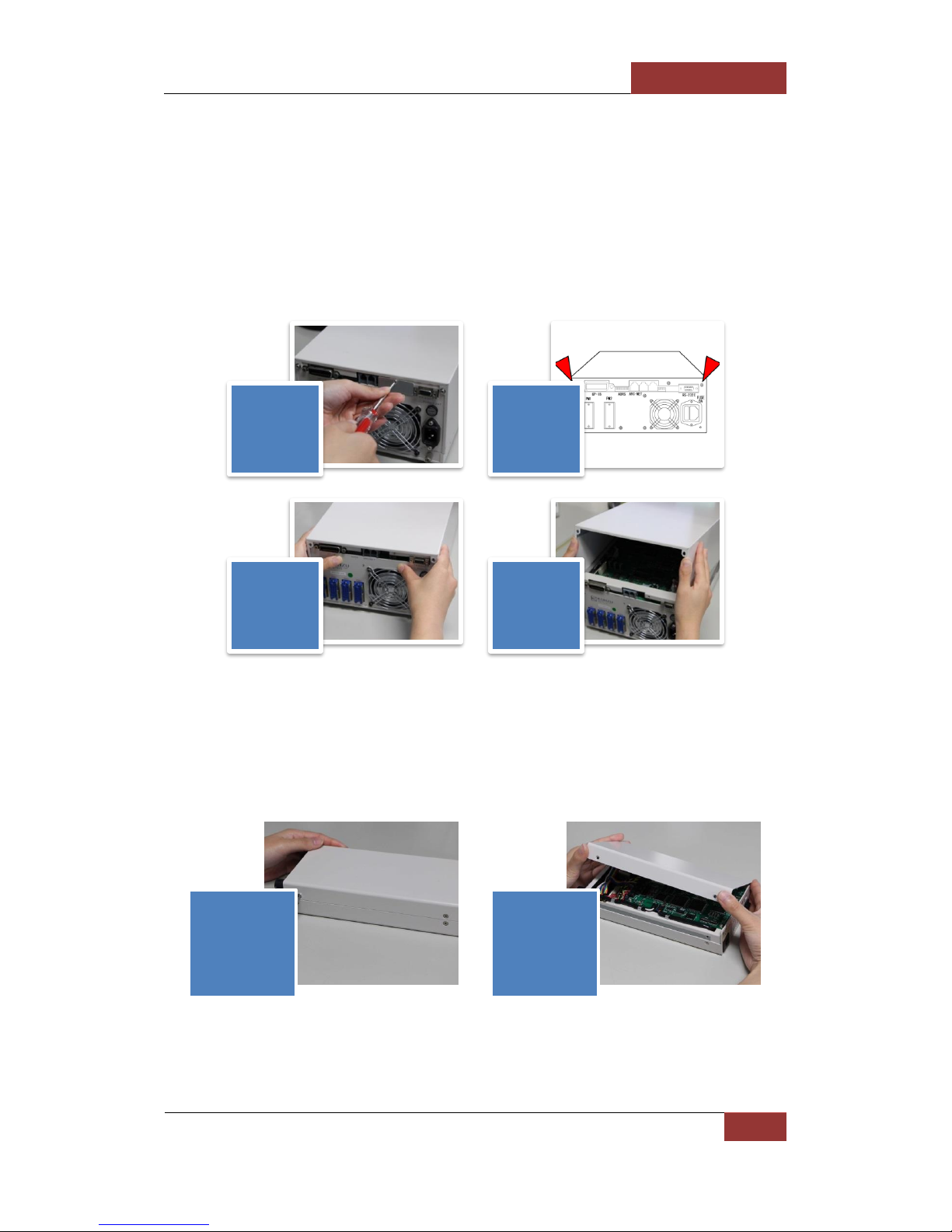
4.1. Remove the SC controller's cover
4.1.1. SC-200, SC-210, SC-400, SC-410, and SC-800
For SC-200, SC-200K, SC-200T, SC-400, SC-210, SC-410, and SC-800, remove the top
cover following the steps shown in Figure 4. The replacing procedure is explained using
SC-410 as an example.
Figure 4 Removing the cover of SC-410
4.1.2. SC-020 and SC-021
For SC-020 and SC-021, Figure 5 take out the screws, etc. on the side of the case, and
remove the top and bottom covers. Figure 5 The replacing procedure is explained using
SC-021 as an example.
Figure 5 Removing the cover of SC-021
Remove the
blinder from
the rear
panel.
Remove the
mounting
screws from
the rear
panel.
Slide the top
cover
backward
about 3 cm.
Remove the
top cover.
Remove the
mounting screws
from the side.
Remove the top
and bottom
cover.

November 29, 2017
[REPLACING THE BACKUP BATTERY OF SC SERIES]
8
Remove the backup battery | Kohzu Precision Co., Ltd.
4.2. Remove the backup battery
4.2.1. SC-200, SC-210, SC-400, SC-410, and SC-800
Follow the procedure next to remove the old backup battery
4
. The replacing procedure is
explained using SC-410 as an example.
Figure 6 Remove the old backup battery (SC-410)
4
When the last 5 characters in the model shown on the substrate are "rev04", it is fixed
with fixing agent. Peel off the fixing agent.
The backup battery is installed on the
rear panel side of the main substrate Cut the cable tie fastening the backup
battery to the main substrate with a pair
of nippers.
Remove the connector of the battery
from the substrate.
When performing tasks, always turn the power of
the SC controller OFF and unplug the power cable.

[REPLACING THE BACKUP BATTERY OF SC SERIES]
November 29, 2017
Kohzu Precision Co., Ltd. | SC-020 and SC-021
9
4.2.2. SC-020 and SC-021
For SC-020 or SC-021, follow the procedure next to remove the old backup battery.
Figure 7 Remove old backup battery (SC-020)
Figure 8 Remove old backup battery (SC-021)
For SC-020, the backup battery is
installed on the side of case. Cut the fastening cable tie with a pair
of nippers, and pull out the battery's
connector.
For SC-021, the backup battery is
installed on the rear panel side. Cut the fastening cable tie with a pair
of nippers, and pull out the battery's
connector
When performing tasks, always turn the power of
the SC controller OFF and unplug the power cable.

November 29, 2017
[REPLACING THE BACKUP BATTERY OF SC SERIES]
10
Prepare a cable tie | Kohzu Precision Co., Ltd.
4.3. Prepare a cable tie
Prepare a cable tie to fix the new backup battery. As shown below, give shape to the cable
tie by bending at 6 mm and 14 mm from the top of the cable tie with a pair of needle nose
pliers.
Figure 9Prepare a cable tie
14 mm corresponds to the length between the mounting holes on the substrate that a new
battery is mounted.
Cable tie before bending. Bend with a pair of needle nose pliers.
Cable tie after bending.
Este manual sirve para los siguientes modelos
7
Tabla de contenidos
Otros manuales de Controladores de Kohzu Precision


