Impecca KBC84BTL Manual de usuario

Detachable Bluetooth Wireless Keyboard &
Protecve Case for iPad™
User’s Guide
Manual del Usuario / Manuel de l’ulisateur
Model # KBC84BTL LED Illuminated Keyboard
Model # KBC84 BT Non-Illuminated Keyboard

- 1 -
IMPECCA USA® is a division of Luzerne Trading Co. Wilkes-Barre PA. All rights reserved. All trademarks
are the property of their respective owners and are used by Luzerne Trading Company solely for descriptive
purposes.
iPad® is the trademark of Apple Inc., registered in the U.S.A. and other countries.
“Made for iPad” means that an electronic accessory has been designed to connect specifically to iPad, and has
been certified by the developer to meet Apple performance standards. Apple is not responsible for the operation
of this device or its compliance with any safety and regulatory standards.
Please note that the use of this accessory with iPad® may affect wireless performance.
This product is serviced and supported exclusively by IMPECCA USA and its Limited Warranty.

- 2 -
TABLE OF CONTENTS
ENGLISH
Table of Contents.......................................................................................................................02
Welcome / Main Features .........................................................................................................03
In The Box / Layout of Controls .................................................................................................04
Precautions ................................................................................................................................05
Getting Started...........................................................................................................................06
Charging the Battery ..................................................................................................................07
Connecting to Your iPad ............................................................................................................07
Backlight Control Function ........................................................................................................10
Using the Hotkeys ......................................................................................................................10
Troubleshooting.........................................................................................................................12
FRENCH
Table des matières.....................................................................................................................15
Bienvenue / Caractéristiques principales ..................................................................................16
Dans la boîte / Disposition des commandes..............................................................................17
Précautions ................................................................................................................................18
Démarrage .................................................................................................................................19
Chargement de la batterie.........................................................................................................20
Branchement sur votre iPad ......................................................................................................20
Commande du rétroéclairage....................................................................................................23
Utilisation des raccourcis...........................................................................................................23
Dépannage .................................................................................................................................25
ESPAÑOL
Contenido...................................................................................................................................28
Bienvenido / Características Principales....................................................................................29
Dentro de la Caja / Distribución de los Mandos .......................................................................30
Precauciones..............................................................................................................................31
Comenzando .............................................................................................................................32
Cargando la Batería....................................................................................................................33
Conectando a su iPad.................................................................................................................33
Función de Control de Luz de Fondo ........................................................................................36
Usando las Teclas de Acceso Rápido .........................................................................................36
Solución de Problemas...............................................................................................................37

- 3 -
WELCOME
Congratulations on your purchase of the Impecca™ Detachable Bluetooth Wireless Keyboard & Protective
Case for iPad™. Now you can enjoy enhanced access to your iPad™ by using a wireless keyboard featuring
Bluetooth 3.0 technology.
The Detachable Bluetooth Wireless Keyboard & Protective Case was designed for convenience and comfort,
and is sleek, stylish, and elegant. Powered by a highly efficient lithium-ion battery capable of providing up to
45 hours working time and 360 hours stand-by time, the IMPECCA Bluetooth Wireless Keyboard and
Protective Case is perfect for business and daily use.
Before using this product, it is recommended that you familiarize yourself with the features, functions, and
operating procedures described in this manual. Due to slight modifications in production, the instructions,
features, and/or descriptions found in this manual might be slightly different from your product.
Model # KBC84BTL LED Illuminated Keyboard
Model # KBC84 BT Non-Illuminated Keyboard
MAIN FEATURES
Three in One - Case, Stand, & Keyboard
Access to all controls including camera, volume, & power
Slim & Elegant: Top quality design with a low profile
Perfect Fit for all iPad™ models
Features:
Detachable Wireless Bluetooth 3.0 QWERTY keyboard
67 regular keys and 17 hot keys for easy access to a variety of applications
Comfortable & Ultra-Thin Keypad Design
Adjustable display stand for easy viewing and typing
Energy saving keyboard sleep mode
Bluetooth Version 3.0
Built-in Rechargeable Lithium Battery

- 4 -
IN THE BOX
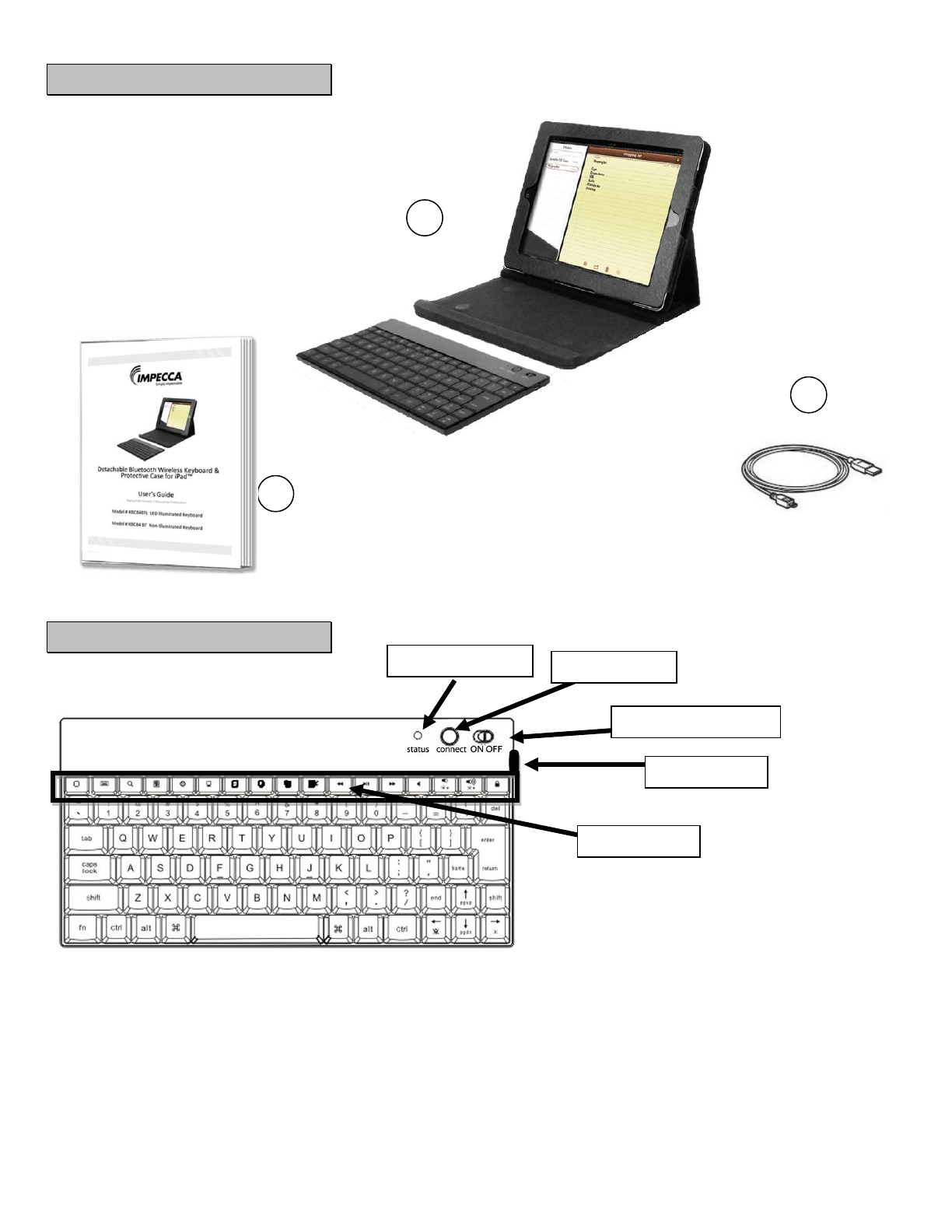
1. Keyboard and iPad case (iPad not included)
2. USB charging cable
3. User’s Guide
LAYOUT AND CONTROLS
LED Indicator light
Connect Button
Power ON/OFF switch
Micro USB port
HOT KEYS
1
2
3

- 5 -
PRECAUTIONS
Follow these tips and safety instructions to preserve the operational lifespan of your Bluetooth Wireless
Keyboard:
Do not use this player in extreme temperatures. Keep away from extreme hot, cold, dry, or damp
areas. Also keep away from water, fire, and radiation.
It is recommended that you allow the battery to fully charge before using the device for the first time
(approximately 2 to 3 hours. Do not recharge unattended for longer than 5 hours.
The effective range for this wireless device is 10 Meters. Performance may be affected by distance and
interference from other devices or conditions within the operating environment.
Barriers and other wireless devices may affect the performance of keyboard.
Check the laws and regulations on the use of mobile phones and hands-free equipment in areas you
intend to use this product.
Do not disassemble your Bluetooth Wireless Keyboard.
Do not allow young children to use your player unsupervised.
Observe all signs and instructions that require an electrical device or radio product to be switched off
in designated areas, such as petrol/refueling stations, hospitals, blasting areas, potentially explosive
atmospheres or aircraft.
Do not use or connect adaptors and/or chargers to this product that are not approved of or specified
by IMPECCA™.

- 6 -
GETTING STARTED
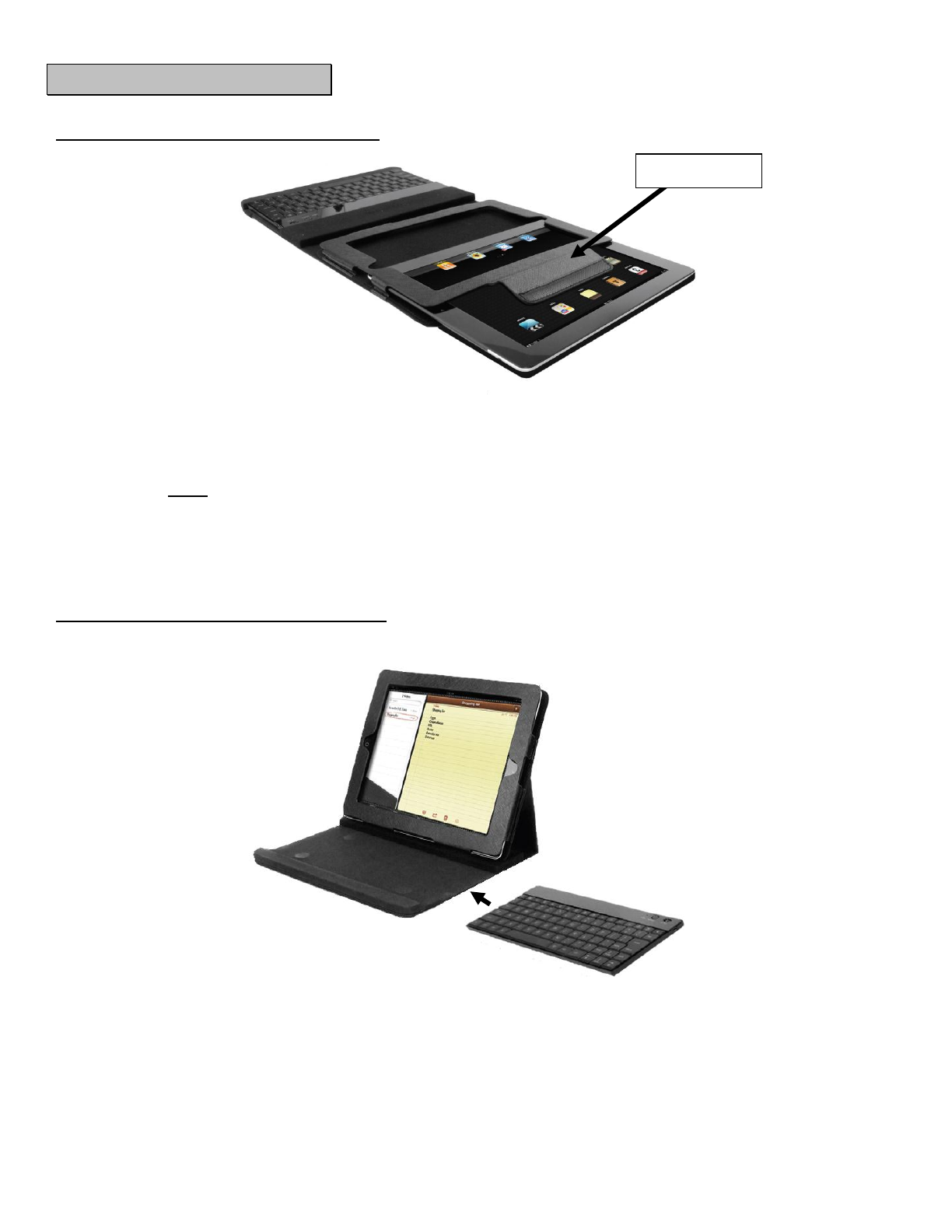
Inserting your iPad into the protective case
1. Lift the Velcro tab located in the upper portion of the protective case.
2. Slide your iPad into the case. Be sure that the Home button on your Ipad is aligned to the right side of the
protective case. Proper alignment will ensure that all of your iPad buttons are accessible while stored in the
case.
Note: Check the back of the case. Your iPad camera lens should be lined up with the circular hole to
allow for proper use of the camera while it is stored in the case.
3. Tuck the Velcro tab so that it wraps around the iPad and the Velcro side sticks securely to the inner wall of
the protective case.
Inserting your keyboard into the protective case
1. Slide the keyboard into the protective case as shown in the diagram above. Once in place, the
keyboard will fit securely.
Velcro Tab

- 7 -
CHARGING THE BATTERY
The Red LED will continually flash when battery power is low. When the battery is completely drained, no
indicator lights will function. Before using, allow the battery to charge for 4 to 5 hours.
1. Connect the mini USB cable to the USB Jack on wireless keyboard.
2. Connect the larger end of the USB cable to a USB port on your PC or Laptop.
3. The Red LED will stop flashing and will remain solid red.
4. When charging has finished, the Red LED will turn off.
CONNECTING TO YOUR IPAD
1. Turn the On/Off switch to the ON position. The Status light will glow blue for a few seconds.
2. On your iPad screen, tap the “Settings”icon to open the Settings Menu.

- 8 -
3. In the Settings menu panel (on the left) press the “General” icon. In the main panel of your iPad
screen, tap the Bluetooth row.
4. Slide the Off switch to the On position (or press the Off icon once).
Your iPad will begin searching for any available Bluetooth Device. Be sure that the keyboard is on.

- 9 -
5. If your iPad is able to discover your keyboard, you will see the screen below. If you do not see this
screen, press the Connect button on your keyboard.
6. Tap the “Bluetooth 3.0 Wireless Keyboard” row on the iPad screen to pair the device. You will be
provided with a 4 digit PIN code.
7. Using your wireless keyboard, type the four digit PIN code and press the Enter / Return key.
Your device should now be connected. You can now begin using your wireless keyboard.
Note the following about the Bluetooth connection between the keyboard and your iPad:
•If the devices are connected and you turn the keyboard off, the devices will reconnect
when you turn the keyboard back on.
• Likewise, if the devices are connected and you turn your iPad off, the devices will reconnect when
you turn the iPad back on.
• If the devices are connected and you disable Bluetooth from the settings on your iPad, when you
turn Bluetooth back on, you need to reconnect the devices again by following the steps above.
Tabla de contenidos
Idiomas:
Otros manuales de Teclado de Impecca