IFM DTC600 Manual de usuario

Operating instructions
CANopen interface
RF-identification system
DTC600
Read/write head
11479651 / 0012 / 2022
GB

2
Contents
1 Preliminary note.............................................................................................. 4
1.1 Symbols used .......................................................................................... 4
1.2 Warnings used......................................................................................... 4
1.3 Legal and copyright information............................................................... 4
2 Safety instructions .......................................................................................... 4
3 Intended use ................................................................................................... 6
4 Items supplied................................................................................................. 6
5 Function .......................................................................................................... 6
5.1 ID tags ..................................................................................................... 6
5.2 CANopen technology............................................................................... 6
5.3 Device overview....................................................................................... 7
6 Installation....................................................................................................... 7
6.1 Notes on the unit installation.................................................................... 7
6.2 Avoiding interference ............................................................................... 7
6.3 Mechanical design ................................................................................... 8
6.4 Mounting options ..................................................................................... 8
6.4.1 Installation with angle bracket E80335 ............................................. 9
6.4.2 Installation with mounting device E80336......................................... 9
6.4.3 Installation with fixing bars E80337................................................... 10
6.5 Mounting distances.................................................................................. 10
6.6 Positioning of the ID tags......................................................................... 11
7 Electrical connection....................................................................................... 11
7.1 Wiring....................................................................................................... 11
8 Operating and display elements ..................................................................... 13
9 Operation ........................................................................................................ 15
9.1 CANopen interface .................................................................................. 15
9.1.1 CANopen functions ........................................................................... 15
9.1.2 Change the Node ID and bit rate ...................................................... 16
9.1.3 Set-up ............................................................................................... 17
9.1.4 Use of 32 bit data types .................................................................... 18
9.1.5 Communication types of the process data object (PDO) .................. 18

3
9.1.6 Object directory (OD) ........................................................................ 19
9.1.7 Error messages................................................................................. 33
9.1.8 Monitoring activity via Heartbeat....................................................... 36
9.1.9 Change objects ................................................................................. 37
9.1.10 Process data objects......................................................................... 37
9.1.11 Device status .................................................................................... 39
9.1.12 Deactivate antenna ........................................................................... 42
9.1.13 Select the ID tag type........................................................................ 43
9.1.14 Read information of an ID tag ........................................................... 44
9.1.15 RSSI value ........................................................................................ 44
9.1.16 ID tag detection filter ......................................................................... 44
9.2 Data transfer with an ID tag ..................................................................... 47
9.2.1 Read UID of the ID tag...................................................................... 47
9.2.2 Read data from the ID tag via PDO transfer ..................................... 47
9.2.2.1 Example 1................................................................................. 48
9.2.2.2 Example 2................................................................................. 48
9.2.3 Write data to the ID tag via PDO transfer ......................................... 49
9.2.3.1 Example 1................................................................................. 50
9.2.3.2 Example 2................................................................................. 51
9.2.4 Error handling for PDO transfer ........................................................ 52
9.2.5 Read data from the ID tag via SDO transfer ..................................... 52
9.2.5.1 Example.................................................................................... 53
9.2.6 Write data to the ID tag via SDO transfer ......................................... 53
9.2.6.1 Example.................................................................................... 53
9.2.7 Lock data range on the ID tag via SDO transfer ............................... 54
9.2.7.1 Example.................................................................................... 54
9.2.8 Error codes during SDO transfer ...................................................... 55
9.3 EDS file.................................................................................................... 57
10 Maintenance, repair and disposal................................................................... 58
11 Approvals/standards ....................................................................................... 58
Glossary.......................................................................................................... 59

4
1 Preliminary note
You will find instructions, technical data, approvals and further information using
the QR code on the unit / packaging or at www.ifm.com.
1.1 Symbols used
Requirement
Instructions
Reaction, result
[...] Designation of keys, buttons or indications
Cross-reference
Important note
Non-compliance may result in malfunction or interference.
Information
Supplementary note
1.2 Warnings used
ATTENTION
Warning of damage to property
1.3 Legal and copyright information
© All rights reserved by ifm electronic gmbh. No part of these instructions may be
reproduced and used without the consent of ifm electronic gmbh.
All product names, pictures, companies or other brands used on our pages are the
property of the respective rights owners.
2 Safety instructions [Übersetzung ist nicht mehr
aktuell]
General
•
The unit described is a subcomponent for integration into a system.
–
The system architect is responsible for the safety of the system.

5
–
The system architect undertakes to perform a risk assessment and to create
documentation in accordance with legal and normative requirements to be
provided to the operator and user of the system. This documentation must
contain all necessary information and safety instructions for the operator,
the user and, if applicable, for any service personnel authorised by the
architect of the system.
•
Read this document before setting up the product and keep it during the entire
service life.
•
The product must be suitable for the corresponding applications and
environmental conditions without any restrictions.
•
Only use the product for its intended purpose (Ò Intended use).
•
If the operating instructions or the technical data are not adhered to, personal
injury and/or damage to property may occur.
•
The manufacturer assumes no liability or warranty for any consequences
caused by tampering with the product or incorrect use by the operator.
•
Installation, electrical connection, set-up, operation and maintenance of the
product must be carried out by qualified personnel authorised by the machine
operator.
•
Protect units and cables against damage.
Radio equipment
In general, radio equipment must not be used in the vicinity of petrol stations, fuel
depots, chemical plants or blasting operations.
uDo not transport and store any flammable gases, liquids or explosive
substances near the unit.
Interference of electronic and medical devices
Operation can affect the function of electronic devices that are not correctly
shielded.
uDisconnect the device in the vicinity of medical equipment.
uContact the manufacturer of the corresponding device in case of any
interference.

6
3 Intended use
The read/write head reads and writes ID tags without contact.
The data is made available as process data via the CAN-bus interface.
4 Items supplied
•
Read/write head
The device is supplied without installation and connection accessories.
Available accessories: www.ifm.com.
The optimum function is not ensured when using components from other
manufacturers.
5 Function
5.1 ID tags
The ID tags are passively operated without a battery. The energy required for
operation is provided by the read/write head.
The energy is provided via an inductive coupling. The integrated antenna coil in
the read/write head generates a magnetic field which partly penetrates the
antenna coil of the ID tag. A voltage is generated by induction that supplies the
data carrier with energy.
The device supports ID tags according to ISO 15693.
5.2 CANopen technology
The CANopen communication profile is based on the CAN Application Layer
(CAL) specification of the CiA organisation. CANopen is considered as a robust
fieldbus with highly flexible configuration options. It is used in many different
applications which are based on different application profiles. CANopen comprises
a concept to configure and communicate real-time data using synchronous and
asynchronous messages. Four message types (objects) are distinguished.
1. Administration messages (layer management, network management and
identifier distribution)
2. Service Data Objects (SDO)
3. Process Data Objects (PDO)
4. Predefined Objects (emergency)

7
For further information please refer to the CiA-CAN specification (CiA 301 -
CANopen).
References
http://www.can-cia.org
CAN Application Layer, DS 201 …207 CiA
LSS profile DS305 CiA
CAN-based communication profile DS 301 CiA
CAN specification version 2.0 A Robert Bosch GmbH
5.3 Device overview
DTC600
Article number: DTC600
Function: Read/write head
Type designation: DTCHF HLRWCOUS03
Type: Rectangular
6 Installation
6.1 Notes on the unit installation [Übersetzung ist nicht mehr
aktuell]
When mounting several RFID units adhere to the minimum distances
between the systems.
Flush mounting of a read/write head in metal reduces the read/write
distance.
Device performance can be affected if positioned in the immediate vicinity
of powerful HF emission sources such as welding transformers or
converters.
6.2 Avoiding interference [Übersetzung ist nicht mehr
aktuell]
The device generates a modulated electrical field with a frequency of 13.56 MHz.

8
Avoid interference with data communication:
uDo not operate any devices in the vicinity that use the same frequency band.
wSuch devices are for example frequency converters and switched-mode power
supplies.
If there are other devices in the same frequency band in the vicinity:
uThe mounting distances between the devices should be as large as possible.
uUse the devices in alternating operation.
uSwitch the HF field of the device on/off.
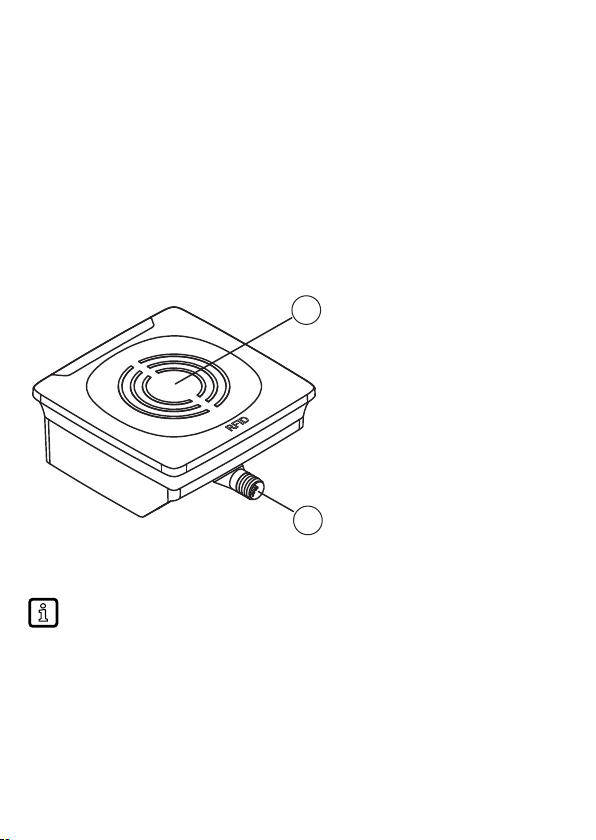
6.3 Mechanical design [Übersetzung ist nicht mehr aktuell]
1
2
1 Sensing face 2 Connection (can be rotated by 270°)
6.4 Mounting options
The device can be mounted without the accessories.
uFor installation, please use the threaded sleeves on the back of the
device.
wThe required screws are not supplied with the device.

9
6.4.1 Installation with angle bracket E80335
6.4.2 Installation with mounting device E80336
The mounting device is used to mount the unit on a clamp. Compatible clamps:
•
E21110 with a rod diameter of 12 mm
•
E20795 with a rod diameter of 14 mm
•
E21109 with a rod diameter of 14 mm

10
6.4.3 Installation with fixing bars E80337
6.5 Mounting distances
Operating mode Distance side (A) Distance front (B)
For reading and writing ≥ 1200 mm ≥ 900 mm
Otros manuales para DTC600
2
Tabla de contenidos
Otros manuales de Sistema RFID de IFM

IFM
IFM DTE8 5 Series Guía de aplicación

IFM
IFM DTM436 Manual de usuario

IFM
IFM DTE800 Manual de usuario

IFM
IFM ANT513 Manual de usuario

IFM
IFM DTE801 Manual de usuario

IFM
IFM DTM426 Manual de usuario

IFM
IFM DTM434 Manual de usuario

IFM
IFM DTE105 Manual de usuario

IFM
IFM DTI434 Manual de usuario

IFM
IFM DTE801 Manual de usuario

IFM
IFM DTE830 Manual de usuario

IFM
IFM DTE603 Manual de usuario

IFM
IFM DTE601 Manual de usuario

IFM
IFM DTC600 Manual de usuario

IFM
IFM DTE601 Manual de usuario

IFM
IFM ANT600 Manual de usuario

IFM
IFM DTE801 Manual de usuario

IFM
IFM DTC510 Manual de usuario

IFM
IFM DTI515 Manual de usuario

IFM
IFM DTI420 Manual de usuario