Harvest TEC 77E Manual de usuario

1
77E-INST/OPR –Imp&Metric
4/21
Installation/Operation Manual
Model 77E
Economy Microwave Moisture Bale Chute System

2
DECLARATION OF INCORPORATION
MANUFACTURER: Harvest Tec Inc.
2821 Harvey St.
P.O. Box 63
Hudson, WI 54016, U.S.A.
REPRESENTATIVE ESTABLISHED IN COMMUNITY: Profitable Farming Company
Middle Barlington, Roborough
Winkleigh, Devon, EX19 8AG
ENGLAND
The person above certifies and declares that:
VIRTUAL MACHINE: Equipment mounted on a farm press and for the application of innoculants onto
forage crops.
MODEL: 770, 771-21-INST/OPR –Imp&Metric
BRAND: Harvest Tec
PATENT NUMBER: US 9,854,743 B2:
This application preservatives for hay Harvest Tec system meets the Directive 2006/42/EC of the
European Parliment and the Council of 17 May 2006 and other applicable European Directives
including Directive 2004/108/EC on the Electromagnetic compatability.
The application of preservatives for hay Harvest Tec system will be turned on after being installed on
a farm press has been declard in conformity with the Machinery Directive.
Person in the community authorized to provide information on the partly completed machinery and
making this statement:
Richard Snell, President, Profitable Farming Company
Signed on May 21, 2011: Middle Barlington, Roborough
Winkleigh, Devon, EX19 8AG
ENGLAND

3
77E Operation Manual Table of Contents
PAGE
Introduction
4
System Requirements
4
Microwave Moisture Installation –Brackets/Sensors
5
Microwave Moisture Installation –Metering Wheel Sensor
6
Wiring Schematic –77E
6
Display Options
Optional tablet display
Baler Display Integration –AGCO 21/2200 series
Baler Display Integration –AGCO 2370UHD
Baler Display Integration –Case LB334/434 & New Holland Big Baler Series
Baler Display Integration –Case LB436HD & New Holland Big Baler 340/1290HD
Baler Display Integration –John Deere 330/340
7-26
7
7-10
11-12
13-19
20-22
23-26
Moisture System Setup
26-27
Common Questions
28
Troubleshooting
29
Pin Outs
30-32
Parts Breakdown
33
Microwave Moisture Bale Chute System –77E
Warranty
34

4
Introduction
Thank you for purchasing this 77E Microwave Moisture Sensor Kit. The Microwave Moisture Sensor Kit is
designed to operate through the baler’s ISOBUS system and/or an Android tablet or Apple iPad (tablet not
included), using the Precision Baling App.
This manual will take you through the steps to install and operate the moisture sensor. Please read this manual
carefully to learn how to operate the equipment correctly. Failure to do so can result in personal injury or
equipment malfunction. If you are unsure about operating the system after consulting this manual, contact your
local authorized dealership for additional assistance or look for the contact information on the back cover of
this manual. If you are in need of parts for the system, please view the Parts Breakdowns in the back of this
manual and contact your local authorized dealer to order the parts.
Tools Needed:
Standard wrench set
Electric drill and bits
Side cutter
Standard nut driver set
Standard socket set
System Requirements for integration into baler display
CNH Balers
The Baler Control Module (BCM)
must have Version 4.2.0.0 or higher.
AGCO Balers
The Baler Processor must have Version 3.3 or higher.
C1000 must have version 3.0.1 or higher
John Deere 330/340 Balers
The Baler must have Software Version 2.0.7 or higher
GreenStar 4th Generation Arm Command Display must have version 8.10.2393-23
System Requirements for tablet display
*Requirement to run iPad option are 3rd Generation iPad (2012) with
current operating system, plus the Precision Bale App.
*Requirement to run Android option are with
Google Play 5 or greater operating system, plus the Precision Bale App.
Not compatible with Kindle Fire tablet.

5
Microwave Moisture Installation –Brackets/Sensors
Locate the mounting holes on the back of both the left and right
side of the bale chute (Figure 1 & 2).
Mount the rear microwave moisture mounting brackets 001-
2601 (figure 3) on the holes using two 3/8” x 3 1/2" hex bolts,
nuts and lock washers located in parts bag. NOTE - Some baler
models may require bracket modification. Ensure no chains or
other moving parts may interfere with mounting of microwave
sensors. If baler is equipped with chute, carefully raise, and
lower it to make sure it does not interfere with microwave
sensors.
Attach the microwave moisture sensors to each mounting bracket. Sensor 006-4641MTX will be mounted on
the left side of the bale chute (figure 4). Sensor 006-4641MRX will be mounted on the right side (figure 5).
Mount the sensors with the wire connection port toward the baler.
Locate the MWM wiring harness (006-7640MWL) in the kit. Start by locating the connector with the white heat
shrink label marked RX. Connect this connector to the sensor mounted on the right-side chute (006-
4641MRX).
Route the MWM harness (006-7640MWL) to the front of the baler using zip ties. If baler is equipped with
Staheli West steam a 25’ extension harness is available from Harvest Tec (006-7640FMX).
Figure 2
Figure 4
Figure 5
Figure 3
Figure 1

6
Microwave Moisture Installation –Metering Wheel Sensor
Attach the 001-4648SS Meter Wheel bracket to the top chamber
door steel tube with the proximity sensor pointing toward the spoke
of the meter wheel. Proximity sensor 006-7401 should be
positioned approximately ¼” from the spikes of the metering wheel
as each spike movement triggers individual microwave readings.
Note –additional modification may be required to properly mount
the proximity sensor depending on baler model and design of
metering wheel.
Route the 006-7401 proximity harness to the main microwave
harness (006-7640MWL) and connect to the triangular Deutsch plug
See wiring schematics for attaching tractor power harness 006-764IC to battery power. 2 display options of
microwave moisture:
1. Readings integrated into baler virtual terminal for AGCO 21/2200 series, Krone balers with CCi1200
monitor, CASE 334, 434, 434HD models, New Holland Big Baler series model, and John Deere
330/340 with use of baler integration harness (006-7670A) to the in cab diagnostic port.
2. Readings displayed thru operator tablet and Precision Bale App with use of 006-765CPH key power
harness
Microwave Moisture Installation –Optional 740DM Moisture Dye Marker
Reference 740DM Manual for installation/operation. Position nozzles behind microwave sensors. Route 006-
765IDM harness from 006-2472DM Dye Marker Controller to rectangular plug on 006-7640MWL baler
moisture harness. Secure with zip ties.
Wiring Schematic –77E

7
Display Options
Optional Tablet Display
The iOS or Android Tablet displays offer the ability to communicate with the 77E microwave moisture system
via hard-wired connection to the ISO Communication Module (ICM) with use of the free Precision Baling App.
The Tablet Display offers easy integration by connecting a charging cable to the USB port on the ICM module
(USB port closest to LED light). Once, connected the system will display upon opening the app and powering
up the 77E moisture sensor. Tablets can be used in addition to integrated baler VT display.
*Made for iPad®(3rd generation minimum) or Android Tablet (Does not work with Amazon Fire).
Required to be running the most current operating system or one version previous.
*iPad is a trademark of Apple Inc., registered in the U.S. and other countries.
Baler Display Integration –AGCO 21/2200 series balers
The ISOBUS Monitor utilizes a combination of soft keys, number menus, and the scroll wheel on the upper
right side of the actual monitor to make selections. Selections are made by scrolling the Thumb Wheel and
pressing in once the selection is highlighted. All buttons are labeled and color coded.
Precision Baling App

8
Baler Monitor Setup
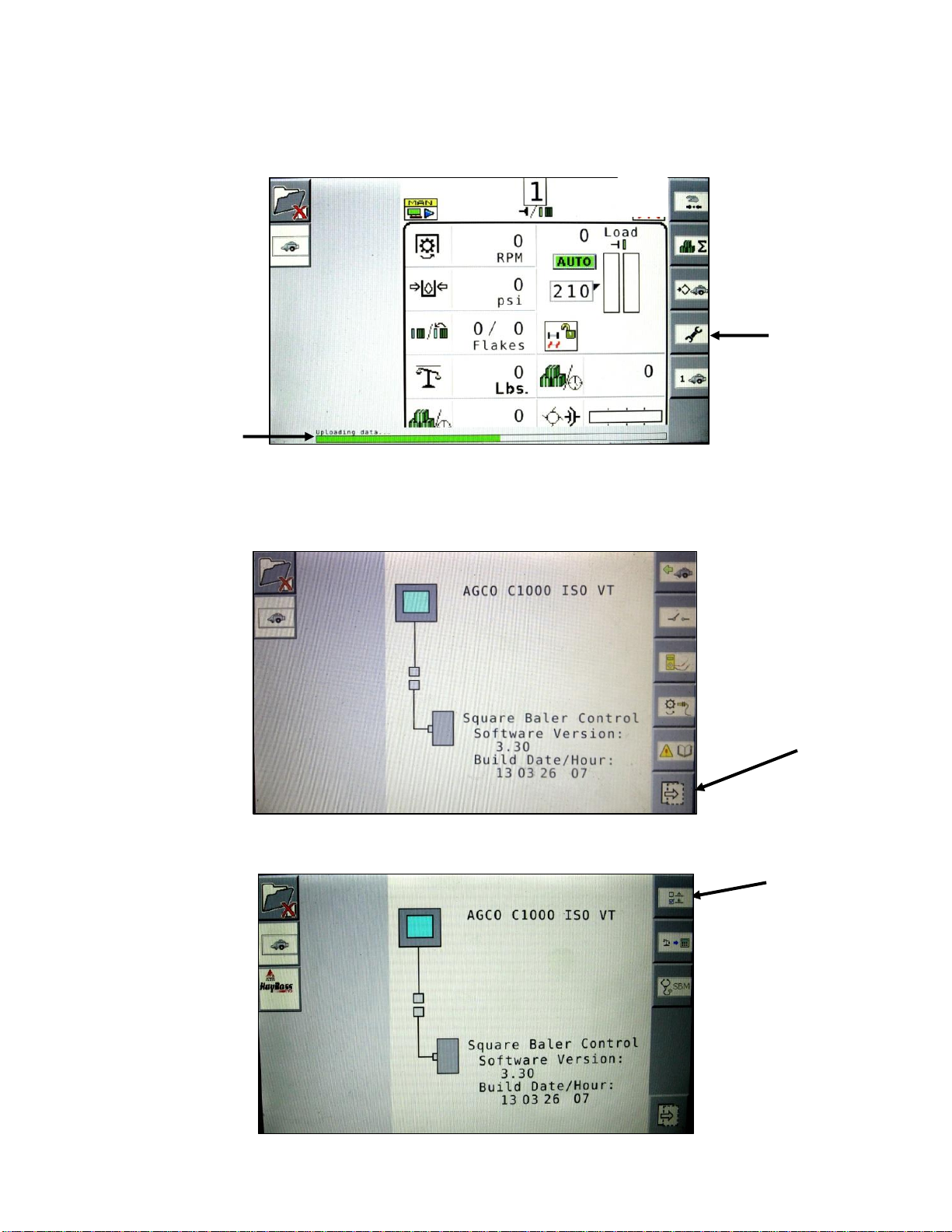
At any time after the initial Start Up/Power On the green “uploading data status bar (arrow A) may begin to fill.
However, due to software version changes a status does not appear on all monitors. To begin setup of the
77E Microwave System select the fourth icon down on the right screen menu-the wrench icon (arrow B).
The service screen displayed below will appear. Here you can see the Version of Software for your baler which
should be 3.30 or higher to enable working with the 77E. Select the icon (arrow C) located at the bottom of the
right selection menu to move to the next options menu.
Then select the ‘A B’icon (arrow D) on the right side, this should be the top button.
C
B
A
D

9
Then select the ‘A B 2’icon (arrow E) on the right side to enter the next baler options screen.
Use the thumb wheel to scroll and select the Harvest Tec Option (arrow F). Press the scroll wheel to open the
drop-down menu.
Select the green check mark to turn the Harvest Tec option ON (arrow G). Then select the Baler Run Screen
button (arrow H) to save the setting and proceed to the baler run screen.
E
F
H
G

10
Use the scroll wheel to select a container option on the baler run screen. Harvest Tec information can be
displayed in any container on the baler run screen. Press the scroll wheel to open the drop-down menu and
scroll to select the option and press the scroll wheel to select it.
This will place the “Instantaneous” and “Last Bale” moisture values in this position on the screen.
Once the and moisture option is selected, the containers should show with a red background.
The moisture information is denoted by a rain droplet for instantaneous and a rain drop with a back arrow
above for the last bale average moisture. These values are separated by a slash.
**NOTE: When the preservative sprayer icon is RED, the preservative system is not in a run mode (Auto or
Manual). When the system is in a run mode, the icon will be GREEN. The HT Preservative and Moisture
containers will have RED background when the system is not in a run mode.
The background for the moisture container will be WHITE, matching the rest of the baler run screen when the
system is in Auto or Manual mode.
J
HT Moisture Container
Este manual sirve para los siguientes modelos
2
Tabla de contenidos
Otros manuales de Accesorios de Harvest TEC