
GeekChef GCF20E Manual de usuario

Model No.: GCF20E
User Manual
Espresso Coffee Maker
Toll Free:1-844-801-8880
IMPORTANT:Read the instructions carefully before operating the
appliance and keep them for future reference.
GEEK产品使用说明书统一排版风格
A5 128g铜版纸 双面印 骑马钉 (建议材质)

Model No.: GCF20E
Power : 1350 W
Voltage: 120 V
Pump Pressure: 20 Bar
Capacity of Water Tank: 1.8 L / 60.9 fl.oz
Safety Instructions
Product Components
How To Use
2
4
8
Cleaning And Maintenance 14
Troubleshooting 16
Limited Warranty 18
TECHNICAL SPECIFICATIONS
TABLE OF CONTENTS
Scan the QR code for more
assistance and support

SAFETY INSTRUCTIONS
2
Read all the safety and operating instructions carefully and retain them for future
reference.
Don't use it outdoors. Keep it away from sources of heat, direct sunlight, humidity
(never dip it into any liquid) and sharp edges. Do not use the appliance with wet
hands. If the appliance is humid or wet, unplug it immediately.
When cleaning or putting it away, switch off the appliance and always pull out the
plug from the socket (pull the plug itself, not the lead) if the appliance is not being
used and remove the attached accessories.
Do not operate the machine without supervision. Never leave the operating
machine unattended. If you leave the room you should always turn the device off.
Remove the plug from the socket.
The device and the mains lead have to be checked regularly for signs of damage
If damage is found the device must not be used.
Do not try to repair the appliance on your own. Always contact an authorized
technician. To avoid the exposure to danger, always have faulty cable be
replaced only by the manufacturer, by our customer service or by qualified
person and with a cable for the same type.
In order to ensure your children
‘
s safety, please keep all packaging (plastic bags,
boxes, polystyrene etc.) out of their reach.
This device is not intended to be used by individuals (including children) who have
restricted physical, sensory or mental abilities and/or insufficient knowledge and/
or experience, unless they are supervised by and individual who is responsible for
their safety or and have received instructions on how to use the device. Children
should be supervised at all times in order to ensure that they do not play with
device.
Place the coffee machine on a firm and flat surface. Position it so that it cannot
tip over.
Never apply accessory attachments which are not specified for this appliance.
IMPORTANT SAFETY INSTRUCTIONS
2.
1.
The appliance is designed exclusively for private use and for the envisaged
purpose. This appliance is not fit for commercial use.
3.
4.
5.
6.
7.
8.
9.
10.
11.
Do not touch hot parts of appliance.12.
Do not place the device directly next to a gas or electric cooker or any other
source of heat.
13.
The water tank must only be filled with cold water!14.

SAFETY INSTRUCTIONS
3
SAVE THESE INSTRUCTIONS!
HOUSEHOULD USE ONLY
The appliance is only to be used as described in the user manual.
Do not use the appliance for any commercial purposes.
Any other use is not intended and can result in damages or personal
injuries.
The manufacturer assumes no liability for damages caused by improper use.
15.
16.
17.
18.
Do not operate any appliance with a damaged cord or plug or after the appliance
malfunctions, or has been damaged in any manner. Return appliance to the
nearest authorized service facility for examination, repair or adjustment.
20. Place appliance on flat surface or table, do not hang its power cord over the edge
of table or counter.
21. Be careful to ensure that the power cable does not become trapped and does not
rub against sharp edges.
22. To protect against fire, electric shock and injury to persons, do not immerse
appliance or power cord into water or any other liquids.
23. Once the fault, defect or machine drop caused by suspicious defect, unplug the
power plug immediately, do not operate on the problem machine.
24. Do not immerse the machine into water.
19.

KNOW YOUR COFFEE MAKER
PRODUCT COMPONENTS
4
1. Coffee spoon
2. Single-cup coffee filter
3. Double-cup coffee filter
4. Filter holder
5. Drip tray cover
6. Buoy
7. Drip tray
8. Power switch
9. Single-cup coffee switch
Note:
The machine must use ground coffee to make coffee and
coffee drinks (e.g. Cappuccino, Latte and so on).
10. Double-cup coffee switch
11. Manual coffee switch
12. Steam switch
13. Display screen
14. Water tank cover
15. Water tank
16. Steam knob
17. Steam pipe handle
18. Main body
19. Steam pipe and nozzle
12
14
15
13
16
18
17
19
89 10 11 12
3
4
7
6
5

CONTROL PANEL
5
1. " " Power button
Plug in the unit, the power button indicator turns on.
Press the power button once to start preheating,the " " " " " " button
indicators are flashing. After preheating, the above indicators keep on, the
machine is in standby mode. Press power button again to turn off.
2. " " Single-cup coffee button
Press it to start brewing single cup volume espresso coffee after preheating.
The coffee machine will stop automatically when coffee brewing finished.
During coffee brewing, you can press the coffee button again to stop the operation
if you like.
3. " " Double-cup coffee button
Press it to start brewing double cup volume espresso coffee after preheating.
The coffee machine will stop automatically when coffee brewing finished.
During coffee brewing, you can press the coffee button again to stop the operation
if you like.
4. " " Manual button
After preheating, press it to start brewing espresso coffee manually, press the
button again to stop working during the brewing process. Maximum 60 seconds
manual brewing time, machine will stop brewing automatically.
Switch temperature display between Fahrenheit and Celsius:
Keep press the manual coffee function button for 2 seconds to enter the
temperature unit switching mode, and the display flashes. Keep press the
manual coffee function button for 2 seconds, the temperature unit can be
switched between °F (Fahrenheit) to °C (Celsius). The setting will automatically
confirm after 5 seconds without any operation.
PRODUCT COMPONENTS

5. " " Steam button
At the standby mode, press this button to preheat for steam function.
After preheating is completed, the steam button indicator stays on.
6
Note:
Please make sure the steam control knob is at “OFF” position
before you turn on the machine. The steam button indicator will
flash and display “E-1” if the steam control knob is not at “OFF”
position, turn the knob back to “OFF” position and the machine
work normally.
6. Steam control knob
The steam control knob is closed when the knob is pointing "OFF ".
When the machine is in Coffee mode, turn the knob to make hot water.
When the machine is in Steam mode, turn the knob to make dry steam.
PRODUCT COMPONENTS
OFF
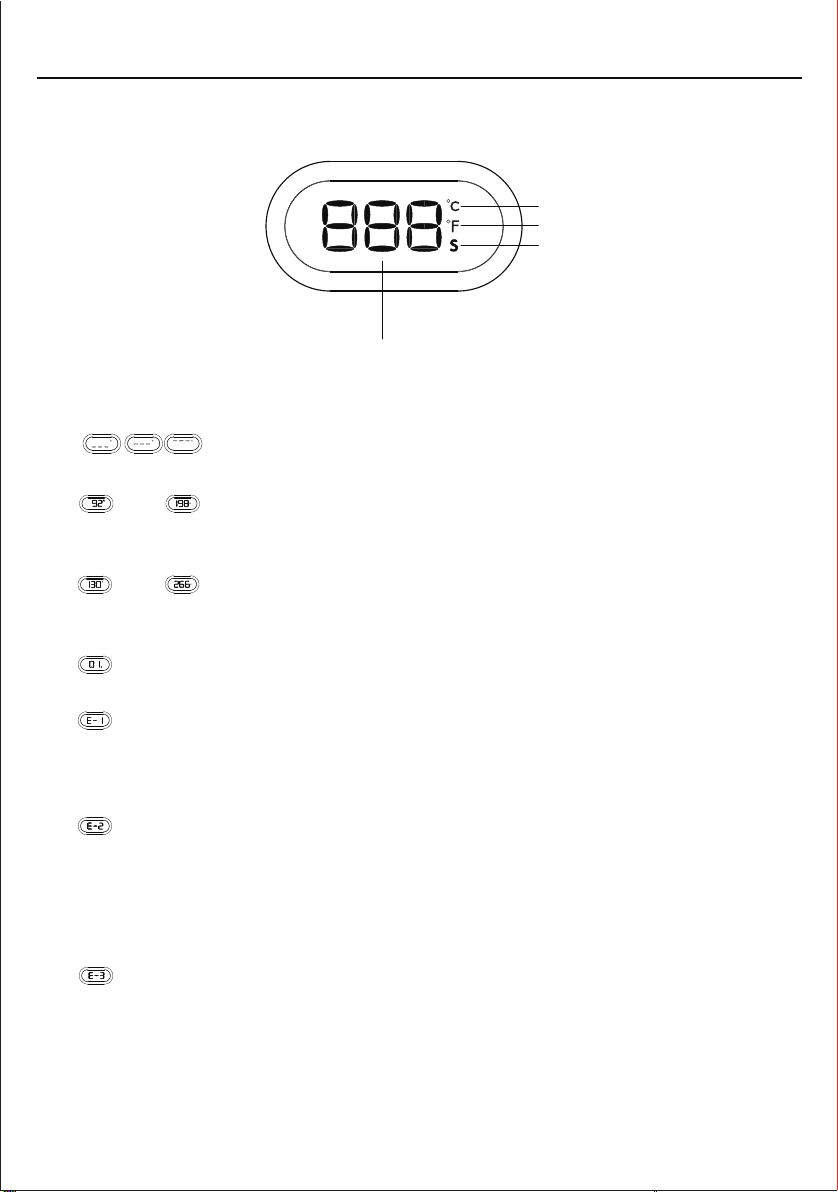
1. " "
Coffee brewing preheating or steam preheating process.
2. " " or " "
After the coffee brewing preheating is completed, the status is displayed in
Celsius or Fahrenheit.
3. " " or " "
After the steam preheating is completed, the status is displayed in Celsius or
Fahrenheit.
4. " "
Displays the coffee brewing time or making hot water/steam time.
5. " "
The steam control knob is turned on: When turn on the machine, the steam preheat
indicator keeps flashing quickly, which means that the steam control knob is not
turned off. Solution: Turn the steam knob to the OFF position.
6. ""
The machine internal temperature is too high: When switch to coffee brewing mode
after making steam immediately, the machine internal temperature is too high
to brew coffee. Solution: Wait a moment for the machine internal temperature
cool down naturally or turn on the steam control knob to release the hot water
to cool down (put a cup under the steam wand).
7. ""
The temperature sensor is short-circuited or open, the temperature fuse is open,
or the connection between the power board and the display board is poor.
Solution: Please contact the Customer Service Center.
DISPLAY
7
PRODUCT COMPONENTS
Celsius
Fahrenhei
Time (second)
Time and temperature digital display

HOW TO USE
8
BEFORE THE FIRST USE
1. Move the coffee maker from the package, and check the accessories according
to the list.
2. Remove the red silicone from the water tank before using the coffee maker.
3. Clean all the detachable parts.
4. Pour water into water tank and the water level should not exceed the "MAX"
mark, put it back on the machine and close the water tank cover.
5. Plug in and press Power button, all coffee indicators are flashing, the machine
starts to preheat. When the indicators stop blinking and keep on, the preheat
function is completed, it takes about 1 minutes. Steam indicator is off.
6. After the preheating is completed, put a big cup under the steamwand, turn the
Steam control knob counterclockwise to the maximum position, and the
electromagnetic pump works until continuous hot water comes out from the
steam wand. Keep making hot water for 30~60 seconds, and then turn off the
Steam control knob. This process in order to pump water into machine and
clean the pipe.
7. Insert the Filter to the Filter holder.
If don’t remove the red silicone cap, the machine will be
unable to pump water.
Note:
Red silicone cap
Water tank

2. Plug in and press the Power button " " all coffee indicators will flash, machine
starts preheating, preheating will be finished within 1 minute, coffee button
indicators will stay on.
3. Remove the filter holder, install the filter in filter holder and fill ground coffee into
the filter. Evenly press down the ground coffee into the filter with the measure
scoop. Please keep the rim of the filter clean after each filling.
8. From position " " to position " " , rotate counterclockwise to install the Filter
holder (No coffee powder added) into the machine, place a cup on Drip tray then
touch the Double-cup coffee button " " to let the hot water out to wash the coffee
filter and the cup.
HOW TO USE
9
If too much coffee powder remains on the edge of the
screen, it is easy to cause poor sealing and water leakage.
Note:
MAKING THE ESPRESSO
1. Open the lid, take out water tank, and fill cold water into water tank NOT exceed the
“MAX” line. Set up the water tank vertically and align the buckles to the hole on the
back of the machine, press it down and close the lid.
Tabla de contenidos
Otros manuales de Cafetera de GeekChef


