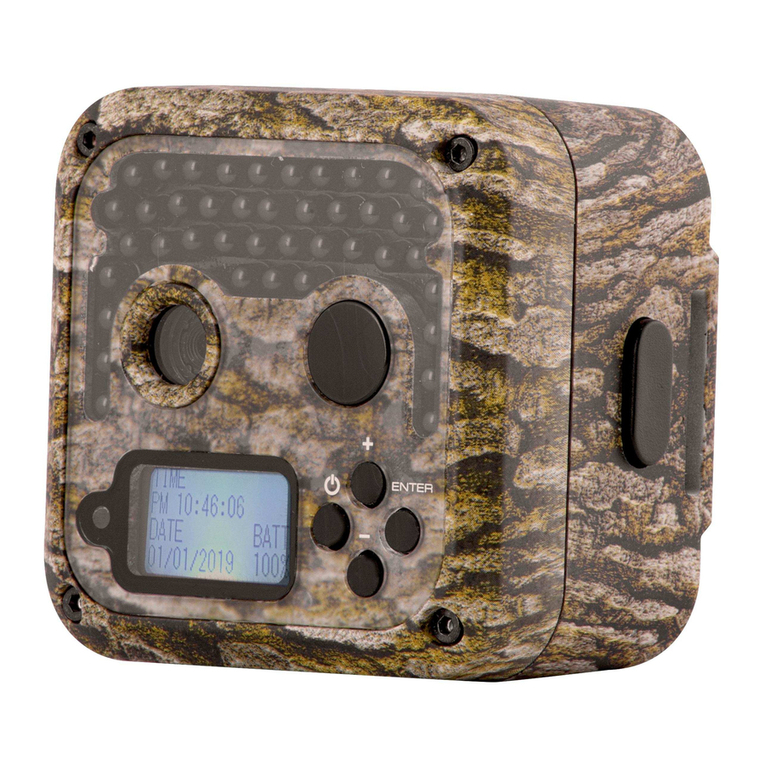
Dsoon H8WIFI-BT Manual de usuario

Dsoon
Model: H8WIFI-BT
Contents
Parts Of The Camera...................................................4
Power Supply...............................................................5
About Memory Card ....................................................6
Basic Operation ..........................................................7
Turn On And Off The Camera .................................. 7
Button Functions ......................................................7
Menu Setting...............................................................8
Operating On Test Mode ...........................................15
Aligning The Camera ......... .................................... 17
Using The Wall Bracket..............................................18
WIFI APP Connection – Remote control....................21
Preparation………................................................. 21
WIFI Connection.................................................... 22
APP Function Setting……………………....................24
Connecting To TV.......................................................27
Download Files To PC……………..............................27
Simple Trouble Shooting............................................29
Warranty ....................................................................31

Dsoon Model: H8WIFI-BT
1
Introduction
Congratulations on the purchase of your new device. You have
selected a high-quality product. The operating instruction is one
constituent of this product. It contains important information
about safety, use and disposal.
Before using the product, familiarise yourself with all operating
and safety instructions. Use this product only as described and
only for the specified areas of application.
Copyright
This documentation is subject to copyright protection.
Any copying or reproduction, including extracts thereof, and the
reproduction of images (even in a modified state), is only
permitted with the written authorisation of the manufacturer.
Intended Use
This device is intended only for recording digital photos and
videos, particularly for observing wildlife. It is not intended for
any other use or for uses extending beyond those stated. This
device is notintended for use in commercial or industrial
environments.

Dsoon Model: H8WIFI-BT
2
The manufacturer accepts no responsibility for damage caused
by failure to observe these instructions, improper use,
incompetent repairs, making unauthorised modifications or for
using unapproved replacement parts. The operator alone bears
liability.When the equipment is placed in the outdoor filming,
rapid changes in the weather could lead to error record.
Safety
Please read below safety precautions carefully before using the
camera.
· Do not try to disassemble the product case.Only authorized
technician can repair the product.
· The camera will be hot after using for too long time.This is
normal.
· Please use the accessory provided by our factory.

Dsoon Model: H8WIFI-BT
3
IMPORTANT
This device complies with Part 15 of the FCC Rules.
Operation is subject to the following two conditions:
(1) This device may not cause harmful interference, and
(2) This device must accept any interference received, including
interference that may cause undesired operation.

Dsoon Model: H8WIFI-BT
4
Parts Of The Camera
1.Display Screen
2.Up/Video Button
3.Shot Button
4.Right Button
5.OK Button
6.Speaker
7.Menu Button
8.Left Button
9.Playback Button
10.Down/Photo Button
11.Micro SD Card Slot
12.AV Jack
13.USB Jack
14.OFF-TEST-ON Mode
Button
15.Infrared LEDs
16.Lens
17.Front Motion Sensor
18.Side Motion Sensor

Dsoon Model: H8WIFI-BT
5
Set the
battery cover
Power Supply
Please install batteries before using the camera.
♦ Open the camera case and remove the battery cover. Install 8
pieces of 1.5V AA batteries. Please make sure the electrode is
correct.
♦ If the camera is in low power, please connect the camera to a
power adapter(not included) for power supply (The specification
of the adapter is DC6.0V/2A). Locate the rubber seal on the
bottom of the camera and open it. Connect one end of the power
adapter to the hunting machine, and the other end to the power
source for power supply.

Dsoon Model: H8WIFI-BT
6
About Memory Card
Please prepare a TF card and insert it into the camera for saving
more files. Before recording, please format the memory card
first.
♦ Support TF card up to 512GB. Suggest to use at least class 6
or above high speed card.
♦ To avoid malfunction, the memory card should be far away
water, strong vibration,dust, hot source and direct sunlight.
♦ Do not insert the memory card forcibly. Please refer to the
marking on the camera.
♦ For the first time use, please wait for the memory card
temperature to reach the ambient temperature.The camera will
be short-circuit influenced by environment temperature and
humidity. Please notice protection for the camera when using it
outdoor.
♦ If the capacity of memory card is full,the camera will stop
recording automatically and the LEDs will go out.
♦ Press the edge of the card gently to pop-up the TF card.

Dsoon Model: H8WIFI-BT
7
Basic Operation
Turn On And Off The Camera
Switch the Mode Button to“Test/On”to turn on the camera.
Switch the Mode Button to “Off” to turn off the camera.
Button Functions
Switch Mode Button to “Test”, then you can set the system
parameters.
1. Press Menu button to open the setup menu.
2. Press Up/Down button to scan all menu. Then press OK
button to enter the options interface.
3. Press Up/Down button to scan all options. And press OK
button to confirm options.
4. Press Menu button again to turn back to last menu or exit the
setup menu.
5. Press Up/down ( video/photo ) button to switch between
video/photo modes for direct manual shooting.

Dsoon Model: H8WIFI-BT
8
Menu Setting
Shooting Mode
Set the working mode. In photo mode,the camera just takes
pictures. In Video mode,the camera just records video. In
photo&video mode,the camera will take a photo first,then start to
record video.
Options:【Photo】/【Video】/【Photo&Video】.
Photo Resolution
Set the still image resolution.
Options:【32MP(6480x4860P)】/【20MP(5200x3900P)】/
【16MP(4608x3456P)】/【12MP(4000x3000P)】/
【8MP(3264x2448P)】/【5MP(2592x1944P)】/
【3MP(2048x1536P)】/【1MP(1280x960P)】.
Photo Series
Set the photo number of continuous shooting. In photo mode,
the camera will take photos continuously.
Options:【1 photo】/【2 photos in series】/【3 photos in series】
/【10 photos in series】.
Tabla de contenidos
Otros manuales de Cámara de exploración de Dsoon