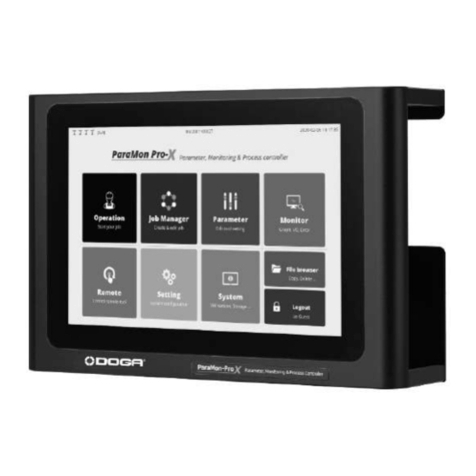
DOGA DPC TOUCH V2 Manual de usuario


User manual DPC Touch V2 DOC.60352-11/20
2
CONTENTS
REMARKS ABOUT THE MANUAL............................................................6
Symbols................................................................................................................ 6
1. INFORMATIONS........................................................................................7
1.1 IMPORTANT................................................................................................. 7
1.2 Product Reference....................................................................................... 7
1.3 General Equipment Description................................................................. 7
1.4 Standard Equipment Presentation............................................................ 8
1.4.1 DPC Touch V2 Controller.............................................................................. 8
1.4.2 Adapters........................................................................................................... 9
1.5 Packing List................................................................................................... 9
1.6 Technical Specifications............................................................................ 10
2. STARTING UP......................................................................................... 13
2.1 Workstation Description............................................................................ 13
2.2 Unpacking................................................................................................... 13
2.3 Configuration...............................................................................................13
2.4 Installation................................................................................................... 14
2.4.1 Workstation Installation............................................................................... 14
2.4.2 Connection.................................................................................................... 14
2.4.3 Firmware Update.......................................................................................... 15
3. SETTINGS................................................................................................ 17
3.1 Select language (English).........................................................................17
3.2 Change Password......................................................................................18
3.3 Controller Parameters - Operating.......................................................... 18
3.3.1 Operating - Management of Interface....................................................... 19
3.3.2 Operating - Management of buttons in operating mode........................ 20
3.3.3 Operating - Management of fastening time..............................................21
3.3.4 Operating - Management of NG tightenings............................................ 23
3.3.5 Operating - Management of operating options........................................24
3.4 Controller Parameters - Encoders...........................................................25

User manual DPC Touch V2 DOC.60352-11/20
3
3.4.1 Encoders - Tolerances Channel 1 to 4......................................................25
3.4.2 Encoders - Position Pick up 1 & 2............................................................. 25
3.4.3 Encoders - Encoder Reference Point / Zero position............................. 27
3.4.4 Encoders - Rest Position............................................................................ 27
3.5 Controller Parameters - Inputs.................................................................28
3.6 Controller Parameters - Outputs..............................................................31
3.7 Controller Parameters - Network............................................................. 33
3.7.1 Network - RS-232 - Serial Communication.............................................. 33
3.7.2 Network - Ethernet Communication - Modbus TCP/IP...........................34
3.7.3 Network - Barcodes..................................................................................... 35
3.7.4 Network - Barcode filtering rules (start/ end) job call:............................ 36
3.8 Controller Parameters - Others................................................................37
3.8.1 Others - Real time encoders monitoring...................................................37
3.8.2 Others - Input monitoring............................................................................ 37
3.8.3 Others - Outputs test................................................................................... 37
3.8.4 Others - Touch Screen Calibration............................................................ 37
3.8.5 Others - Sounds........................................................................................... 37
3.8.6 Others - Date & time.................................................................................... 38
3.8.7 Others - Languages..................................................................................... 38
3.8.8 Others - Change Password........................................................................ 39
3.8.9 Others - Reset to factory settings.............................................................. 39
3.8.10 Others - Firmware Version........................................................................39
4. USE............................................................................................................40
4.1 Tool Start-Up and Stop.............................................................................. 40
4.2 Main Menu...................................................................................................40
4.3 Menu - Operation Mode............................................................................ 41
4.4 Menu - Job Manager................................................................................. 42
4.4.1 New job creation...........................................................................................43
4.4.2 Fastening step creation............................................................................... 45
4.4.3 Manual programming of fastening step (DC Tool).................................. 49
4.4.4 Automatic programming of fastening step (GX/GY)............................... 50
4.4.5 Picture programming into a fastening step.............................................. 51
4.4.6 Smart Tolerance detection feature.............................................................52

User manual DPC Touch V2 DOC.60352-11/20
4
4.4.7 Logical Input step creation.......................................................................... 53
4.4.8 Logical Output step creation.......................................................................54
4.4.9 Delay step creation...................................................................................... 55
4.4.10 Programmation d’une étape message....................................................56
4.4.11 Job example................................................................................................ 57
5. MAINTENANCE...................................................................................... 59
5.1 Maintenance............................................................................................... 59
5.2 Troubleshooting.......................................................................................... 59
5.3 Spare Parts................................................................................................. 62
5.4 Hotline.......................................................................................................... 63
5.4.1 For any information regarding the use of the DPC Touch V2............... 63
5.4.2 For any information regarding troubleshooting........................................63
5.5 After-sales Returns.................................................................................... 64
5.5.1 Download the after-sales return form........................................................64
5.5.2 Send your equipment.................................................................................. 65
5.6 On-site repair.............................................................................................. 65
5.7 Warranty...................................................................................................... 66
6. SAFETY.................................................................................................... 67
6.1 General Provisions.....................................................................................67
6.2 Contra-indications...................................................................................... 67
7. STANDARDS........................................................................................... 68
7.1 Manufacturer details.................................................................................. 68
7.2 Markings...................................................................................................... 68
7.3 Transport and storage............................................................................... 69
7.3.1 Transport........................................................................................................69
7.3.2 Storage.......................................................................................................... 69
7.4 WEEE recycling and end of service life..................................................70
7.4.1 Collection and recycling scheme............................................................... 70
7.4.2 Collection points........................................................................................... 70
8. APPENDICES.......................................................................................... 71
8.1 DPC Touch V2 Electrical wiring............................................................... 71
8.1.1 Encoder port wiring scheme....................................................................... 71
8.1.2 RS232 port wiring scheme..........................................................................72

User manual DPC Touch V2 DOC.60352-11/20
5
8.1.3 Inputs wiring scheme................................................................................... 73
8.1.4 Outputs wiring scheme................................................................................ 74
8.2 Connection of DOGA low voltage tools.................................................. 75
8.2.1 Connection of DOGA low voltage tool GX/GY/DO/GA...........................75
8.2.2. Connection of DOGA Hybrid HDC & current control SDC tools.......... 77
8.2.3. Connection of DOGA current control MDC series................................. 78
8.2.4. Connection of Atlas Copco PF4000......................................................... 80
8.2.5. Connection of Stanley Alpha & Kappa tools........................................... 82
8.2.6. Connection of Kolver EDU tools............................................................... 83
8.2.7. Two tools example wiring...........................................................................85
8.2.8. Automation equipment wiring example.................................................... 86
8.2.9. I/O port adaptor (DB44 DB25 + DB9) wiring scheme...................... 87
8.3 Modbus TCP/IP addresses.......................................................................89
8.4 Modbus TCP/IP address - Event monitoring......................................... 94
8.5 EC Declaration of Conformity...................................................................96

User manual DPC Touch V2 DOC.60352-11/20
6
REMARKS ABOUT THE MANUAL
Symbols
Information
This warning statement indicates important information
(for example : damage to property), but no hazard.
Information
Information to view in your customer area on the www.doga.fr web
site.
Caution
This warning statement indicates a low risk that may lead to minor or
moderate injuries if not avoided.
Warning
This warning statement indicates a moderate risk that may lead to
severe or fatal injuries if not avoided.

User manual DPC Touch V2 DOC.60352-11/20
7
1. INFORMATIONS
1.1 IMPORTANT
The DPC TOUCH V2 delivered with this manual may have been modified for
specific needs.
If this is the case, when ordering a replacement or spare parts, please indicate
the controller serial number written on our shipping note, or contact DOGA
at +33 1 30 66 41 41.
In this way, you will be sure to get the required controller and/or spare parts
1.2 Product Reference
1.3 General Equipment Description
To ensure quality production, it is necessary to count, control, sequence and to
display assembly steps. Our Posi-Control interface, DPC Touch V2, is the
ideal tool for autonomous workstations or line production. It was developed by
DOGA to address all application requirements. The DPC Touch V2 is versatile
and compatible with most tightening tools on the market. It guides the operator,
even a novice, through every step of an assembly process to ensure a zero
default assembly.
Description
DPC TOUCH V2
Type
POSITION CONTROLLER

User manual DPC Touch V2 DOC.60352-11/20
8
1.4 Standard Equipment Presentation
1.4.1 DPC Touch V2 Controller
1
SD Card
6
1 : GX, GY, DO, GA
2
USB mini-B port *
7
2 : GX, GY, DO, GA
3
USB-B port *
8
I/O port (DB44)
4
Power Supply
9
Encoders port (DB9)
5
Ethernet Port
10
Barcode reader (RS-232)
* Not activated.

User manual DPC Touch V2 DOC.60352-11/20
9
1.4.2 Adapters
I/O Adapters
This adapter is used to split
I/O signals for tool interface
and other automation
equipment (see Electric
wiring chapter for the wiring
scheme)
Refer to paragraph 5.3
1.5 Packing List
x 1 DOGA Posi-Control DPC Touch V2
x 1 Mounting kit
x 1 Power supply cable
x 1 I/O DB44 DB25 + DB9 cable
Accessories / others:
x 4 Screw M3
x 1 Adapter EU-UK
x 1 Adapter EU-US

User manual DPC Touch V2 DOC.60352-11/20
10
1.6 Technical Specifications
mm
mm
mm
mm
mm
mm
mm
mm
mm
/ 7,952 in
/ 6,016 in
/ 1,538 in
/ 6,043 in
mm
/ 3,614 in
mm
/ Ø0,216 in
/ 5,039 in
mm
Tabla de contenidos
Otros manuales de Controladores de DOGA