
DOGA BM Series Manual de usuario


ParaMon-Pro X controller DOC.60391-01/21
2
CONTENTS
Symbols...................................................................................................................................................................................... 5
1. INFORMATION.......................................................................................................................................................... 6
1.1 IMPORTANT........................................................................................................................................................................6
1.2 Product reference............................................................................................................................................................... 6
1.3 Product description.............................................................................................................................................................6
1.4 Standard packing items..................................................................................................................................................... 7
1.5 Specifications...................................................................................................................................................................... 8
1.6 System overview.................................................................................................................................................................8
1.7 Dimensions and appearances.......................................................................................................................................... 9
2. HOME........................................................................................................................................................................ 11
2.1 Operator mode.................................................................................................................................................................. 11
2.2 Administrator mode.......................................................................................................................................................... 12
3. NETWORK CONFIGURATION.............................................................................................................................13
3.1 Connect through internal AP...........................................................................................................................................14
3.2 Connection through external AP.................................................................................................................................... 16
4. BM WIFI SETUP......................................................................................................................................................18
4.1 Setup using ParaMon Air (PC)....................................................................................................................................... 18
4.1 Setup using ParaMon-Pro X........................................................................................................................................... 21
5. MEMBER TOOL MANAGEMENT........................................................................................................................23
5.1 Register Member Tools....................................................................................................................................................24
5.2 Deregister Member Tools................................................................................................................................................ 27
5.3 Modify member tool names............................................................................................................................................ 29
5.4 Check member tool status.............................................................................................................................................. 30
6. STATUS BAR...........................................................................................................................................................32
7. SELECT TARGET TOOL.......................................................................................................................................33
8. PARAMETER........................................................................................................................................................... 35
8.1 Fastening........................................................................................................................................................................... 35
8.2 Advanced........................................................................................................................................................................... 40
8.2.1 Free reverse rotation................................................................................................................................................................. 41
8.2.2 Thread tapping............................................................................................................................................................................41
8.2.3 Engaging torque detection........................................................................................................................................................ 43
8.2.4 Angle after torque up................................................................................................................................................................. 45
8.3 Controller........................................................................................................................................................................... 46
8.4 Multi-sequence................................................................................................................................................................. 52
8.5 Network.............................................................................................................................................................................. 54
9. MONITOR................................................................................................................................................................. 55
9.1 Graph................................................................................................................................................................................. 56
9.2 I/O....................................................................................................................................................................................... 58
9.3 Error....................................................................................................................................................................................59
10. REMOTE.................................................................................................................................................................60
10.1 Output.............................................................................................................................................................................. 60
10.2 Tool................................................................................................................................................................................... 61

ParaMon-Pro X instruction manual DOC.60391-01/21
3
11. SETTING.................................................................................................................................................................62
11.1 Operation......................................................................................................................................................................... 62
11.2 I/O..................................................................................................................................................................................... 67
11.2.1 Input............................................................................................................................................................................................68
11.2.2 Output.........................................................................................................................................................................................69
11.3 Log.................................................................................................................................................................................... 70
11.4 Barcode - without job & BM integrated scanner........................................................................................................ 71
11.5 Network............................................................................................................................................................................ 73
11.6 Share................................................................................................................................................................................ 74
11.7 System............................................................................................................................................................................. 76
12. SYSTEM................................................................................................................................................................. 77
12.1 Device info.......................................................................................................................................................................77
12.2 Storage............................................................................................................................................................................ 78
12.3 Network............................................................................................................................................................................79
13. JOB MANAGER....................................................................................................................................................80
13.1 Edit job & step.................................................................................................................................................................81
13.1.1 Fastening step.......................................................................................................................................................................... 83
13.1.2 Input step...................................................................................................................................................................................86
13.1.3 Output step................................................................................................................................................................................87
13.1.4 Delay step................................................................................................................................................................................. 88
13.1.5 Message step........................................................................................................................................................................... 89
13.2 Barcode........................................................................................................................................................................... 90
14. OPERATION.......................................................................................................................................................... 92
14.1 With job mode.................................................................................................................................................................93
14.1.1 Fastening step.......................................................................................................................................................................... 94
14.1.2 Input step...................................................................................................................................................................................96
14.1.3 Output step................................................................................................................................................................................97
14.1.4 Delay step................................................................................................................................................................................. 98
14.1.5 Message step......................................................................................................................................................................... 100
15. FILE BROWSER.................................................................................................................................................101
16. FTP SERVER...................................................................................................................................................... 103
16.1 Connection via WiFi.....................................................................................................................................................104
16.2 Connection via ethernet.............................................................................................................................................. 105
17. BACKUP & RESTORE...................................................................................................................................... 106
17.1 ParaMon-Pro X.............................................................................................................................................................106
17.1.1 Backup..................................................................................................................................................................................... 107
17.1.2 Restore.................................................................................................................................................................................... 109
17.2 BM Parameters.............................................................................................................................................................110
17.2.1 Backup..................................................................................................................................................................................... 111
17.2.2 Restore.................................................................................................................................................................................... 112
18. SOFTWARE UPGRADE.................................................................................................................................... 113

ParaMon-Pro X instruction manual DOC.60391-01/21
4
19. MAINTENANCE.................................................................................................................................................. 115
19.1 Maintenance..................................................................................................................................................................115
19.2 Troubleshooting............................................................................................................................................................ 115
19.3 Spare parts....................................................................................................................................................................116
19.4 Hotline............................................................................................................................................................................ 116
19.4.1 For any questions about the use of the device..................................................................................................................116
19.4.2 For any questions regarding troubleshooting.................................................................................................................... 116
19.5 After-sales returns........................................................................................................................................................ 117
19.5.1 Download the after-sales return form..................................................................................................................................117
19.5.2 Send your equipment............................................................................................................................................................ 117
19.6 On-site repair................................................................................................................................................................ 118
19.7 Warranty........................................................................................................................................................................ 118
20. SAFETY................................................................................................................................................................ 119
20.1 General provisions....................................................................................................................................................... 119
20.2 Contra-indications........................................................................................................................................................ 119
21. STANDARDS.......................................................................................................................................................120
21.1 Importer details.............................................................................................................................................................120
21.2 Markings........................................................................................................................................................................ 120
21.3 Transport and storage................................................................................................................................................. 120
26.3.1 Transport................................................................................................................................................................................. 120
26.3.2 Storage.................................................................................................................................................................................... 120
21.4 WEEE recycling and end of service life................................................................................................................... 121
26.4.1 Collection and recycling scheme.........................................................................................................................................121
26.4.2 Collection points..................................................................................................................................................................... 121
22. APPENDICES......................................................................................................................................................122
22.1 - Declaration of conformity......................................................................................................................................... 122
22.2 - Interface port DB44 pin out...................................................................................................................................... 122
22.3 - Backup data forwarding............................................................................................................................................123

ParaMon-Pro X instruction manual DOC.60391-01/21
5
REMARKS ABOUT THE MANUAL
Symbols
Information
This warning statement indicates important information (for example: damage to property), but no hazard.
Information
Information to view in your customer area on the www.doga.fr web site.
Caution
This warning statement indicates a low risk that may lead to minor or moderate injuries if not avoided.
Wear personal protection equipment
This symbol indicates the need to wear protective gloves.
Warning
This warning statement indicates a moderate risk that may lead to severe or fatal injuries if not avoided.

ParaMon-Pro X instruction manual DOC.60391-01/21
6
1. INFORMATION
1.1 IMPORTANT
The tool supplied with this manual may have been altered to meet specific needs.
If this is the case, when ordering a renewal or spare parts, please indicate the tool item code featured on the delivery
document, or contact DOGA at +33 1 30 66 41 41 indicating the approximate delivery date. You will then be sure to
get the required tool and/or parts.
1.2 Product reference
Description
BM series controller
Type
ParaMon-Pro X
1.3 Product description
ParaMon-Pro X offers diverse features to help users use the BM tool more efficiently..
The features of ParaMon-Pro X are as follows:
Dual-band (2.4 & 5GHz) WiFi, AP-mode only
Able to connect up to 8 BM/MD tools
Able to check and change parameter settings
Displays fastening data in real time and saves them automatically
Directly programs and visualizes assembly procedures
Realtime graph monitoring (torque, speed, angle…)
Remote tool control
I/O port (input x 16 / output x 16)
External display extension (HDMI)
Supports barcode scanner
Supports File Transfer Protocol (FTP) server
Backup / restore
ParaMon-Pro X instruction manual DOC.60391-01/21
7
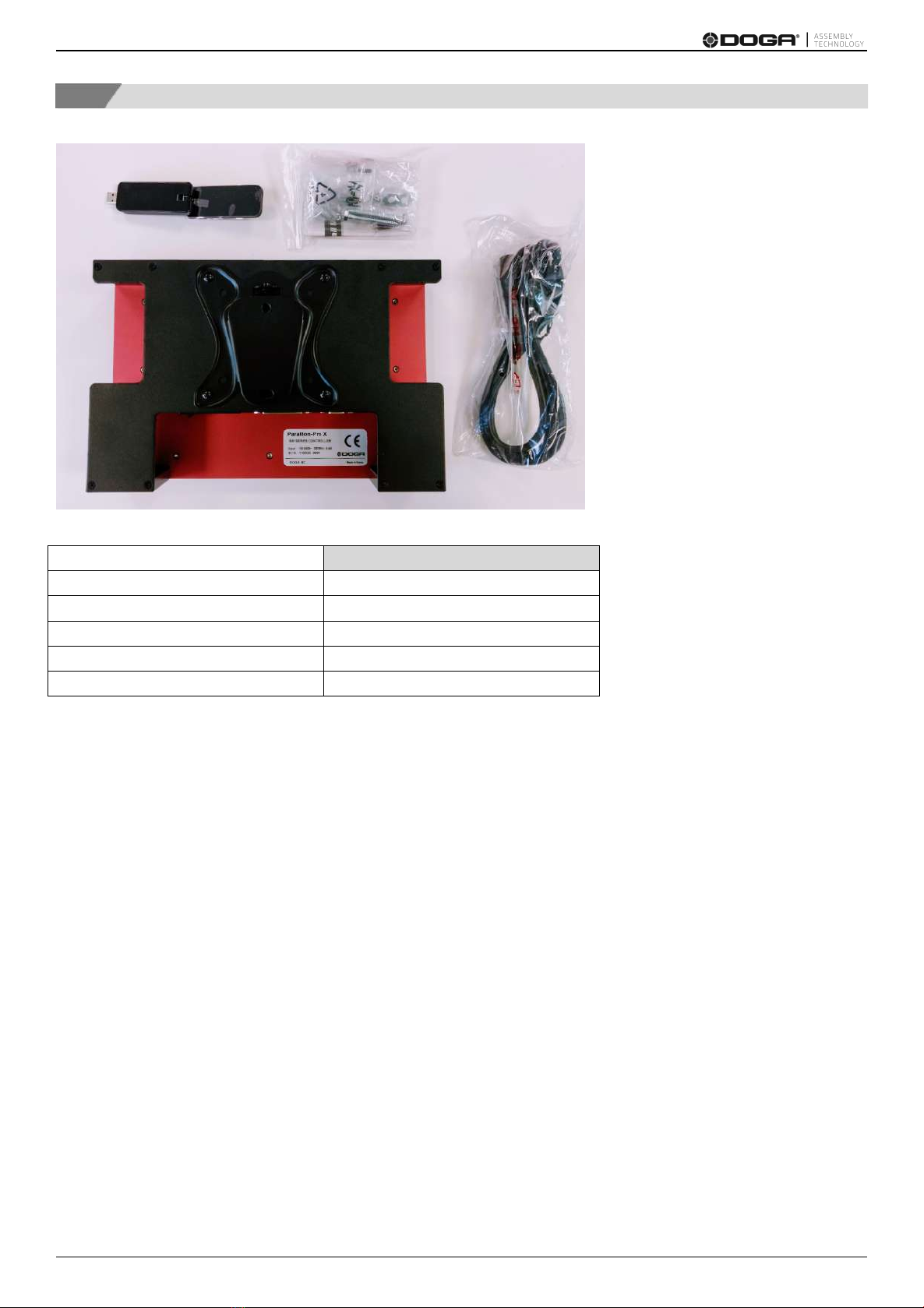
1.4 Standard packing items
Quantity
ParaMon-Pro X Controller
X 1
Power Cord
X 1
WiFi USB adapter
X 1
Vesa wall mounting support
X 1
CE Declaration of Conformity
X 1

ParaMon-Pro X instruction manual DOC.60391-01/21
8
1.5 Specifications
No.
Category
Specifications
1
Input Power
AC 100-240 V, 50/60Hz, 0.35A
2
Dimensions
300(W) x 196(H) x 80(D) mm
3
Weight
3.54 kg (including wall mount bracket)
4
Mounting
VESA 100 x 100 (wall mount bracket included)
5
Display
10.1-inch capacitive touchscreen (1280 x 800 px)
6
Extended Display
HDMI x 1 (duplicate)
7
Storage
On-board 8GB eMMC
8
Ethernet
Gigabit ethernet x 1
9
WiFi
Wireless USB adapter included
2.4GHz, 5GHz dual-band, IEEE 802.11 b/g/n/ac
AP-mode only
10
Interface
USB 2.0 x 3
24V digital I/O (input x 16, output x 16)
Micro-SD slot (up to 32GB)
11
Multi-Language
English, Translation in progress :French, German, Spanish,
Cautions
Do NOT use any item other than the accompanying USB WiFi adapter.
There is a possibility of signal interference while operating the equipment
1.6 System overview

ParaMon-Pro X instruction manual DOC.60391-01/21
9
1.7 Dimensions and appearances

ParaMon-Pro X instruction manual DOC.60391-01/21
10
Este manual sirve para los siguientes modelos
1
Tabla de contenidos
Otros manuales de Controladores de DOGA


