cool blue blue built BBWLBKQ23 Manual de usuario

FLYING START.
Whoooo.
921904 - BBWLBKQ23
Wireless Bluetooth Keyboard
Draadloos Bluetooth Toetsenbord
Clavier sans Fil Bluetooth
Kabellose Bluetooth-Tastatur

2
TABLE OF CONTENTS
HOW TO CONNECT YOUR KEYBOARD 3
KEYBOARD INDICATORS 4
CHARGING YOUR KEYBOARD
5
KEYS AND FUNCTIONS 6
DECLARATION OF CONFORMITY
7
INHOUDSOPGAVE
JE TOETSENBORD AANSLUITEN 9
TOETSENBORD INDICATOREN 10
JE TOETSENBORD OPLADEN
11
TOETSEN EN FUNCTIES 12
VERKLARING VAN OVEREENSTEMMING
13
TABLE DES MATIÈRES
CONNECTER VOTRE CLAVIER 15
INDICATEURS DU CLAVIER 16
CHARGEMENT DU CLAVIER
17
TOUCHES ET FONCTIONS 18
DÉCLARATION DE CONFORMITÉ
19
INHALTSVERZEICHNIS
IHRE TASTATUR ANSCHLIEßEN 21
TASTATUR-ANZEIGEN 22
AUFLADEN DER TASTATUR
23
TASTEN UND FUNKTION 24
KONFORMITÄTSERKLÄRUNG 2
5

3
1
You turn the keyboard on by operating the switch on
the top right.
Press Fn and one of the Bluetooth channels at the
same time, select one of the three channels, and
the light on the top right will light up once. Press
and hold for 5 seconds on Bluetooth channel
1, the chosen channel will start the Bluetooth
pairing mode, and the indicator light will flash
quickly.
Open the Bluetooth
settings on your
device, select the
keyboard and make a
connection.
HOW TO CONNECT YOUR KEYBOARD

4
2
After the keyboard is powered on, a red light will
appear. is light will dissapear after 3 seconds.
Indicates whether caps lock is enabled or disabled,
caps lock is enabled when the the light is turned on.
Indicates whether the numpad is enabled or
disabled, num lock is enabled when the light is
turned on.
Caps lock
Num lock /
Bluetooth indicator /
Power indicator
Charging
indicator
KEYBOARD INDICATORS

5
3
When the battery is low the battery indicator light
will start to flash, plug the included usb-C cable on
the top of the keyboard to charge.
CHARGING YOUR KEYBOARD
Please note: when the battery is low, the
transmission of the keyboard can be delayed or
unstable.

6
4
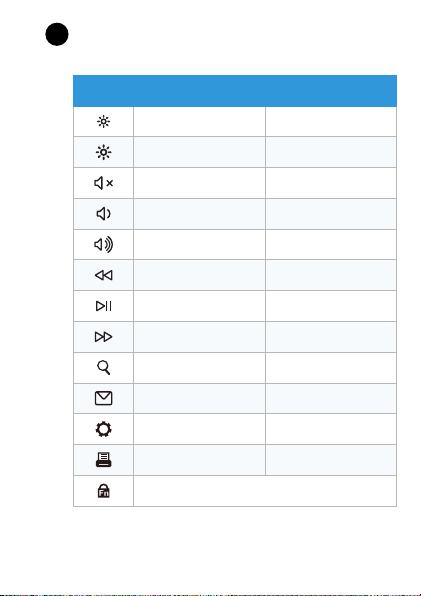
Key Windows Mac
Decrease brightness Decrease brightness
Increase brightness Increase brightness
Mute Mute
Decrease volume Decrease volume
Increase volume Increase volume
Previous track Previous track
Play / pause Play / pause
Next track Next track
Search N/A
Mail N/A
Set up N/A
Print Print
Fn lock, open or close the Fn function
KEYS AND FUNCTION

7
Declaration of conformity
Product specifications
Frequency: 2.4GHz
Working current: ≤5mA
Battery capacity: 300mAh
Safety instructions
1. Always follow these instructions and note the warnings, save this document for
future use as long as you own or use the device, and give it to the next users of the
device.
2. Make sure you read and understand the entire manual before you use the device.
3. Use the device only in the application for which it is intended, namely as a pointing
device that is connected to a laptop or computer to control the cursor on the screen
with a hand movement.
4. Before you connect a device, check if the output power of the charger provides
enough power for the connected device.
5. Don’t expose the device to extreme heat, like sunlight or fire. Avoid sudden
temperature shifts.
6. Don’t use or use the device in moist or wet conditions.
7. Don’t use the device close to explosive gasses or flammable materials.
8. Don’t burn the device.
9. Avoid contact with the chemicals of the battery. When the chemicals of the battery
come into contact with skin or the eyes, stop using the device right away, use plenty
of water to rinse off the chemicals, and contact a doctor.
10. Don’t throw, shake, vibrate, drop, or mechanically misuse the device and don’t
expose it to impacts.
11. Don’t cover the device with objects that affect the heat dispersal.
12. Only use the device with the included cables or with cables that came with the
device. Don’t use the device when the included cables are damaged or have gotten
damaged over time.
13. Disconnect the device when it’s not in use. Don’t charge or discharge the device
unsupervised.
14. Keep the device away from children.
15. Don’t disassemble, open, or repair the device.
16. Only clean the device with a damp cloth with water. Don’t use (aggressive)
cleaning agents.

8
is symbol on the product indicates that it can’t be treated as
regular waste, but that it’s supposed to be collected separately.
Hand the product in at a collection point for the recycling of
electronic devices if you live in the EU or in a different European
country that has a separate collection system for electronic
devices. If you correctly dispose of the product, you help to avoid
risks for the environment and public health which might arise
by the mishandling of disposed devices. Recycling materials
contributes to the maintenance of our natural resources.
17. is device can be used by people with reduced physical, sensory, or mental
capacity, or by people without experience and knowledge, given that they’re
supervised or have gotten instructions about safe use of the product and understand
any dangers.
Warranty and liability
is device comes with a warranty period of five (5) years after the date of purchase.
For more information about the warranty terms and conditions, go to https://www.
coolblue.nl/en/customer-service. Coolblue B.V. can in no way be held liable for
material and immaterial damage suffered by you, others, the device, other property,
or the property of others due to non-compliance with the instructions in this manual.
Hereby, Coolblue B.V. declares that this product is in compliance with
RoHS Directive 2011/65/EU and Radio Equipment Directive 2014/53/
EU. e full text of the EU Declaration of Conformity is available at
www.coolblue.nl/en/product/921904.

9
1
Je zet het toetsenbord aan door de schakelaar
rechtsboven om te zetten.
Druk tegelijkertijd op Fn en één van de
Bluetooth-kanalen, selecteer één van de drie
kanalen, het lampje rechtsboven zal eenmalig
oplichten. Houd 5 seconden ingedrukt op
Bluetooth kanaal 1, het gekozen kanaal zal
de Bluetooth pairing mode starten, en het
indicatielampje zal snel
knipperen.
Open de Bluetooth-
instellingen op je
apparaat, selecteer het
toetsenbord en maak
verbinding.
JE TOETSENBORD AANSLUITEN

10
2
Nadat het toetsenbord is ingeschakeld, verschijnt er
een rood lampje. Dit lampje verdwijnt na 3 seconden.
Geeft aan of caps lock is ingeschakeld of
uitgeschakeld, caps lock is ingeschakeld wanneer
het lampje wordt ingeschakeld.
Geeft aan of het numpad is in- of uitgeschakeld,
num lock is ingeschakeld wanneer het lampje wordt
ingeschakeld.
Caps lock
Num lock /
Bluetooth-indicator /
Stroomindicator
Laadindicator
TOETSENBORDINDICATOREN
Este manual sirve para los siguientes modelos
1
Tabla de contenidos
Idiomas:
Otros manuales de Teclado de cool blue