Clas Ohlson PT15 Manual de usuario

EnglishSvenskaNorskSuomi
MP3/WMA Player
MP3/WMA-spelare
MP3/WMA-spiller
Mp3-/WMA-soitin
Art.no. Model
38-3471 PT15 Ver. 200908


3
English
MP3/WMA Player
Art.no. 38-3471 Model PT15
Please read the entire instruction manual before use and save it for future reference.
We reserve the right for any errors in text or images and for making any necessary
technical changes to this document. If you should have any questions concerning
technical problems please contact our Customer Services.
Contents
1. Safety........................................................................................... 3
2. Product description..................................................................... 3
3. Buttons and functions................................................................. 4
4. Getting started............................................................................. 5
5. Basic operation ........................................................................... 7
6. Operation ..................................................................................... 8
7. Converting video to other formats............................................ 18
8. Care and maintenance.............................................................. 19
9. Troubleshooting......................................................................... 19
10. Disposal ................................................................................... 20
11. Specifications.......................................................................... 20
1. Safety
• Prolonged exposure to high volume can damage your hearing.
• Never expose the device to direct sunlight, sources of heat, moisture or rain.
• Never expose the device to knocks or blows.
• Never place the device beside magnets such as loudspeakers.
2. Product description
2.1 System requirements
• Pentium 200 MHz or greater
• Windows 98SE/2000/ME/XP/VISTA
• 120 MB of available hard disk space
• USB port
• CD reader

4
English
1
2
3
5
12
10
7
4
6
11
9
8
3. Buttons and functions
1. USB port
2. FUNC – Acts as an enter/exit function for the music mode
3. Colour display
4. [V+] – Up/Volume up
5. Reset hole
6. []– Left/Previous/Quick search backwards (hold in button)
7. Headphone socket (3.5 mm stereo)
8. [V-] – Down/Volume down
9. []– Right/Next/Quick search forward (hold in button)
10. [ ] – Press and hold in to turn the player on/off
11. [] – Play/Pause/Confirm. Press and hold in to come to the main menu. Press and
hold in to unlock the buttons.
12. MIC – Built-in microphone

5
English
4. Getting started
4.1 Connecting to the computer
The device can be connected to or disconnected from the computer without having to
turn the computer off. The device will automatically be allocated a device letter by the
computer. The MP3 player does not have to be restarted before transferring files.
The following installation instructions apply for Windows XP with Service Pack 2 installed.
4.1.1 Installation using Windows XP
1. No extra driver is required for Windows XP.
2. Connect the supplied USB cable to a vacant USB port on your computer and then
to the USB port (1) on the player.
3. The computer will automatically detect the player as a “Removable Storage
Device” and allocate it a letter in “My Computer”.
4.1.2 Transferring files
When a connection has been made pictures, music and videos can be transferred
to the device.
1. Select the files on your computer. Right-click and Copy the files.
2. Double-click on the device’s symbol (e.g. “F”). The device symbol allocated to your
computer may vary depending on the configuration of your computer.
3. Right-click on the device and select Paste.
General advice:
• You can also use the “drag and drop” method to copy or transfer files between
your computer and the device.
Sorting files
• The player can sort your files into alphabetical order and play them in this order
unless another order has been chosen (random playback).

6
English
4.1.3 Disconnecting the player
1. Double-click on Safely Remove
Hardware on the task bar.
2. Select USB Mass Storage Device and
then click on Stop.
4. The player can now be safely removed
from the USB port.
N.B. Do not remove the device from the USB port when data is being transferred to or
from the memory. The built-in flash memory could become damaged.
4.2 Charging the battery
The device has a built-in rechargeable battery. The status of the battery is indicated by
the battery symbol in the upper right-hand corner of the display. When the symbol ap-
pears empty it is time to recharge the battery. A USB charger cable is provided
for recharging the battery.
1. Connect the USB cable to a vacant USB port on your computer and then to the
USB port on the device.
2. When the battery symbol appears full the battery is fully charged.
Important:
• Charge the battery fully before using it for the first time.
• It takes approximately four hours to fully charge the battery.
• Charge the battery as soon as the “Low Battery” message is displayed.
• Release the USB cable when the battery is fully charged. Overcharging the battery
will shorten its life.
• The battery can discharge if the device is not used for a long time (more than 3
months). To avoid the battery becomming discharged, it should be fully charged
every second or third month.
3. Select Audio Player USB Device and
then click on OK.

7
English
5. Basic operation
5.1 Turning the device on and off
To turn on – Push and hold [ ] for three seconds.
To turn off – Push and hold [ ] for three seconds.
Note:
• If you are using the player for the first time after it has been reset, you will need
to select a display language using the [V+] and [V-] buttons, and then confirm by
pressing [].
• When the player is connected to the computer it can also be turned off by pressing
and holding in the [ ] button.
5.2 Adjusting the volume
Press [V+] to increase, and [V-] to decrease the volume.
5.3 Before use
• Download files to the device as described in section 4.1.2 Transferring files.
• Make sure that the battery is charged and that your earphones are plugged into
one of the jacks.
• If the device is turned off, press and hold [ ] to turn it on.
5.4 Button lock
The button lock prevents unwanted button activity. Press and hold in [] to activate
the button lock. Please note that the button lock activate automatically after a set time
(the set time can be adjusted).
5.5 Resetting
If the player needs to be reset, press into the reset hole using a pointed metal object.

8
English
1
2
3
4
5
6
7
8
10
9
6. Operation
Key to the main menu selection:
1. Press and hold in []to enter the main menu from another application.
2. Use [V+] and [V-] to browse the menu selection: MUSIC, PHOTO, VIDEO, FM
RADIO, VOICE, E-BOOK, FILE BROWSE and SETUP.
3. Press in []to confirm and select the highlighted function.
4. Press and hold in [] to exit the menu.
1. Music Music playback
2. Photo Picture viewer
3. Video Video playback
4. Voice Recording and playback of speech.
5. FM Radio Listening to and recording from the radio
6. Mic. Record Recording via the built-in microphone
7. E-Book Text file reader
8. File browse View all files
9. Setup Settings
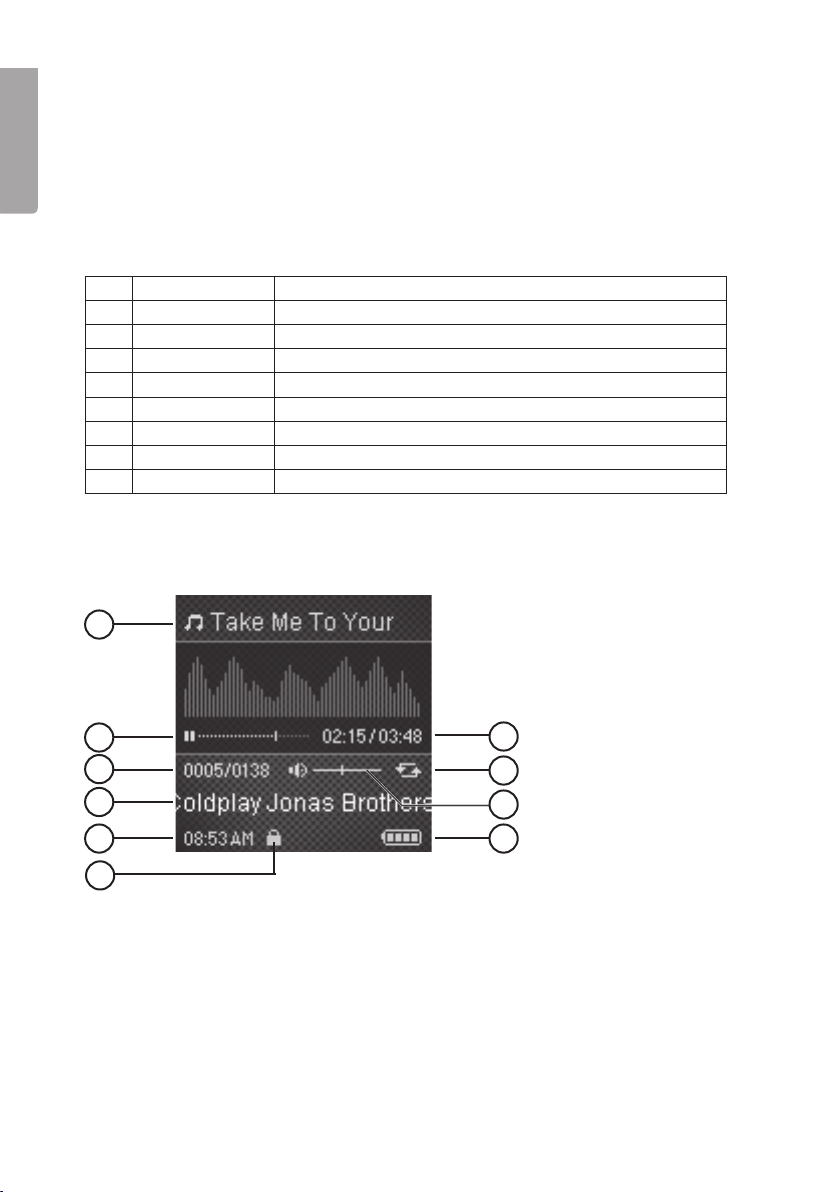
6.1 Music
6.1.1 Display Key
1. Current track information
(file name/ID3 tag)
2. Progress bar
3. Current track/total number of tracks
4. Title
5. Clock
6. Button lock
7. Elapsed time/ total time
8. Repeat mode
9. Volume level
10. Battery level

9
English
6.1.2 Listening to music
1. Enter the main menu by
pressing and holding in [].2. Select MUSIC using [V+]/[V-],
and confirm using [].
3. Press []to start/pause playback.
- Use []and []to select the desired track.
- Press and hold [] and [] to fast forward or rewind.
6.1.3 Opening the functions menu
1. In music mode, press FUNC once to enter the functions menu. Press FUNC again
to exit the menu.
2. Press []or []to choose from All Songs, Repeat Mode, Equalizer, Classification,
Play rate, 3D, ACL and Back.
3. Press []to confirm.
Key to the functions menu:
• All songs: Shuffles all the songs on the playlist. Select SHUFFLE ALL and then
press []to shuffle the songs. Select PLAYLIST and then press []to confirm.
Then press [V+] or [V-] to select a song or folder. Press []or []to either play
the song or open the selected folder. Press []to go back.
• Repeat – Repeats a track, all tracks or a folder. Random playback Use [V+] and
[V-] to select from: No repeat, Repeat One, Repeat All, Folder Normal, Folder All
Repeat and Folder Shuffle All. Press [] to confirm or press []to go back.
• Equalizer – Select from 6 pre-programmed equalizer settings (Normal, Pop, Rock,
Classic, Jazz, Bass) or configure your own mode (Custom EQ). Use [V+] and [V-]
to make a selection. Press [] to confirm or press []to go back.

10
English
Configuring your own equalizer setting:
1. Select Custom EQ and confirm
using [].
2. Use []and []to highlight the bar
(frequency range) you wish to change.
3. Change the setting value using [V+]
and [V-].
4. Continue in the same way with the
other bars.
5. Press []to save your settings.
• Classification – Classify your songs by genre, artist, album, and titel. Select
CLASSIFICATION and YES. Confirm by pressing []. When you have finished, use
[V+] and [V-] to make your selection, confirm using [].
• Play rate – Changes the rate of play. Use [V+] and [V-] to make a selection. Press
[] to confirm or press []to go back.
• 3D – To activate the 3D effect, (gives the sound an extra dimension) use [V+] and
[V-] to select OFF or ON, confirm using []or press []to go back.
• ACL – To activate ACL, use [V+] and [V-] to select OFF or ON, confirm using []
or press []to go back.
• Back – Return to the song.
Note: The Play rate setting cannot be altered in WMA format.
6.2 Lyrics
This player supports the display of lyrics during playback. Only lyrics in LRC format
can be displayed. To add lyrics, do as follows:
1. Download the “.lrc” lyric file from the Internet.
2. Make sure that the lyric file has the same name as the music file.
3. Copy both files to the same folder in the player.
6.3 Picture Viewer (Photo)
The picture viewer supports playback of pictures in formats of JPG or BMP.
Este manual sirve para los siguientes modelos
1
Tabla de contenidos
Idiomas:
Otros manuales de Reproductor de MP3 de Clas Ohlson

Clas Ohlson
Clas Ohlson MP734AF Manual de usuario

Clas Ohlson
Clas Ohlson MPCD-122 Manual de usuario

Clas Ohlson
Clas Ohlson LD05-2GB Manual de usuario

Clas Ohlson
Clas Ohlson MP714AF Manual de usuario

Clas Ohlson
Clas Ohlson MH606 Manual de usuario

Clas Ohlson
Clas Ohlson MP-567AF Manual de usuario

Clas Ohlson
Clas Ohlson KA10 Manual de usuario

Clas Ohlson
Clas Ohlson COBY MP-CD521 Manual de usuario

Clas Ohlson
Clas Ohlson BM366 Manual de usuario

Clas Ohlson
Clas Ohlson MP569A Manual de usuario