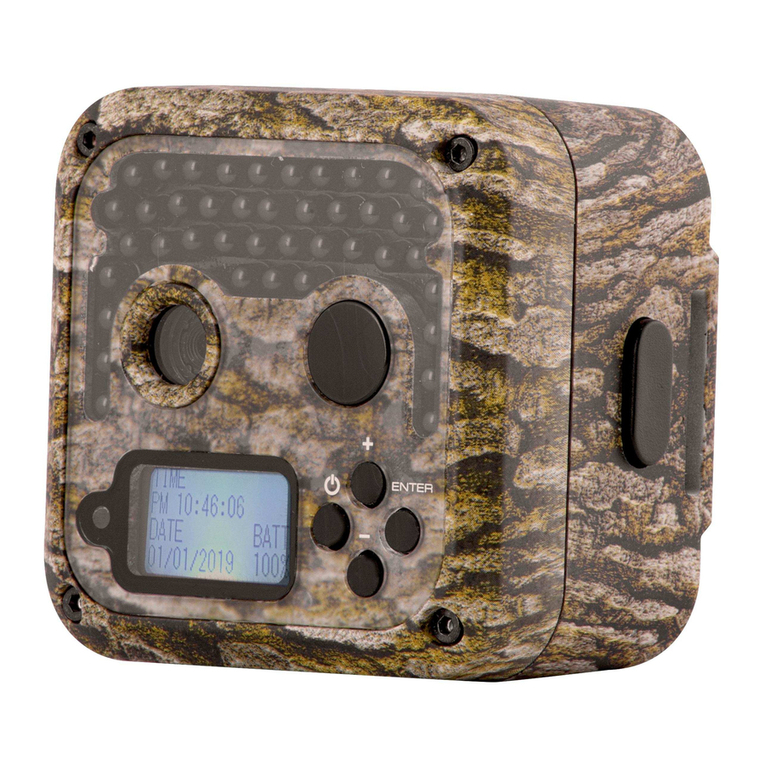
Camouflage SM4-PRO Manual de usuario

Digital Wildlife Camera
SM4-PRO

-1-
TABLE OF CONTENTS
PREFACE......................................................................................................................... 2
1. GENERAL INFORMATION...................................................................................... 3
1.1 Introduction .......................................................................................................................3
1.2 Application ........................................................................................................................ 4
1.3 Illustration ......................................................................................................................... 4
2. QUICK START..........................................................................................................7
2.1 Batteries ............................................................................................................................ 7
2.2 Insert TF card ....................................................................................................................7
2.3 Enter the "SET"-mode ..................................................................................................... 8
2.4 Enter Live Mode ................................................................................................................9
3. ADVANCED SETTINGS...........................................................................................9
3.1 Parameter settings ...........................................................................................................9
3.2 File format ....................................................................................................................... 13
4. WARRANTY............................................................................................................13
5. Appendix I: TECHNICAL SPECIFICATION..........................................................14
6. Appendix II: PACKAGE CONTENTS....................................................................17
7. Appendix III: FAQ.................................................................................................. 18

-2-
PREFACE
Thank you for purchasing the SM4-PRO Camouflage Digital Wildlife Camera. This
product is a digital camera for wildlife recording and observation. To make our product
easy to use and have a general understanding, we have created this guide specifically
for you. This manual explains how to use this camera systematically. Read this manual
carefully before use, so that you can master the method quickly and correctly.
The contents of this manual are for reference only and use the latest information
available at the time of writing. The screen displays, illustrations, etc. used in this
manual are intended to provide a more detailed and intuitive explanation of camera
operations. Due to differences in technology development and production batches,
these may differ slightly from the camera you actually use.
If you have any questions while using this product, please contact us. We will be happy
to serve you.

-3-
1. GENERAL INFORMATION
1.1 Introduction
The Wildlife Camera (also called Scouting/Hunting Camera) is a reconnaissance device
that can be activated by a sudden change in ambient temperature caused by any
movement of human (or animal) in a particular Region Of Interest (ROI), which is
detected by a highly sensitive passive infrared (PIR) sensor and then automatically
records high-quality photos or HD video clips. The camera can reach more applications
through the timer, interval, and other function settings.
Main Features:
1) 90-degree camera lens.
2) Optional 1/3/5/8/12/16 Mega-pixel high-quality resolution.
3) The trigger time reaches up to 0.6 seconds.
4) Build-in 2.36” TFT color screen to review photos and videos.
5) Support SD Card up to 32GB (64GB is possible).
6) Waterproof IP66.
7) Perform in the most extreme temperatures from -22°F to 158°F
8) 38pcs IR LEDs.
9) The date, time, temperature, and moon phase can be stamped in the picture.
10) In the “Camera + Video” Mode, the camera takes both pictures and video at every
trigger event.
11) In the Time-lapse setting, the camera automatically and constantly takes
pictures/videos at the specified interval. It’s very useful when observing plants

-4-
flowering, birds building nests, or when monitoring unattended properties such as
parking lots/yards. This feature can be used together with the Timer feature to
meet your timetable
12) Auto power offin 10 minutes while no keypad controlling.
13) Extremely long in-field battery life (in standby mode, up to 6 months with 8*AA
batteries).
14) The serial Number function enables you to code locations in the photos. This helps
multi-camera users identify the location when reviewing the photos.
15) Lockable and password protected.
16) Color pictures in the daytime, and monochrome pictures at night, switched
automatically.
1.2 Application
For hunting, trail animals’ trace or habit.
For wildlife observation and research, captures pictures and videos of wild animals.
As a sports camera, for riding, driving, camping, or exploring
As a Motion-Triggered security camera, for home, office, and community.
All other indoor and outdoor surveillance where invasion evidence is needed.
1.3 Illustration
Figure 1-1 shows the front view of the camera
Figure 1-2 shows the bottom and the side view of the camera
Figure 1-3 shows the back view of the camera
Figure 1-4 shows the inside view of the camera

-5-
IR-LED
Lock hole
Lens
PIR-sensor
TF-card slot
USB port
Battery compartment
DC-port
Tripod nut
Figure 1-1: Front View
Figure 1-2: Bottom and Side View

-6-
Figure 1-3: Back View
Figure 1-4: Inside View
Keypad
TFT screen
Lock buckle
Strap hole

-7-
Note:
1) The camera provides the following connections for external devices: USB port, SD
card slot, and external DC power in jack. The 3-way Power/Mode Switch is used to
select the main operation modes: OFF, ON, and SET.
2) LED lights Indicator: red light for PIR monitoring; green light for taking photos or
videos.
2. QUICK START
2.1 Batteries
To supply power, it is recommended to use 4xAA or 8xAA high-performance alkaline
batteries. Make sure the polarity matches the sign on the cover.
If you are not using the camera for an extended period, please remove batteries from
the camera to avoid possible acid leaks that may damage the camera.
Alternatively, the camera can run on an external (6V/2A) DC power supply, solar power
supply, etc.
On “SET” mode when the battery power level gets low, the message “Low Battery” will
show on the TFT screen.
2.2 Insert TF card
The camera does not come with internal memory. So it will not work without a TF
memory card. Check the TF card before inserting it into the card slot. The supported
memory capacity is up to 32GB. If you use a card capable of above 32GB, make sure
you test it before putting the camera in use.

-8-
2.3 Enter the "SET"-mode
Switch to the “SET” position to enter the Set mode. In this mode, you can take pictures
or video clips like a regular digital camera or enter the Menu to set up parameters. On
the keypad there are four “shortcut” functional keys (see Figure 2-1) working as below:
Figure 2-1: Keypad View
Press the “UP” key to set the camera to shoot video clips.
Press the “DOWN” key to set the camera to take pictures.
Press the “RIGHT” key to manually trigger the shutter. A photo or video (depending
on the camera setting) will be taken and saved to the SD card.
Press the “OK” key to review/playback photos/videos on the LCD screen. Use the
“UP” and “DOWN” keys to navigate.
Press the “MENU” key to set up photos and videos when reviewing photos/ videos.
You can Delete one /Delete All /Slide Show /Protect the photos and videos you
want.

-9-
2.4 Enter Live Mode
Switch to the ON position to enter the live mode. The Motion Indicator will flash green
for about 15 seconds and the camera starts working by itself without any manual
handling. It will at once shoot pictures or record videos when animals or other objects
enter the PIR area of the sensor. If the game roams away after entering the PIR area of
the sensor, the camera will power offand enter standby mode.
Press the “RIGHT” key can enter live mode quickly when the switch is at the “ON”
position.
Note:
In general, you are recommended to place the camera 3 to 6 feet (1 to 2 meters) above
the ground.
To avoid potential false triggers due to temperature and motion disturbances, please do
not aim the camera at a heat source (i.e. the sun) or nearby tree branches and limbs.
The ideal direction to aim at is North or South. Also, remove any limbs close to the front
of the camera.
3. ADVANCED SETTINGS
The trail camera comes with preset manufacturer settings. You can change the settings
to meet your requirements. Please make sure that the camera is in SET mode.
3.1 Parameter settings
Press the “MENU” key to enter/exit the menu. Press the “UP/DOWN” key to move the
marker, Press the “LEFT/RIGHT” key to change the setting, and press the “OK” key to
confirm the change. Always remember to press “OK” to save the change. Otherwise,
you will lose your new setting.
Tabla de contenidos