BURREL EDGE HD+3G Manual de usuario

EDGE HD+3G
All rights reserved Burrel 2018.
User Manual
EN English
SE Svenska
NO Norsk
FI Suomi

CONTENTS
EN
FI
SE
NO
Package Contents .......................................................................................................... 4
Construction ................................................................................................................... 5
Installation ...................................................................................................................... 6
Settings Menu ............................................................................................................... 10
SMS Control .................................................................................................................. 14
Technical Specications .............................................................................................. 16
Innehållet i förpackningen .......................................................................................... 34
Kamerakonstruktion .................................................................................................... 35
Så här kommer du igång ............................................................................................. 36
Inställningsmeny .......................................................................................................... 40
Fjärrstyrning av kameran ............................................................................................ 44
Teknisk information ..................................................................................................... 46
Pakkauksen sisältö ....................................................................................................... 19
Kameran rakenne ........................................................................................................ 20
Käyttöönotto ................................................................................................................. 21
Asetusvalikko ................................................................................................................ 25
Kameran etäohjaus ..................................................................................................... 29
Tekniset tiedot .............................................................................................................. 31
Innholdet i pakken ....................................................................................................... 48
Kameraets konstruksjon ............................................................................................. 49
Slik kommer du i gang ................................................................................................. 50
Instillingsmeny ............................................................................................................. 54
Fjernstyring av kameraet ............................................................................................ 58
Teknisk informasjon .................................................................................................... 60
User Manual
Bruksanvisning
Käyttöohje
Bruksanvisning
2

INTRODUCTION
Declaration of conformity
WARNING!
Congratulations on your purchase of Burrel trail camera! Trail camera is useful for animal
surveillance and security purposes. Please refer to the instructions of this manual carefully to get
most of it!
Compact trail camera is easily transportable! Built-in passive infrared sensor detects the moving
objects and camera captures image or video. Wireless trail camera works via mobile network and
delivers thumbnail pictures to email or mobile.
Burrel trail cameras support 12 x AA batteries or 6V external power source. Use of high quality AA
batteries, 6V external battery or AC adapter is recommended.
Hereby, Suomen Retkitukku Oy declares that wireless Burrel digital scouting camera Edge HD+3G
is in compliance with the essential requirements and other relevant provisions of Directice 1999/5/
EC. A copy of the DOC may be obtained through the manufacturer/importer.
Check the local legislation for camera surveillance before placing the
camera in the forest. It may also be required to use camera surveillance
signs within surveillance area. Camera is not allowed to be used for any
illegal purposes.
EN
3

PACKAGE CONTENTS
Following parts are provided with standard product packing. Check the contents before starting
use the camera.
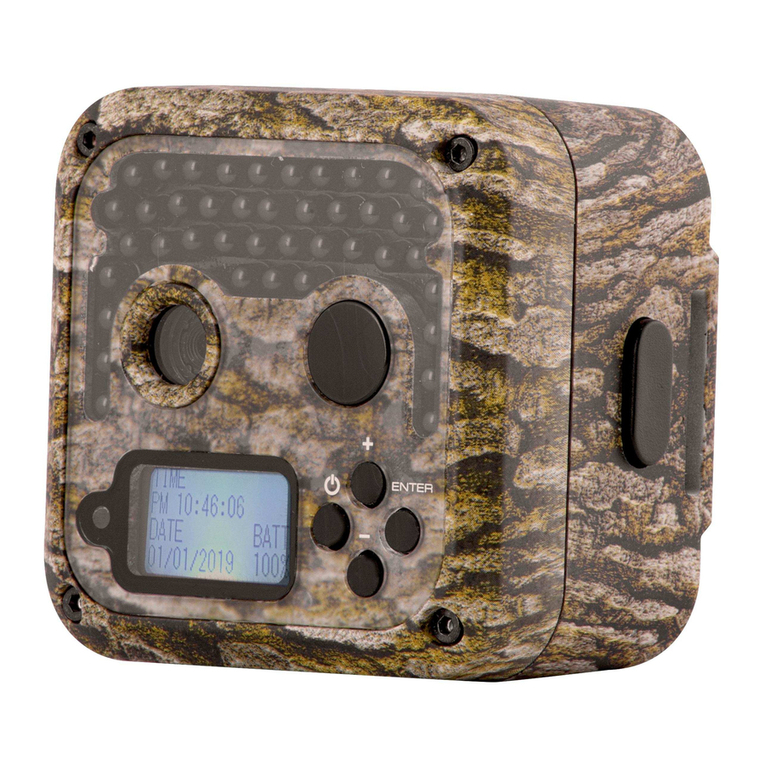
Trail Camera
USB Cabel
Antenna
User Manual
Mounting Belt
Trail camera with built-in PIR,
camera unit and IR.
Connect trail camera to PC
using USB cabel.
External antenna for better
signal reception.
Read the User Manual carefully
before using the camera.
Mounting belt is used to mount
the camera around the tree.
EN
4
S12 HD+SMS II
User Manual
EN English
SE Sverige
NO Norsk
FI Suomi

CONSTRUCTION EN
Black IR
PIR sensor
Antenna
Microphone
Lens
Latch
5

INSTALLATION (PART 1)
Loading batteries
Open the camera’s latch and install 12 x AA size batteries.
Alternatively you may use 6V external battery or AC
adapter to plug in camera.
1.
Inserting SIM card
Open the camera’s latch and insert SIM card in the slot
on the left side of the display. SIM card with data plan is
needed in order to use wireless function. Disable PIN-
code before using the SIM card in the camera!
3.
Inserting SD card
Open the camera’s latch and insert SD card into the
memory card slot. Up to 32GB SD cards are supported. We
recommend using Class 6 or 10 SD card, not an UHS card.
2.
Attaching antenna
Attach the antenna in the top of the camera to the
antenna thread. Do not remove the black o-ring around
the thread that blocks the water from leaking inside
camera housing!
4.
●IF YOU HAVE RECEIVED THE CAMERA AS PRE-INSTALLED, MOVE TO PART 4. ATTACHING
ANTENNA AND THEN TO PAGE 9.
EN
2 alternative ways for wireless function setup are presented on the
next pages. You may choose between them (2A or 2B)
6

INSTALLATION (PART 2A)
7
Go to Sensegram online
Adding a new camera
Go to sensegram.com/burrel
After creating an account and signing in, choose DEVICES and
after that “Add a new camera”. You can now add your new
Burrel camera to the service.
1.
3.
Quick wireless setup on Sensegram, starting from 4,90€/month
Creating a new account
Making the settings
Fill in the required information setting up a new account. You
may use the coupon if one was delivered in the camera packing.
Sensegram Wizard will guide you through the settings by
following the steps. Finally download the setup le on your
computer and transfer it to the camera’s SD card using USB
cable or SD card reader. Finally update the camera wireless
settings in the camera MENU Wireless -> Update Para.
2.
4.
EN

INSTALLATION (PART 2B)
Go to Burrel Online Tool
Testing the sending function
Go to burrelhunting.com/setup
Turn camera switch to SETUP. Wait until the camera shows
signal strength and operator name. Press OK and camera
captures picture manually. Conrm manual sending and
camera will send the picture. If an error occurs during the
sending, please go through the wireless settings again.
1.
3.
Wireless setup with Burrel Online Tool (alternative for Sensegram)
Making the settings
Online tool will guide you through the settings step by step.
Finally download the setup le and transfer it to the camera’s
SD card using USB cable or SD card reader. After this, turn
camera switch to SETUP and press Menu to get to settings. Go
to Wireless -> Update Para.
2.
NOTICE!
Using Burrel online setup tool requires email account for sending pictures.
Check the email settings (server, port) from your email provider!
EN
8

INSTALLATION (PART 3)
9
Placing the camera
Directing the camera
Place the camera in open area. Moving brushes or other
objects in front of the camera may cause false triggers. Avoid
placing the camera towards direct sunlight. Optimal distance
from the object is 5-10m.
When mounting the camera on a tree with mounting belt, it
is rotated slightly downwards. Directing the camera plays an
important role for PIR functionality and illumination of nigh-
time images. Use some time to nd the most optimal position
for your camera!
1.
3.
Camera can be mounted on a tree or wall
Mounting the camera
Camera is now ready for use!
Camera unit can be mounted on a tree with mounting belt
included in the package. Choose the optimal height for the
camera based on the object you are about to monitor: 0,8-1,5
meters. Special tree mounts and wall mounts are available as
accessories.
You may now turn the camera switch ON. The green indicatord
LED blinks few times and the camera is now ready for
surveillance.
2.
4.
EN

SETTINGS MENU
Camera comes with default settings that are suitable for most of the users. You can still change the
settings from camera settings menu, such as image resolution or PIR sensitivity.
Turn camera switch to SETUP. When camera is powered ON, press MENU-button. Move between
dierent settings by pressing arrow buttons “UP” or “DOWN”. Change the setting by pressing “LEFT”
or “RIGHT” and conrm by pressing OK. You can access to submenus by pressing OK. There you
can change the settings with arrow buttons and confrim by pressing OK. Get back to start screen
by pressing Menu.
Camera Settings
●Camera settings are presented in the rst row with camera icon. Here you can
change all the settings related to images and videos.
Setting Description
Mode Photo, Video or Photo + Video.
Photo Size 3MP, 5MP, 8MP or 12MP.
Photo Burst Set the number of images taken for each trigger (1-3). The camera
will transmit the rst photo.
Video Size Choose video size QVGA, WVGA, 720p or 1080p.
Video Length Choose length of the video clip 1-30s.
Sound Turn Video sound On or O.
EN
10
Tabla de contenidos
Idiomas:
Otros manuales de Cámara de exploración de BURREL