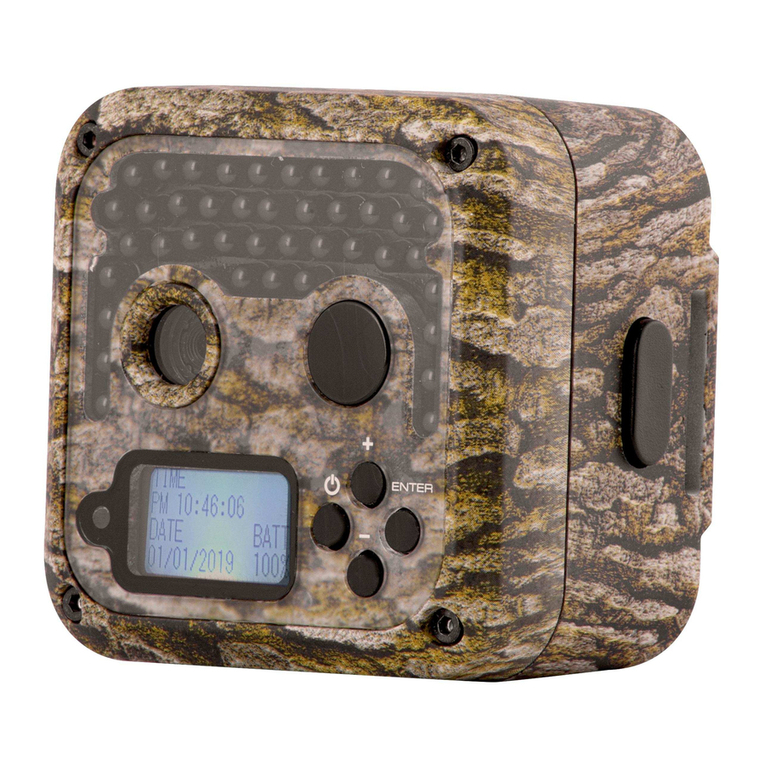
Boly SG560X-8mHD Manual de usuario

No Motion Blur
Digital Scouting Camera
User’s Manual
SG560X-8mHD

Content
1Instruction................................................................................................. 1
1.1 General Description .......................................................................... 1
1.2 Application ........................................................................................ 1
1.3 Camera Interface...............................................................................2
1.4 Saving Images or Videos ...................................................................5
2Cautions.....................................................................................................6
3Easy Operations ........................................................................................7
3.1 Loading Batteries ..............................................................................7
3.2 Inserting the SD Card........................................................................7
3.3 Powering On and Entering into the ON Mode ................................ 8
3.4 Power Off.......................................................................................... 8
4Advanced Operations................................................................................9
4.1 Enter into the SETUP Mode .............................................................9
4.1.1 Preview .......................................................................................9
4.1.2 Customer Settings ......................................................................9
4.1.3 Manual Capturing.......................................................................9
4.1.4 View Images or Videos ...............................................................9
4.1.5 Delete Images or Videos...........................................................10
4.2 Settings Menu..................................................................................10
4.2.1 Setting Items.............................................................................10
4.2.2 Default Set ................................................................................ 13
4.3 Firmware Upgrade ..........................................................................14
5 Mounting the Camera ............................................................................ 15
6 Trouble Shooting....................................................................................16
Appendix I: PIR Detection Zone.................................................................. 17
Appendix : Technical SpecificationsⅡ.........................................................19
Appendix : Parts ListⅢ............................................................................... 20

SG560X-8mHD 1 Instruction
Page
1
1Instruction
1.1 General Description
This camera is a surveillance device working automatically
with dual light: infrared LEDs and incandescent flash.
It can be triggered by any movement of human (or animal) in
a certain region of interested (ROI) monitored by a highly sensitive
Passive Infra-Red (PIR) motion sensor,and then take high quality
pictures (up to 8 mega pixels) or video clips.
It integrates infrared LEDs and incandescent flash. The
incandescent flash as a supplement light turned to 940nm infrared
light after filter as a result of which it can reduce time of exposure.
This own function leads to no motion blur in the video clips. The
camera will clearly take black and white pictures or video clips
without disturbing animals at night.
The camera consumes very little power (at μA level) at
surveillance mode. If powered by 8 new AA alkaline batteries, the
camera can stand-by for month.
The device is designed for outdoor use and is resistant against
water and snow. Furthermore, the camera can be used as a
portable digital camera. Pictures or videos can be taken manually
by pressing on the operation panel.
1.2 Application
This camera can be used as an automatic surveillance device

SG560X-8mHD 1 Instruction
Page
2
for guarding and recording unexpected intrusion to homes, shops,
schools, depots, offices, taxis, work sites,etc. It can also be used as
a trail camera for hunting or monitoring animals by recording the
traces of wild animals. It can be left alone for weeks and months
and it will save event records automatically in digital format.
1.3 Camera Interface
1.3.1 Camera Body Interface
The camera has the following interfaces: a 2.0’’ TFT LCD
display screen, operation panel, USB connector, SD card slot, TV
output,and external DC power connector. Fig. 1 shows the front
view of the camera and its function parts. Fig. 2 shows the
operation panel and display screen. Fig. 3 shows the bottom view
of the camera and its I/O interface.
Take a few moments to familiarize with the camera controls
and displays. It is helpful to bookmark this section and refer to it
when reading through the rest of the manual.

SG560X-8mHD 1 Instruction
Page
3
Figure 1: Front view
Figure 2: Operation interface

SG560X-8mHD 1 Instruction
Page
4
Figure3:Bottomview
1.3.2 Key Notes
“MENU”: enter the program menu in preview mode; delete all
images or videos in playback mode.
“▲”“▼”“◄”“►”: for parameter settings as described in the
user’s manual.
“OK”: to save parameter settings and play videos.
“”: to exchange between playback and preview.
“DEL”: to delete an image.
“”: to capture a photo or record a video manually.
1.3.3 Shooting Information Display
Fig. 4 shows a sample of the LCD Display of the Programming
Menu.

SG560X-8mHD 1 Instruction
Page
5
Figure 4: LCD Display
1.4 Saving Images or Videos
The camera uses a standard SD (Secure Digital) memory card
to save images (in .jpg format) and videos (in .avi format). SD and
SDHC (High Capacity) cards up to a maximum 32 GB capacity are
supported. Before inserting the SD card be sure that the SD card is
unlocked.

SG560X-8mHD 2 Cautions
Page
6
2Cautions
★ The working voltage of the camera is 6V. The camera is supplied
by 8 AA batteries.
★ Please install batteries according to shown polarity.
★ Must insert the SD card before power on camera. The camera
will not work properly unless a working SD card is detected by
the camera.
★ Please unlock the write-protect before inserting the SD card.
★ Please insert the SD card when the power switch is at OFF
position before testing the camera. The camera has no internal
memory for saving images or videos. If no SD card is inserted,
the camera will shut down automatically after a continuous
indication sound.
★ Please do not insert or take out the SD card when the power
switch is at ON position.
★ It is recommended to format the SD card by the camera when
used for the first time. Many other SD cards formatted by other
cameras have poor compatibility with different brands of
cameras. So,it is best to format the SD card with this camera or
on a computer.
★ In the SETUP mode,the camera will shut down automatically
after 3 minutes if no operation is done. Please turn on the power
again if you want to continue to work with the control.

SG560X-8mHD 3 Easy Operations
Page
7
3Easy Operations
3.1 Loading Batteries
Use 8 or 4 AA batteries or 6V external battery for power
supply (Fig. 5).
Figure 5: Battery Configurations of 8 or 4 batteries
Please use high-capacity and high-performance alkaline
batteries (recommended), rechargeable Lithium batteries or
rechargeable NiMH batteries.
3.2Inserting the SD Card
The camera has no internal memory for saving images or
videos. If no SD card is inserted, the camera will shut down
automatically.

SG560X-8mHD 3 Easy Operations
Page
8
3.3 Powering On and Entering into the ON Mode
The camera has three basic operation modes:
1. OFF mode: to turn off the camera.
2.SETUP mode: to set up camera or to playback the photos or
video clips.
3.ON mode: the camera will take pictures or videos
automatically according to the previous programmed settings
when human or animals enter into the monitoring region.
After switching the camera to ON position, the motion
indication LED (red) will blink for about 10 seconds. This time
interval is for you to make the camera ready for automatic
surveillance operation, e.g., to lock the camera,fix it on a tree and
walk away.
3.4Power Off
Switch the camera to OFF position to power off the camera.
Please note that even in the OFF mode, the camera still consumes
certain power at μA level. Therefore, please remove the battery if
the camera will not be used for a long time.
Tabla de contenidos
Otros manuales de Cámara de exploración de Boly

Boly
Boly BG320 Manual de usuario

Boly
Boly MG984G Series Manual de usuario

Boly
Boly MG984G Series Manual de usuario

Boly
Boly SG520 Manual de usuario

Boly
Boly BG710 Series Manual de usuario

Boly
Boly BG962-K30W Manual de usuario

Boly
Boly MG984G Series Manual de usuario

Boly
Boly MG984G-30M Manual de usuario

Boly
Boly SG520 Manual de usuario

Boly
Boly SG2060 Series Manual de usuario