
Asus Transformer Book T300FA Guía
ASUS Transformer
Book
E-Manual
ASUS Transformer Book T300FA
First Edition
August 2014
E9590

2
ASUS Transformer Book E-Manual
COPYRIGHT INFORMATION
No part of this manual, including the products and software described in it, may be reproduced,
transmitted, transcribed, stored in a retrieval system, or translated into any language in any form or by
any means, except documentation kept by the purchaser for backup purposes, without the express
written permission of ASUSTeK COMPUTER INC. (“ASUS”).
ASUS PROVIDES THIS MANUAL “AS IS”WITHOUT WARRANTY OF ANY KIND, EITHER EXPRESS OR IMPLIED,
INCLUDING BUT NOT LIMITED TO THE IMPLIED WARRANTIES OR CONDITIONS OF MERCHANTABILITY OR
FITNESS FOR A PARTICULAR PURPOSE. IN NO EVENT SHALL ASUS, ITS DIRECTORS, OFFICERS, EMPLOYEES
OR AGENTS BE LIABLE FOR ANY INDIRECT, SPECIAL, INCIDENTAL, OR CONSEQUENTIAL DAMAGES
(INCLUDING DAMAGES FOR LOSS OF PROFITS, LOSS OF BUSINESS, LOSS OF USE OR DATA, INTERRUPTION
OF BUSINESS AND THE LIKE), EVEN IF ASUS HAS BEEN ADVISED OF THE POSSIBILITY OF SUCH DAMAGES
ARISING FROM ANY DEFECT OR ERROR IN THIS MANUAL OR PRODUCT.
Products and corporate names appearing in this manual may or may not be registered trademarks or
copyrights of their respective companies, and are used only for identication or explanation and to the
owners’benet, without intent to infringe.
SPECIFICATIONS AND INFORMATION CONTAINED IN THIS MANUAL ARE FURNISHED FOR INFORMATIONAL
USE ONLY, AND ARE SUBJECT TO CHANGE AT ANY TIME WITHOUT NOTICE, AND SHOULD NOT BE
CONSTRUED AS A COMMITMENT BY ASUS. ASUS ASSUMES NO RESPONSIBILITY OR LIABILITY FOR ANY
ERRORS OR INACCURACIES THAT MAY APPEAR IN THIS MANUAL, INCLUDING THE PRODUCTS AND
SOFTWARE DESCRIBED IN IT.
Copyright © 2014 ASUSTeK COMPUTER INC. All Rights Reserved.
LIMITATION OF LIABILITY
Circumstances may arise where because of a default on ASUS’part or other liability, you are entitled to
recover damages from ASUS. In each such instance, regardless of the basis on which you are entitled to
claim damages from ASUS, ASUS is liable for no more than damages for bodily injury (including death)
and damage to real property and tangible personal property; or any other actual and direct damages
resulted from omission or failure of performing legal duties under this Warranty Statement, up to the
listed contract price of each product.
ASUS will only be responsible for or indemnify you for loss, damages or claims based in contract, tort or
infringement under this Warranty Statement.
This limit also applies to ASUS’ suppliers and its reseller. It is the maximum for which ASUS, its suppliers,
and your reseller are collectively responsible.
UNDER NO CIRCUMSTANCES IS ASUS LIABLE FOR ANY OF THE FOLLOWING: (1) THIRD-PARTY CLAIMS
AGAINST YOU FOR DAMAGES; (2) LOSS OF, OR DAMAGE TO, YOUR RECORDS OR DATA; OR (3) SPECIAL,
INCIDENTAL, OR INDIRECT DAMAGES OR FOR ANY ECONOMIC CONSEQUENTIAL DAMAGES (INCLUDING
LOST PROFITS OR SAVINGS), EVEN IF ASUS, ITS SUPPLIERS OR YOUR RESELLER IS INFORMED OF THEIR
POSSIBILITY.
SERVICE AND SUPPORT
Visit our multi-language web site at http://support.asus.com

ASUS Transformer Book E-Manual
3
Table of Contents
About this manual.....................................................................................................7
Conventions used in this manual ............................................................................. 9
Icons .................................................................................................................................... 9
Typography....................................................................................................................... 9
Safety precautions.....................................................................................................10
Using your ASUS Transformer Book......................................................................... 10
Caring for your ASUS Transformer Book................................................................. 11
Proper disposal................................................................................................................ 12
Chapter 1: Hardware Setup
Getting to know your ASUS Transformer Book...............................................14
Tablet..............................................................................................................................15
Top View............................................................................................................................. 15
Ports and slots..................................................................................................................16
Rear view ........................................................................................................................... 17
Keyboard dock............................................................................................................19
Top View............................................................................................................................. 19
Right Side .......................................................................................................................... 21
Left Side ............................................................................................................................. 21
Docking the tablet ....................................................................................................22
Undocking the tablet...............................................................................................23
Chapter 2: Using your ASUS Transformer Book
Getting started ...........................................................................................................26
Charge your ASUS Transformer Book...................................................................... 26
Lift to open the display panel. ................................................................................... 28
Press the power button................................................................................................ 28
Using the tablet only..................................................................................................... 29
Gestures for the tablet and touchpad................................................................30
Using the tablet............................................................................................................... 30
Using the touchpad....................................................................................................... 33
Using the keyboard...................................................................................................40
Function keys ................................................................................................................... 40
Windows® 8.1 keys ......................................................................................................... 41

4
ASUS Transformer Book E-Manual
Chapter 3: Working with Windows® 8.1
Starting for the rst time.........................................................................................44
Windows®UI.................................................................................................................45
Start screen....................................................................................................................... 45
Hotspots............................................................................................................................. 46
Start button ...................................................................................................................... 49
Customizing your Start screen................................................................................... 51
Working with Windows®apps ...............................................................................52
Launching apps............................................................................................................... 52
Customizing apps........................................................................................................... 52
Accessing the Apps screen.......................................................................................... 55
Charms bar........................................................................................................................ 57
Snap feature ..................................................................................................................... 60
Other keyboard shortcuts ......................................................................................62
Connecting to wireless networks ........................................................................64
Wi-Fi..................................................................................................................................... 64
Bluetooth .......................................................................................................................... 65
Airplane mode................................................................................................................. 66
Connecting to wired networks.............................................................................67
Conguring a dynamic IP/PPPoE network connection .................................... 67
Conguring a static IP network connection ......................................................... 68
Turning your ASUS Transformer Book o .........................................................69
Putting your ASUS Transformer Book to sleep..................................................... 70
Windows® 8.1 lock screen........................................................................................71
To proceed from the lock screen............................................................................... 71
Customizing your lock screen.................................................................................... 72
Chapter 4: Power-On Self-Test (POST)
The Power-On Self-Test (POST).............................................................................76
Using POST to access BIOS and Troubleshoot...................................................... 76
BIOS ................................................................................................................................76
Accessing BIOS ................................................................................................................ 77
BIOS Settings.................................................................................................................... 77

ASUS Transformer Book E-Manual
5
Recovering your system..........................................................................................84
Enabling a recovery option ........................................................................................ 86
Chapter 5: Upgrading your ASUS Transformer Book
Installing the Hard Disk Drive................................................................................90
Tips and FAQs
Useful tips for your ASUS Transformer Book....................................................98
Hardware FAQs ...........................................................................................................99
Software FAQs.............................................................................................................102
Appendices
Internal Modem Compliancy ..................................................................................... 106
Overview............................................................................................................................ 106
Network Compatibility Declaration......................................................................... 107
Non-Voice Equipment .................................................................................................. 107
Federal Communications Commission Interference Statement................... 109
Declaration of Conformity (R&TTE directive 1999/5/EC).................................. 110
FCC Radio Frequency (RF) Exposure Caution Statement................................. 111
CE Marking........................................................................................................................ 111
IC Radiation Exposure Statement for Canada ...................................................... 112
Déclaration d’Industrie Canada relative à l’exposition aux ondes radio ... 113
IC Warning Statement................................................................................................... 114
Avertissement d’Industrie Canada .......................................................................... 115
Radio Frequency (RF) Exposure Information ....................................................... 116
Informations concernant l’exposition aux fréquences radio (RF) ................. 116
Wireless Operation Channel for Dierent Domains........................................... 117

6
ASUS Transformer Book E-Manual
France Restricted Wireless Frequency Bands ....................................................... 117
UL Safety Notices............................................................................................................ 119
Power Safety Requirement.......................................................................................... 120
TV Notices ......................................................................................................................... 120
REACH................................................................................................................................. 120
Macrovision Corporation Product Notice.............................................................. 120
Nordic Lithium Cautions (for lithium-ion batteries)........................................... 121
Optical Drive Safety Information .............................................................................. 122
CTR 21 Approval (for ASUS Transformer Book with built-in modem)..........123
ENERGY STAR complied product .............................................................................. 125
European Union Eco-label........................................................................................... 125
Global Environmental Regulation Compliance and Declaration .................. 126
ASUS Recycling/Takeback Services.......................................................................... 126
Prevention of Hearing Loss......................................................................................... 126
Regional notice for Singapore ................................................................................... 127
Rechargeable Battery Recycling Service in North America............................. 127
Regional notice for India.............................................................................................. 127
Japan Technical Conformity Mark ............................................................................ 128
Regional notice for California..................................................................................... 128
Notices for removeable batteries.............................................................................. 128
Avis concernant les batteries remplaçables..........................................................128

ASUS Transformer Book E-Manual
7
About this manual
This manual provides information about the hardware and software
features of your ASUS Transformer Book, organized through the
following chapters:
Chapter 1: Hardware Setup
This chapter details the hardware components of your ASUS
Transformer Book.
Chapter 2: Using your ASUS Transformer Book
This chapter shows you how to use the dierent parts of your
ASUS Transformer Book.
Chapter 3: Working with Windows® 8.1
This chapter provides an overview of using Windows® 8.1 in your
ASUS Transformer Book.
Chapter 4: Power-On Self-Test(POST)
This chapter shows you how to use POST to change the settings
of your ASUS Transformer Book.

8
ASUS Transformer Book E-Manual
Chapter 5: Upgrading your ASUS Transformer Book
This chapter guides you through the process of installing
additional parts to your ASUS Transformer Book.
Tips and FAQs
This section presents some recommended tips, hardware FAQs,
and software FAQs you can refer to for maintaining and xing
common issues with your ASUS Transformer Book.
Appendices
This section includes notices and safety statements for your ASUS
Transformer Book.
ASUS Transformer Book E-Manual
9
Conventions used in this manual
To highlight key information in this manual, some text are presented as
follows:
IMPORTANT! This message contains vital information that must be
followed to complete a task.
NOTE: This message contains additional information and tips that can
help complete tasks.
WARNING! This message contains important information that must be
followed to keep you safe while performing tasks and prevent damage to
your ASUS Transformer Book's data and components.
Icons
The icons below indicate the devices you can use for completing a
series of tasks or procedures on your ASUS Transformer Book.
Typography
Bold = This indicates a menu or an item that must be selected.
Italic = This indicates sections that you can refer to in this manual.
= Use the touch screen panel.
= Use the touchpad.
= Use the keyboard.
10
ASUS Transformer Book E-Manual
Safety precautions
Using your ASUS Transformer Book
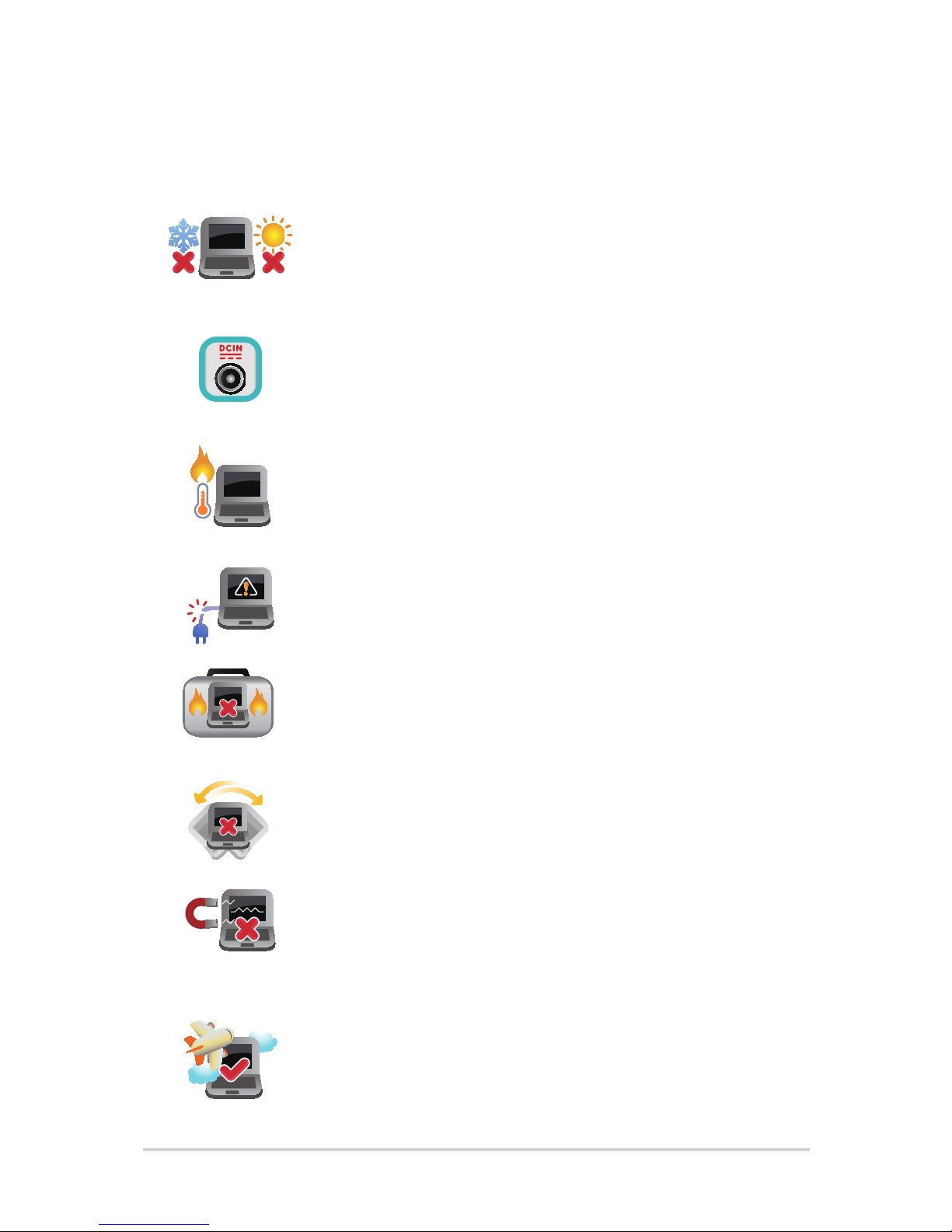
This ASUS Transformer Book should only be used in
environments with ambient temperatures between
5°C (41°F) and 35°C (95°F).
Refer to the rating label on the bottom of your
ASUS Transformer Book and ensure that your power
adapter complies with this rating.
Do not leave your ASUS Transformer Book on
your lap or near any part of your body to prevent
discomfort or injury from heat exposure.
Do not use damaged power cords, accessories, and
other peripherals with your ASUS Transformer Book.
While powered on, ensure that you do not carry
or cover your ASUS Transformer Book with any
materials that can reduce air circulation.
Do not place your ASUS Transformer Book on
uneven or unstable work surfaces.
You can send your ASUS Transformer Book through
x-ray machines (used on items placed on conveyor
belts), but do not expose them to magnetic
detectors and wands.
Contact your airline provider to learn about related
inight services that can be used and restrictions
that must be followed when using your ASUS
Transformer Book in-ight.
Tabla de contenidos
Otros manuales de Computadora portátil de Asus

Asus
Asus Eee PC S101 XP Manual de usuario

Asus
Asus GM501G Manual de usuario

Asus
Asus A550CA Guía

Asus
Asus ZenBook 14 UX425 Manual de usuario

Asus
Asus M52V Manual de usuario

Asus
Asus G501VW Guía
Asus
Asus Eee PC 900HD XP Manual de funcionamiento

Asus
Asus N75SF Manual de usuario

Asus
Asus N50Vn - A1B - Core 2 Duo GHz Instrucciones de uso

Asus
Asus AX201D2 Guía

Asus
Asus E9959 Manual de usuario

Asus
Asus Chromebook 7265D2 Manual de usuario

Asus
Asus X411 Series Manual de usuario

Asus
Asus S430UN Guía

Asus
Asus FX504GM EN102T Guía

Asus
Asus Transformer Book Flip TP200SA Guía

Asus
Asus DA10549 Guía

Asus
Asus M9A Instrucciones de uso

Asus
Asus T100 Series Guía

Asus
Asus S551LA Guía


