
Aim MXK10 Manual de usuario

User Manual
MXK10 for
Kawasaki Ninja ZX-10R
Kawasaki Ninja ZX-10R racing Kit
Release 1.02

2
INDEX
1–MXK10inafewwords3
2–Whatisinthekit?4
3–Installation5
4–MXK10Mainfeatures5
4.1–LapTimes7
4.2–Icons8
4.3–LEDs9
4.4–Thebikekeyboard10
4.5–Parameterssettingatstartuporwhileriding11
4.6–DataRecording11
5–Menu12
5.1–Vehiclesettings13
5.1.1–PowerModesetting......................................................................................................................................................................13
5.1.2–KQSUP(Quickshift)......................................................................................................................................................................14
5.1.3–KLCM(LaunchControlLevel).........................................................................................................................................................14
5.1.4–KIBS(Intelligentbrakingsystem)...................................................................................................................................................14
5.1.5–KECS(electronicsuspensions–withKECSunitonly)....................................................................................................................15
5.1.6–KECSsettings.................................................................................................................................................................................15
5.1.7–S‐KTRC(TractionControl)Settings................................................................................................................................................16
5.2–Preferences17
5.2.1–Display...........................................................................................................................................................................................18
5.2.2–Alarms...........................................................................................................................................................................................20
5.2.3–Lapswitch......................................................................................................................................................................................20
5.2.4–Brightness......................................................................................................................................................................................20
5.2.5–Wi‐Fi..............................................................................................................................................................................................21
5.3–Trip21
5.4–TrackManager21
5.5–System23
6–Ontrackapplication24
6.1–ConnectiontothePC24
6.2–Configuration25
6.2.1–CANexpansionsconfiguration......................................................................................................................................................26
6.2.2–ShiftLightsConfiguration..............................................................................................................................................................29
6.3–ManagingatrackonMXK10withRaceStudio330
7–Datarecall33
8–Datadownloadandanalysis34
9–Wi‐Ficonfiguration35
9.1–ConfiguringMXK10dash‐loggerasanaccesspoint(AP)37
9.2–AddingMXK10loggerstoanexistingnetwork39
9.3–Wi‐Finetworksettings42
9.4–TheInternetconnectivity43
9.5–Connectionissues43
9.6–WorkingonMacTMwithvirtualizedWindowsTM44
9.7–Connecteddevicevisualizationissues46
10–Newfirmwareupgrade47

3
1 – MXK10 in a few words
MXK10 is an AiM dash-logger designed to be installed on Kawasaki Ninja ZX-10R produced in the years 2016-2019 also if connected to
Kawasaki Racing kit.
It is a full Plug and Play dash, completely compatible with the original connector and with the fixing points of the original bracket of your
bike.
It features:
CAN connection for getting all the data coming from the stock ECU
6 alarm LEDs
10 RGB LEDs to help you shifting the gear.
The dash-logger has an internal memory to record sampled data and comes with AiM GPS Module for Kawasaki that automatically gets
lap times and a lot of important information you will find very useful if using your bike on the track.

4
2 – What is in the kit?
MXK10 kit (part number: XA2MXS12A05R0KN) includes:
MXK10 dash-logger (1)
washers and screws to fix MXK10 (2)
GPS Module (3)
GPS bracket with screws (4)

5
3 – Installation
MXK10 installation is extremely simple. You only need the tools shown here below:
pin punch (1)
ratchet (2)
10 and 13 Wrench (3)
screwdriver (4)
universal pliers (5)
3, 4, 5 and 6 Allen keys (6)
At this link https://www.youtube.com/watch?v=TmP4SQzS2n8&feature=youtu.be a tutorial video that shows how to remove Kawasaki
Ninja stock dash and install MXK10 dash-logger is available.
4 – MXK10 Main features
First of all, we have to say that MXK10 has two different working modes: Road Mode and Track Mode. You may swap between the two
modes entering “Display” option of “Preferences” Menu (paragraph 5.2.1).
Track Mode is intended to be used when you are riding on a track. The GPS Module is enabled, in order to automatically get Lap Times;
data are automatically recorded, TFT page is swapped in Track Mode and Lap pushbutton may be disabled in order to avoid confusion
between the GPS Signal and the pushbutton one.
In Road Mode TFT page is swapped in Road Mode, the data are by default not recorded, GPS Module is disabled and Lap Pushbutton is
enabled.
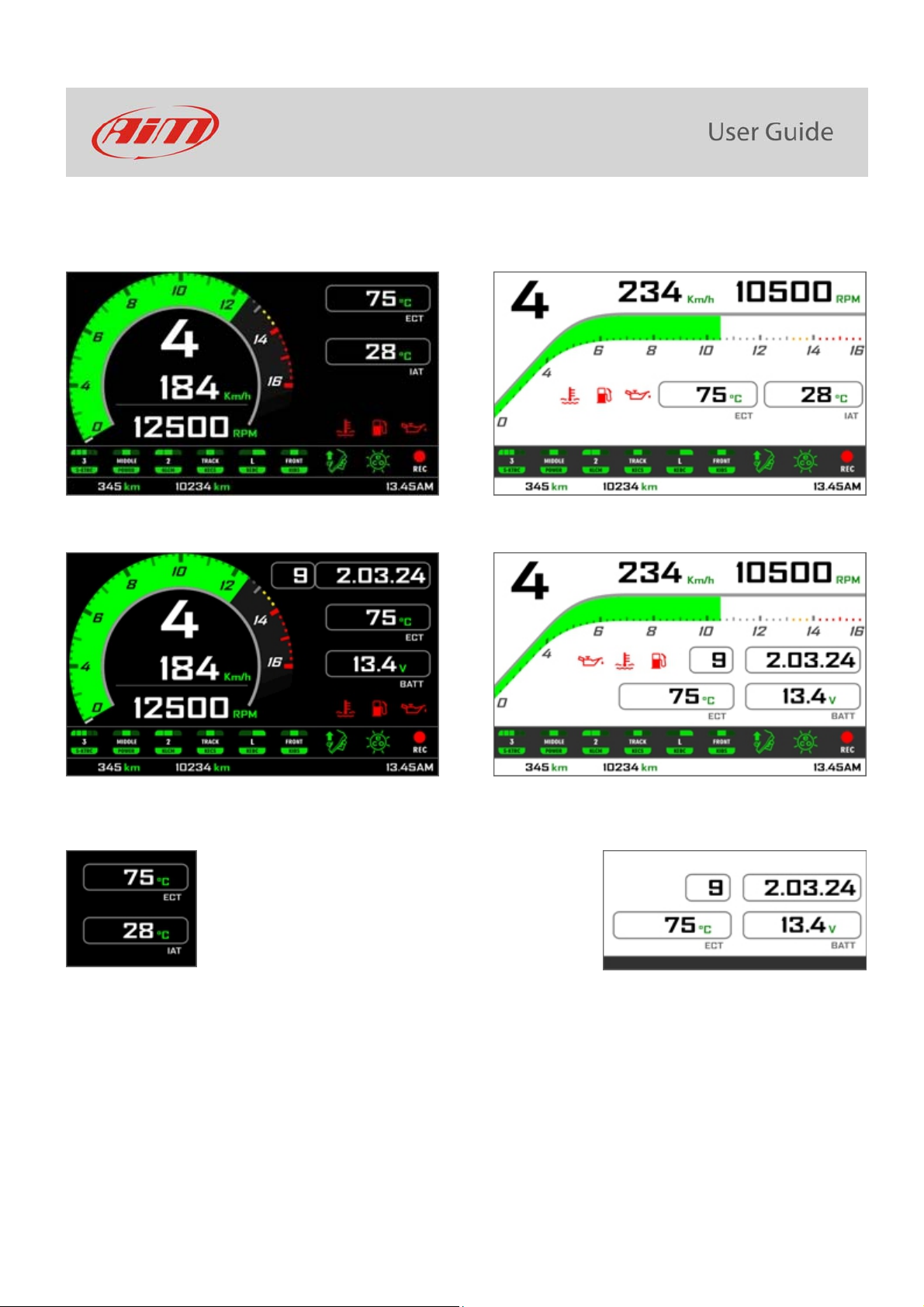
The dash offers different pages, freely selectable through the bike keyboard entering “Preferences” menu.
6
Images here below show some examples of possible pages layout.
Road usage.
Track usage
In road pages ECT or Engine Coolant Temperature (Water Temperature) and IAT or intake air temperature (Air Temperature) are shown
while in track pages also Lap Time and Lap number are shown.

7
4.1 – Lap Times
MXK10 calculates and shows lap times. This can be made in two ways:
manually pushing “Lap” on the bike left keyboard
automatically using GPS Module you find in the kit; the
Module includes most of the world tracks.
When you switch the bike on near a track the Module
automatically recognizes it, loads the start/finish coordinates
and calculates lap times when these coordinates are crossed.
If your track is not in the database you may always create and
load it in the database using Race Studio 3 software, freely
downloadable from AiM website at:
https://www.aim-sportline.com/en/sw-fw-download.htm
As said MXK10 features two working modes: road and track. In track mode the lap pushbutton can be disabled (see paragraphs 5.2.1 and
5.2.3) to avoid confusion between GPS signal and Lap button one while in road mode Lap button is always enabled and GPS Module is
always disabled.

8
4.2 – Icons
Thanks to the wide number of icons available on its display, the dash-logger shows a good amount of information. Here follows
explanation of their meaning and working mode.
Water Temperature
It turns on when water temperature gets over a customized value (default value 105°C)
Battery
It turns on when
battery voltage gets under a customized value (default value 10V)
Oil pressure
It turns on when the bike engine detects a problem with oil pressure.
Traction control (S-KTRC)
Working range: 0 (OFF)-5 (Max)
Power Mode
Working range: Low-Middle-Full
Launch Control Level
Working range: from 1 (min) to 3 (max)
Electronic suspensions (KECS)
Working modes: Manual, Road and Track
Engine Brake (KEBC)
Available options: Low, OFF
Intelligent Braking System (KIBS)
Available Levels: ON, FRONT/REAR, OFF
Quick Shift
Available levels: Up (shown here on the left), Down, Up&Down, OFF
Economy
It turns ON when: RPM is lower than 6500 and throttle position is <5%
REC
It turns on when the dash-logger is recording.

9
4.3 – LEDs
With reference to the image here below MXK10 features 6 LEDs that gives you these information.
Turn Light (2)
High beam (3)
Engine problem (4)
Fuel level low (5)
ABS off/problems (6)
Traction control intervention warning (7)
In the upper part of the dash logger are 10 LED customizable shift lights (1): when all lights are on it is suggested to shift gear.
Please note: to set the shift lights you need AiM Race Studio 3 software (from Race Studio 3.29.47 onwards) you can freely download from
www.aim-sportline.com.

10
4.4 – The bike keyboard
Kawasaki Ninja features five buttons: four on the left handlebar and one on the right one, used to manage MXK10 dash logger:
UP (1)
SEL (2)
DOWN (3)
LAP (4)
START/STOP (5)
Differently pushed they perform different actions on MXK10 display pages. With reference to the following table: Sstays for short (less
than half of a second) pressure, Lfor long pressure (from half of a second to a second).
Function Up Down Sel Lap Start/Stop Notes
Access Menu S
Access Data Recall S
Change S-KTRC (traction control) settings LL
Change S-KTRC (traction control) settings S S Racing kit only
Activate Launch control L L
Laptime
L Recording
Power mode S
Racing kit only
Please note: as a general rule “UP” and “DOWN” pushbuttons scroll the options, “SEL” pushbutton select an option and “LAP” pushbutton
exit a menu.
Otros manuales para MXK10
1
Tabla de contenidos
Otros manuales de Accesorios para motocicletas de Aim


Manuales populares de Accesorios para motocicletas de otras marcas

SRC
SRC B-TRK502-01-01-SL Manual de usuario

3M
3M Speedglas 9100 MP Manual de usuario

hepco & becker
hepco & becker 6307520 00 01 Manual de usuario

HOMCOM
HOMCOM AA0-077 Manual de usuario

hepco & becker
hepco & becker 6307558 00 01 Manual de usuario

Wunderkind Custom
Wunderkind Custom 106503-F15 Guía del usuario


