
Advanced Illumination DCS-400E Manual de usuario

Document Version: v1.1
Release: 20-July-2020
Document Number: 1595-050167
User Manual
DCS-400E
DCS-800E
Quad Controller Series
DCS-400E
DCS-800E
Quad Controller Series

Page 2 of 24
DCS400_800 Controller Manual V1.1 072020
Contents
DCS-400E DCS-800E Quad Controller Series ...............................................................................................1
DCS-400E DCS-800E Quad Controller Series ...............................................................................................1
Hardware Overview..............................................................................................................................................3
DCS-400E, Quad Controller..............................................................................................................................3
DCS-800E, Quad Controller x2.........................................................................................................................3
Installation Model ................................................................................................................................................4
General Specications.........................................................................................................................................5
Front Panel ...........................................................................................................................................................6
Front Panel Descriptions.....................................................................................................................................7
Connector Information ........................................................................................................................................9
Quick-Start..........................................................................................................................................................10
General Connection Diagram ........................................................................................................................10
Modes of Operation...........................................................................................................................................11
Trigger Input & Outputs .....................................................................................................................................12
Simplied Input Diagram (P2 pins 1 & 2)......................................................................................................12
Outputs – Frame Start/Stop (P2 pins 3 & 4) ...............................................................................................12
Software Setup ..................................................................................................................................................13
Default Ethernet Settings...............................................................................................................................13
User Interface (GUI) .......................................................................................................................................14
Software Usage..................................................................................................................................................16
Overview .........................................................................................................................................................16
Software Modes.................................................................................................................................................17
Standard Mode...........................................................................................................................................17
Sequenced Mode .......................................................................................................................................18
Network Conguration...................................................................................................................................19
Web Browser User Interface .............................................................................................................................20
Software Command and Control Interface ......................................................................................................21
Command Structure.......................................................................................................................................21
Command Table.............................................................................................................................................22
Warranty Information ........................................................................................................................................24
Customer Support and Product Information ...................................................................................................24

Page 3 of 24
DCS400_800 Controller Manual V1.1 072020
Hardware Overview
The DCS400 and DCS800 Quad Lighting Controller is a multi-channel controller for
Advanced Illumination LED illuminators. With multi-channel control, this controller is
ideal for applications such as photometric stereo, high-resolution color and bright-field /
dark-field combination lighting.
This controller family is not limited to computational imaging and can be used as a
general-purpose controller for a wide range of applications in both continuous and
strobe modes of operation.
DCS-400E, Quad Controller
Single Output, 4 Channels
Ethernet 10/100
x2 digital trigger input
x2 trigger outputs
DCS-800E, Quad Controller x2
Dual Output, 8 Channel
Ethernet 10/100
x2 digital trigger inputs
x2 trigger outputs
Figure 1
Figure 2

Page 4 of 24
DCS400_800 Controller Manual V1.1 072020
Installation Model
Figure 3

Page 5 of 24
DCS400_800 Controller Manual V1.1 072020
General Specications
Specification DCS-400E (single output) DCS-800E (dual output)
Power Requirements 24VDC Nominal, 4.5A
Vmin = 22VDC
Vmax = 48VDC
Output Power Up to 100W total
5A Pulsed (24V input)
*10A pulsed *(48V input)
500mA continuous per channel
Channel Control 4 Independent Channels,
1 Output
8Independent Channels,
2 Outputs
Modes Continuous, Pulsed, or Gated Continuous
External Trigger
Input/Output
5V, TTL Compatible
Overvoltage protected, safe up to 30VDC
Pulse Width Range 30usec to 1 hour
Trigger-to-Pulse Latency 30 usec delay
2us rise/fall
Duty Cycle / Frequency 15% duty cycle limit in overdrive/pulsed
mode*
*Longer duty cycles possible at
“continuous” current ratings
Operating Temperature Range 0 °C to 60 °C
Communication / Software 10/100 Ethernet Standard TCP-IP, UDP
.NET library compatible with C#, F# and
VB
Windows Software

Page 6 of 24
DCS400_800 Controller Manual V1.1 072020
Front Panel
DCS-400E
DCS-800E
Refer to the tables on the next page for connection info
Figure 4
Figure 5

Page 7 of 24
DCS400_800 Controller Manual V1.1 072020
Front Panel Descriptions
Table 1 - Input Power, P1
Pin Description Note
124-48VDC Reverse polarity protected
2 DC GND
Table 2 - Indicator LEDs
Color Behavior Function
LED 1 Green On Main Power Indicator
LED 2 Amber Heartbeat / Blink Flashes once per second
heartbeat while light is connected.
Flashes when commands are
received.
LED 3 Red Blink Code Error code—Long / Medium /
Short flashes indicate an error
code
Table 3 – IO Connector, P2
Pin Description Note
1TRIGGER-IN1 ACTIVE-HIGH — pull high to activate
(Channels 1-4)
2TRIGGER-IN2 ACTIVE-HIGH — pull high to activate
(Channels 1-4 for DCS-400E, Channels
5-8 for DCS-800E)
3TRIGGER-OUT1 Frame Start—output signal, occurs at
the beginning of each channel pulse
4TRIGGER-OUT2 Frame Stop—output signal, occurs at
the end of each channel pulse
5TRIGGER GND Same as DC ground
6TRIGGER GND Same as DC ground

Page 8 of 24
DCS400_800 Controller Manual V1.1 072020
Table 4 – Output Connector P3 & P4
Output 1 (P3) Output 2 (P4) Notes
Pin Description Pin Description
1SignaTechTM
GND
9 SignaTechTM
GND
Reserved
2SignaTechTM 10 SignaTechTM SignaTechTM Light Protection
— NOT USER SERVICEABLE
3CH3 & CH4 - 11 CH7 & CH8 - LED Cathode (common)*
4CH4 + 12 CH8 + LED Anode
5CH3 + 13 CH7 + LED Anode
6CH1 & CH2 - 14 CH5 & CH6 - LED Cathode (common)*
7CH2 + 15 CH6 + LED Anode
8CH1 + 16 CH5 + LED Anode
Important Information
*LED Cathode pins, pin 1 and pin 9 are COMMON and may be tied together.
This controller requires SignaTech to operate correctly. SignaTech is included with lights purchased from
Advanced Illumination. It is not possible to drive a non-SignaTech protected light source without explicit
instruction from Advanced Illumination.
Page 9 of 24
DCS400_800 Controller Manual V1.1 072020
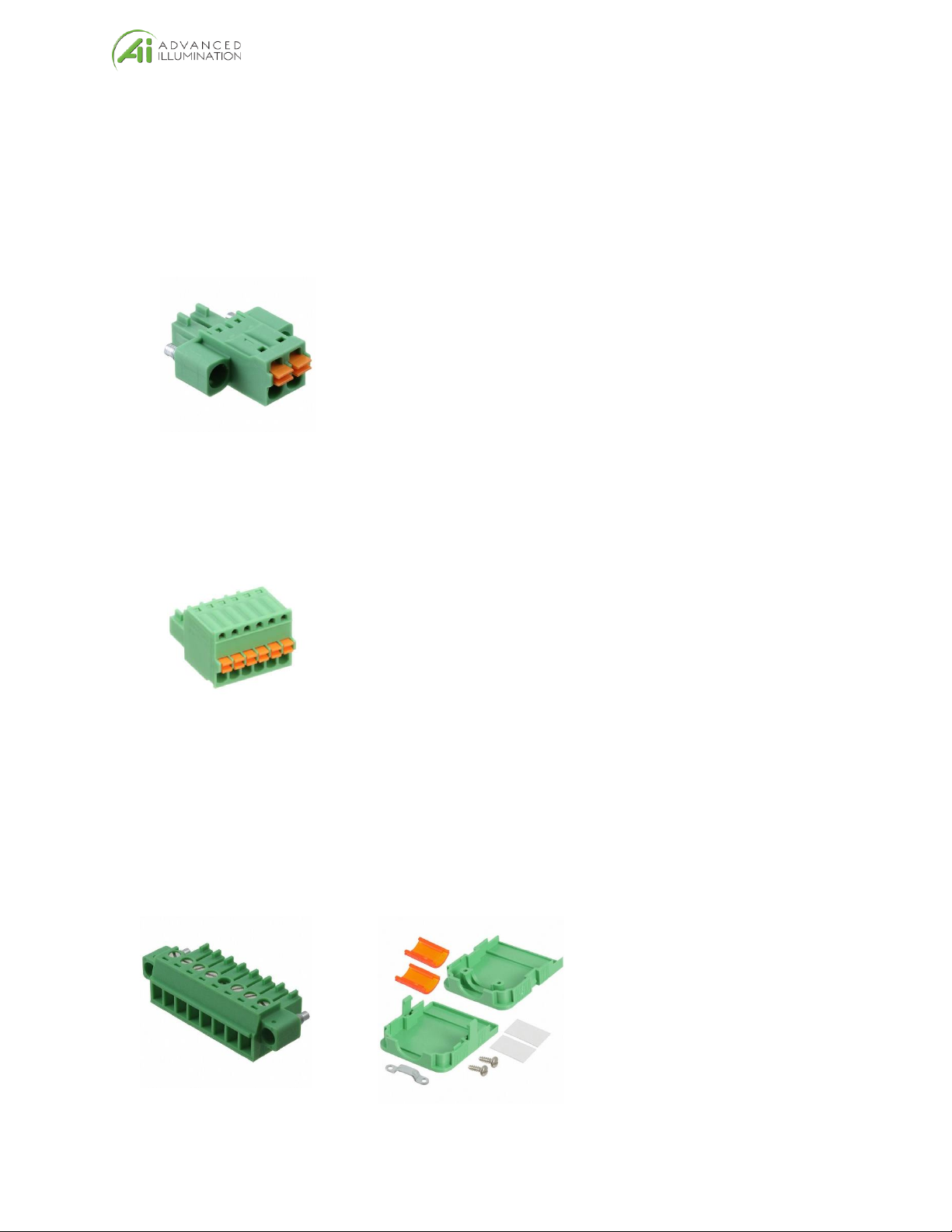
Connector Information
Power Input (P1)
Phoenix Contact, 1748354, 18-24 AWG
Trigger Input (P2)
Phoenix Contact, 1881367, 22-26 AWG
Light Output (P3, P4)
Plug: Phoenix Contact, 1827761
Strain Relief: Phoenix Contact, 1834408, 18-24 AWG

Page 10 of 24
DCS400_800 Controller Manual V1.1 072020
Quick-Start
General Connection Diagram
Trigger 2 and Light 2 only apply to DCS800*
Figure 6 – General Wiring Example
Otros manuales para DCS-400E
1
Este manual sirve para los siguientes modelos
1
Tabla de contenidos
Otros manuales de Controladores de Advanced Illumination


