
ADA Amplification GCS-2 Manual de usuario
Page 1
ADA GCS-2 GUITAR CABINET SIMULATOR
USER MANUAL
Turn any full-range passive or powered monitor speaker or sound system
into a dynamic guitar cabinet, loaded with your choice of drivers.
Record directly from your pedal board or preamp without speakers or
microphones.
Get guitar cabinet feedback from your stage monitor

- 2 -
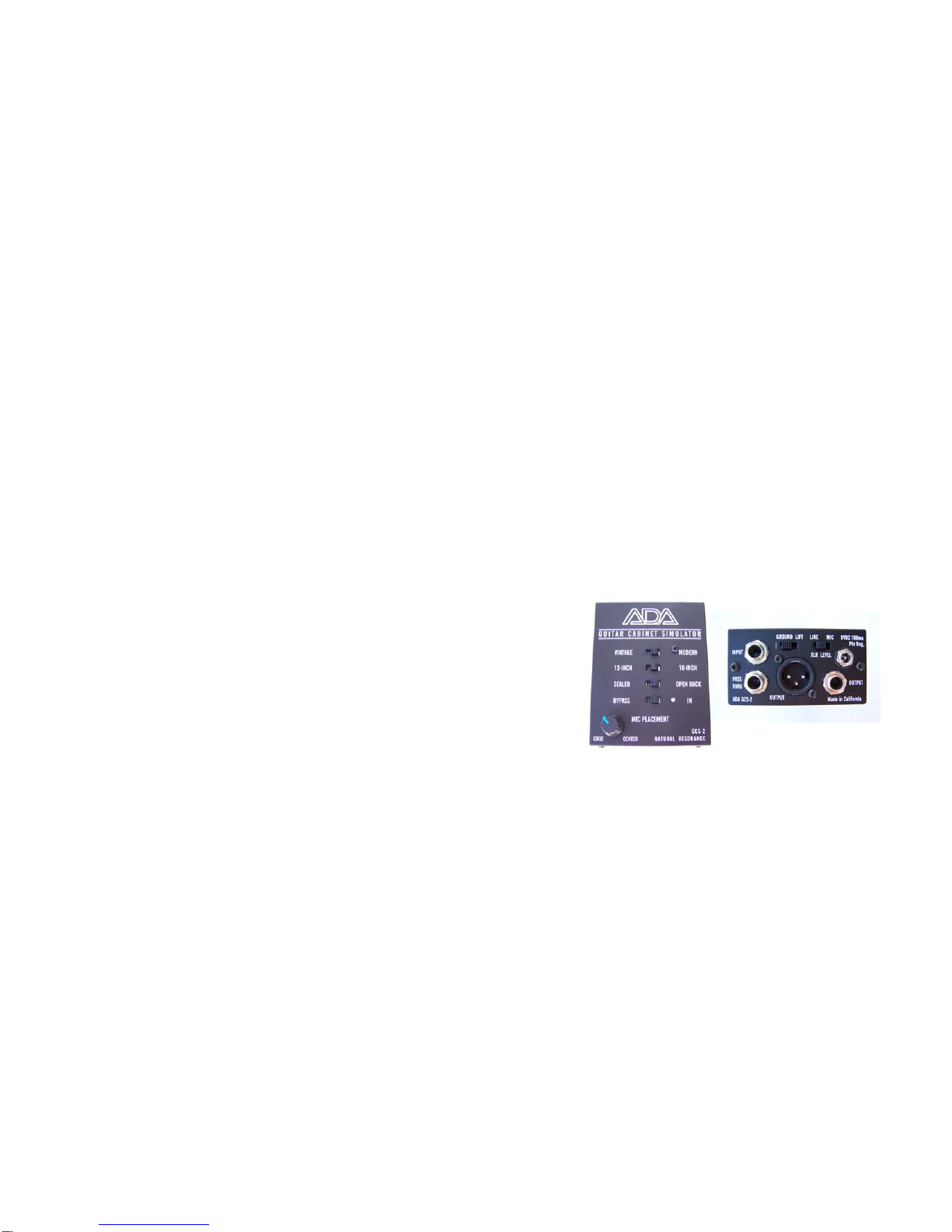
The new ADA Guitar Cabinet Simulator (GCS-2) is an easy-to-use guitar cabinet
simulator designed for guitar players and sound engineers who are looking for high
quality analog solutions for amplifying and recording electric guitar without the need for
power amps, speaker cabinets or microphones. With the GCS-2 you can easily get the
most realistic tone and dynamics of a guitar speaker cabinet directly from your guitar
preamp or your pedal board. The GCS-2 can send a cabinet simulated guitar signal to
a mixing console to feed both the house sound system and your stage monitor. The
use of a floor monitor allows the guitarist to produce feedback the same way a head
and stack or combo amp would. The outputs of the GSC-2 include a PASS THRU jack
so you can send an unaffected signal to a stage amp and send a processed signal to
the house sound system to increase the volume, widen the sound field and fatten-up
your guitar tone as a multiple cabinet array would.
The GCS-2 is inserted between the output of your preamplifier (or effects pedal chain)
and a mixing or recording console to replace the close proximity microphone which is
typically placed in front of a guitar speaker cabinet. This eliminates the microphone
problems of bleed through or crosstalk from other instruments or amplifiers in live
situations. The GCS-2 is especially useful for owners of our APP-1 PEDAL PREAMP
because it can split the output of the APP-1 and send your signal to a guitar power
amplifier and to a mixing console.
Versatility is built into the GCS-2, but we have kept the front panel simple with four
switches and one MIC PLACEMENT control. Designed around a radically different

- 3 -
analog technology called NATURAL RESONANCE, we have been able to achieve the
feel and not just the frequency response of the classic speakers and cabinets used
today and in the past. Real cabinet resonance at all levels and driver compression at
high levels adds an organic depth and focus to your guitar tone.
We have focused on the two extremes of speakers, the alnico (Jensen) and the
ceramic (Celestion and Eminence) by providing a VINTAGE / MODERN switch. You
have a choice of 10-inch and 12-inch drivers for bottom response and mid-range
coloration by using the 10-INCH / 12-INCH switch. You can select an open-back
cabinet or a sealed cabinet with the OPEN-BACK / SEALED switch. This feature sets
the GCS-2 apart from other cabinet simulators due to the NATURAL RESONANCE
filters at the low-end that resonate or “ring” like a real sealed cabinet. Finally we have
added a MIC POSITION potentiometer to allow you to tailor the low and high
frequencies of a real speaker in the same way a sound engineer would by moving a
microphone near the edge or the center of the speaker positioning the mic. As
recording engineers will tell you, the microphone placement is the key to achieving the
right tonal spectrum for a given track and can make or break the quality of your solos
and chording.

- 4 -
CONTROLS
Selectable VINTAGE (Jensen alnico) or MODERN (Celestion / Eminence
ceramic) Speaker Character
Selectable 10” or 12” Speaker Size. Effects the bottom response and mid-
range coloration.
Selectable OPEN BACK or SEALED Cabinet Type. This feature sets the
GCS-2 apart from other cabinet simulators due to the NATURAL
RESONANCE filters at the low-end that resonate or “ring” like a real sealed
cabinet or “flap” like older open back cabinets.
Variable MICROPHONE PLACEMENT Control “positions” the mic to tailor
the low and high frequencies of a real speaker in the same way a sound
engineer would by moving a microphone near the edge or the center of the
speaker. As recording engineers will tell you, the microphone placement is
the key to achieving the right tonal spectrum for a given track and can make
or break the quality of your solos and chording.
FEATURES
Pure Analog Circuit Design using thru-hole, low-noise components
Powered by a single industry standard 9-volt AC Adapter, but runs internally
at 18 volts for high headroom and lower noise

- 5 -
¼” phone jack INPUT with a direct, un-buffered PASS THROUGH ¼” phone
jack. This effectively splits the signal to feed both a guitar amplifier and a
mixing console
Balanced Output with switchable LINE or MIC LEVEL Output and GROUND
LIFT for Pin 1
Rugged all-steel chassis
Manufactured in California
HOOK-UP
Do not plug your guitar directly into the GCS-2. The input impedance is not
optimized for a guitar pickup, but rather for low impedance signals up to line
level.
Do connect the output of an effects pedal (especially a distortion pedal), the
output of your pedal board or a guitar preamp output to the input of the GCS-2.
Use only 9VDC 75 ma to 200 ma adapter with a 2.1 mm power plug, center pin
negative.

- 6 -
There are many ways to use the ADA GCS-2, and the following are the most common.
1. Go direct to the house sound system from your pedal board for live
performances.
Take your guitar signal straight off your pedal board and skip the need to use
speaker cabinets and power amps and run it through the GCS-2. No need to haul
a combo amp or a head and stack around because you can achieve the same
response, feel and power by using a house sound and monitor system.
Advantages:
You have total control of your guitar tone if you tell the sound engineer
to set your channel “flat.”
Your audiences will here your guitar throughout the room because a
house sound system has greater dispersion than a combo or stack on
stage.
You won’t have to deal with micing your amp and any cross-talk or
bleed-over from other instruments.

- 7 -
Diagram 1: Guitar to pedal board to GCS-2 to console to monitor speakers and house
speakers – no stage amp

- 8 -
2. Split your guitar signal to your power amp and cabinet and send a cabinet
simulated signal to the main sound system
Diagram 2: Guitar to pedal board to GCS-2 split via the THRU jack to your stage amp
and the processed signal to the house sound system

- 9 -
3. Get the same guitar feedback from a stage monitor as from your combo or
stack
Diagram 3: The GCS-2 has been carefully voiced and balanced to get the same
dynamics and frequency response as your stack or combo, so the feedback will be at
the same intensity and frequencies. You will find that getting feedback from your
monitor is more controllable than moving around your stack while performing.

- 10 -
4. Record in silence while listening through headphones. The sound in your
headphones is so dynamic and realistic that your inspiration will allow you a
wholesome freedom of expression.
Diagram 4: Guitar to pedal board to GCS-2 to the recording console and to your
headphone mix.
Tabla de contenidos
Manuales populares de Pedal de música de otras marcas


Matthews Effects
Matthews Effects Whaler V2 Manual de usuario

Grid 1
Grid 1 Pedal Jeanie Manual de usuario

Amptweaker
Amptweaker tightboost Manual de usuario

Ibanez
Ibanez TS-808 Tube Screamer Overdrive Pro Manual de usuario

PuzzleSounds
PuzzleSounds DR. Q ENVELOPE FILTER Manual de usuario

BYOC
BYOC Analog Chorus Manual


