
Abus PPIC42520 Manual de usuario


2
English
Introduction
Dear customer,
Thank you for purchasing this product.
ABUS Security Center hereby declares that the PPIC42520, PPIC44520 camera complies with the
RED Directive 2014/53/EU. The devices also meet the requirements of the following EU
directives: EMC Directive 2014/30/EU and RoHS Directive 2011/65/EU. The full text of the EU
Declaration of Conformity is available at the following internet addresses:
http://www.abus.com/product/PPIC42520
http://www.abus.com/product/PPIC44520
In order to maintain this condition and to ensure safe operation, you as the user must observe these
operating instructions!
Read through the complete operating instructions before using the product, observe all operating and
safety instructions!
All company names and product designations contained herein are trademarks of their
respective owners. All rights reserved.
If you have any questions, please contact your specialist dealer or visit us on the Internet at
https://www.abus.com/.

3
English
Data storage is subject to country-specific data protection guidelines .
The commissioning of monitoring systems may be prohibited or regulated by law in certain countries.
Before commissioning the system, the operator must ensure that the monitoring is within the legal
framework.
Note on data protection
The operator is responsible for the legally compliant use of the product in accordance with the GDPR.
Warning:
Anyone who unauthorizedly records the non-publicly spoken word of another person on a sound
carrier and uses such a recording or makes it available to a third party can be punished with
imprisonment or a fine!
Similarly, an unauthorized person may be punished if he or she intercepts with a tapping device the
non-publicly spoken word of another person which is not intended for his or her knowledge or if he
or she communicates publicly, in full or in part, the recorded or intercepted non-publicly spoken
word of another person.
Disclaimer
These operating instructions have been prepared with the utmost care. Should you nevertheless
notice any omissions or inaccuracies, please let us know in writing at the above address.
ABUS Security Center GmbH accepts no liability whatsoever for technical and typographical errors
and reserves the right to make changes to the product and operating instructions at any time without
prior notice.
ABUS Security Center shall not be liable or responsible for any direct or indirect consequential
damages in connection with the equipment, performance and use of this product. No guarantee is
given for the content of this document.
The Purchaser acknowledges that, according to current technological standards, it is not possible to
create a software program that is completely error-free. ABUS Security Center therefore does not
guarantee uninterrupted or error-free operation of the products or the correction of all errors. ABUS
Security Center expressly does not warrant that all ABUS Security Center products will function
properly on all customer systems or in conjunction with integrations, solutions, applications and (or)
programs, or that integrations, solutions, applications and (or) programs will function properly with
later versions of ABUS Security Center products and systems.

4
English
Table of contents
1. Scope of delivery............................................................................................................................... 6
1.1. PPIC42520................................................................................................................................... 6
1.2. PPIC44520................................................................................................................................... 7
2. Hardware description........................................................................................................................ 8
2.1. Wi-Fi Pan Tilt Outdoor Camera.................................................................................................... 8
2.2. WI-FI Outdoor Camera............................................................................................................... 10
3. Assembly / Installation.................................................................................................................... 12
3.1. Camera mounting....................................................................................................................... 12
3.1.1. Wi-Fi Pan Tilt Outdoor Camera (flush-mounted) ................................................................. 12
3.1.2. Wi-Fi Pan Tilt Outdoor Camera (Surface-Mounted)............................................................. 13
3.1.3. WI-FI outdoor camera (flush-mounted)................................................................................ 14
3.1.4. Wi-Fi outdoor camera (surface-mounted)............................................................................ 15
3.2. Restore factory settings ............................................................................................................. 17
3.2.1. PPIC42520........................................................................................................................... 17
3.2.2. PPIC44520........................................................................................................................... 17
3.3. Installation instructions Wi-Fi operation ..................................................................................... 18
3.4. Coverage of the camera............................................................................................................. 18
3.5. Installation site............................................................................................................................ 18
4. Intelligent image analysis (object recognition) ............................................................................ 19
4.1. Notes on object recognition........................................................................................................ 19
5. App2Cam Plus: First access.......................................................................................................... 21
5.1. System requirements ................................................................................................................. 21
5.2. Download app ............................................................................................................................ 21
5.3. Setup camera............................................................................................................................. 22
5.3.1. Bluetooth setup .................................................................................................................... 22
5.3.2. WI-FI setup........................................................................................................................... 24
5.3.3. Setup via network cable....................................................................................................... 25
5.3.4. Add cameras that have already been set up ....................................................................... 27
5.4. App2Cam Plus: Compatibility..................................................................................................... 28
5.5. App2Cam Plus: Overview .......................................................................................................... 28
5.5.1. Menu bar .............................................................................................................................. 29
5.5.2. Camera bar .......................................................................................................................... 29
5.5.3. Info / App settings................................................................................................................. 29
5.6. App2Cam Plus: Live View.......................................................................................................... 30
5.6.1. PPIC42520 Live View Functions.......................................................................................... 31
5.6.3. Camera indicators ................................................................................................................ 32
5.6.4. Stream indicators ................................................................................................................. 33
5.7. App2Cam Plus: Event list / playback ......................................................................................... 34
5.7.1. Event list............................................................................................................................... 34
5.7.2. Event list functions ............................................................................................................... 34
5.7.3. Mode (iOS only) ................................................................................................................... 34
5.8. Playback..................................................................................................................................... 35

5
English
5.8.1. Playback functions ............................................................................................................... 35
5.8.2. Download & Forwarding....................................................................................................... 36
5.9. Advanced settings...................................................................................................................... 37
5.9.1. Open advanced settings ...................................................................................................... 37
5.9.2. Login data............................................................................................................................. 37
5.9.3. Automatic login..................................................................................................................... 38
5.9.4. Advanced settings................................................................................................................ 38
5.9.5. Security settings................................................................................................................... 39
5.9.6. Video settings....................................................................................................................... 40
5.9.7. Sound settings...................................................................................................................... 43
5.9.8. WI-FI settings ....................................................................................................................... 44
5.9.9. Motion detection settings ..................................................................................................... 45
5.9.10. Notification Settings ........................................................................................................... 48
5.9.11. Memory settings................................................................................................................. 50
5.9.12. Schedule settings............................................................................................................... 52
5.9.13. Device settings................................................................................................................... 53
5.9.14. Device information.............................................................................................................. 54
6. Update firmware .............................................................................................................................. 55
6.1. Updating via server .................................................................................................................... 55
6.2. Current firmware version............................................................................................................ 56
7. Troubleshooting tips....................................................................................................................... 57
8. Open Source License Notes........................................................................................................... 58

6
English
1. Scope of delivery
1.1. PPIC42520
PPIC42520
1
2
3
4
5
6
7
8
9
PPIC42520
•Wi-Fi Pan Tilt Outdoor Camera (1)
•Power supply unit, 5V DC / 2A (2)
•Antenna (3)
•Drilling template (4)
•Mounting material (5)
•Reset tool (6)
•microSD card (pre-installed) (7)
•2x Allen key (8)
•Wall bracket (pre-installed) (9)

7
English
1.2. PPIC44520
PPIC44520
1
2
3
4
5
6
7
8
9
PPIC44520
•WI-FI Outdoor Camera (1)
•Power supply unit, 5V DV / 2A (2)
•Antenna (3)
•Drilling template (4)
•Mounting material (5)
•Reset tool (6)
•microSD card (pre-installed) (7)
•Allen key (8)
•Wall bracket (pre-installed) (9)
8
English
2. Hardware description
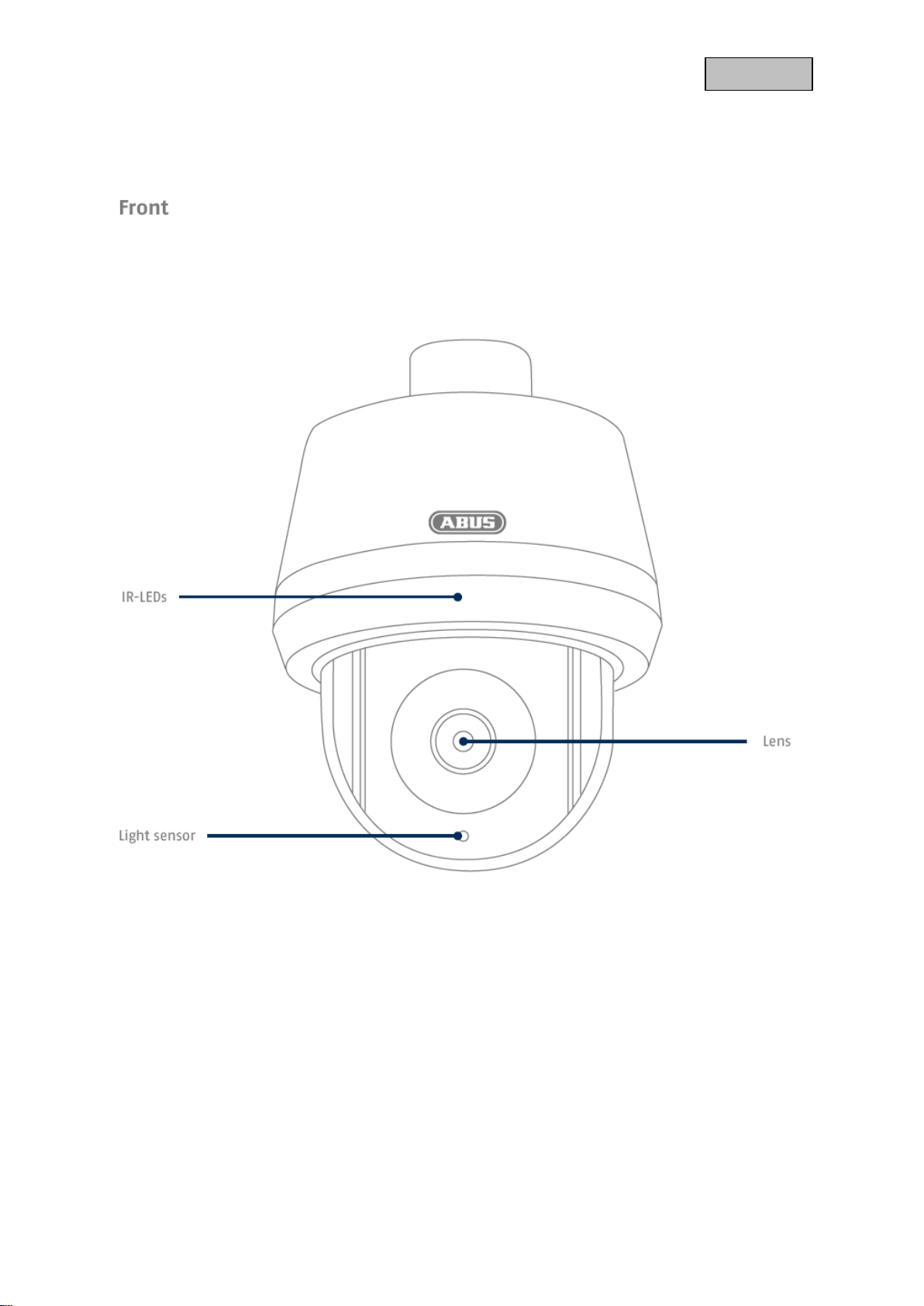
2.1. Wi-Fi Pan Tilt Outdoor Camera

9
English

10
English
2.2. Wi-Fi Outdoor Camera
Otros manuales para PPIC42520
1
Este manual sirve para los siguientes modelos
1
Tabla de contenidos
Otros manuales de Cámara para exteriores de Abus


