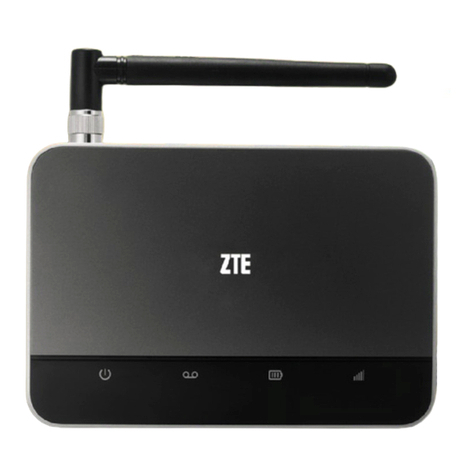
Zte AC8716 Manual de usuario

CDMA2000 1X EV-DO Wireless Data Terminal User Guide
ZTE Corporation http://www.zte.com.cn
CDMA2000 1X EV-DO
Wireless Data Terminal
User Guide
This User Guide is used for Wireless Data Terminal of AC8716.

CDMA2000 1X EV-DO Wireless Data Terminal User Guide
ZTE Corporation http://www.zte.com.cn
Copyright Statement
Copyright © 2009 by ZTE Corporation
All rights reserved.
No part of this publication may be excerpted, reproduced, translated or utilized in any form or by
any means, electronic or mechanical, including photocopying and microfilm, without the prior
written permission of ZTE Corporation.
ZTE Corporation reserves the right to make modifications on print errors or update specifications
in this manual without prior notice.

CDMA2000 1X EV-DO Wireless Data Terminal User Guide
ZTE Corporation http://www.zte.com.cn
Table of Contents
1. Introduction.............................................................................................................................1
2. Precautions..............................................................................................................................1
3. Appearance.............................................................................................................................2
3.1 Introduction.........................................................................................................................2
3.2 Insert R-UIM Card..............................................................................................................2
3.3 Operation Guide of Data Cable...........................................................................................3
4. Install and Uninstall................................................................................................................4
4.1 System Requirements..........................................................................................................4
4.2 Installation Guide...............................................................................................................4
4.2.1 Install........................................................................................................................4
4.2.2 Uninstall...................................................................................................................8
4.3 Manually Install Through Other USB Port .........................................................................8
4.3.1 Windows 2000..........................................................................................................8
5. Run the Application................................................................................................................9
6. Connect/Disconnect..............................................................................................................11
7. Connection Records..............................................................................................................12
8. Voice Call.................................................................................................................................13
9. Call History .............................................................................................................................16
10. Short Message........................................................................................................................17
11. Phone Book............................................................................................................................19
12. Setting....................................................................................................................................20
13. Help .......................................................................................................................................23
14. Connect to the Website..........................................................................................................23
15. Trouble-shooting....................................................................................................................23
16. FCC Regulations....................................................................................................................27

CDMA2000 1X EV-DO Wireless Data Terminal User Guide
ZTE Corporation 1http://www.zte.com.cn
1. Introduction
Thank you for choosing AC8716 CDMA2000 1X EV-DO Wireless Data Terminal (hereinafter
referred to as Data Terminal) of ZTE Corporation.
The Data Terminal equips with a standard USB interface and supports both CDMA2000 1X
EV-DO and CDMA2000 1X network. In the area where there is signal, it allows you to go surfing
on the Internet, send&receive short messages, and make&receive phone calls.
The Data Terminal adopts two designing options: R-UIM and Built-in UIM, which make your
operation more flexible.
The pictures in this guide are only used to demonstrate your Data Terminal’s functions, so they
are maybe different from what you see on your Data Terminal. Please refer to your Data Terminal
if they are differences.
2. Precautions
zUse the original accessories or those authenticated by the manufacturer. Using any
unauthenticated accessories may affect the data terminal’s performance, violate the warranty
provisions or relevant national regulations about telecom terminals, or even cause body
injury.
zDo not disassemble, modify, frequently pull/plug the antenna, stretch, rotate or bend the
antenna with great force.
zBefore pulling out the data terminal, please use Windows safely removing the hardware and
make sure to exit the application. Do not directly pull out the terminal to avoid the damage of
data terminal or the influence on the normal operation of operating system.
zDo not forcefully plug/pull the data terminal to avoid the damage of connector.
zDo not use your data terminal near weak signal or high-precision electronic devices. Radio
wave interference may cause misoperation of electronic devices or other problems.
zTurn off your data terminal on airplane where it’s forbidden to use it. The data terminal may
affect the normal operation of electronic devices, therefore please follow the relevant
regulations when using your mobile phone on airplane.
zTurn off your data terminal in hospital where it’s forbidden to use it. The data terminal may
affect the normal operation of medical apparatus, therefore please follow the relevant
regulations when using your mobile phone in hospital.
zPlease do not use the data terminal near flammable or explosive materials, otherwise it might
cause failure or fire.
zKeep your data terminal away from water. This may cause overheating or failure if water or
any other kind of liquid enters your mobile phone. Please do not use your data terminal near
high temperature, damp or dusty place.
zKeep your data terminal away from children to avoid shock, plunge or impact. It may cause
body injury when the data terminal is used as a toy.

CDMA2000 1X EV-DO Wireless Data Terminal User Guide
ZTE Corporation 2http://www.zte.com.cn
3. Appearance
3.1 Introduction
LED status descriptions:
Network Registered Service available or
Searching for the network
Upon an incoming
call(as the terminal
supports voice call)
LED
Inserting
the data
terminal EV-DO 1X EV-DO 1X EV-DO 1X
Yellow ON OFF Slow Flash OFF Quick Flash OFF Flash
Green ON Slow Flash OFF Quick Flash OFF Flash OFF
3.2 Insert R-UIM Card
Note: If your data terminal doesn’t need R-UIM card, please skip this section.
1. Pull out the tap;
2. Take out the R-UIM card cover in the direction indicated by the arrow;

CDMA2000 1X EV-DO Wireless Data Terminal User Guide
ZTE Corporation 3http://www.zte.com.cn
3. Insert R-UIM card as below figure;
4. Push back R-UIM card cover in the direction indicated by the arrow.
3.3 Operation Guide of Data Cable
Generally, the Data Terminal could be directly connected with USB port. You could also connect
the Data Terminal with PC by using the accompanying data cable, as shown in the following
figure. Connect Interface ①with Data Terminal, and interface ②with PC's USB port. If the
power supply from USB port is insufficient, connect both interface ②and ③with USB port
together.

CDMA2000 1X EV-DO Wireless Data Terminal User Guide
ZTE Corporation 4http://www.zte.com.cn
4. Install and Uninstall
4.1 System Requirements
The Data Terminal supports the following operating system:
¾Windows 2000
¾Windows XP
¾Windows Vista
PC minimum configurations:
CPU Pentium-II/233MHz
USB interface 2.0 (USB1.0 and 1.1 compatible)
Optical Drive CD-ROM (for installation only)
Memory 64 MB
Disk Space 50 MB (used for installation of application)
4.2 Installation Guide
Take Windows XP for example. Under other operating systems, please refer to the installation
under Windows XP. Do not insert the Data Terminal before installation.
4.2.1 Install
1. Find “setup.exe” firstly in the Data Terminal CD-ROM, double-click it to display the
Welcome picture, and then click “Next”;
2. Select the location where you want the program to be installed, and then click “Next”;

CDMA2000 1X EV-DO Wireless Data Terminal User Guide
ZTE Corporation 5http://www.zte.com.cn
3. Select Start Menu folder, and then click “Next”;
4. When you see the window below, please click “Install”;
5. Please wait for installation;

CDMA2000 1X EV-DO Wireless Data Terminal User Guide
ZTE Corporation 6http://www.zte.com.cn
6. Please insert the Data Terminal into USB interface if the system prompts you to insert the
hardware; (If it has been inserted, please unplug it and insert again.)
7. The system shall find the new hardware and install the driver automatically. Just wait a
minute;

CDMA2000 1X EV-DO Wireless Data Terminal User Guide
ZTE Corporation 7http://www.zte.com.cn
8. The driver is installed successfully. Pleas click “OK”;
9. Click “Finish” to close the last screen of the wizard. Now you can start the application for
data terminal.
Tabla de contenidos
Otros manuales de Terminal táctil de Zte

Zte
Zte WF832 Manual de usuario

Zte
Zte ZXA10 C300 Manual de usuario

Zte
Zte AC2791 Manual de usuario

Zte
Zte CDMA2000 1X EVDO Manual de usuario

Zte
Zte WF723CA Manual de usuario

Zte
Zte AC2792 Manual de usuario

Zte
Zte ZXA10 F660 Manual de usuario

Zte
Zte AR910 Manual de usuario

Zte
Zte CDMA2000 Manual de usuario

Zte
Zte MG880 Manual de usuario