
Zte MC315 Manual de usuario

MC315 User Guide 2005-3-7
ZTE Corporation
page1 http://www.zteit.com
ZTE MC315
Wireless Network Card
User Guide
(Version: V4.1-TY)

MC315 User Guide 2005-3-7
ZTE Corporation
page2 http://www.zteit.com
Contents
1. Introduction...............................................................................................................................3
2. Specifications............................................................................................................................3
3. Care for your card.....................................................................................................................3
4. Features.....................................................................................................................................4
Insert R-UIM card to MC315....................................................................................................4
5. Setup and Uninstall...................................................................................................................4
5.1 System Requirements.........................................................................................................4
5.2 Setup for Windows 2000....................................................................................................5
5.2.1 Setup.........................................................................................................................5
5.2.2 Uninstall...................................................................................................................8
5.3 Setup for Windows XP........................................................................................................9
5.3.1 Setup.........................................................................................................................9
5.3.2 Uninstall.................................................................................................................13
6. The Main Window and Icons..................................................................................................14
7. Connect/Disconnect ................................................................................................................15
8. Connection Record..................................................................................................................16
9. Voice call.................................................................................................................................17
10. Call History.............................................................................................................................18
11. Send Short Messages ..............................................................................................................18
12. Read Short Messages ..............................................................................................................19
13. Phone Book.............................................................................................................................20
14. Settings....................................................................................................................................21
15. Trouble Shooting.....................................................................................................................21
16. FCC RF EXPOSURE INFORMATION.................................................................................23

MC315 User Guide 2005-3-7
ZTE Corporation
page3 http://www.zteit.com
1. Introduction
ZTE MC315 PCMCIA wireless network card fits into a standard Type II PC Card slot (available
on most notebook PCs) and can function as a wireless network card, a modem, and a mobile
phone. This card allows you to connect to the Internet, send and receive SMS messages, and make
phone calls, without the need of a network cable or phone line.
With the design of the UIM card separate from the body, MC315 PCMCIA wireless network card
can make the operation more flexible.
2. Specifications
Transmit Frequency 824.04~848.97MHz
Receive Frequency 869.04~893.37MHz
Freq. Stability FA±300Hz
Dimension 86*54*5 mm
Weight 33g
Data Transmission MAX 153.6 kbps
Voltage
3.3V from PCMCIA Slot
Current
Dormancy: 90mA Maximum
:
850mA
Transmitter Power
200mW
3. Care for your card
Protect the card from liquids, dust, and excessive heat.
Optimal signal strength is usually obtained when the antenna is perpendicular to the modem.
The antenna should bend easily. Do not forcefully bend the antenna or plugs the antenna in
and out MC315 card frequently.
The MC315 card should fit easily into your PC slot. Forcing the card into a slot may damage
connector pins.

MC315 User Guide 2005-3-7
ZTE Corporation
page4 http://www.zteit.com
4. Features
Insert R-UIM card to MC315
When MC315 card start up, the lamp is in YELLOW. After a few seconds, the PCMCIA card
will ready to work, the lamp is in GREEN.
5. Setup and Uninstall
5.1 System Requirements
The MC315 wireless network card is supported on:
• Windows 98
• Windows 2000
• Windows XP
To install the MC315, you will require these system resources at the minimum:
CPU
Pentium-II/233MHz
Card Slots 1 Type II PCMCIA (PC Card) Slot
Disk Drive CD-ROM (for installation only)
Memory 64 MB

MC315 User Guide 2005-3-7
ZTE Corporation
page5 http://www.zteit.com
Disk Space 30 MB
5.2 Setup for Windows 2000
5.2.1 Setup
Note:
Don’t insert the ZTE MC315 Wireless network Card before setup.
1. Please find “autosetup.exe” first in ZTE MC315 CD, and double click the icon of
autosetup.exe, then choose “English” when the picture displayed in the screen.
2. When you see this window, please click “next”.

MC315 User Guide 2005-3-7
ZTE Corporation
page6 http://www.zteit.com
3. Select the location where the program is to be installed, then click “Next”.
4. When you see this window, please click “next”.
5. When you see this window, please click “install”.

MC315 User Guide 2005-3-7
ZTE Corporation
page7 http://www.zteit.com
6. Please wait.
7. Please insert the MC315 card. (If your card is in the slot, please insert the card again)

MC315 User Guide 2005-3-7
ZTE Corporation
page8 http://www.zteit.com
8. Please wait for updating the driver.
9. Click “Finish” to close the last screen of the wizard. Now you can start the application for
MC315.
5.2.2 Uninstall
1. Select Start -> Programs -> ZTE MC315 -> Uninstall ZTE MC315. You will be asked if
uninstall the card. Click “Yes”.

MC315 User Guide 2005-3-7
ZTE Corporation
page9 http://www.zteit.com
2. Please wait.
3. Click “OK” when you are notified that uninstall is complete.
5.3 Setup for Windows XP
5.3.1 Setup
Note:
Don’t insert the ZTE MC315 WIRELESS Card before setup.
MC315 User Guide 2005-3-7
ZTE Corporation
page10 http://www.zteit.com
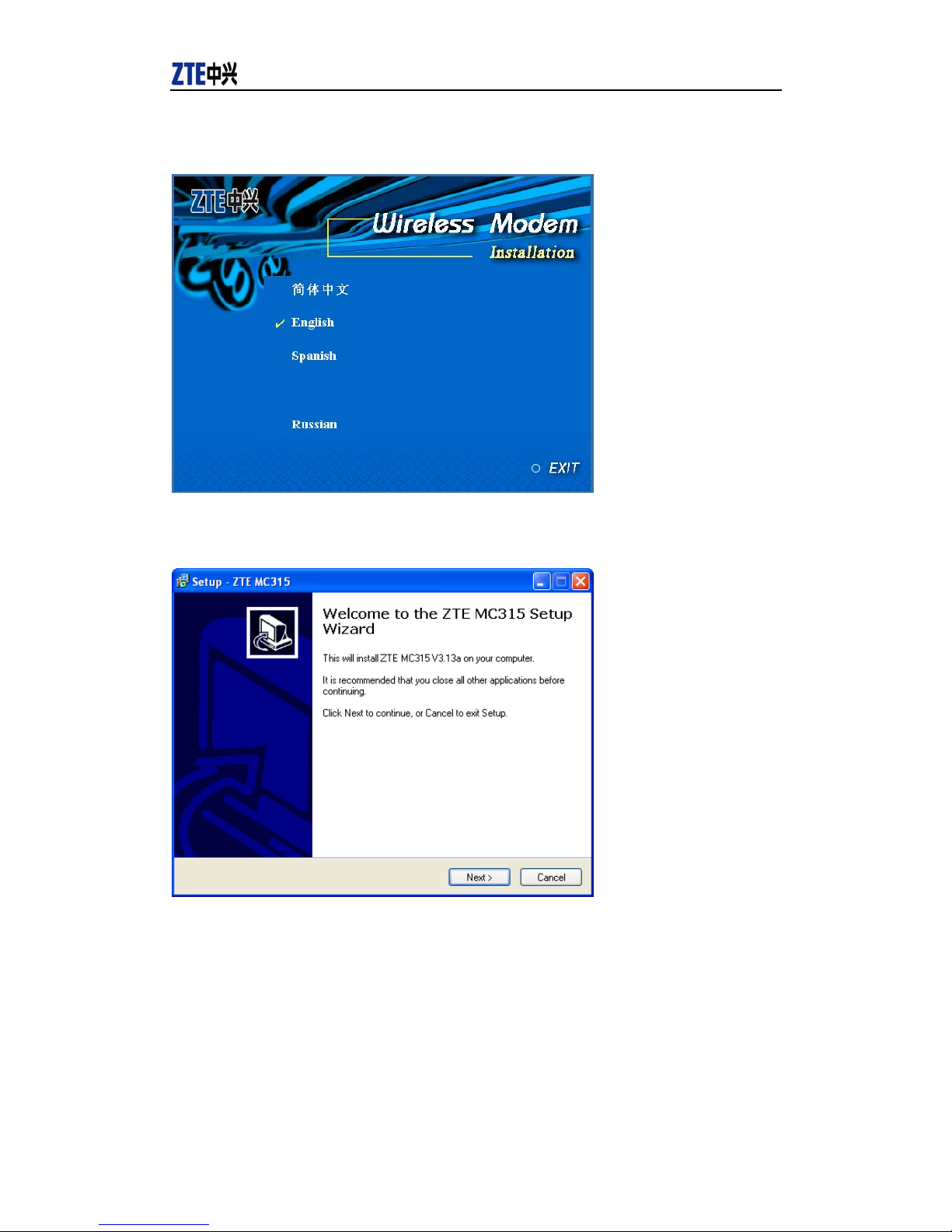
1. Please find “autosetup.exe” first in ZTE MC315 CD, and double click the icon of
autosetup.exe, then choose “English” when the picture displayed in the screen.
2. When you see this window, please click “next”.
3. Select the location where the program is to be installed, then click “Next”.
Otros manuales para MC315
1
Tabla de contenidos
Otros manuales de Tarjeta de red de Zte


Manuales populares de Tarjeta de red de otras marcas


3Com
3Com EtherLink 3C509B Manual de usuario

TRENDnet
TRENDnet TEG-PCITX Manual de usuario

Cisco
Cisco MC16E Manual de usuario

Delta Electronics
Delta Electronics Braking Modules VFDB Series Manual de usuario

TwinMOS
TwinMOS Booming Manual de usuario

Dialogic
Dialogic Media Board DM/V1200BTEPEQ Manual de usuario

Buffalo
Buffalo AirStation WLI-PCM-L11GP Manual de usuario

National Instruments
National Instruments NI 9234 Manual de usuario

Hama
Hama 49276 Manual de usuario

Linksys
Linksys WCF54G - Wireless-G Compact Flash Card Manual de operación

Compaq
Compaq Wireless LAN 100 Manual de usuario

Bose
Bose PowerMatch Dante Manual de usuario